
LocoLee 21351
LocoLee Light Kit Instruction Manual
For Lego Tim Burton's The Nightmare Before Christmas Set 21351 (Upgraded Version)
1. Product Overview
This LocoLee LED light kit is designed to enhance your Lego Tim Burton's The Nightmare Before Christmas set (model 21351). It provides custom lighting elements to illuminate various parts of your model, bringing it to life with vibrant light effects. Please note: The Lego model building set is not included with this light kit and must be purchased separately or already owned.
The kit features high-quality copper lines and ABS plastic components, ensuring durability and seamless integration with your Lego bricks. The lights are designed to be discreetly hidden within the model structure.


2. Package Contents
Before beginning installation, please verify that all components listed below are present in your package. If any parts are missing or damaged, please contact customer support.
- LED Light Kit components (various lights, connecting cables, expansion boards)
- Instruction Manual (online video/PDF guide)
- Power Supply (USB compatible, voltage less than 5V)

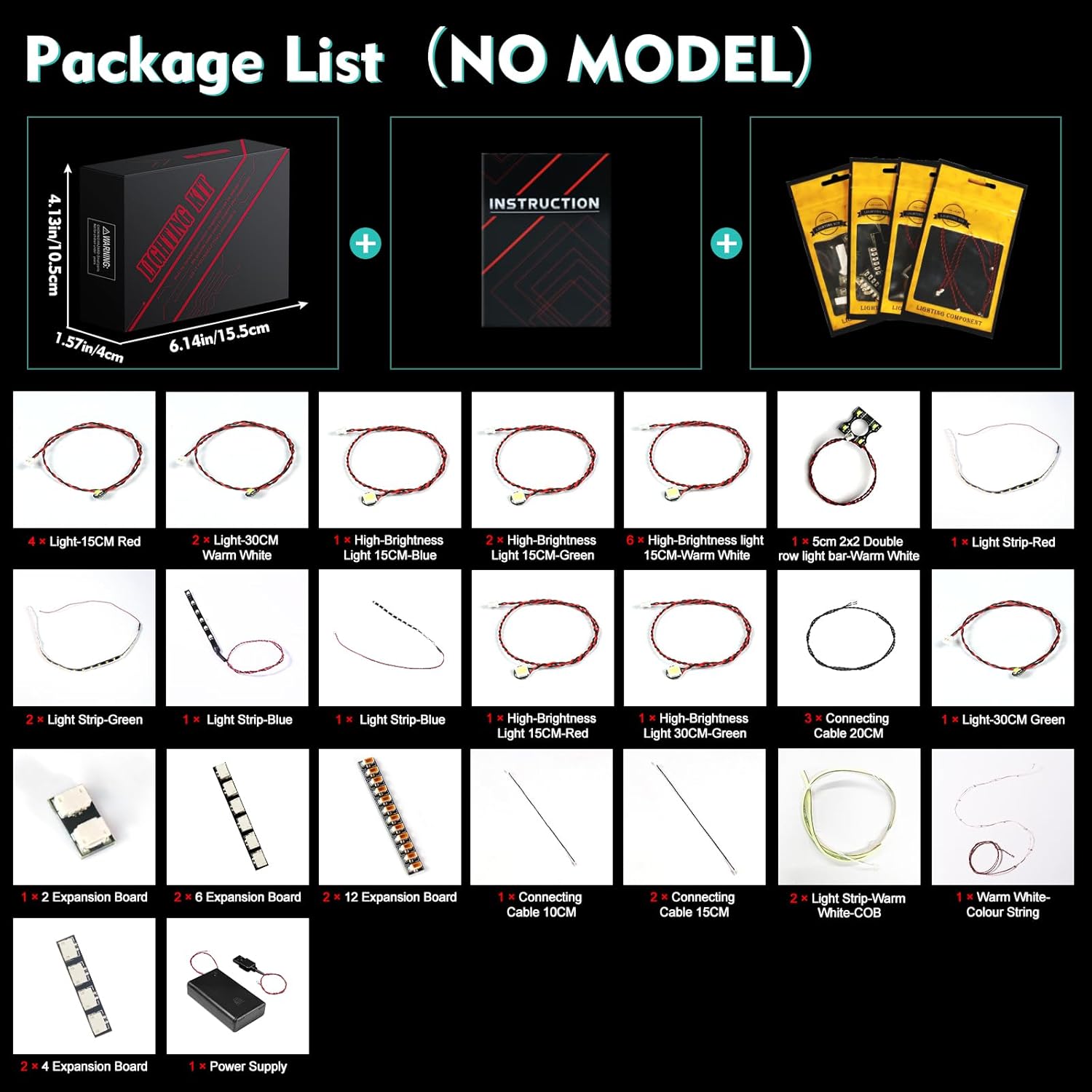
3. Setup and Installation
Installation of the LocoLee light kit requires careful attention to detail. Detailed video and PDF instructions are available online to guide you through each step. It is recommended to follow these instructions precisely.
- Access Instructions: Refer to the website printed in the booklet included in your package.
- Locate Guide: Enter the model number (21351) or the code found on the packing box to find the specific installation guide for your kit.
- Follow Steps: Watch the video or review the PDF instructions. The light components are organized into numbered bags to correspond with the installation steps.
- Gentle Handling: The parts are small and delicate. Avoid pulling wires too hard during installation to prevent damage. You may need to disassemble a few bricks of your Lego model to properly integrate the light fixtures.
- Test Lights: Before fully assembling and securing all components, test each light part to ensure it functions correctly.

Video 1: An official product video demonstrating the illuminated Lego Tim Burton's The Nightmare Before Christmas set with the LocoLee light kit installed.
4. Operating Instructions
The LocoLee light kit is designed for simple operation once installed.
- Power Source: The light kit can be powered via USB. Ensure the voltage is less than 5V. Using a USB power source typically results in brighter lights.
- Activation: Connect the USB cable from the light kit to a compatible USB power adapter or port. The lights should illuminate automatically.
- Remote Control (if applicable): If your specific version includes a remote control (e.g., RC Version), refer to its separate instructions for controlling light patterns and brightness. This "Upgraded Version" typically does not include a remote.
5. Maintenance
To ensure the longevity and optimal performance of your LocoLee light kit, follow these maintenance guidelines:
- Cleaning: Use a soft, dry cloth to gently wipe away dust from the lights and wires. Avoid using liquid cleaners, which can damage electrical components.
- Handling: When moving or adjusting your Lego model, handle it carefully to avoid stressing or dislodging the installed light components and wires.
- Storage: If storing the model for an extended period, ensure the light kit is disconnected from its power source. Store in a cool, dry place away from direct sunlight.
6. Troubleshooting
If you encounter any issues with your LocoLee light kit, please consult the following common troubleshooting steps:
- Lights Not Turning On:
- Ensure the USB power cable is securely connected to both the light kit and a functional power source.
- Verify that the power source (e.g., USB adapter, power bank) is providing power.
- Check for any loose connections between individual light components and expansion boards.
- Re-test individual light parts as described in the installation guide to identify any faulty components.
- Flickering Lights:
- Ensure the power supply is stable and providing sufficient current.
- Check for any loose connections.
- Dim Lights:
- Confirm the power source is USB (voltage less than 5V). USB power generally provides brighter illumination compared to battery boxes (if used with other versions).
- Ensure all connections are firm.
If these steps do not resolve the issue, please contact LocoLee customer support for further assistance.
7. Specifications
| Feature | Detail |
|---|---|
| Brand | LocoLee |
| Model Number | 21351 (Compatible with Lego Tim Burton's The Nightmare Before Christmas) |
| Style Name | Upgraded Version |
| Material | Plastic (ABS), Copper Lines |
| Light Source Type | LED |
| Power Source | DC adapter (USB, Voltage less than 5V) |
| Batteries Included | No |
| Included Components | LED Light Kit, Instruction Manual (online) |
8. Warranty and Support
LocoLee products are manufactured with high-quality materials and undergo quality checks to ensure reliability. If you encounter any issues or have questions regarding your light kit, please do not hesitate to contact LocoLee customer support. Refer to the contact information provided in your package or on the official LocoLee website.
Ask a question about this manual
Ask about setup, troubleshooting, compatibility, parts, safety, or missing instructions. Manuals+ will review the question and use this page’s manual context to help answer it.