1. Introduction and Overview
The Sangean MMR-99J is a versatile multi-power emergency radio designed to operate reliably even in challenging conditions. It integrates AM/FM radio, Bluetooth connectivity, and AUX input for various audio sources. For emergency power, it features a dynamo hand-crank and a solar panel. Additionally, it includes a Type-C input/output port, allowing it to function as a portable power bank for charging external devices. An emergency light is also built-in, offering practical illumination. With its IP55 dustproof and waterproof rating, the MMR-99J is suitable for both daily use and demanding outdoor environments.
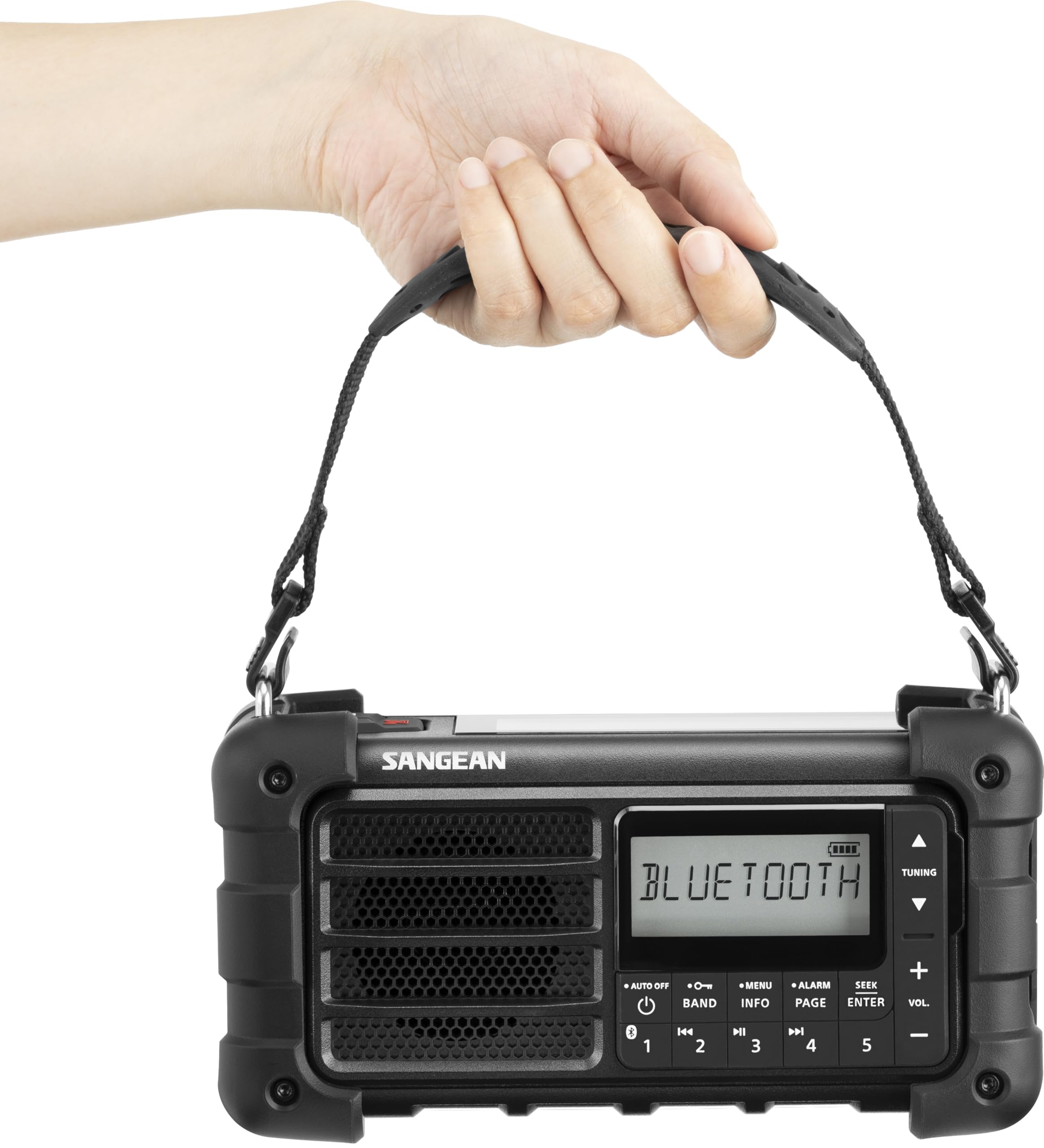
Figure 1: Sangean MMR-99J Multi-Function Emergency Radio (Midnight Black)
2. Setup
2.1 Initial Charging
Before first use, fully charge the internal battery. Use the provided Type-C USB charging cable to connect the radio to a compatible USB power adapter (not included). The charging indicator will illuminate during charging and turn off when complete.
2.2 Antenna Extension
For optimal radio reception, fully extend the telescopic antenna when listening to FM or SW bands.
3. Operating Instructions
3.1 Power On/Off
Press the Power button to turn the radio on or off.
3.2 Radio Operation (AM/FM)
- Press the BAND button to select AM or FM band.
- To automatically scan for stations, press and hold the SEEK button. The A.T.S. (Auto-Tuning System) will scan and store up to 40 stations based on signal strength.
- To manually tune, use the Tuning Up/Down buttons.
- To recall a stored station, use the Memory buttons (1-5).
3.3 Bluetooth Streaming
- Press the BAND button to select Bluetooth mode.
- On your smartphone or other Bluetooth device, search for "MMR-99J" and pair.
- Once paired, you can stream audio from your device to the radio.
3.4 AUX Input
Connect an external audio device to the AUX input socket using a 3.5mm audio cable (not included). Select AUX mode using the BAND button.
3.5 Emergency Light Functions
The MMR-99J features a built-in light with 5 modes, including SOS and Morse code patterns, and a red light mode for night visibility. Refer to the user manual for specific button presses to cycle through these modes.

Figure 2: Front view of the Sangean MMR-99J with the flashlight illuminated.
3.6 Charging External Devices (Power Bank)
The radio can charge external devices via its Type-A USB output port (5V/1A). Connect your device using a compatible USB cable. This feature is useful in emergencies when other power sources are unavailable.

Figure 3: Side view of the Sangean MMR-99J showing the USB charging ports and AUX input.
4. Charging Methods
The MMR-99J offers multiple ways to charge its internal battery, ensuring power availability in various situations:
- USB Type-C Charging: Connect the provided Type-C USB cable to a compatible USB power adapter. This is the primary and fastest charging method.
- Solar Panel Charging: Place the radio in direct sunlight. The integrated solar panel will convert solar energy into electrical energy to charge the battery. This method is ideal for outdoor use and maintaining charge.
- Dynamo Hand-Crank: Extend the retractable hand-crank and rotate it clockwise or counter-clockwise to generate power. One minute of cranking can provide approximately 10 minutes of radio listening in typical conditions. This is a crucial emergency charging method.
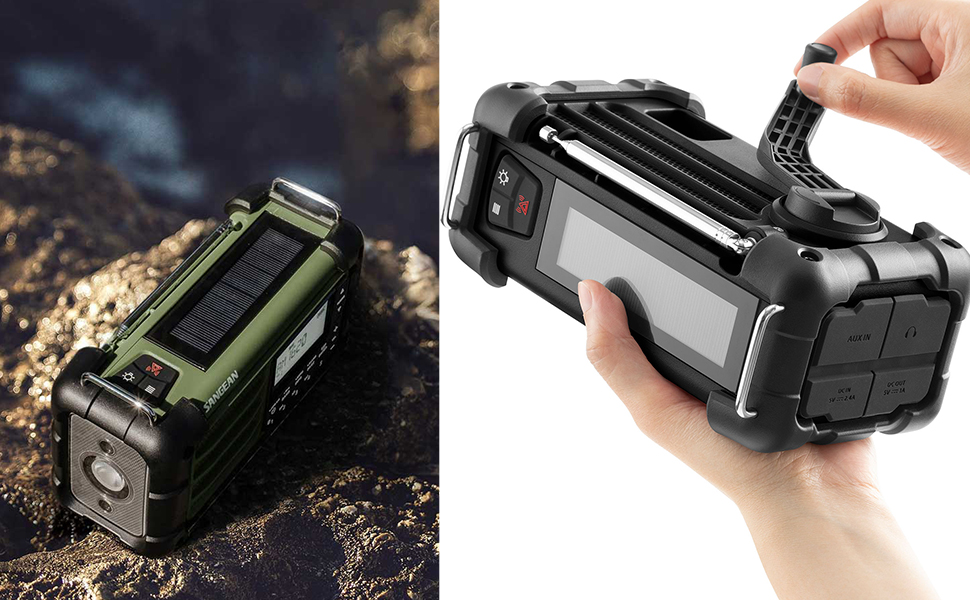
Figure 4: The MMR-99J demonstrating solar panel and hand-crank charging capabilities.
5. Maintenance
- Cleaning: Use a soft, dry cloth to clean the radio's exterior. Do not use abrasive cleaners or solvents.
- Water and Dust Protection: The MMR-99J is IP55 rated, meaning it is protected against dust ingress and low-pressure water jets from any direction. While durable, avoid submerging the device in water or exposing it to heavy rain for prolonged periods. Ensure all port covers are securely closed to maintain water resistance.
- Storage: Store the radio in a cool, dry place away from direct sunlight and extreme temperatures. If storing for an extended period, ensure the battery is partially charged (around 50%) and recharge it every few months to prolong battery life.
- Impact Protection: The radio features reinforced corners for enhanced durability against drops and impacts. However, avoid unnecessary rough handling to prevent damage.
6. Troubleshooting
- No Power: Ensure the battery is charged. Try charging via USB, solar panel, or hand-crank.
- Poor Radio Reception: Fully extend the telescopic antenna. Try repositioning the radio to improve signal strength. Perform an auto-tune scan to find available stations.
- Bluetooth Pairing Issues: Ensure the radio is in Bluetooth mode. Turn off and on your Bluetooth device and the radio, then try pairing again. Make sure no other devices are actively connected to the radio.
- External Device Not Charging: Verify the external device is properly connected to the Type-A USB output port. Ensure the radio's battery has sufficient charge.
- Light Not Working: Check the battery level. Cycle through the light modes to ensure it's not in an off state.
7. Specifications
| Feature | Description |
|---|---|
| Model | MMR-99J |
| Brand | Sangean |
| Color | Midnight Black |
| Display Type | LED |
| Tuner Type | AM, FM |
| Connectivity | AUX, Bluetooth |
| Power Source | Battery powered, Solar powered |
| Battery | 1 Non-standard battery (included) |
| Charging Ports | Type-C (input/output), Type-A (5V/1A output) |
| Product Features | Dustproof/Waterproof (IP55), Multi-power compatible, Built-in light, Portable battery |
| Dimensions | 20.8 cm (Length) x 9.8 cm (Width) x 14 cm (Height) |
| Weight | 1.08 kg |
| Included Accessories | MMR99J x 1, Type-C USB charging cable, wrist strap |
8. Warranty and Support
This product comes with a standard manufacturer's warranty. Please refer to the warranty card included in the packaging for specific terms and conditions. For technical support, troubleshooting assistance, or warranty claims, please contact Sangean customer service through their official website or the retailer where the product was purchased. Keep your proof of purchase for warranty validation.


