
1. Product Overview
The Leipsden BlueShield Screen Protector is specifically designed for the iiyama LEVEL-15FX165-i7-RM4X-aoi 15.6-inch laptop. This protective film offers multiple benefits, including blue light and UV radiation reduction, anti-glare properties, scratch resistance, and an anti-fingerprint surface, enhancing visual comfort and screen longevity.
What's Included:
- Screen Protector Film x 1
- Film Application Tool Set x 1

Image 1: The Leipsden BlueShield Screen Protector applied to a compatible laptop screen, demonstrating its transparent and protective nature.

Image 2: An illustration highlighting the main features of the screen protector, including blue light cut, anti-reflection, screen protection, antibacterial properties, water repellency, bubble dispersion, and fingerprint prevention.
2. Setup: Installation Guide
This screen protector features a self-adhering design for easy and clean application without the need for special adhesives or double-sided tape. It is designed to minimize air bubbles during installation.
Installation Steps:
- Prepare the Screen: Ensure the laptop screen is powered off and completely clean. Use a microfiber cloth to remove any dust, smudges, or fingerprints. The included tool set may contain cleaning wipes.
- Align the Protector: Carefully peel back a small portion of the protective layer from one edge of the screen protector. Align the exposed edge of the protector with the corresponding edge of your laptop screen's display area.
- Apply Gradually: Slowly peel off the remaining protective layer while gently pressing the screen protector onto the screen surface. Use a squeegee (if provided in the tool set) or a soft card wrapped in a cloth to smooth out any air bubbles as you go.
- Remove Air Bubbles: If bubbles appear, gently lift the nearest edge of the protector and reapply, pushing the air out towards the edges. Small bubbles often dissipate over 24-48 hours.
- Final Check: Once applied, ensure the protector is securely adhered and free from major bubbles or dust.
Note: The film is designed to cover only the display area (active area) of the screen, not the entire bezel or frame. Please confirm your monitor's display area size before purchase.
3. Operating Benefits
The Leipsden BlueShield Screen Protector enhances your viewing experience and protects your eyes through several integrated technologies.
Blue Light & UV Cut:
This film is engineered to cut approximately 48% of blue light and 99% of ultraviolet (UV) rays emitted from the LCD screen. This reduction helps alleviate eye strain and discomfort, especially during prolonged use or in low-light conditions, making it gentler on your eyes.

Image 3: A diagram illustrating how the screen protector filters blue light and UV rays before they reach the eye, reducing potential strain.
Anti-Glare Processing:
The low-reflection design of the film suppresses reflections from external light sources such as sunlight or fluorescent lamps. This anti-glare treatment significantly improves screen visibility, making your laptop more comfortable to use outdoors or in brightly lit environments.
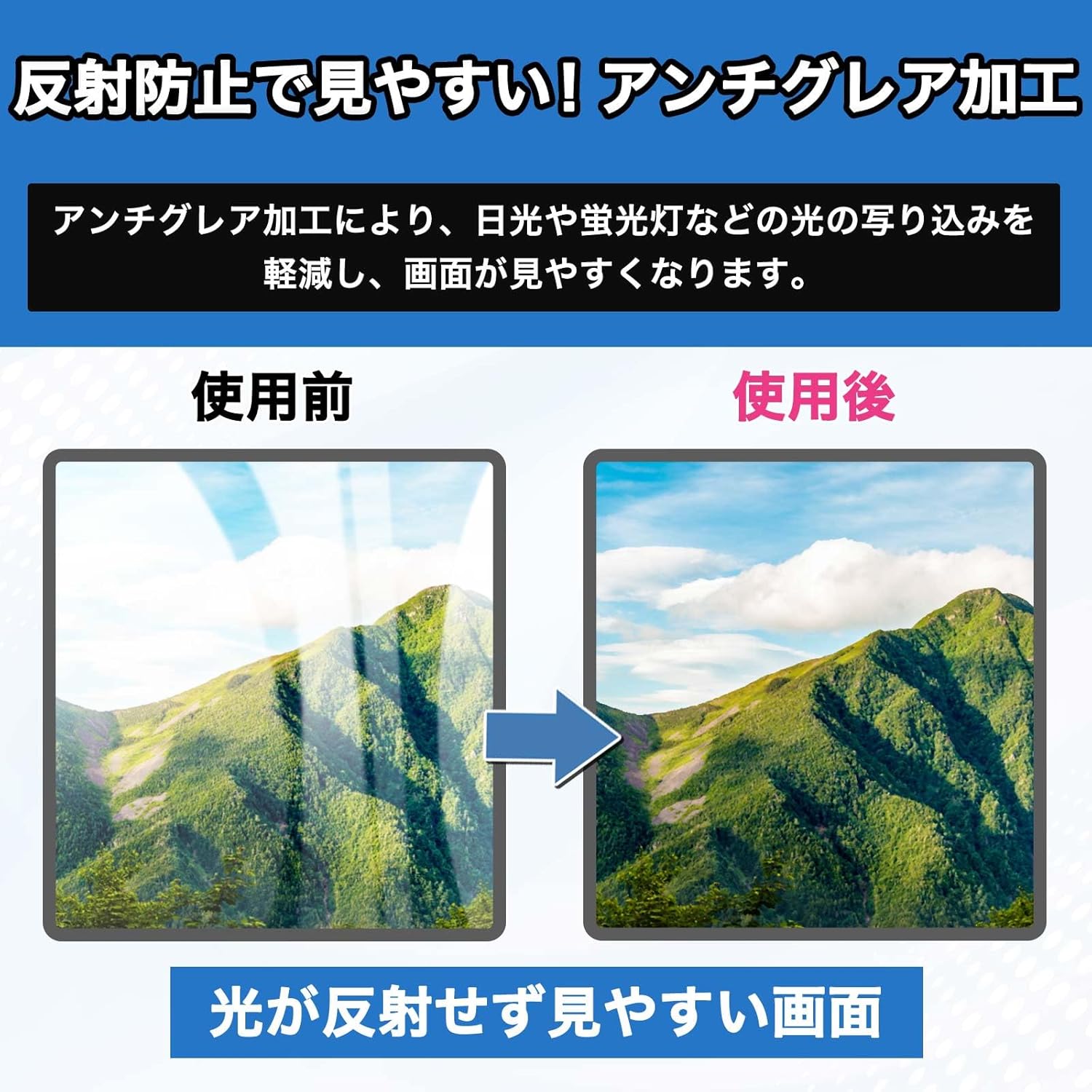
Image 4: A visual comparison demonstrating the effectiveness of the anti-glare processing, showing a clear screen after application compared to a reflective screen before.
Hard Coat Protection:
The screen protector features a hard coat finish that provides a layer of defense against scratches and minor abrasions, helping to maintain the pristine condition of your laptop's display.

Image 5: An illustration depicting the hard coat layer deflecting sharp objects, symbolizing its scratch-resistant properties.
Anti-Fingerprint Surface:
Utilizing a special material, the film resists fingerprints and smudges, keeping your touch panel clean. Any fingerprints that do appear can be easily wiped away, ensuring a consistently clear and responsive screen.

Image 6: A comparison showing a screen covered in fingerprints before cleaning, and a clean screen after applying the anti-fingerprint coating.
Water Repellent Coating:
The surface of the screen protector is treated with a water-repellent coating, which causes liquids to bead up and roll off, protecting your device's screen from accidental spills and moisture.

Image 7: An image demonstrating water droplets beading on the screen protector's surface, indicating its water-repellent properties.
4. Maintenance
To ensure the longevity and effectiveness of your Leipsden BlueShield Screen Protector, follow these simple maintenance guidelines:
Cleaning:
- Gently wipe the screen protector with a clean, soft microfiber cloth.
- For stubborn smudges or fingerprints, lightly dampen the cloth with water or a screen-safe cleaning solution. Avoid harsh chemicals or abrasive materials.
- Do not spray cleaning solutions directly onto the screen protector.
Care:
- Avoid using sharp objects near the screen to prevent damage to the protector.
- Store your laptop in a protective sleeve or bag when not in use to minimize exposure to dust and potential scratches.
5. Troubleshooting
Air Bubbles After Installation:
- While the film is designed to be bubble-resistant, small bubbles may occasionally appear. Most small bubbles will naturally disappear within 24-48 hours.
- For larger bubbles, gently lift the nearest edge of the screen protector and slowly reapply, using a squeegee or soft card to push the air out towards the edge.
Dust Particles Under the Film:
- If a dust particle is trapped, carefully lift the corner of the film closest to the dust using a piece of tape. Use another piece of tape to gently dab and remove the dust particle from the screen or the adhesive side of the film.
- Reapply the film slowly, ensuring no new dust settles.
6. Specifications
| Compatible Device | iiyama LEVEL-15FX165-i7-RM4X-aoi (ILeNEs-15FX165-i7-RM4XB-aoi) |
| Film Size | 344mm x 194mm (Covers display area only) |
| Material | Polyethylene Terephthalate |
| Features | Blue Light Cut, UV Cut, Anti-Reflection, Anti-Glare, Anti-Fingerprint, Hard Coat, Water Repellent |
| Finish Type | Matte |
| Product Weight | 25 g |
| Product Dimensions | 0.01 x 0.01 x 1.27 cm |
| Manufacturer Reference | LBAPB02732 |
Important Note: Due to slight variations in monitor sizes, a size difference of 1-3mm between the film and the monitor may occur. Product specifications, shape, and price are subject to change without prior notice.
7. Warranty and Support
For information regarding product warranty, returns, or technical support, please refer to the retailer's policy where the product was purchased or contact Leipsden customer service directly. Please retain your proof of purchase for any warranty claims.