
1. Introduction
Thank you for choosing the GOWENIC Bluetooth 5.3 Rechargeable Earpiece Headset. This manual provides essential information for setting up, operating, and maintaining your new earpiece. Please read it carefully before use to ensure optimal performance and longevity of the product.
2. Package Contents
Please check the package for the following items:
- 1 x GOWENIC Earpiece
- 1 x USB Charging Cable
3. Product Overview
Familiarize yourself with the components and controls of your GOWENIC Earpiece.
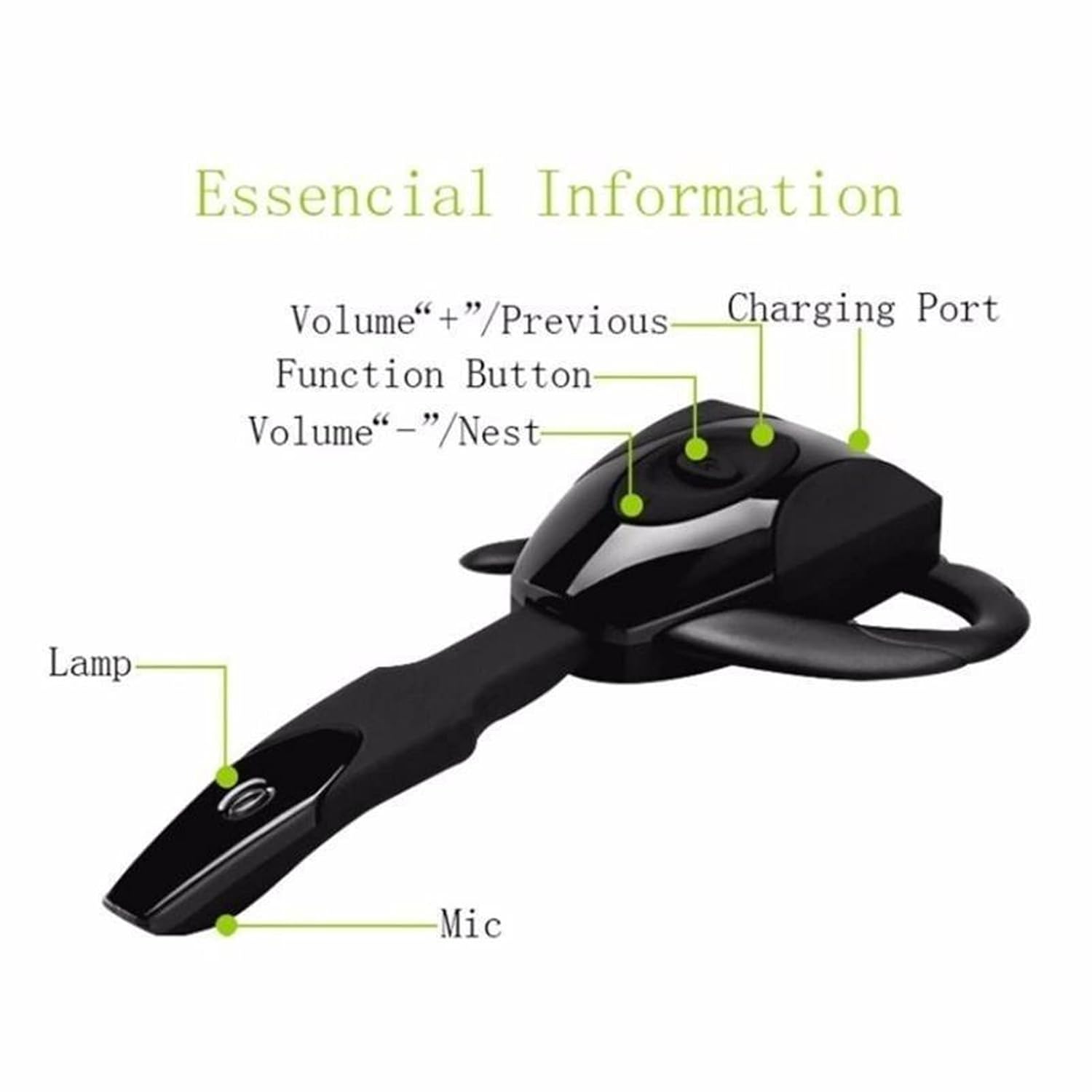
Figure 3.1: Earpiece Components. This image displays the earpiece with labels pointing to its key features: the Charging Port, Function Button, Volume +/Previous button, Volume -/Next button, Indicator Lamp, and Microphone.

Figure 3.2: Detailed Earpiece Diagram. This diagram provides a comprehensive view of the earpiece, highlighting the Multi-function button, Volume +/Next Song, Volume -/Previous Song, Indicator light, Charging port, Ear hang, Hi-Fi receiver, and Microphone.
- Multi-function Button: Used for power on/off, play/pause, answer/end calls.
- Volume + / Previous Song: Short press for volume up, long press for previous track.
- Volume - / Next Song: Short press for volume down, long press for next track.
- Charging Port: Connect the USB charging cable here.
- Indicator Light: Displays status (e.g., charging, pairing, connected).
- Microphone: For voice communication.
- Ear Hook: Provides secure and comfortable fit.
4. Setup
4.1. Charging the Earpiece
Before first use, fully charge the earpiece.
- Connect the small end of the USB charging cable to the charging port on the earpiece.
- Connect the larger end of the USB charging cable to a USB power source (e.g., computer USB port, USB wall adapter).
- The indicator light will typically show a solid color (e.g., red) during charging and change or turn off when fully charged.
- Charging time is approximately 1-2 hours.
4.2. Wearing the Earpiece
The earpiece is designed for comfortable, long-term wear. You may need to adjust the ear hook for the best fit.

Figure 4.1: Earpiece Worn on Ear. This image demonstrates the earpiece comfortably positioned on a user's ear, highlighting its ergonomic design.

Figure 4.2: Ear Hook Installation and Charging Port Access. This series of images illustrates the steps for attaching and removing the ear hook, as well as locating the charging port on the earpiece.
- Identify the transparent cover and the ear hang/hook.
- Gently remove the transparent cover if present.
- Attach the ear hook to the earpiece, ensuring it clicks into place securely.
- Place the earpiece over your ear, adjusting the ear hook for a snug and comfortable fit.
4.3. Bluetooth Pairing
To connect your earpiece to a device:
- Power On: Press and hold the Multi-function Button until the indicator light flashes (often blue and red alternately), indicating it is in pairing mode.
- Activate Bluetooth: On your device (smartphone, tablet, computer), enable Bluetooth.
- Search for Devices: In your device's Bluetooth settings, search for available devices.
- Select Earpiece: Select "GOWENIC Earpiece" or a similar name from the list of found devices.
- Confirm Connection: Once paired, the indicator light on the earpiece will typically flash blue slowly or turn off, and your device will confirm the connection.
The earpiece supports connection to two devices simultaneously.

Figure 4.3: Multi-Device Connection. This image illustrates the earpiece's capability to connect to two devices, such as smartphones and tablets, at the same time.
5. Operating Instructions
5.1. Power On/Off
- Power On: Press and hold the Multi-function Button for approximately 3-5 seconds until the indicator light flashes.
- Power Off: Press and hold the Multi-function Button for approximately 3-5 seconds until the indicator light turns off.
5.2. Call Management
- Answer Call: Short press the Multi-function Button when an incoming call rings.
- End Call: Short press the Multi-function Button during a call.
- Reject Call: Press and hold the Multi-function Button for 2 seconds when an incoming call rings.
- Redial Last Number: Double-press the Multi-function Button when not on a call.
5.3. Music Playback
- Play/Pause: Short press the Multi-function Button.
- Next Track: Long press the Volume - button.
- Previous Track: Long press the Volume + button.
5.4. Volume Control
- Volume Up: Short press the Volume + button.
- Volume Down: Short press the Volume - button.
6. Maintenance
To ensure the longevity and optimal performance of your earpiece:
- Keep the earpiece dry. Do not expose it to moisture or extreme temperatures.
- Clean the earpiece regularly with a soft, dry cloth. Avoid using harsh chemicals or abrasive materials.
- Store the earpiece in a cool, dry place when not in use.
- Avoid dropping or subjecting the earpiece to strong impacts.
7. Troubleshooting
If you encounter issues with your earpiece, refer to the following common solutions:
| Problem | Possible Solution |
|---|---|
| Earpiece does not power on | Ensure the earpiece is fully charged. Press and hold the Multi-function Button for a longer duration. |
| Cannot pair with device | Ensure the earpiece is in pairing mode (indicator light flashing). Turn off and on Bluetooth on your device. Move the earpiece closer to your device. Clear previous Bluetooth connections on your device. |
| No sound or low volume | Increase the volume on both the earpiece and your connected device. Ensure the earpiece is properly connected. Check if the audio output is set to the earpiece on your device. |
| Charging issue | Ensure the USB cable is securely connected to both the earpiece and the power source. Try a different USB cable or power source. |
| Intermittent connection | Ensure there are no obstructions between the earpiece and your device. Move away from sources of strong electromagnetic interference. |
8. Specifications
Detailed technical specifications for the GOWENIC Earpiece:
- Item Type: Earpiece
- Material: ABS
- Size: Approx. 10.5 x 6 x 2 cm (4.1 x 2.4 x 0.8 in)
- Bluetooth Version: 5.3
- Battery Type: Built-in rechargeable lithium battery
- Battery Model: 381423 lithium battery
- Battery Capacity: 135mAh
- Color: Black
- Item Weight: 2.08 ounces
9. Warranty and Support
GOWENIC products are designed for reliability and performance. For warranty information or technical support, please refer to the retailer's return policy or contact the seller directly through your purchase platform.
Please retain your proof of purchase for any warranty claims.