
1. Introduction
This manual provides essential instructions for the proper installation, operation, and maintenance of your WOOCARTY Single Wireless Rear View Camera, designed exclusively for use with the W7 system. Please read this manual thoroughly before installation and use to ensure correct functionality and to prevent damage.
Important Note: This camera is ONLY suitable for the W7 System. It is NOT compatible with WF7, WF703, WN4, or WN7 systems. Please consult the seller if you are unsure about your system's compatibility before purchase.
2. Safety Information
- Always ensure the vehicle is turned off and the ignition key is removed before performing any installation or maintenance.
- Disconnect the vehicle's battery before connecting any electrical components to prevent short circuits or electrical damage.
- Ensure all wiring is properly insulated and secured to prevent interference or damage from vehicle movement and environmental factors.
- Do not attempt to modify the camera or its components. Unauthorized modifications will void the warranty and may cause malfunction.
- This camera is an aid for safe driving and parking. Always exercise caution and use mirrors and direct observation in conjunction with the camera system.
3. Package Contents
Verify that all items are present in the package:
- Wireless Rear View Camera (x1)
- Power Cable (x1)
- Mounting Hardware (screws, brackets)
- User Manual (this document)
4. Setup and Installation
4.1 Pre-Installation Pairing
Before physically installing the camera, it is crucial to pair the camera with your original W7 system monitor. This step ensures the wireless connection is established correctly.
- Connect the camera to a temporary 12V-24V power source (e.g., a car battery or power adapter) in a safe, stationary environment.
- Power on your W7 system monitor.
- Follow the pairing instructions provided with your W7 monitor to establish a connection with the new camera. Refer to your W7 system's manual for specific pairing steps.
- Once paired, verify that the camera's video feed appears on the monitor. If not, repeat the pairing process or consult the troubleshooting section.
4.2 Physical Installation
The WOOCARTY W7 Single Wireless Rear View Camera is designed for roof mount installation. Ensure the camera is mounted securely and has a clear line of sight for optimal wireless signal transmission.
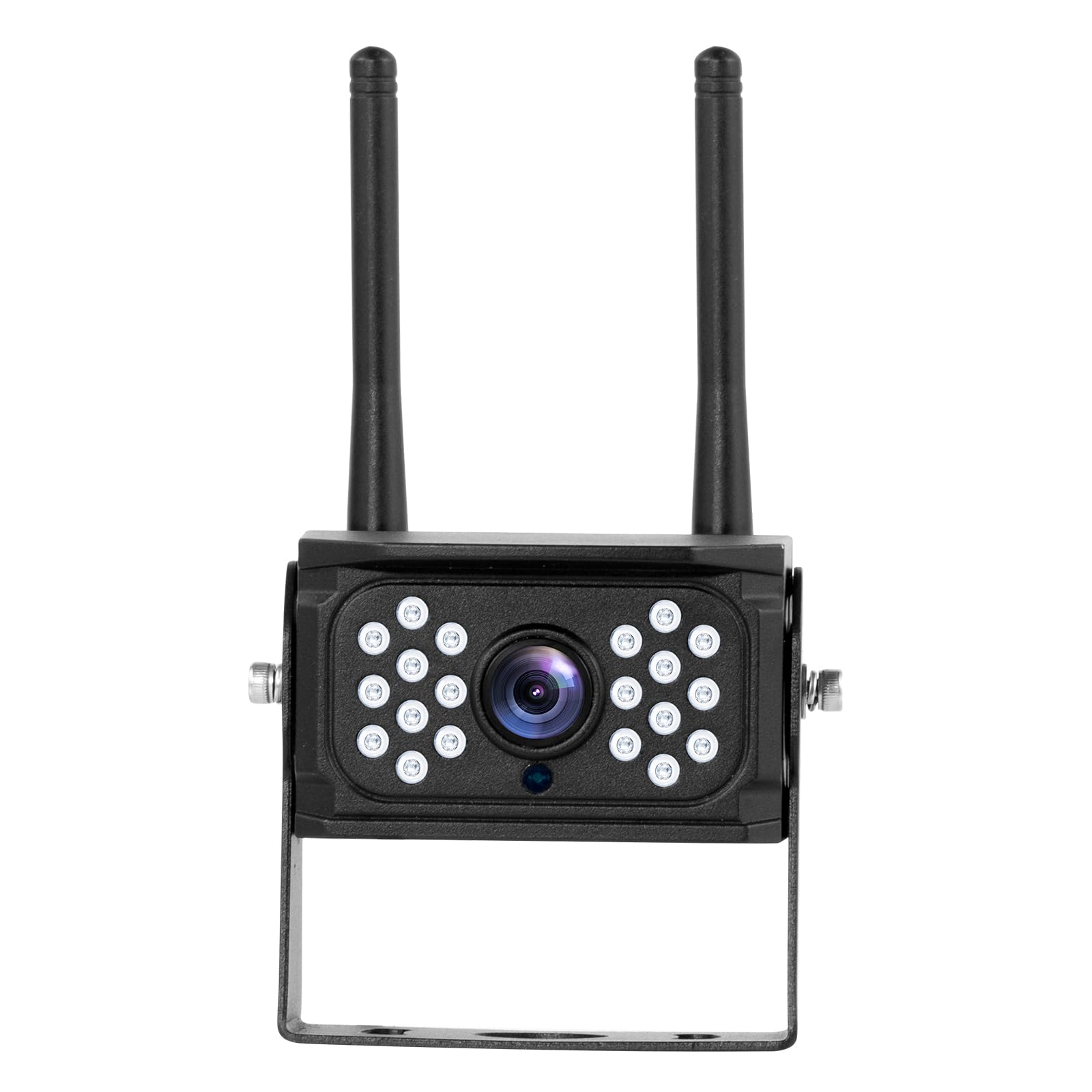
Figure 1: WOOCARTY W7 Single Wireless Rear View Camera. This image shows the compact design of the camera with its antenna and mounting bracket.
- Choose Mounting Location: Select a suitable location on the rear of your vehicle, preferably on the roof or high on the back, that provides an unobstructed view and allows for secure mounting. Ensure the camera's antenna has minimal obstructions for best signal.
- Secure the Bracket: Use the provided mounting hardware to securely attach the camera's bracket to the chosen location. Mark drill holes carefully if necessary and ensure no vital vehicle components are damaged during drilling.
- Attach the Camera: Mount the camera onto the secured bracket. Adjust the camera angle to achieve the desired viewing area. Tighten all screws to prevent movement.
- Connect Power: Connect the camera's power cable to a 12V-24V power source. This is typically connected to the vehicle's reverse light circuit so the camera activates when the vehicle is in reverse, or to a constant power source if continuous monitoring is desired. Ensure connections are waterproof and secure.
- Route Cables: Carefully route the power cable, ensuring it is protected from heat, sharp edges, and moving parts. Use cable ties to secure the wiring.
- Final Test: Reconnect the vehicle's battery. Turn on the vehicle and engage reverse gear (if connected to reverse lights) or power on the system. Verify the camera feed on your W7 monitor. Adjust the camera angle as needed for optimal view.
5. Operating Instructions
Once installed and paired, operating the WOOCARTY W7 Single Wireless Rear View Camera is straightforward as it integrates with your existing W7 monitor system.
- Power On: The camera will automatically power on when its connected power source is active (e.g., when the vehicle is in reverse or the ignition is on, depending on wiring).
- View Feed: The video feed from the camera will appear on your W7 monitor. Refer to your W7 monitor's manual for instructions on switching between camera views or adjusting display settings.
- Parking Lines: If your W7 monitor supports parking lines, they may be displayed on the screen to assist with parking maneuvers.
- Night Vision: The camera is equipped with infrared LEDs for night vision, which will automatically activate in low-light conditions to provide a clear image.
6. Maintenance
Regular maintenance ensures the longevity and optimal performance of your camera.
- Cleaning the Lens: Periodically clean the camera lens with a soft, damp cloth. Avoid abrasive cleaners or materials that could scratch the lens.
- Check Connections: Annually inspect all power connections and mounting hardware to ensure they are secure and free from corrosion or damage.
- Antenna Check: Ensure the antenna is not damaged and is securely attached for optimal wireless signal.
- Environmental Protection: While the camera is designed to be weather-resistant, extreme conditions (e.g., high-pressure washing directly on the lens) should be avoided.
7. Troubleshooting
If you encounter issues with your WOOCARTY W7 Single Wireless Rear View Camera, refer to the following common problems and solutions:
| Problem | Possible Cause | Solution |
|---|---|---|
| No image on W7 monitor |
|
|
| Image is blurry or distorted |
|
|
| Image flickers or drops out |
|
|
| Night vision not working |
|
|
If the problem persists after trying these solutions, please contact WOOCARTY customer support for further assistance.
8. Specifications
| Feature | Specification |
|---|---|
| Product Dimensions | 3.15"L x 2.5"W x 3.15"H |
| Item Weight | 14.4 ounces |
| Compatible Devices | W7 System ONLY |
| Installation Type | Roof Mount |
| Optical Sensor Technology | CCD CMOS |
| Lens Type | Wide Angle, Fixed |
| Connector Type | Wireless |
| Optical Sensor Size | 1/3 inch |
| Manufacturer | WOOCARTY |
9. Warranty Information
WOOCARTY products are covered by a limited warranty. For specific details regarding the warranty period and terms, please refer to the warranty card included with your product or contact WOOCARTY customer support directly. The warranty typically covers manufacturing defects but does not cover damage caused by improper installation, misuse, accidents, or unauthorized modifications.
10. Customer Support
If you have any questions, require technical assistance, or need to report an issue that cannot be resolved using the troubleshooting guide, please contact WOOCARTY customer support.
- Online Support: Visit the official WOOCARTY website for FAQs and support resources.
- Email: Refer to your product packaging or the WOOCARTY website for customer service email addresses.
- Seller Contact: For purchases made through Amazon, you can contact the seller directly via your Amazon order history.