
1. Important Safety Information
Please read all safety instructions carefully before using this product. Failure to follow these instructions may result in electric shock, fire, or serious injury.
- Tip-Over Protection: The power automatically turns off if the unit is tilted more than 45 degrees. This prevents accidents and ensures safety.
- Overheat Protection: The heating function automatically stops if the internal temperature exceeds 70°C, preventing overheating and potential burns.
- Human Motion Sensor: The heater features a human motion sensor that automatically turns the unit ON when movement is detected within approximately 5 meters (90° range vertically and horizontally). If no movement is detected for 3 minutes, the unit automatically turns OFF to save energy and prevent accidents, especially around children and pets.
- 12-Hour Auto-Off Timer: The unit will automatically power off after 12 hours of continuous operation without user input. This prevents unnecessary power consumption if the unit is left on accidentally.
- Flame-Retardant Material: Constructed with VO-grade flame-retardant materials for enhanced safety.
- No Combustion: This electric heater does not use fuel like kerosene or gas, eliminating concerns about open flames, fire hazards, or carbon monoxide poisoning.
2. Product Overview
The Bijia PTC-1500JR is an ultrasonic humidifying ceramic fan heater designed to provide instant warmth and comfortable humidity. It features a compact and lightweight design, making it easy to move and suitable for various indoor spaces.
- Integrated Heating and Humidification: Combines a ceramic heater with an ultrasonic humidifier to warm and humidify the air simultaneously, preventing dryness.
- Air Purification: The unit starts air purification when powered on, passing air through a filter to release fresh air.
- Compact Design: Weighing 1.75 kg with dimensions of 19 x 17.5 x 40.5 cm, it includes a handle for easy portability.
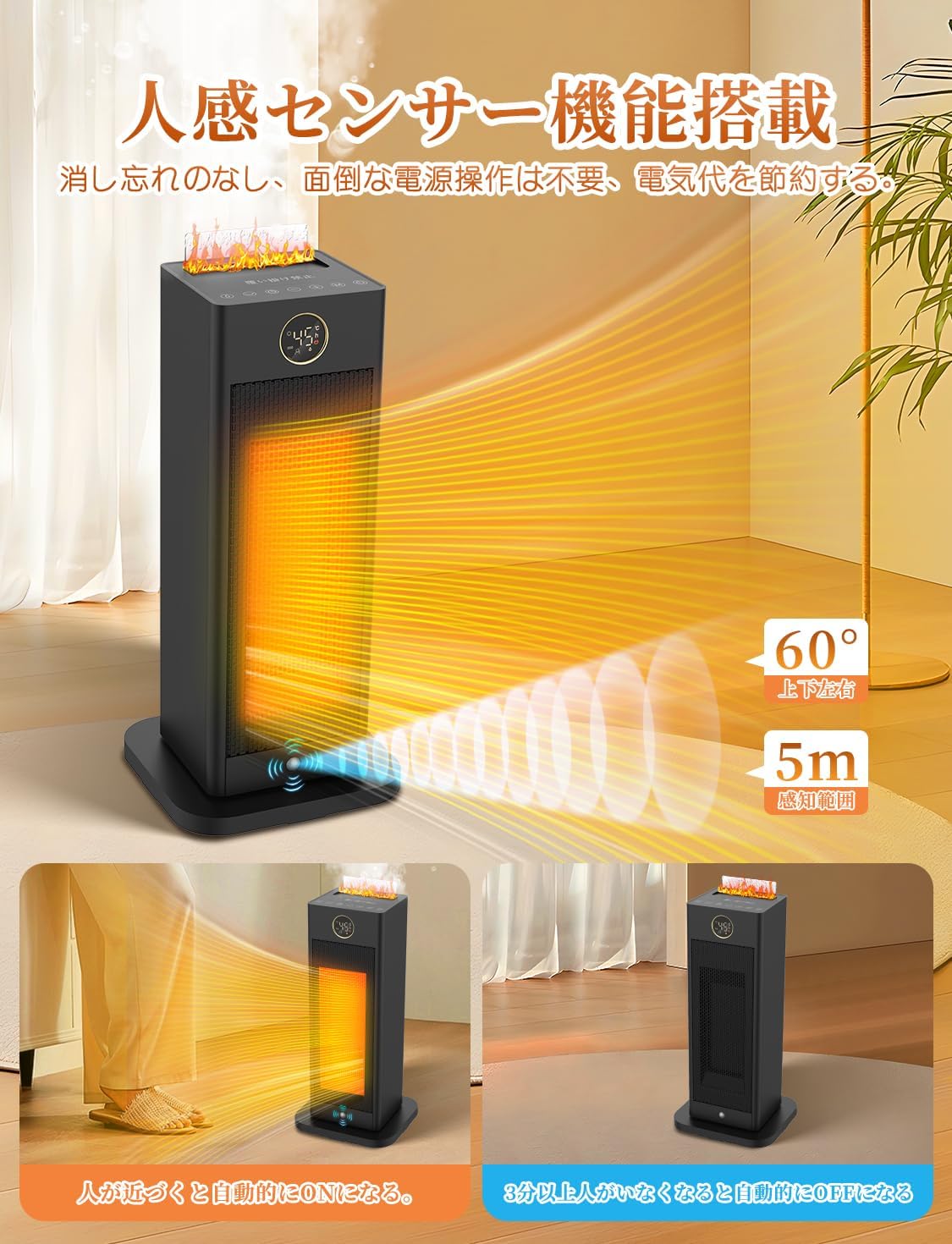
Image 2.1: Front view of the Bijia PTC-1500JR heater, showcasing its sleek design and digital display.
3. Setup
- Unpacking: Carefully remove the heater and all accessories from the packaging. Retain the packaging for future storage or transport.
- Placement: Place the heater on a stable, flat surface indoors. Ensure there is adequate clearance around the unit for proper airflow (at least 30 cm from walls and furniture). Do not block the air intake or outlet.
- Water Tank Filling (for Humidification):
- Locate the water tank on the unit.
- Fill the water tank with clean tap water. Important: Do not exceed 200ml of water. Exceeding this limit may prevent the humidification function from operating correctly.
- Ensure the humidifying plate is lightly pressed into place after filling.
- Power Connection: Plug the power cord into a standard electrical outlet. Ensure the voltage matches the product specifications.

Image 3.1: The heater placed in a bedroom, illustrating its compact size and heat distribution.
4. Operating Instructions
4.1 Control Panel and Remote Control
The heater can be operated using the control panel on the unit or the included remote control. The remote control has an effective range of approximately 5-8 meters.
4.2 Basic Operation
- Power ON/OFF: Press the power button to turn the unit on or off. The heater provides instant warmth, reaching desired temperatures in approximately 1 second.
- Temperature Adjustment: Use the temperature control buttons to set the desired room temperature between 15°C and 45°C, in 1°C increments.
- ECO Intelligent Constant Temperature Mode: Activate ECO mode. In this mode, the heater will automatically adjust its operation to maintain the set temperature, turning off when the room reaches the target temperature and restarting if it drops. This helps save energy.
- Airflow Settings: Select from 4 levels of airflow to adjust the heating intensity.
- Automatic Oscillation: Press the oscillation button to activate the 90-degree automatic oscillation function, distributing warm air more widely across the room.
- Humidification Function: Ensure the water tank is filled (max 200ml) and the humidifying plate is correctly seated. Activate the humidification function via the control panel or remote.
- Timer Function: Set the timer for automatic shutdown from 1 to 12 hours. This is useful for scheduled operation or for turning off the unit after you fall asleep.

Image 4.1: Display showing temperature settings and different heating modes (8W natural wind, 750W medium heat, 1500W high heat).
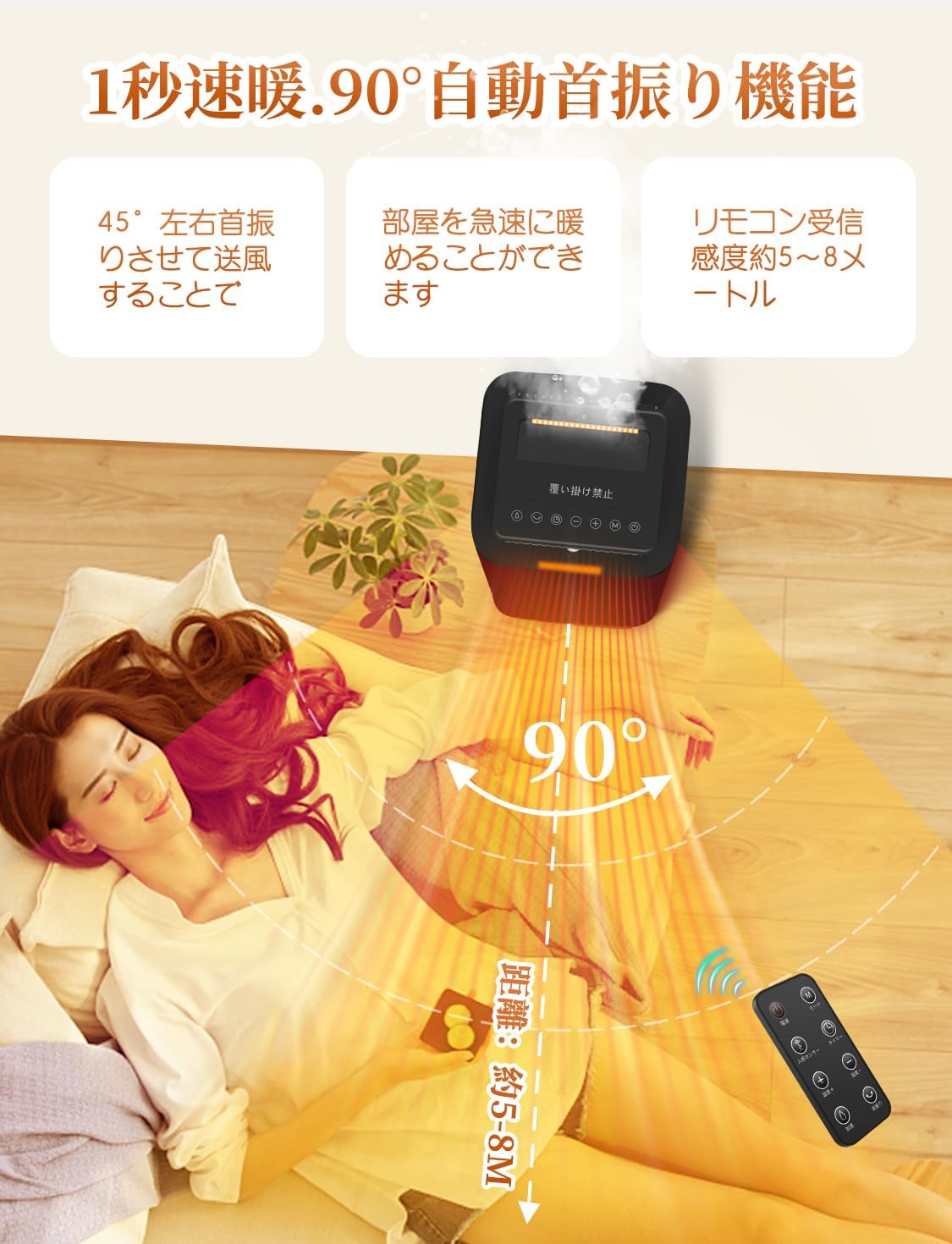
Image 4.2: The heater demonstrating its 90-degree automatic oscillation feature, distributing warmth.

Image 4.3: Illustration of the human motion sensor detecting presence and automatically turning on/off.
5. Maintenance
Regular maintenance ensures optimal performance and longevity of your heater.
- Cleaning:
- Always unplug the power cord from the electrical outlet before performing any cleaning or maintenance.
- Wipe the exterior surface of the unit with a soft, damp cloth to remove dust and dirt. Do not use abrasive cleaners or solvents.
- Ensure the air intake and outlet grilles are free from dust and obstructions. Use a soft brush or vacuum cleaner if necessary.
- Storage:
- If the heater will not be used for an extended period, ensure it is clean and dry.
- Store the unit in its original packaging or a polybag to prevent dust accumulation.
- Keep the heater in a dry place, away from direct sunlight and excessive humidity.
6. Troubleshooting
If you encounter any issues with your heater, please refer to the following common problems and solutions:
- Heater does not turn on:
- Check if the power cord is securely plugged into a working electrical outlet.
- Ensure the unit is placed on a flat, stable surface and has not been tipped over, triggering the tip-over protection.
- Verify that the power button has been pressed.
- No heat or insufficient heat:
- Check the set temperature. Ensure it is higher than the current room temperature.
- If ECO mode is active, the heater may turn off automatically once the set temperature is reached. It will resume heating when the temperature drops.
- Ensure the air intake and outlet are not blocked.
- Humidification function not working:
- Check the water level in the tank. Ensure it is filled with water, but not exceeding 200ml.
- Verify that the humidifying plate is correctly and lightly pressed into its position.
- Ensure the humidification function is activated.
- Unit turns off unexpectedly:
- The tip-over protection may have been activated if the unit was bumped or moved.
- The overheat protection may have been activated. Allow the unit to cool down before restarting.
- The 12-hour auto-off timer may have expired.
- If the human motion sensor is active, the unit will turn off if no movement is detected for 3 minutes.
If the problem persists after checking these points, please contact customer support.

Image 6.1: Diagram illustrating the internal components and safety mechanisms like tip-over and overheat protection.
7. Specifications
| Feature | Specification |
|---|---|
| Brand | Bijia |
| Model Number | PTC-1500JR |
| Package Size | 44.5 x 21.4 x 19.9 cm |
| Color | Black |
| Other Functions | 1-second rapid heating, Humidification, Human motion sensor, 4-stage airflow, Automatic tip-over off, Overheat protection, ECO constant temperature, 12-hour timer, Oscillation function, VO-grade flame-retardant material, Double overheat protection |
| Package Weight | 2.21 kg |
| Battery Usage | No |
| Form Factor | Tower |
| Indoor/Outdoor Use | Indoor |
8. Warranty and Support
Your Bijia PTC-1500JR heater is covered by a manufacturer's warranty. Please refer to the product packaging or contact the seller for specific warranty terms and conditions.
For any questions, concerns, or technical support during use, please contact us directly through your Amazon order history:
- Go to 'Order History'.
- Select the 'Relevant Order' for your Bijia heater.
- Click on 'Contact Seller'.
Our customer service team is available to assist you.