1. Introduction
This manual provides detailed instructions for the installation and proper use of the YTRIO Car Radio Frame, designed specifically for Renault Kadjar models manufactured between 2015 and 2017. This frame facilitates the installation of a 9-inch aftermarket Android stereo head unit, ensuring a seamless and integrated appearance within your vehicle's dashboard.
2. Product Overview and Package Contents
The YTRIO Car Radio Frame kit includes the necessary components to replace your vehicle's original radio bezel and accommodate a new 9-inch display head unit.
2.1 Package Contents:
- Car Radio Frame (ABS Plastic, Black)
- ISO Wiring Harness (Plug and Play)
- USB Adapter Cables (if applicable, based on specific kit)
- Antenna Adapter (if applicable, based on specific kit)

Figure 1: YTRIO Car Radio Frame and included wiring harness. The frame is designed to integrate a 9-inch display, and the harness provides necessary electrical connections.
3. Compatibility
This car radio frame is specifically designed for the following vehicle models:
- Renault Kadjar: 2015 Model Year
- Renault Kadjar: 2016 Model Year
- Renault Kadjar: 2017 Model Year
It is intended for use with 9-inch display head units (dimensions approximately 230*130*220mm for the frame opening).
4. Installation Guide
Installation requires basic automotive knowledge and tools. If you are unsure about any step, it is recommended to seek professional assistance.
4.1 Before Installation:
- Ensure the vehicle's ignition is off and the battery's negative terminal is disconnected to prevent electrical shorts.
- Gather necessary tools: trim removal tools, screwdrivers (Phillips and flathead), wire cutters/strippers (if custom wiring is needed, though the harness is plug-and-play).
- Verify all components of the YTRIO kit are present and undamaged.

Figure 2: View of the original Renault Kadjar dashboard before the installation of the new radio frame. This shows the factory radio and climate controls.
4.2 Step-by-Step Installation:
- Remove Original Trim: Carefully use trim removal tools to pry off the existing dashboard trim surrounding the factory radio. Work slowly to avoid damaging clips or the dashboard surface.
- Unscrew Factory Radio: Once the trim is removed, locate and unscrew the bolts or screws holding the factory radio in place.
- Disconnect Wiring: Gently pull out the factory radio and disconnect all wiring harnesses and antenna cables from its rear.
- Prepare New Head Unit: If not already done, attach the mounting brackets (usually supplied with the 9-inch head unit) to your new Android stereo.
- Connect Wiring Harness: Connect the provided ISO wiring harness from the YTRIO kit to the vehicle's factory wiring. Ensure all connections are secure. Connect the other end of the ISO harness to your new 9-inch Android head unit.
- Install New Head Unit: Slide the new 9-inch Android head unit into the dashboard opening. Secure it using the mounting brackets and screws.
- Install YTRIO Frame: Position the YTRIO Car Radio Frame around the newly installed 9-inch head unit. Align the clips and gently press the frame into place until it snaps securely into the dashboard.
- Reconnect Battery: Reconnect the negative terminal of the vehicle's battery.
- Test Functionality: Turn on the vehicle's ignition and test the new head unit's functionality, including audio, touch screen, and any integrated controls.
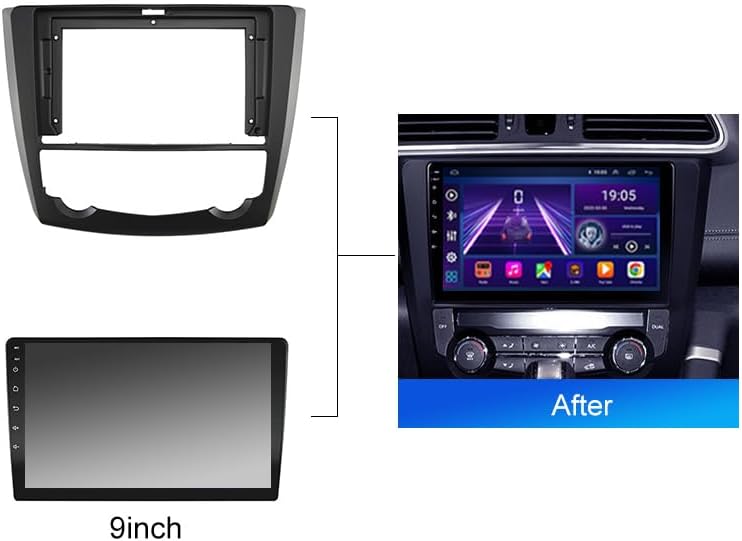
Figure 3: Illustration showing the YTRIO Car Radio Frame and a 9-inch display head unit installed in the Renault Kadjar dashboard, demonstrating the final integrated appearance.
5. Maintenance
The YTRIO Car Radio Frame is made from durable ABS plastic and requires minimal maintenance.
- Cleaning: Use a soft, damp cloth to wipe the surface of the frame. Avoid abrasive cleaners or solvents, as these can damage the finish.
- Inspection: Periodically check that the frame remains securely seated in the dashboard.
6. Troubleshooting
- Frame Does Not Fit:
- Ensure your vehicle is a Renault Kadjar model from 2015, 2016, or 2017.
- Verify that your aftermarket head unit is a standard 9-inch display.
- Check for any obstructions behind the dashboard that might prevent proper seating.
- New Head Unit Not Powering On:
- Confirm all wiring harness connections are secure and correctly matched.
- Check the vehicle's fuses.
- Ensure the battery is properly reconnected.
- Loose Fit After Installation:
- Ensure all clips on the frame are properly engaged with the dashboard.
- Re-check that the head unit is securely mounted within the frame.
7. Specifications
| Model Number | YTRIO717 |
| Compatible Vehicles | Renault Kadjar (2015, 2016, 2017) |
| Material | ABS Plastic |
| Color | Black |
| Installation Size | For 9-inch display head unit (approx. 230*130*220mm) |
| Item Weight | 1.76 ounces (approx. 50 grams) |
| Package Dimensions | 1.18 x 0.79 x 0.39 inches (approx. 3 x 2 x 1 cm) |
8. Customer Support
For further assistance, technical support, or inquiries regarding the YTRIO Car Radio Frame, please refer to the seller's contact information on the platform where the product was purchased. Please have your model number (YTRIO717) and purchase details ready when contacting support.