1. Introduction
The KLIM K7 is a versatile portable cassette player designed to bring your analog audio into the digital age. It allows you to play your cherished cassette tapes, convert them directly to MP3 files on an SD card, and record new audio using its built-in microphone. With its compact design, integrated speaker, and rechargeable battery, the KLIM K7 offers a convenient solution for enjoying and preserving your audio collection.
2. What's Included
Upon opening the package, you should find the following items:
- KLIM K7 Portable Cassette Player and MP3 Converter Unit
- User Manual
- 16GB Micro SD Card
- SD Card Reader
- Type-C USB Charging Cable
- KLIM Fusion Earphones

Image: The KLIM K7 unit displayed with its accompanying accessories, including earphones, a 16GB Micro SD card, a card reader, and a Type-C USB cable.
3. Product Overview (Controls and Ports)
Familiarize yourself with the various controls and ports on your KLIM K7 device:
Front Panel
- Speaker: Integrated speaker for audio playback.
- LCD Display: Shows track information, recording status, and battery level.
- Playback Controls: Buttons for Play/Pause, Next Track, Previous Track, Record, Mode, and Loop.
Top Panel
- Tape Controls: Buttons for STOP, Fast Forward (F.FWD), Rewind (F.REW), and PLAY for cassette operation.
- Volume Dial: Adjusts the audio output level.
Side Panel
- ON/OFF Switch: Powers the device on or off.
- 3.5mm Headphone Jack: For connecting earphones or external audio devices.
- SD Card Slot: Insert the Micro SD card for storage.
- Type-C USB Port: For charging the device.
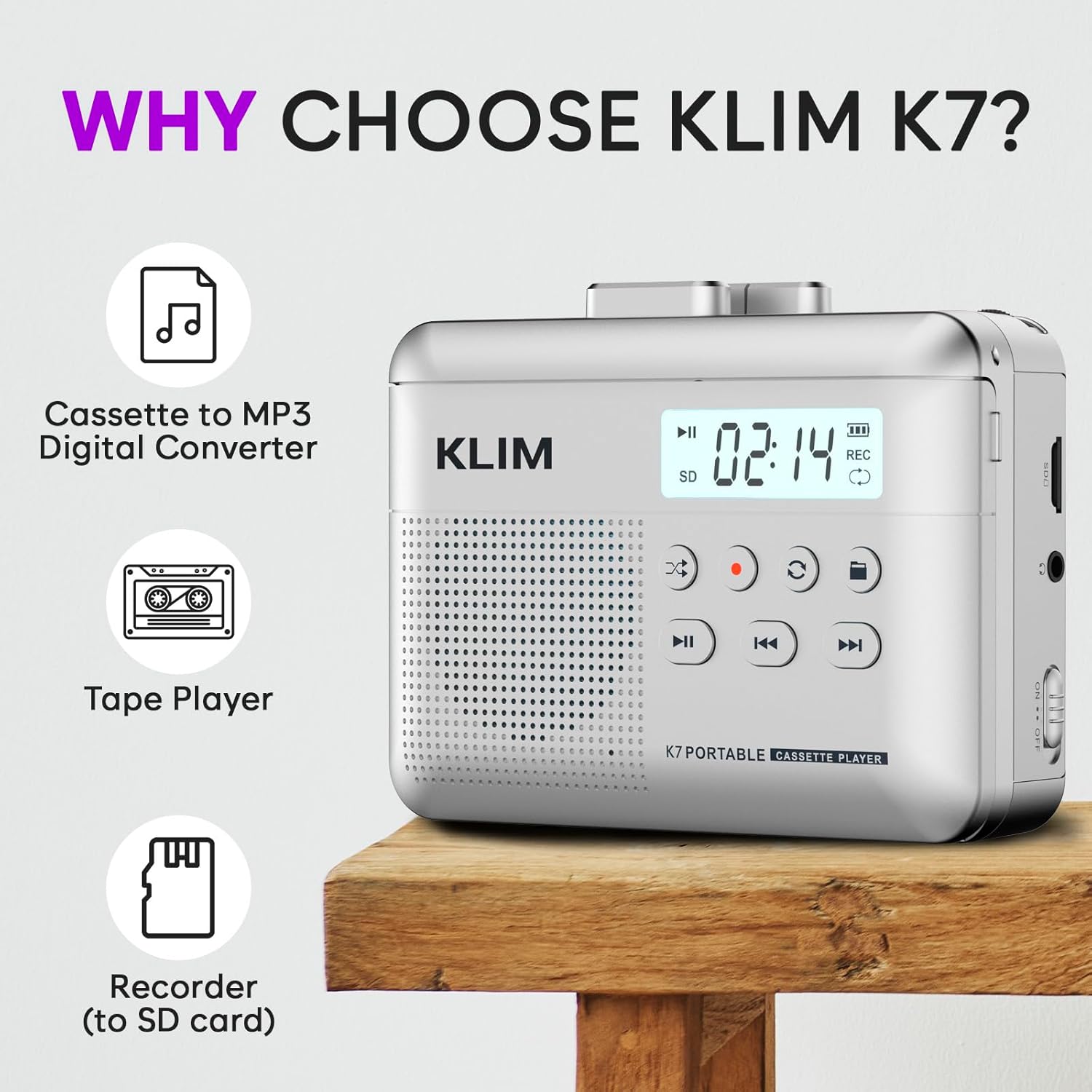
Image: Front view of the KLIM K7, highlighting the speaker grille, digital display, and various control buttons for playback and recording.

Image: Side view of the KLIM K7, illustrating the SD card slot with a Micro SD card being inserted, along with the ON/OFF switch and headphone jack.
4. Setup
4.1. Charging the Device
The KLIM K7 is equipped with a 1000mAh rechargeable battery. Before first use, or when the battery indicator on the LCD display is low, charge the device:
- Connect the provided Type-C USB cable to the USB port on the side of the KLIM K7.
- Connect the other end of the USB cable to a compatible USB power source (e.g., a computer USB port, a USB wall adapter).
- The device typically requires approximately 2 hours for a full charge. The LCD display will indicate charging status.

Image: The KLIM K7 unit shown with its Type-C USB charging cable, emphasizing its 1000mAh rechargeable battery.
4.2. Inserting the SD Card
The included 16GB Micro SD card is essential for converting tapes to MP3 and recording audio. To insert it:
- Locate the SD card slot on the side of the KLIM K7.
- Gently push the Micro SD card into the slot until it clicks into place. Ensure the card is oriented correctly.
- To remove, push the card in again until it springs out.

Image: The KLIM K7 with its cassette compartment open, illustrating the insertion of a 16GB Micro SD card for MP3 conversion.
4.3. Inserting a Cassette Tape
To play or convert a cassette tape:
- Locate the cassette compartment door on the front of the device.
- Press the 'OPEN' button or slide the latch to open the compartment.
- Insert your cassette tape with the open side facing upwards and the tape reels aligned with the player's mechanisms.
- Close the compartment door firmly until it clicks.
5. Operating Instructions
5.1. Playing a Cassette Tape
After inserting a cassette tape:
- Ensure the device is powered ON using the side switch.
- Press the 'PLAY' button on the top panel to start playback.
- Use the 'F.FWD' and 'F.REW' buttons for fast forwarding and rewinding.
- Press the 'STOP' button to halt playback.
- Adjust the volume using the 'VOL' dial on the top panel.
5.2. Converting Cassette to MP3
The KLIM K7 allows direct conversion of cassette audio to MP3 files on the inserted SD card, without needing a computer:
- Insert your cassette tape and the Micro SD card as described in Section 4.
- Start playing the cassette tape by pressing the 'PLAY' button on the top panel.
- To begin recording, long-press the 'Record' button (red circle icon) on the front panel. The display will show a recording indicator.
- To stop recording, press the 'Record' button again. The recorded audio will be saved as an MP3 file on the SD card.

Image: A visual guide detailing the five steps for converting cassette audio to MP3 files directly onto the Micro SD card using the KLIM K7.
5.3. Recording with Built-in Microphone
The KLIM K7 features a built-in microphone for recording voice or ambient sounds directly to the SD card:
- Ensure a Micro SD card is inserted into the device.
- Press the 'Record' button (red circle icon) on the front panel to start recording. The device will capture audio through its built-in microphone.
- Press the 'Record' button again to stop recording. The audio will be saved as an MP3 file on the SD card.
Note: The KLIM K7 does not support recording onto cassette tapes. All recordings are saved digitally to the SD card.

Image: A visual representation of the KLIM K7's built-in microphone recording function, capable of capturing high-quality sound directly to the SD card.
5.4. Playing Music from SD Card
The KLIM K7 can also function as an SD card music player:
- Ensure a Micro SD card containing MP3 files is inserted.
- Press the 'Mode' button (often labeled with an 'M' or similar icon) to switch to SD card playback mode.
- Use the 'Play/Pause', 'Next Track', and 'Previous Track' buttons to navigate and control your music.
5.5. Using Earphones
For private listening, connect the included KLIM Fusion earphones or your own 3.5mm headphones:
- Plug the 3.5mm jack of your earphones into the headphone port on the side of the KLIM K7.
- Adjust the volume using the 'VOL' dial to a comfortable listening level.

Image: A user enjoying music with the KLIM K7 and its included earphones, highlighting the universal 3.5mm jack port for listening anywhere.
6. Maintenance
To ensure the longevity and optimal performance of your KLIM K7:
- Cleaning: Use a soft, dry cloth to clean the exterior of the device. Avoid using liquid cleaners or abrasive materials.
- Tape Head Cleaning: Periodically clean the cassette tape heads with a specialized tape head cleaning solution and cotton swab to maintain audio quality.
- Storage: Store the device in a cool, dry place away from direct sunlight and extreme temperatures. Remove cassette tapes when not in use.
- Battery Care: For long-term storage, ensure the battery is partially charged (around 50%) to prevent degradation.
7. Troubleshooting
If you encounter issues with your KLIM K7, refer to the following common solutions:
- Poor Audio Quality During Conversion: The quality of the converted MP3 file is highly dependent on the original cassette tape's condition. Very worn or degraded tapes may produce noise or hiss. Ensure your tapes are in good condition for best results.
- SD Card Read/Write Errors: If the device struggles to read or write to the SD card, try reinserting the card. If the problem persists, test with a different SD card, as some cards may become corrupted or incompatible over time.
- No Sound from Headphones: Ensure your 3.5mm headphones are fully plugged into the jack. Some headphones with built-in microphones may not function correctly with the device's audio output; try using standard headphones without a microphone.
- Device Not Powering On: Check if the battery is charged. Connect the device to a power source using the Type-C USB cable and allow it to charge for at least 30 minutes before attempting to power it on again.
8. Specifications
| Feature | Detail |
|---|---|
| Product Dimensions | 4.76 x 3.61 x 1.56 inches |
| Item Weight | 9.9 ounces |
| Item Model Number | K7 Cassette Player |
| Batteries | 1 Lithium Ion battery required (included) |

Image: The KLIM K7 unit with its compact dimensions and light weight indicated, showcasing its portability.
9. Warranty and Support
KLIM is committed to producing quality electronics built to last. The KLIM K7 comes with a 5-year assurance. If you encounter any problems with your device, please refer to the troubleshooting section of this manual or contact KLIM customer support for assistance. Detailed support information can typically be found on the KLIM official website or through the contact details provided in your product packaging.


