Introduction
This manual provides instructions for the YTRIO Android Car Radio Canbus Box 16-pin wiring harness. This product is designed to facilitate the installation of an aftermarket Android head unit in compatible vehicles, ensuring proper communication and power supply.
Compatibility:
- For KIA Sportage 2015
- For Hyundai Veloster 2011-2017
- For KIA Sportage 2010-2015
- For KIA Cerato 2013-2016
- For Hyundai IX45 2011-2017
This harness is suitable for 16-Pin Port Android Head units.
Product Overview and Components
The YTRIO 16-pin wiring harness includes the necessary connectors and a Canbus decoder box to integrate your Android car radio with your vehicle's electrical system.
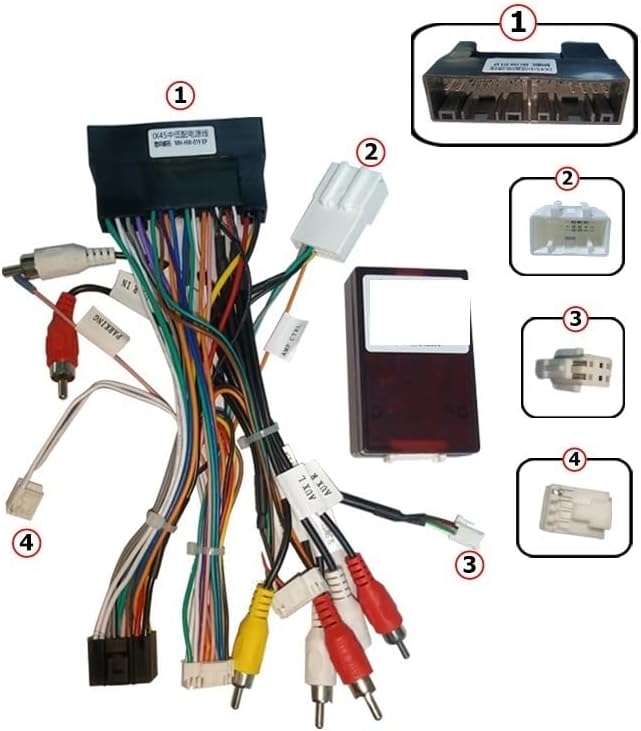
Image Description: This image displays the YTRIO 16-pin wiring harness and Canbus box, with key components numbered for identification.
(1) Main 16-pin connector for the Android head unit.
(2) Vehicle-specific connector for power and speaker wires.
(3) Canbus decoder box, responsible for translating vehicle data (e.g., steering wheel controls, ignition status).
(4) RCA connectors for audio/video input/output, including auxiliary and camera inputs.
The harness features color-coded wires for various functions such as power, ground, speaker outputs, and accessory connections. The Canbus box ensures compatibility with vehicle-specific features.
Setup and Installation
Important: Professional installation is highly recommended for this product to ensure correct wiring and prevent damage to your vehicle's electrical system or the head unit.
Before Installation:
- Disconnect the vehicle's battery to prevent electrical shorts.
- Ensure the new Android head unit is compatible with a 16-pin harness.
- Verify that the vehicle's existing wiring matches the provided harness connectors.
Installation Steps:
- Remove Existing Head Unit: Carefully remove the factory car radio from the dashboard. Refer to your vehicle's service manual for specific instructions.
- Connect Harness to Android Head Unit: Plug the 16-pin connector (labeled 1 in the image) from the YTRIO harness into the corresponding port on your Android head unit.
- Connect Harness to Vehicle: Connect the vehicle-specific connector (labeled 2 in the image) from the YTRIO harness to the vehicle's factory wiring harness.
- Integrate Canbus Box: Ensure the Canbus decoder box (labeled 3 in the image) is properly connected within the harness. This box is crucial for features like steering wheel control integration and ignition sensing.
- Connect Auxiliary Wires: Connect any additional wires such as RCA cables for external amplifiers, cameras, or auxiliary inputs/outputs (labeled 4 in the image) as required by your Android head unit and accessories.
- Test Connections: Before fully reassembling the dashboard, reconnect the vehicle's battery and perform a basic test of the Android head unit's functions, including power, audio, and steering wheel controls.
- Secure Wiring: Once confirmed operational, neatly route and secure all wiring to prevent pinching or interference.
- Reassemble Dashboard: Carefully reassemble the vehicle's dashboard components.
Functionality and Operation
The YTRIO Canbus Box and wiring harness enable the following functionalities with a compatible Android head unit:
- Power Supply: Provides stable power and ground connections to the Android head unit.
- Speaker Outputs: Connects the head unit's audio outputs to the vehicle's speakers.
- Steering Wheel Controls: The Canbus box decodes signals from the vehicle's steering wheel buttons, allowing them to control the Android head unit (e.g., volume, track skip).
- Ignition/Accessory Signal: Provides the necessary ignition and accessory signals to turn the head unit on and off with the vehicle.
- Reverse Gear Signal: Supplies a reverse gear signal for automatic camera activation (if connected).
- Illumination Signal: Provides an illumination signal for automatic dimming of the head unit's display with vehicle lights.
Specific features and their configuration may vary depending on the Android head unit model and its software. Refer to your Android head unit's manual for detailed operation instructions.
Maintenance
This wiring harness and Canbus box are designed for long-term reliability and typically require no routine maintenance.
- Regular Checks: Periodically inspect visible wiring for any signs of wear, fraying, or loose connections, especially if you experience intermittent issues.
- Cleanliness: Keep the area around the head unit and wiring free from excessive dust or moisture.
- Avoid Modifications: Do not attempt to modify the wiring harness or Canbus box, as this can void any potential warranty and may cause damage.
- Professional Service: If any issues arise that cannot be resolved through basic troubleshooting, consult a professional car audio installer.
Troubleshooting
This section addresses common issues you might encounter.
No Power to Head Unit:
- Check Battery Connection: Ensure the vehicle's battery is properly reconnected and charged.
- Check Fuses: Verify the vehicle's fuse for the radio and any inline fuses on the harness are intact.
- Verify Harness Connections: Double-check that all connectors on the YTRIO harness are securely plugged into both the head unit and the vehicle's wiring.
No Sound:
- Speaker Connections: Confirm all speaker wires are correctly connected and not shorted.
- Head Unit Settings: Check the audio settings on your Android head unit (e.g., volume, mute, fader/balance).
Steering Wheel Controls Not Working:
- Canbus Box Connection: Ensure the Canbus box is correctly connected and receiving power.
- Head Unit Configuration: Most Android head units require configuration or "learning" of steering wheel controls in their settings menu. Refer to your head unit's manual.
- Compatibility: Confirm the Canbus box is compatible with your specific vehicle model and year, and that your Android head unit supports Canbus integration.
Intermittent Functionality:
- Loose Connections: Inspect all connections for looseness.
- Ground Connection: Ensure a solid ground connection for both the head unit and the harness.
Specifications
| Feature | Detail |
|---|---|
| Brand | YTRIO |
| Model Number | YTRIO717 |
| Connector Type | 16-pin |
| Material | Copper, Polyvinyl Chloride (PVC) |
| Item Weight | 1.76 ounces (50 Grams) |
| Package Dimensions | 1.18 x 0.79 x 0.39 inches |
| Installation Type | Direct Replacement |
Warranty and Support
Specific warranty details for the YTRIO Android Car Radio Canbus Box 16-pin wiring harness are not provided in this document. Please refer to your point of purchase or the manufacturer's official website for warranty information.
For technical support or further assistance, please contact the vendor or manufacturer directly.