
1. Product Overview
This YTRIO 16-pin wiring harness is designed to integrate an Android car radio with specific Suzuki vehicle models. It provides the necessary power and signal connections for a seamless installation, ensuring compatibility and reliable performance.
Compatibility:
- Suzuki Grand Vitara
- Suzuki Swift
- Suzuki SX4
This harness is suitable for Android head units with a 16-pin port.
Components
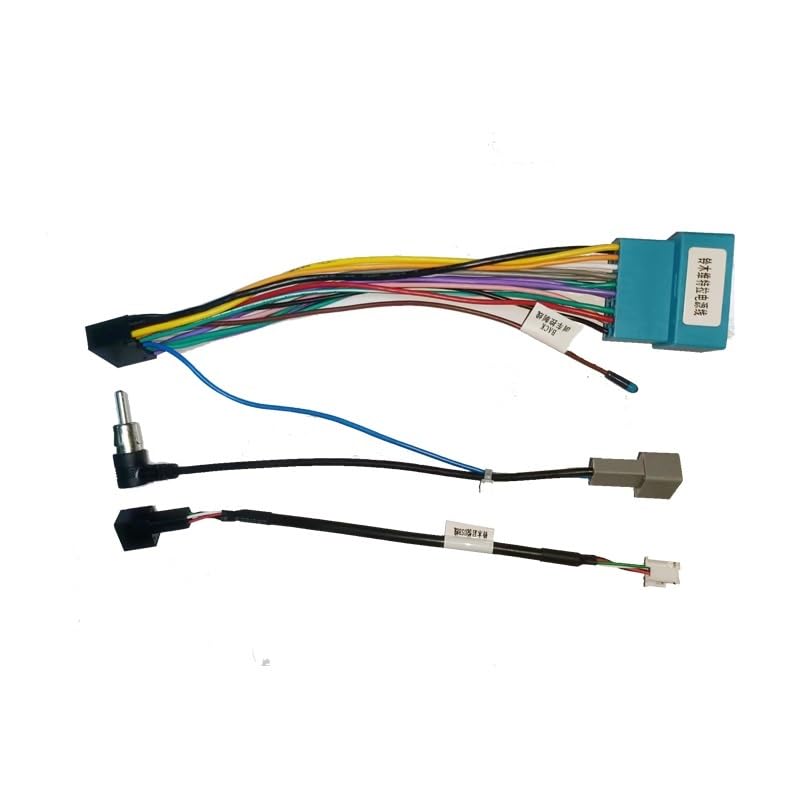
Image Description: The image displays the YTRIO 16-pin wiring harness. It consists of a main blue 16-pin connector (labeled 1) with numerous colored wires extending from it. Below this, there is an antenna adapter cable (labeled 2) with a gray connector, a small white 3-wire connector (labeled 3), and a black 4-pin connector (labeled 4). The lower part of the image shows magnified views of each numbered connector for detailed identification.
- Main 16-Pin Connector: Connects to the Android head unit.
- Antenna Adapter Cable: Connects the vehicle's antenna to the new head unit.
- Auxiliary Connector (3-wire): For specific auxiliary functions, if applicable.
- Auxiliary Connector (4-pin): For specific auxiliary functions, if applicable.
2. Setup and Installation
This wiring harness is designed for direct replacement and easy installation. Professional installation is recommended to ensure correct wiring and prevent damage to your vehicle's electrical system or the new head unit.
Installation Steps:
- Safety First: Before beginning any installation, disconnect the vehicle's negative battery terminal to prevent electrical shorts.
- Remove Existing Head Unit: Carefully remove the factory car radio from your vehicle. Refer to your vehicle's service manual for specific instructions on dash disassembly.
- Identify Vehicle Wiring: Locate the existing wiring harness in your vehicle that connects to the factory radio.
- Connect the Main Harness: Connect the main 16-pin connector (labeled 1 in the diagram) of the YTRIO harness to the corresponding 16-pin port on your new Android head unit.
- Connect to Vehicle: Connect the other end of the YTRIO harness to the vehicle's factory wiring harness. Ensure all connections are secure.
- Antenna Connection: Connect the antenna adapter cable (labeled 2) to the vehicle's antenna cable and then to the antenna input on your Android head unit.
- Auxiliary Connections: If your Android head unit or vehicle requires them, connect the auxiliary connectors (labeled 3 and 4) to their respective ports. Consult your Android head unit's manual for specific auxiliary input requirements.
- Test Connections: Before fully reassembling the dash, reconnect the vehicle's negative battery terminal. Turn on the vehicle and the Android head unit to test all functions (power, audio, steering wheel controls if applicable, etc.).
- Secure Installation: Once all functions are verified, carefully reassemble the vehicle's dash, ensuring no wires are pinched.
Note: This harness is designed to be highly matched with original equipment, simplifying the installation process.
3. Operation
The YTRIO wiring harness facilitates the proper functioning of your Android car radio by providing stable power and signal transmission. Once correctly installed, the operation of your car radio will depend on the features and interface of the Android head unit itself.
- Power Supply: Ensures consistent power delivery to the Android head unit.
- Audio Signals: Transmits audio signals from the head unit to the vehicle's speakers.
- CAN Bus Communication: If equipped with CAN Bus functionality, it allows communication between the head unit and the vehicle's onboard computer for features like steering wheel controls, ignition sensing, and illumination.
Refer to your Android head unit's user manual for detailed instructions on its specific operational features.
4. Maintenance
The YTRIO wiring harness is constructed from durable materials (Copper, Polyvinyl Chloride (PVC)) for a long and reliable service life and generally requires minimal maintenance once installed correctly.
- Periodic Inspection: If you ever need to access the area behind your car radio, visually inspect the harness connections to ensure they remain secure and free from corrosion or damage.
- Avoid Stress: Ensure the wires are not under tension or pinched by other components in the dashboard.
- Cleaning: Keep the area around the connections clean and free of dust or debris.
Do not attempt to modify or repair the harness yourself. Any modifications may void potential warranties and could lead to electrical issues.
5. Troubleshooting
If you encounter issues after installing the wiring harness, consider the following troubleshooting steps:
- No Power to Head Unit:
- Check all power connections on the harness and to the head unit.
- Verify the vehicle's fuse for the radio is intact.
- Ensure the vehicle's battery is properly connected and charged.
- No Audio Output:
- Confirm speaker wires are correctly connected from the harness to the head unit and to the vehicle's speakers.
- Check the head unit's audio settings.
- Steering Wheel Controls Not Working:
- Ensure the CAN Bus connection (if applicable) is secure.
- Verify that your Android head unit supports steering wheel controls and that they are configured correctly in the head unit's settings.
- Some vehicles may require an additional CAN Bus decoder or interface, which is typically integrated into this type of harness. Confirm compatibility.
- Intermittent Functionality:
- Check for loose connections at all points of the harness.
- Inspect wires for any signs of damage or pinching.
If troubleshooting steps do not resolve the issue, it is recommended to consult with a professional car audio installer or contact YTRIO customer support.
6. Specifications
| Model Number | YTRIO717 |
| Brand | YTRIO |
| Connector Type | 16-pin Connector |
| Compatible Vehicles | Suzuki Grand Vitara, Suzuki Swift, Suzuki SX4 |
| Material | Copper, Polyvinyl Chloride (PVC) |
| Number of Pieces | 1 |
| Assembly Required | No |
| Item Weight | 1.76 ounces (50 Grams) |
| Package Dimensions | 1.18 x 0.79 x 0.39 inches |
7. Warranty and Support
Specific warranty information for the YTRIO Android Car Radio Canbus Box 16-Pin Wiring Harness is not provided in the product details. Please refer to the retailer's return policy or contact the manufacturer, YTRIO, directly for warranty details and customer support.
For technical assistance or inquiries, please reach out to YTRIO customer service through their official channels.