
1. Introduction
Thank you for choosing the Teglu TMS-219 Paraffin Wax Machine. This device is designed to provide a moisturizing and therapeutic paraffin wax treatment for your hands, feet, and elbows in the comfort of your home. Please read this manual thoroughly before initial use to ensure safe and optimal operation.

Image 1.1: Teglu TMS-219 Paraffin Wax Machine and included accessories.
2. Safety Information
Important Safety Precautions:
- Do not use this product in excessively humid indoor environments or outdoors.
- Ensure the machine is placed on a stable, heat-resistant surface during operation.
- Keep out of reach of children and pets.
- Always test the wax temperature with your finger before immersing hands or feet to prevent burns.
- Do not operate the machine if the power cord or plug is damaged.
- Unplug the machine from the power outlet when not in use or before cleaning.
- Do not immerse the machine in water or any other liquid.
- Use only paraffin wax specifically designed for paraffin bath machines.
- If you have any skin conditions, open wounds, or circulatory problems, consult a medical professional before use.
3. Package Contents
Verify that all items are present in the package:
- 1x 4000ML Paraffin Wax Machine
- 3x 450g Paraffin Wax
- 2x Thermal Hand Gloves
- 2x Thermal Foot Gloves
- 100x Plastic Hand Gloves
- 100x Plastic Foot Gloves
- 1x Silicone Brush
- 1x Heat Insulation Panel

Image 3.1: All components included in the Teglu TMS-219 Paraffin Wax Machine kit.
4. Setup
- Placement: Place the paraffin wax machine on a flat, stable, and heat-resistant surface. Ensure there is adequate ventilation around the unit.
- Add Wax: Open the lid and place the desired amount of paraffin wax blocks into the inner pot. The machine has a large capacity of 4000ML, suitable for hands, feet, or elbows.
- Connect Power: Plug the power cord into a standard electrical outlet. The digital display will illuminate.

Image 4.1: The large inner tank (13"x7.2") accommodates hands, feet, and elbows.
5. Operating Instructions
5.1 Melting the Wax
The Teglu TMS-219 features a 200W heating system and an aluminum liner for efficient wax melting. It can melt 3x 450g paraffin wax blocks in approximately 30 minutes.
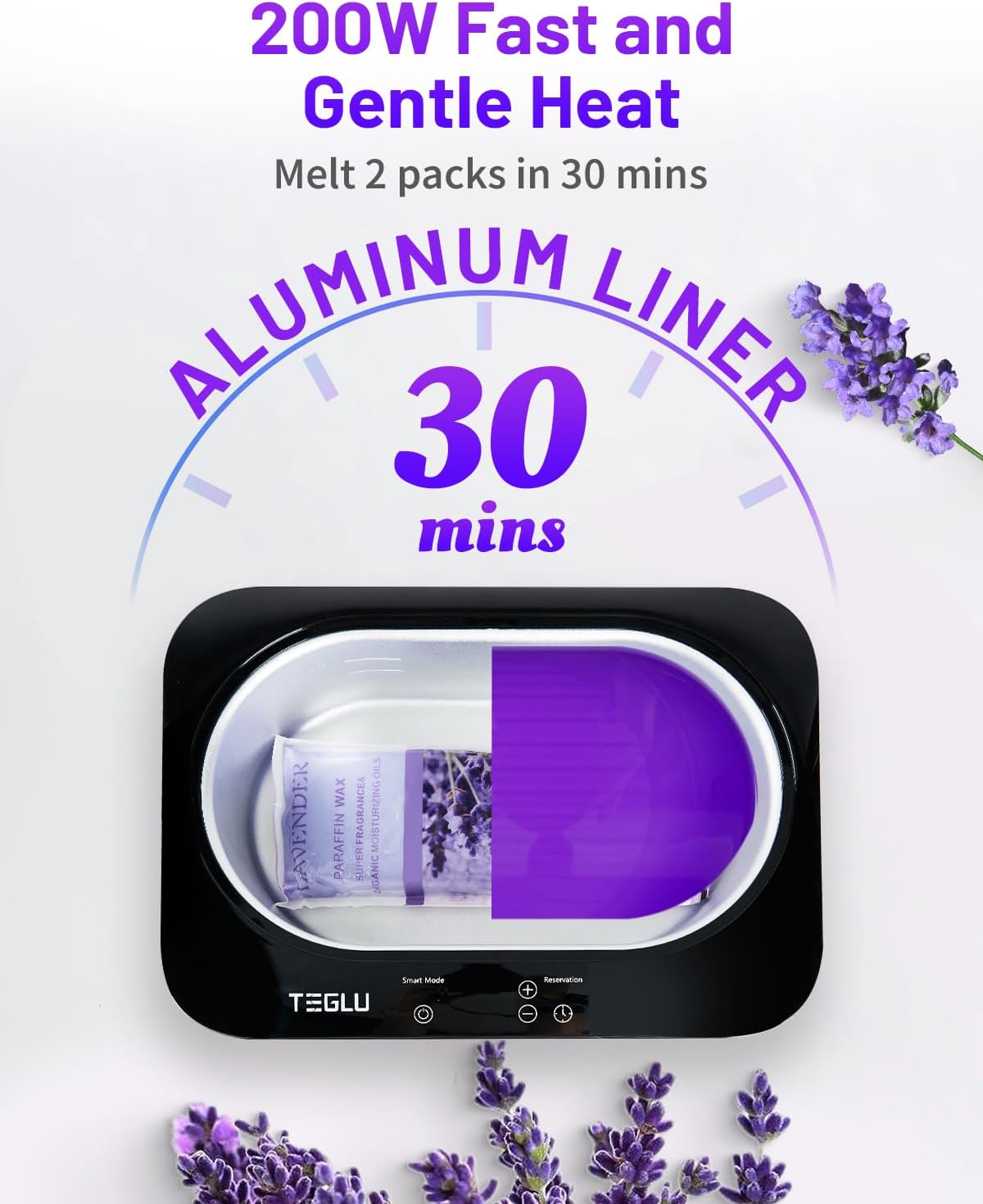
Image 5.1: The machine melts paraffin wax quickly, typically within 30 minutes for multiple blocks.
5.2 Control Panel and Functions
The machine features a digital temperature/time display and touchable buttons for easy operation.

Image 5.2: Overview of the control panel and key features like the cooling fan and handles.
Temperature Unit Conversion (°C/°F)
To change temperature units, press the "+" and "-" buttons simultaneously.

Image 5.3: Demonstration of temperature unit conversion.
5.3 Heating Modes
The Teglu TMS-219 offers three distinct heating modes:
- One-touch Smart Mode: Simply press the Power button, and the machine will automatically enter smart mode, heating to a preset optimal temperature.
- Temperature Setting Mode:
- Press the Power button.
- Press the "+" or "-" buttons to set the desired temperature (range: 86-176°F / 30-75°C). The setting is complete when the screen stops flashing.
- Time Reservation Mode:
- Press the Power button.
- Press the Timer button.
- Press the "+" or "-" buttons to set the reservation time (1-99 hours).
- Finally, press the Timer button again. The setting is complete when the screen stops flashing.

Image 5.4: Activating One-touch Smart Mode.

Image 5.5: Setting the desired temperature.

Image 5.6: Setting the time reservation mode.
5.4 Usage Steps for Paraffin Treatment
- Melt Wax: Place paraffin wax into the pot and select a heating mode to melt it.
- Cool Down: After the wax has fully melted, wait approximately 10 minutes for it to cool slightly. Test the temperature with your finger to ensure it is comfortable and safe for immersion.
- Immerse: Place the white insulation grid into the pot. Slowly immerse your hand or foot into the melted wax for about 10 seconds, then remove it. Repeat this process approximately 10 times to build up several layers of wax.
- Cover: Immediately after dipping, cover the waxed area with a plastic glove liner, then place a thermal cotton mitt over it to retain heat.
- Relax: Allow the wax to remain on your skin for about 15 minutes.
- Remove Wax: Gently peel off the hardened wax. The wax should come off easily, taking dead skin cells with it.
- Moisturize: Enjoy the nourishing and moisturizing effects on your skin.
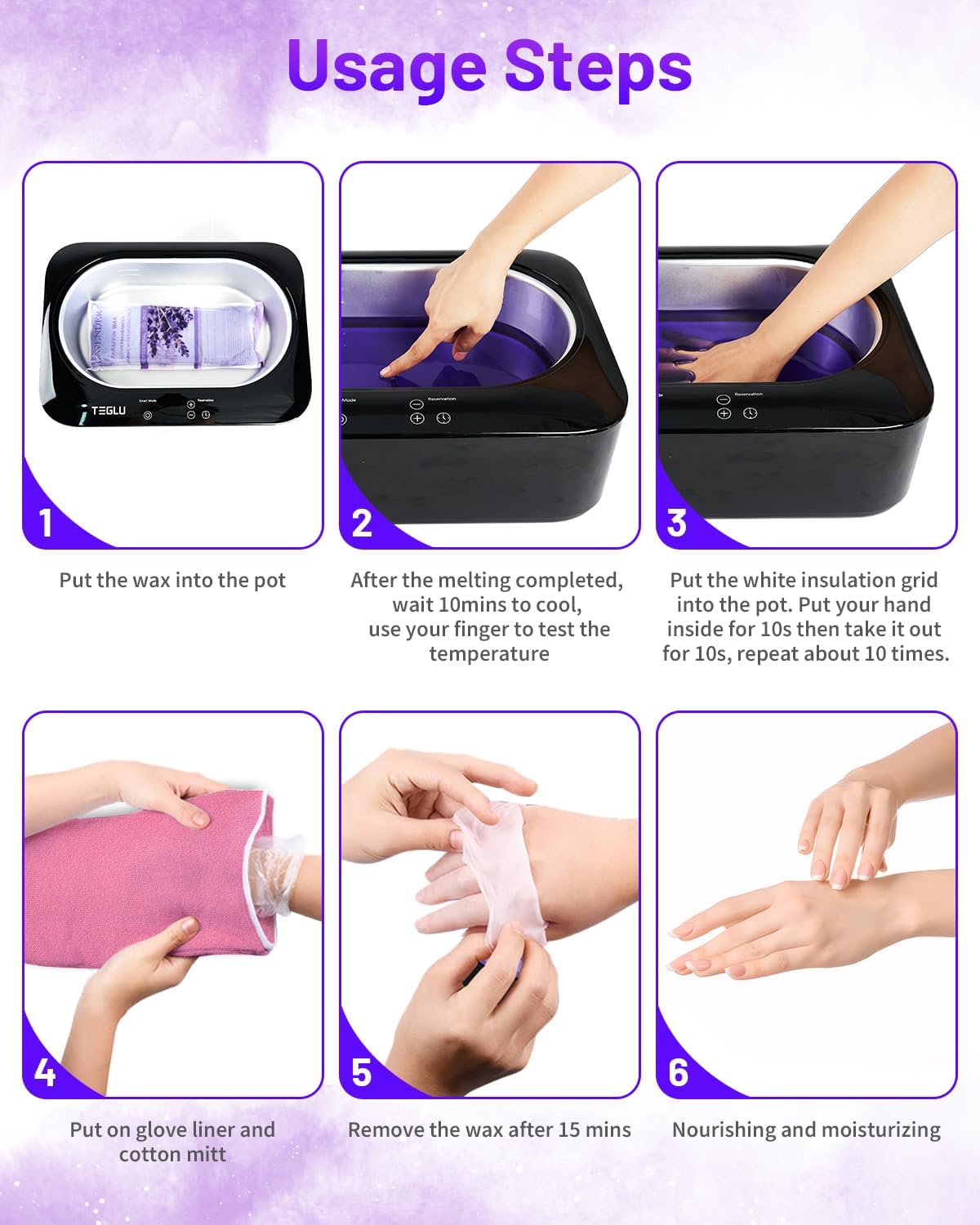
Image 5.7: Step-by-step guide for a paraffin wax treatment.
5.5 Fast Cooldown with Built-in Fan
The Teglu paraffin bath includes a built-in fan located at the bottom. This fan automatically activates once the heating cycle is complete, facilitating faster heat dissipation and reducing waiting time before the wax is ready for use.
5.6 Constant Temperature & Overheat Protection
For your safety, the machine is equipped with constant temperature control and overheat protection. If the internal temperature exceeds 75°C (167°F), the machine will automatically stop heating and maintain a constant temperature to prevent overheating.
6. Maintenance
6.1 Cleaning the Unit
- Always unplug the machine and allow it to cool completely before cleaning.
- To remove hardened wax, turn the machine on to a low heat setting for a few minutes until the wax softens, then carefully scrape it out using a non-abrasive tool (like the included silicone brush).
- Wipe the interior and exterior surfaces with a soft, damp cloth. Do not use abrasive cleaners or immerse the unit in water.
- Ensure the unit is completely dry before storing or next use.
6.2 Storing the Unit
- Store the machine in a cool, dry place, away from direct sunlight and moisture.
- Keep the lid closed to prevent dust accumulation.
7. Troubleshooting
- Machine does not turn on:
- Check if the power cord is securely plugged into both the machine and the electrical outlet.
- Ensure the power outlet is functional by testing it with another appliance.
- Wax is not melting or heating slowly:
- Verify that the correct heating mode is selected and the temperature is set appropriately.
- Ensure the lid is closed during the melting process to retain heat.
- Allow sufficient time for the wax to melt (approximately 30 minutes for 3x 450g blocks).
- Wax is too hot or too cold:
- Adjust the temperature setting using the "+" and "-" buttons.
- Always test the wax temperature with your finger before full immersion. If too hot, allow it to cool for a few minutes.
- Error message on display:
- Refer to the specific error code (if any) in a separate troubleshooting guide or contact customer support.
- Try unplugging the unit for 5 minutes and plugging it back in to reset.
8. Specifications
| Feature | Specification |
|---|---|
| Product Dimensions | 15 x 10.5 x 5.1 inches |
| Item Model Number | TMS-219 |
| Weight | 3.9 Pounds |
| Manufacturer | Teglu |
| Capacity | 4000ML |
| Heating Power | 200W |
| Temperature Range | 86-176°F / 30-75°C |
9. Warranty and Support
For warranty information and customer support, please refer to the documentation included with your purchase or contact Teglu customer service directly. Keep your purchase receipt as proof of purchase for any warranty claims.