
1. Introduction
The SereneLife SLFTRD12 Portable Walking Pad Treadmill is designed to integrate fitness into your daily routine, whether at home or in the office. This compact and versatile walking pad offers a convenient way to stay active, improve cardiovascular health, and build stamina. With its low-speed operation and smart control features, it provides an accessible exercise solution for various fitness levels.

The SereneLife SLFTRD12 Portable Walking Pad Treadmill, designed for home and office use, shown with its wireless remote control.
2. Important Safety Instructions
To ensure safe operation and prevent injury, please read and adhere to the following safety guidelines:
- Always place the treadmill on a flat, stable surface.
- Keep children and pets away from the treadmill during operation.
- Do not operate the treadmill if it has a damaged cord or plug, or if it is not working properly.
- Wear appropriate athletic footwear and clothing.
- Do not exceed the maximum user weight limit of 265 lbs (120 kg).
- Ensure adequate clearance around the treadmill (at least 2 feet on all sides).
- Consult a physician before starting any new exercise program.
- Unplug the treadmill from the power outlet when not in use or before cleaning/maintenance.
3. What's in the Box
Upon unpacking, please verify that all components are present:
- SereneLife SLFTRD12 Portable Walking Pad Treadmill Unit
- Remote Controller (requires 1 x CR-2032 battery, included)
- Power Cord (6.0 ft length)
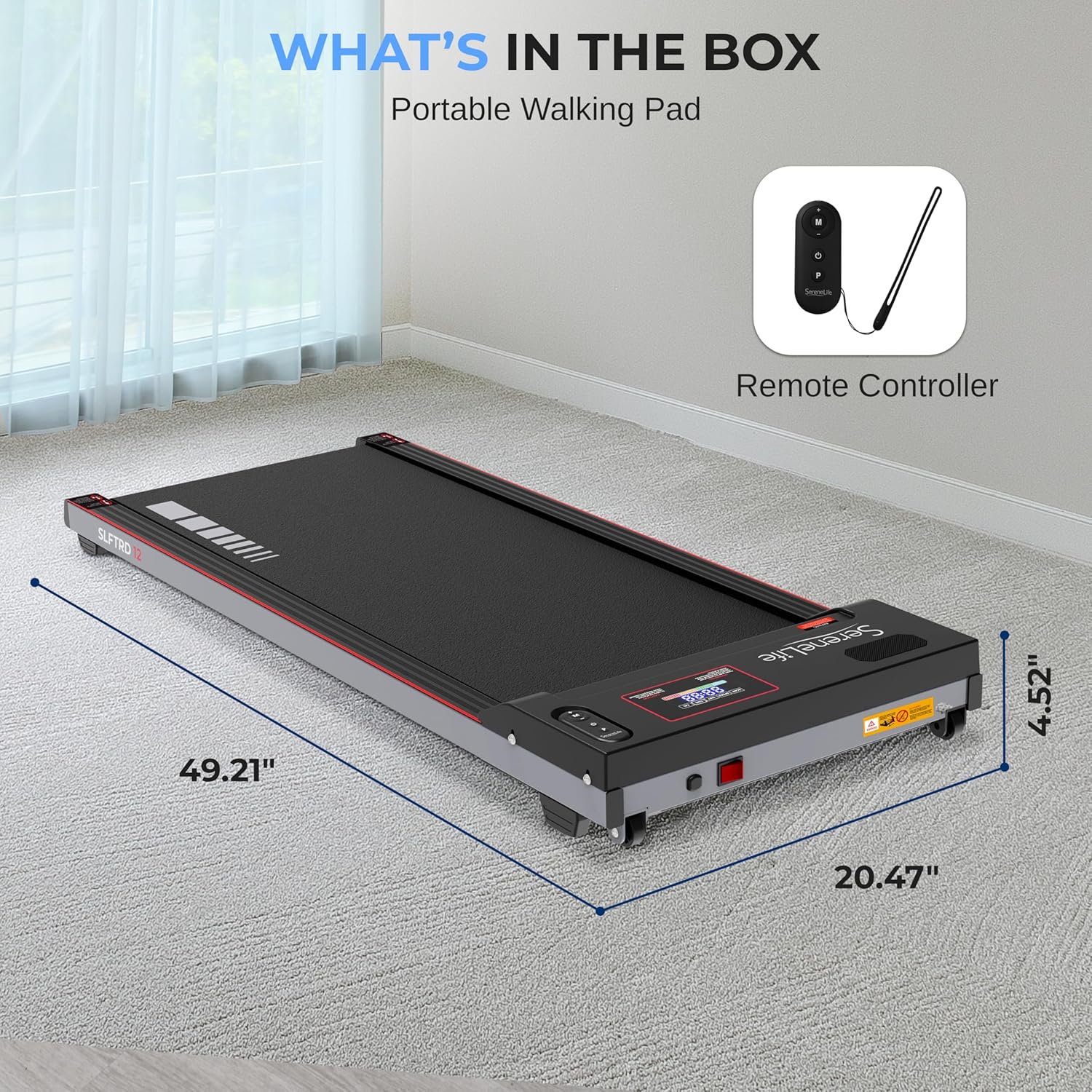
The package contents for the SereneLife SLFTRD12, showing the portable walking pad and its remote controller. Key dimensions are indicated as 49.21 inches length, 20.47 inches width, and 4.52 inches height.
4. Setup
The SereneLife SLFTRD12 Walking Pad Treadmill requires minimal setup and arrives ready to use. Follow these steps to prepare your treadmill for operation:
- Placement: Choose a flat, stable surface for the treadmill. Ensure there is sufficient space around the unit for safe movement.
- Power Connection: Plug the power cord into the treadmill's power input, then connect it to a standard 100-120V (60Hz) electrical outlet.
- Remote Control: Ensure the CR-2032 battery is correctly installed in the remote control.
- Initial Check: Before stepping on, briefly turn on the treadmill at a very low speed to ensure the belt moves smoothly and there are no unusual noises.
The treadmill features built-in transport wheels for easy relocation and can be stored under furniture due to its low profile (4.52 inches height).

The SereneLife SLFTRD12 treadmill in use, demonstrating its low profile (4.52 inches height) which allows for easy storage under furniture like a couch, thanks to its built-in transport wheels.
5. Operating Instructions
The SereneLife SLFTRD12 is operated using the included remote control. Familiarize yourself with the remote's functions before beginning your workout.
5.1 Powering On/Off
- To turn on the treadmill, press the power button on the unit or the 'Start' button on the remote.
- To turn off the treadmill, press the 'Stop' button on the remote or the power button on the unit.
5.2 Remote Control Functions
- Start/Stop Button: Initiates or halts the treadmill belt movement.
- Speed +/- Buttons: Adjusts the walking speed. The speed range is 0.6 MPH to 5.0 MPH.
- Mode (M) Button: Cycles through display modes (Time, Calories, Distance) or selects pre-set programs.
- Program (P) Button: Selects one of the 4 pre-set training modes.
5.3 Display Functions
The integrated LED display provides real-time feedback on your workout:
- Time: Shows the duration of your workout (0-99:00 minutes).
- Speed: Displays the current speed in MPH (0.6-5.0 MPH).
- Calories: Estimates calories burned (0-995 calories).
- Distance: Shows the distance traveled (0-65.0 km).

The LED display of the SereneLife SLFTRD12 treadmill, providing real-time statistics such as run time, speed, calories burned, and distance. The remote control is also visible.

This image illustrates the SereneLife SLFTRD12 treadmill's suitability for under-desk use, highlighting its compact design and features like 2.5 HP motor, 4 pre-set programs, and a speed range of 0.6-5.0 MPH.
5.4 Smart Fitness Hub Integration
The SLFTRD12 supports integration with smart fitness applications for an enhanced workout experience. Refer to the specific app's instructions for pairing and usage.

This image depicts the SereneLife SLFTRD12 treadmill's capability for smart fitness app integration, displaying a dashboard with training goals, daily activity, heart rate, and workout statistics for an enhanced user experience.
6. Maintenance
Regular maintenance ensures the longevity and optimal performance of your treadmill.
6.1 Cleaning
- Wipe down the treadmill surface with a damp cloth after each use to remove sweat and dust.
- Avoid using abrasive cleaners or solvents that could damage the finish.
- Ensure the treadmill is unplugged before cleaning.
6.2 Belt Lubrication
The running belt requires periodic lubrication to reduce friction and extend its lifespan. Use 100% silicone lubricant (not included) as follows:
- Unplug the treadmill.
- Loosen the rear roller bolts slightly to lift the belt.
- Apply a small amount of silicone lubricant evenly under the center of the running belt.
- Tighten the rear roller bolts.
- Plug in the treadmill and run it at a low speed (e.g., 1 MPH) for 5 minutes to distribute the lubricant.
Frequency of lubrication depends on usage. For light use (1-3 hours/week), lubricate every 3 months. For moderate use (4-7 hours/week), lubricate every 2 months. For heavy use (8+ hours/week), lubricate monthly.
6.3 Belt Adjustment
If the running belt shifts to one side during use, it may need adjustment:
- If the belt shifts left: Turn the left rear roller bolt clockwise a quarter turn.
- If the belt shifts right: Turn the right rear roller bolt clockwise a quarter turn.
- Run the treadmill at a low speed for a few minutes and observe the belt. Repeat adjustments as necessary until the belt is centered.
- Avoid over-tightening the belt, as this can cause excessive wear on the motor and belt.

A detailed view of the SereneLife SLFTRD12 treadmill's running surface, emphasizing its shock absorption design, large multi-layer tread belt, 265+ lbs maximum weight capacity, and electric motorized plug-in design.
7. Troubleshooting
If you encounter issues with your SereneLife SLFTRD12 treadmill, refer to the following common problems and solutions:
| Problem | Possible Cause | Solution |
|---|---|---|
| Treadmill does not power on. | Power cord not connected; outlet not working; power switch off. | Ensure power cord is securely plugged in. Check the wall outlet with another device. Verify the treadmill's power switch is in the 'On' position. |
| Belt stops or slips during use. | Belt too loose; insufficient lubrication; motor overload. | Adjust belt tension (refer to Section 6.3). Lubricate the belt (refer to Section 6.2). Reduce user weight or speed. |
| Unusual noise from the treadmill. | Loose components; belt friction; motor issue. | Check for any loose screws or parts and tighten them. Lubricate the belt. If the noise persists, discontinue use and contact customer support. |
| Burning smell during operation. | Motor overheating; excessive friction. | Immediately stop the treadmill and unplug it. Allow it to cool down. Check for proper lubrication and belt tension. If the issue recurs, contact customer support. |
| Remote control not responding. | Dead battery; remote out of range. | Replace the CR-2032 battery in the remote. Ensure you are within close proximity to the treadmill. |
For issues not listed here or if troubleshooting steps do not resolve the problem, please contact SereneLife customer support.
8. Specifications
| Feature | Specification |
|---|---|
| Model Number | SLFTRD12 |
| Construction Material | Powder Coated Steel, ABS |
| Motor Power | 2.5 HP |
| Adjustable Speed Range | 0.6 – 5.0 MPH |
| Adjustable Timer Range | 5 - 99 Minutes |
| Weight Capacity | Up to 265 lbs |
| Item Weight | 38.8 lbs (10 kg) |
| Running Belt Surface Size (L x W) | 39.37” x 15.74” inches |
| Product Dimension (L x W x H) | 49.21" x 20.47" x 4.52" inches |
| Power Supply | 100-120V, 60Hz |
| Display Type | LED |
| Included Components | Power Cord, Remote Controller, Unit |
9. Warranty and Support
For warranty information, technical support, or service inquiries, please contact SereneLife customer service. Keep your purchase receipt and model number (SLFTRD12) handy for faster assistance.
Contact information can typically be found on the SereneLife official website or on the product packaging.