
NPTWARCOT 100024646
NPTWARCOT Replacement Remote Control User Manual
Model: 100024646 / 100026240
Brand: NPTWARCOT
1. Introduction
This manual provides detailed instructions for the setup, operation, and maintenance of your NPTWARCOT Replacement Remote Control. This remote is designed to be compatible with Onn TV FHD 4K UHD Streaming Stick TV Box models 100026240 and 100024646. Please read this manual thoroughly before use to ensure proper functionality and to avoid any issues.

Image 1.1: Front view of the NPTWARCOT Replacement Remote Control.
2. Package Contents
Please verify that all items are present in your package:
- 1 x NPTWARCOT Replacement Remote Control
- 1 x User's Manual (this document)
3. Setup
3.1 Battery Installation
The remote control requires two AAA alkaline batteries (not included). Follow these steps to install them:
- Locate the battery compartment cover on the back of the remote control.
- Slide the cover downwards to open the compartment.
- Insert two AAA batteries, ensuring the positive (+) and negative (-) terminals align with the markings inside the compartment.
- Slide the battery compartment cover back into place until it clicks securely.

Image 3.1: Open battery compartment showing AAA battery slots.
3.2 Pairing Instructions
To pair your NPTWARCOT Replacement Remote Control with your Onn TV FHD 4K UHD Streaming Stick TV Box, follow these steps:
- First, use your original TV remote control to turn on your TV and Onn Box. Switch the TV's HDMI input to the one connected to your Onn Box.
- Navigate to "Settings" on your TV using your original remote.
- Select "Remote Control Settings" or "Bluetooth & Devices" (the exact menu name may vary depending on your Onn Box model).
- Your Onn Box will begin searching for a new remote control.
- While the Onn Box is searching, hold down the Back (
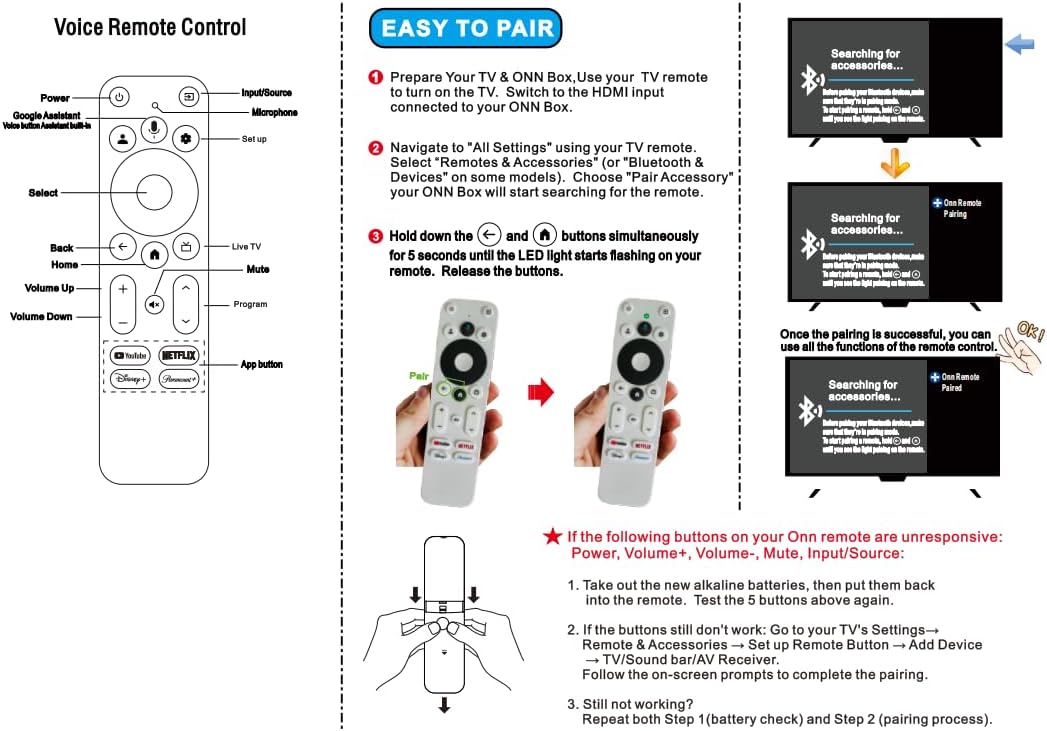 ) and Home () buttons simultaneously on your NPTWARCOT Replacement Remote Control. The LED light on the remote will start flashing.
 - Release the buttons once the LED starts flashing.
- Once the TV displays the remote control name "ONN Remote" and confirms pairing, the remote is ready for use.
Image 3.2: Visual guide for pairing the remote control.
Important Note: This remote control is NOT compatible with Mecool TV boxes or TCL TVs.
4. Operating Instructions
The NPTWARCOT Replacement Remote Control provides intuitive control over your Onn TV Box. Refer to Image 3.2 for a detailed button layout.
- Power Button: Turns the Onn Box on or off.
- Google Assistant / Voice Search Button: Activates voice commands for search and other functions.
- Navigation Ring (Up, Down, Left, Right): Used to navigate menus and select items.
- Select / OK Button: Confirms selections.
- Back Button: Returns to the previous screen or menu.
- Home Button: Returns to the main home screen of the Onn Box.
- Volume Up/Down: Adjusts the volume.
- Mute Button: Mutes or unmutes the audio.
- App Shortcut Buttons (YouTube, Netflix, Disney+, HBO Max): Provides quick access to these streaming applications.
4.1 Key Features
This remote control incorporates several design enhancements for improved user experience:
- ABS Material: Constructed from durable ABS material for high resilience.
- Voice Search: Integrated voice search functionality for convenient content discovery.
- Ergonomic Design: Features more rounded corners for a comfortable grip.
- Enhanced Infrared Emitter: Equipped with a larger infrared emitter for improved signal transmission.
- Operating Distance: Effective remote control distance of approximately 32 feet.

Image 4.1: Key features of the remote control.

Image 4.2: Detail of the remote's rounded corners.

Image 4.3: Detail of the larger infrared emitter.

Image 4.4: Illustration of the remote control's effective distance (approx. 32 feet).
5. Troubleshooting
If you encounter issues with your NPTWARCOT Replacement Remote Control, please refer to the following common problems and solutions:
5.1 Remote Not Responding / Not Pairing
- Check Batteries: Ensure new AAA alkaline batteries are correctly installed with the correct polarity. Replace old batteries if necessary.
- Re-pair the Remote: Follow the pairing instructions in Section 3.2 carefully. Ensure your Onn Box is in pairing mode.
- Obstructions: Ensure there are no obstructions between the remote and your Onn Box.
- Distance: Make sure you are within the effective operating range (approximately 32 feet).
5.2 Remote Cannot Turn Off TV / Control TV Functions
If the substitute remote control cannot turn off the TV or control other TV functions (like input source), you may need to configure the remote's TV control settings:
- Using the substitute remote control, navigate to the TV settings on your Onn Box.
- Find "Remote Control Settings" or "Remote Control Button Settings."
- Locate and select your TV brand from the list.
- Follow the on-screen prompts to allow the substitute remote control to learn the button functions of your TV remote control. This process will enable the substitute remote to control your TV's power and other functions.
5.3 Specific Buttons Unresponsive (Power, Volume, Mute, Input/Source)
If these specific buttons on your Onn Remote are unresponsive:
- Take out the new alkaline batteries, then put them back into the remote. Test the 5 buttons mentioned above again.
- If the buttons still do not work: Go to your TV's Settings → Remote & Accessories → Set up Remote Button → Add Device → TV/Sound bar/AV Receiver. Follow the on-screen prompts to complete the pairing.
- If still not working, repeat both Step 1 (battery check) and Step 2 (pairing process).
6. Specifications
| Feature | Description |
|---|---|
| Product Dimensions | 5.5 x 1.5 x 0.67 inches |
| Item Weight | 1.44 ounces |
| Model Number | 100024646 |
| Batteries Required | 2 AAA batteries |
| Compatible Devices | Onn TV FHD 4K UHD Streaming Stick TV Box (Models 100026240, 100024646) |
| Max Number of Supported Devices | 1 |
| Special Feature | Ergonomic, Voice Search |
| Color | White |

Image 6.1: Dimensions of the NPTWARCOT Replacement Remote Control.
7. Warranty and Support
For any questions, technical support, or warranty inquiries regarding your NPTWARCOT Replacement Remote Control, please contact the seller or refer to the product listing on the platform where it was purchased. Please retain your proof of purchase for warranty claims.
Ask a question about this manual
Ask about setup, troubleshooting, compatibility, parts, safety, or missing instructions. Manuals+ will review the question and use this page’s manual context to help answer it.