
1. Introduction
Thank you for choosing the Jansite Wireless Car Play Android Auto with 4K Dashcam. This device is designed to enhance your driving experience by integrating smart features like wireless Apple Carplay and Android Auto, a high-resolution 4K dashcam, and advanced audio capabilities into your vehicle. This manual provides detailed instructions for setup, operation, and maintenance to ensure optimal performance and safety.
2. Product Features
- Exclusive Standing Screen Bracket: Features a unique stand-up design for a stable and integrated look, preventing common adhesive issues and ensuring a clear view.

Image: The Jansite portable car display mounted with its exclusive standing screen bracket, highlighting its stable and integrated appearance within a car's interior. It also shows a comparison with a traditional, less stable adhesive mount.
- Wireless Carplay & Android Auto: Enjoy seamless wireless connectivity for Apple Carplay and Android Auto, allowing access to phone apps, navigation, and media directly on the 10.26-inch display. Supports Airplay and Android Cast.
- Adjustable 350° Rotating Front Camera: Equipped with a dual camera system (front and rear). The front camera rotates 350° to capture various angles, including blind spots, the car's interior, and sides.
- 4K + 1080P Dual HD Recording: The front camera records in 4K, and the rear camera in 1080P, providing clear and detailed footage for comprehensive driving safety. Features loop recording, G-sensor, and video playback.
- Dual Bluetooth Lossless Audio: Updated Bluetooth 5.0 ensures stable transmission. Wirelessly transmit audio to your car's speakers for high-quality sound. Supports wireless FM transmission and AUX audio output.
- Optical Sensor Light & Safe Reversing: An intelligent light sensor automatically adjusts screen brightness for optimal visibility day and night. The adjustable reversing cable provides a real-time rear view for precise and safe parking.
- Intelligent Voice Control & Online Map: Integrated Siri and Google Assistant allow hands-free control for calls, music, and navigation. Real-time intelligent navigation system without frequent map updates or additional costs.
3. Package Contents
Please check the package for the following items:
- Jansite 10.26-inch Portable Car Display with Integrated Front Dashcam
- Rear Camera (1080P)
- Power Cable (for 12V cigarette lighter)
- Rear Camera Cable
- Mounting Bracket and Accessories
- User Manual
4. Setup Instructions
4.1 Mounting the Device
The device offers multiple installation methods to suit various car interiors. Choose the most suitable method for your vehicle.

Image: Various mounting options for the Jansite portable car display, including a suction cup mount and a dashboard-standing bracket. This illustrates how the device can be positioned on the dashboard.
- Dashboard Mount: Attach the standing bracket to the dashboard using the provided adhesive base. Ensure the surface is clean and dry before application.
- Suction Cup Mount: Attach the suction cup mount to a clean, smooth surface on your dashboard or windshield. Secure the device to the mount.
- Adjust the screen angle for optimal visibility without obstructing your view of the road.
4.2 Power Connection
Connect the provided power cable to the device and plug the other end into your vehicle's 12V cigarette lighter socket. The device will power on automatically when the vehicle's ignition is turned on.
4.3 Rear Camera Installation (Optional)
If you are installing the rear camera, connect its cable to the designated port on the main unit. Route the cable carefully to the rear of your vehicle and mount the camera in a suitable position, typically above the license plate or on the rear bumper, ensuring a clear view.
4.4 Wireless Connectivity
To use Wireless Apple Carplay or Android Auto:
- Ensure Bluetooth and Wi-Fi are enabled on your smartphone.
- On the Jansite display, navigate to the Carplay or Android Auto icon.
- Follow the on-screen prompts to pair your phone via Bluetooth. Once paired, the device will establish a Wi-Fi connection for wireless Carplay/Android Auto functionality.

Image: The Jansite display showing the interfaces for Wireless Apple Carplay and Android Auto, along with MirrorLink. This illustrates the seamless integration of smartphone features.
You can check compatibility for Carplay and Android Auto with your car model by scanning the QR codes below:
-
Carplay Car Model Compatibility:
Scan for Carplay Compatibility -
Android Auto Car Model Compatibility:
Scan for Android Auto Compatibility
5. Operating Instructions
5.1 Using Carplay / Android Auto
Once connected, your phone's compatible applications will appear on the Jansite display. You can navigate through them using the touchscreen. Access navigation, music, calls, and messages directly.
5.2 Dashcam Operation
The integrated dashcam automatically begins recording when the device powers on. It features:
- Loop Recording: Continuously records, overwriting the oldest footage when the memory card is full.
- G-Sensor: Automatically locks and saves video footage in the event of a sudden impact or collision.
- Video Playback: Access recorded videos directly from the device's interface.

Image: The Jansite display illustrating simultaneous 4K front and 1080P rear camera recording. Key features like loop recording, G-sensor, and auto light sensor are highlighted.
The front camera can be rotated 350 degrees to capture various perspectives, including the interior of the car or side views.

Image: Detailed view of the Jansite device's front camera, demonstrating its ability to adjust up and down, rotate side to side, and achieve a full 350-degree rotation for versatile recording angles.
5.3 Audio Output Methods
You can output audio from the Jansite display to your car's speakers using several methods:
- Bluetooth: Pair the Jansite display with your car's Bluetooth system for high-quality audio transmission.
- FM Transmitter: Select an unused FM frequency on the Jansite display and tune your car's radio to the same frequency.
- AUX Connection: Connect the Jansite display to your car's AUX input using an AUX cable (not included).
- Built-in Speaker: The device has a built-in speaker for basic audio output.
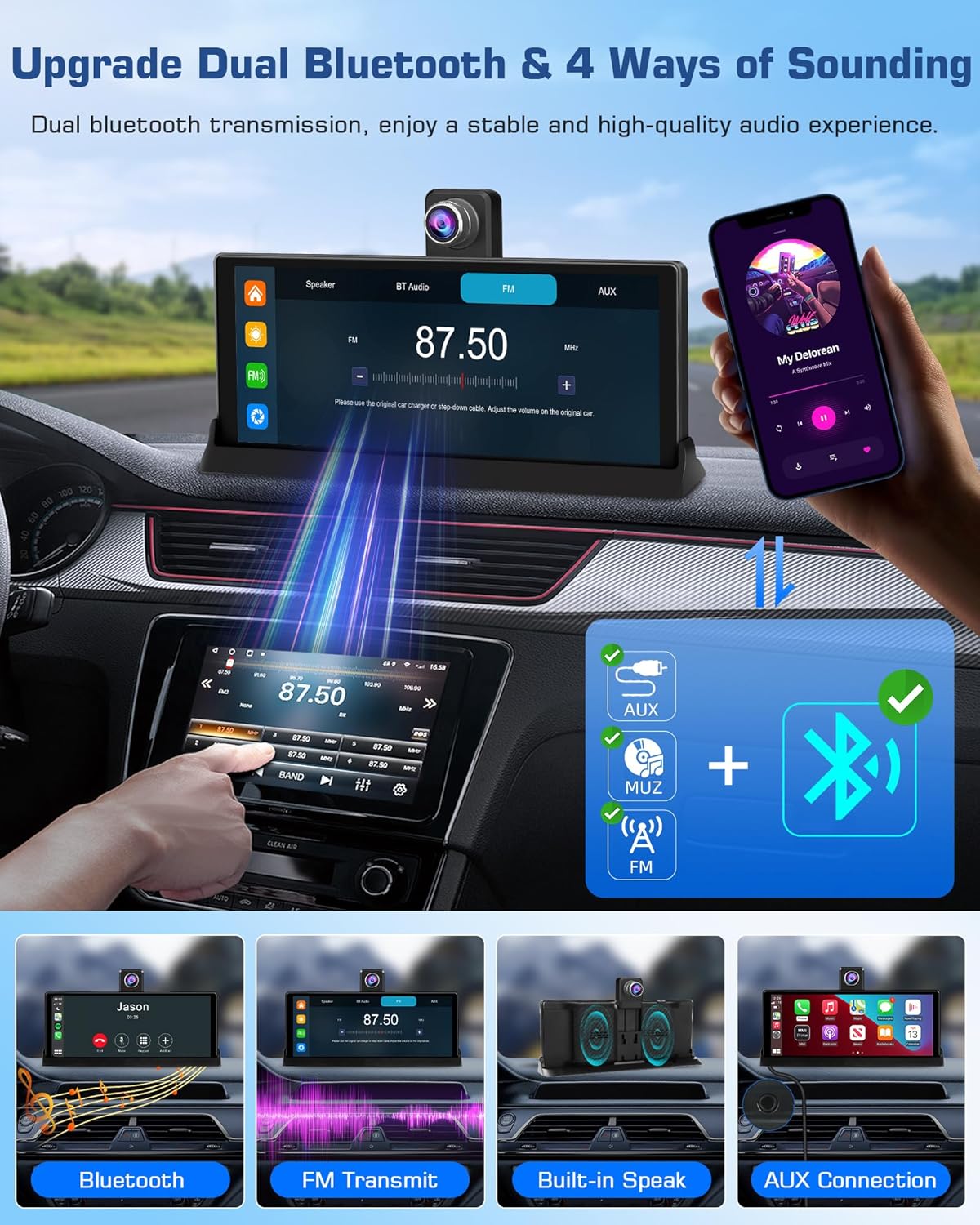
Image: The Jansite display demonstrating its dual Bluetooth capabilities and various audio output options, including Bluetooth, FM transmission, built-in speaker, and AUX connection.
5.4 Intelligent Voice Control
Utilize Siri (for Apple Carplay) or Google Assistant (for Android Auto) for hands-free control. Simply activate the voice assistant and issue commands for navigation, making calls, playing music, and more.

Image: The Jansite display illustrating intelligent voice control features with examples of commands for Google Assistant and Siri. It also shows the mobile app interface for managing dashcam functions.
5.5 Mobile App Connection (Dashcam)
The device features a built-in 2.4GHz high-speed Wi-Fi function. Download the dedicated mobile app to:
- Directly control the dashcam.
- View live video feed.
- Download recorded videos and pictures.
- Adjust device settings.
5.6 Automatic Brightness Adjustment
The integrated optical sensor intelligently detects ambient light conditions (day/night) and automatically adjusts the screen brightness to ensure comfortable viewing and prevent glare.
5.7 Reversing Camera Display
When the vehicle is put into reverse (and the rear camera is properly installed and connected), the display will automatically switch to show the real-time feed from the rear camera, assisting with safe parking and maneuvering.
6. Maintenance
- Cleaning: Use a soft, dry cloth to clean the screen and device body. Avoid using abrasive cleaners or solvents.
- Temperature: Avoid exposing the device to extreme temperatures (very hot or very cold) for extended periods.
- Cable Management: Ensure all cables are securely routed and not interfering with driving controls.
- Firmware Updates: Check the manufacturer's website or mobile app periodically for firmware updates to ensure optimal performance and new features.
7. Troubleshooting
| Problem | Possible Cause | Solution |
|---|---|---|
| Device does not power on. | No power from cigarette lighter; loose connection. | Check the 12V cigarette lighter socket and ensure the power cable is securely connected. Test the socket with another device. |
| Wireless Carplay/Android Auto not connecting. | Bluetooth/Wi-Fi off on phone; incorrect pairing; phone not compatible. | Ensure Bluetooth and Wi-Fi are active on your phone. Re-pair the device. Check phone compatibility. |
| No audio output to car speakers. | Incorrect audio output setting; car radio not tuned to FM frequency; AUX cable not connected. | Verify the selected audio output method (Bluetooth, FM, AUX). If using FM, ensure the frequencies match. Check AUX cable connection. |
| Dashcam not recording. | Memory card full or faulty; recording function disabled. | Check the memory card status. Format the card if necessary (back up important files first). Ensure recording is enabled in settings. |
| Rear camera not displaying. | Rear camera cable loose or damaged; camera not powered. | Check the connection of the rear camera cable to the main unit. Ensure the camera is receiving power. |
8. Specifications
| Feature | Detail |
|---|---|
| Brand | Jansite |
| Model Number | T337S+Z025 |
| Screen Size | 10.26 Inches |
| Display Resolution | 1280 x 720 cm |
| Display Type | LCD |
| Color | Black |
| Connectivity Technology | USB, Dual Bluetooth 5.0, Wi-Fi (2.4GHz) |
| Special Features | 350° Pivoting Front Camera, Exclusive Standing Screen Support, Wireless Carplay, Wireless Android Auto, 4K Front Dashcam, 1080P Rear Camera, G-Sensor, Loop Recording, Optical Light Sensor, Voice Control (Siri/Google Assistant) |
| Compatible Devices | Mobile Phone |
| Power Input | 7-32V (via 12V cigarette lighter) |
| Product Dimensions | 26.1L x 26.1W x 26.1H centimeters |
9. Warranty and Support
For warranty information, technical support, or any inquiries regarding your Jansite product, please refer to the warranty card included in your package or visit the official Jansite website. You may also contact the seller directly for assistance.


