
Introduction
Thank you for choosing the RONGJI 8Core 2+32GB Android Car Radio. This manual provides essential information for the proper installation, operation, and maintenance of your new in-dash navigation system. Please read this manual thoroughly before using the product to ensure safe and optimal performance. This unit is designed for the Toyota Sienta 2022 RHD model and features a 10.1-inch IPS touch screen with built-in Car-Play, Android Auto, GPS Navigation, Steering Wheel Control (SWC), Digital Sound Processor (DSP), and support for a rear view camera.
Safety Information
- Professional Installation Recommended: Due to the complexity of car electrical systems, professional installation is highly recommended to prevent damage to the unit or your vehicle.
- Vehicle Compatibility: Ensure this unit is compatible with your vehicle. Compare the dashboard photo in the product listing with your car's dashboard. If unsure, consult a professional or the seller.
- Driving Safety: Do not operate the unit in a way that distracts you from driving. Always prioritize road safety.
- Power Supply: Connect the unit only to a 12V DC power supply with a negative ground.
- Avoid Moisture: Do not expose the unit to water or excessive moisture.
- Temperature: Avoid extreme temperatures. The unit is designed for typical automotive operating conditions.
Package Contents
Verify that all items listed below are included in your package. If any items are missing or damaged, please contact your retailer.

Image: Package Contents. This image displays the various components included with the RONGJI 8Core Android Car Radio. It shows the main head unit, the power cable harness, RCA cables, a cable for a reversing camera, two USB cables, an external microphone, and a GPS antenna. For 4-Core models, a single USB cable is shown, while 8-Core models include two USB cables, an audio out cable, and a 4G antenna.
- Main Head Unit (Machine)
- Power Cable Harness
- RCA Cable
- Reversing Camera Cable
- USB Cable (2 for 8Core models)
- Microphone (MIC)
- GPS Antenna
- Audio Out Cable (for 8Core models)
- 4G Antenna (for 8Core models)
Setup and Installation
Proper installation is crucial for the performance and longevity of your car radio. It is highly recommended to have the unit installed by a qualified professional.
Vehicle Compatibility Check
Before beginning installation, ensure the unit is compatible with your Toyota Sienta 2022 RHD. Compare the shape and size of your original car radio and dashboard with the product images. If you are uncertain, provide photos of your dashboard and the back of your OEM radio to the seller for verification.
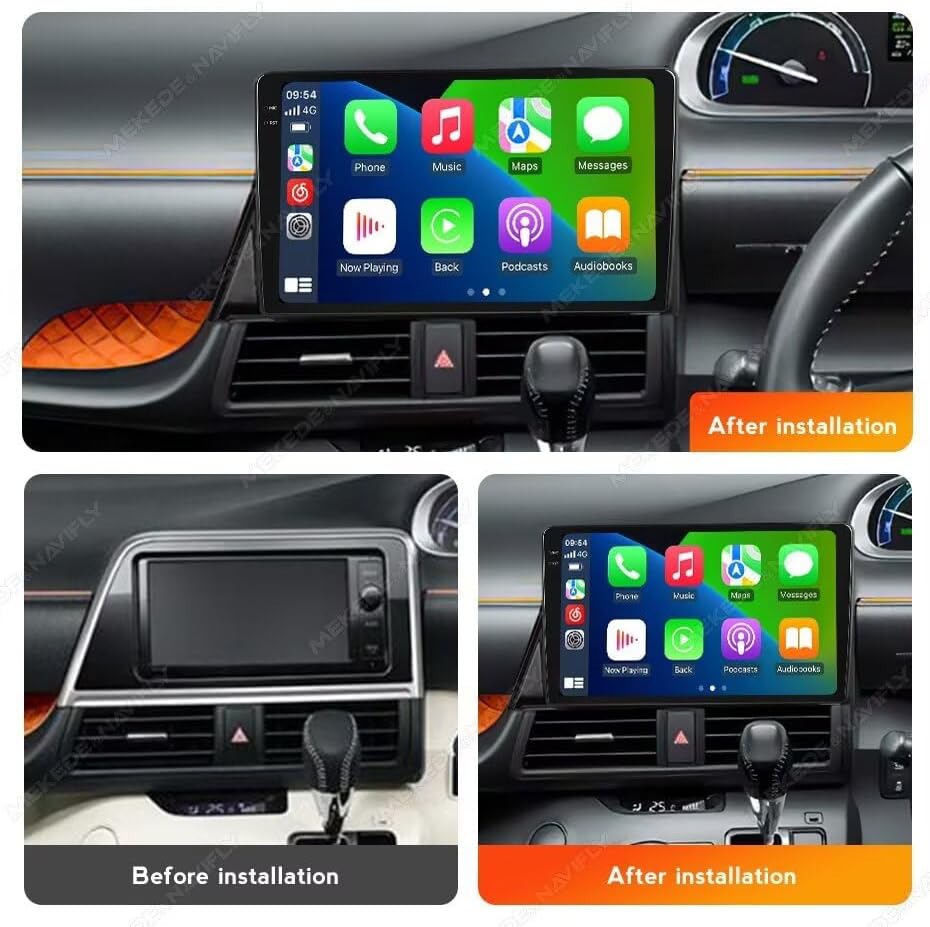
Image: Before and After Installation. This image illustrates the transformation of the car's dashboard. The top-left panel shows the original dashboard layout before the RONGJI Android Car Radio is installed. The top-right and bottom-right panels show the dashboard after the installation, with the 10.1-inch IPS touch screen unit seamlessly integrated, displaying the CarPlay interface.
Basic Installation Steps (General Guide)
- Disconnect Battery: Before any electrical work, disconnect the vehicle's negative battery terminal to prevent short circuits.
- Remove OEM Radio: Carefully remove the existing car radio and trim panels. Refer to your vehicle's service manual for specific instructions.
- Connect Wiring Harness: Connect the provided power cable harness to the vehicle's wiring. Ensure all connections are secure.
- Connect Peripherals: Connect the GPS antenna, external microphone, USB cables, RCA cables, and reversing camera cable (if applicable) to the corresponding ports on the new head unit. Position the GPS antenna in a location with a clear view of the sky.
- Test Connections: Before fully reassembling, reconnect the battery and perform a basic test of the unit's functions (power on, audio, touch screen response).
- Secure Unit: Mount the new head unit securely into the dashboard opening.
- Reassemble Dashboard: Reinstall all trim panels and secure them properly.
Operating Instructions
Power On/Off and Basic Controls
Press and hold the power button (usually located on the front panel or a soft button on the screen) to turn the unit on or off. Adjust volume using the physical buttons or on-screen controls.
CarPlay and Android Auto
The unit features built-in Wireless/Wired CarPlay and Android Auto for seamless smartphone integration. This allows access to navigation, music, calls, and messages directly from the car's display.

Image: CarPlay and Android Auto. This image demonstrates the user interfaces for both Apple CarPlay and Android Auto on the RONGJI car radio. The left side shows the CarPlay interface with its characteristic app icons for phone, music, maps, and messages. The right side displays the Android Auto interface, featuring apps like YouTube Music, Spotify, and a phone icon, indicating both wired and wireless connectivity options.
- Connection: Connect your iPhone via USB for wired CarPlay, or wirelessly via Bluetooth and Wi-Fi. For Android phones, connect via USB for wired Android Auto, or wirelessly via Bluetooth and Wi-Fi.
- Access: Once connected, the CarPlay or Android Auto icon will appear on the main screen. Tap to launch.
GPS Navigation
The unit has a built-in GPS module and supports online and offline navigation. An external GPS antenna is included for improved signal reception.

Image: GPS, Wi-Fi, Split Screen, and Steering Wheel Control. This composite image highlights several key features. The top section illustrates the GPS navigation system with a detailed map, showing real-time positioning and traffic information. The bottom-left section depicts the Wi-Fi connectivity feature, allowing the unit to connect to the internet. The bottom-right section demonstrates the split-screen capability, enabling two applications to run simultaneously, and also shows the integration with steering wheel controls for safe operation while driving.
- Offline Maps: Connect to Wi-Fi, then open the navigation app (e.g., Google Maps, HERE WeGo) and download free maps for your desired regions for offline use.
- Online Navigation: With an active Wi-Fi or 4G connection (if 4G antenna is installed), you can use real-time online navigation services.
Bluetooth (BT)
The built-in Bluetooth module supports hands-free calling and Bluetooth music streaming.
- Pairing: Go to the Bluetooth settings on the unit and your phone. Search for and select the unit's Bluetooth name to pair.
- Hands-Free Calling: Once paired, you can make and receive calls directly through the unit. The built-in microphone ensures clear communication.
- Music Streaming: Play audio from your phone through the car's speakers.
FM/AM RDS Radio
Enjoy stable radio reception with automatic and manual channel search functions.

Image: FM/AM RDS Radio. This image illustrates the user interface of the FM/AM radio function. It shows the current frequency (e.g., 87.50 MHz), a list of saved or available stations, and controls for automatic search, manual tuning, and RDS (Radio Data System) settings.
- Search: Use the auto-search function to find available stations or manually tune to a specific frequency.
- RDS: Radio Data System provides additional information like station name, program type, and traffic announcements (where available).
DSP (Digital Sound Processor)
The built-in DSP chip allows for advanced audio equalization and sound effect adjustments, providing a customizable and enhanced audio experience.

Image: DSP Processor. This image displays the Digital Sound Processor (DSP) interface, which includes a multi-band equalizer. Users can adjust various frequency bands (e.g., 20Hz, 50Hz, 1.25KHz) to fine-tune the audio output. Additional controls for sound effects such as surround sound and bass enhancement are also visible.
- Equalizer: Adjust frequency bands to tailor the sound to your preference.
- Sound Effects: Explore various sound enhancements like surround sound and bass boost.
Steering Wheel Control (SWC)
The unit supports steering wheel controls, allowing you to manage audio and calls without taking your hands off the wheel.
- Configuration: After installation, you may need to configure the SWC settings in the unit's menu to match your vehicle's controls.
- Functions: Typically includes volume up/down, track skip, mode change, and answer/end call.
Wi-Fi Connectivity
The built-in Wi-Fi receiver allows you to connect to the internet via a home Wi-Fi network or a mobile hotspot.
- Connection: Go to Wi-Fi settings, scan for available networks, and enter the password.
- Applications: Use Wi-Fi to download apps, stream online content, and update software.
Split Screen Function
The unit supports displaying two applications simultaneously on the screen, enhancing multitasking capabilities.
- Activation: Typically, long-press the recent apps button or drag an app to one side of the screen to activate split-screen mode.
- Usage: For example, run navigation on one side and music on the other.
Maintenance
- Cleaning the Screen: Use a soft, lint-free cloth to gently wipe the touch screen. For stubborn smudges, slightly dampen the cloth with water or a screen-cleaning solution. Avoid harsh chemicals.
- Software Updates: Periodically check for software updates through the unit's settings menu or the manufacturer's website. Keeping the software updated ensures optimal performance and access to new features.
- Avoid Extreme Temperatures: While designed for automotive use, prolonged exposure to extreme heat or cold can affect the unit's lifespan.
- Cable Connections: Ensure all cables remain securely connected. Loose connections can lead to intermittent issues.
Troubleshooting
If you encounter issues with your RONGJI Android Car Radio, refer to the following common problems and solutions:
| Problem | Possible Cause | Solution |
|---|---|---|
| Unit does not power on. | Loose power connection, blown fuse, vehicle battery issue. | Check power cable connections. Inspect vehicle fuses. Ensure car battery is charged. |
| No sound or distorted audio. | Volume too low, incorrect audio source, loose speaker wires, DSP settings. | Increase volume. Select correct audio source. Check speaker wire connections. Reset DSP settings to default. |
| GPS signal is weak or inaccurate. | GPS antenna not properly placed, antenna cable loose, environmental interference. | Ensure GPS antenna has a clear view of the sky. Check antenna cable connection. Move vehicle to an open area. |
| Bluetooth connection issues. | Phone not in pairing mode, unit not discoverable, interference. | Ensure phone's Bluetooth is on and discoverable. Restart both phone and unit. Delete previous pairings and re-pair. |
| Touch screen unresponsive. | Software glitch, screen calibration issue. | Restart the unit. If issue persists, perform a factory reset (note: this will erase all data). |
| CarPlay/Android Auto not connecting. | Incorrect cable, phone software issue, unit settings. | Use a high-quality USB cable. Ensure phone's OS is updated. Check CarPlay/Android Auto settings on the unit and phone. |
If the problem persists after trying these solutions, please contact customer support.
Specifications
Below are the technical specifications for the RONGJI 8Core 2+32GB Android Car Radio (Model: B0DG5VLZWJ):
- Brand: RONGJI
- Model: B0DG5VLZWJ
- Operating System: Android
- CPU: Octa Core (8Core)
- RAM: 2GB
- Internal Storage: 32GB
- Screen Size: 10.1 Inches
- Display Type: IPS LCD
- Resolution: 1280*720
- Touch Screen Type: Capacitive
- Connectivity: Bluetooth, Wi-Fi
- Special Features: Built-in Car-Play, Android Auto, GPS Navigation, DSP, Steering Wheel Control (SWC), Rear View Camera Support, FM/AM/RDS Radio
- Map Type: Worldwide (supports offline map downloads)
- Human-Interface Input: Microphone, Touchscreen
- Control Method: Touch
- Vehicle Service Type: Car (Toyota Sienta 2022 RHD specific)
- Manufacturer: Shenzhen Rongji Electronics Co., Ltd
Warranty Information
This product comes with a standard manufacturer's warranty. Please refer to the warranty card included in your package or contact the seller for specific details regarding warranty duration and coverage. Keep your purchase receipt as proof of purchase for any warranty claims.
Customer Support
For technical assistance, troubleshooting beyond this manual, or warranty inquiries, please contact your original retailer or the RONGJI customer support team. Contact information can typically be found on the product packaging or the seller's Amazon store page.
RONGJI Store Link: Visit the RONGJI Store on Amazon