
1. Introduction
This manual provides detailed instructions for the assembly, operation, and maintenance of your Harper & Bright Designs Queen Size Murphy Bed. This versatile furniture piece functions as both a stylish cabinet and a comfortable queen-size bed, ideal for optimizing space in guest rooms, home offices, or bedrooms. It features a built-in USB charging station and a large storage drawer for added convenience.
2. Safety Information
Please read and understand all safety warnings before assembly and use.
- Always follow the assembly instructions carefully to prevent instability or collapse.
- Do not exceed the maximum weight capacity of 500 lbs.
- Keep the bed frame away from potential pinch points or sharp edges to prevent injury during conversion.
- Ensure all hardware is securely tightened before use. Periodically check and retighten as necessary.
- Assembly requires at least two adults. Attempting to assemble alone may result in injury or damage to the product.
3. Product Features
- Space-Saving Design: Converts from a compact cabinet to a queen-size bed, ideal for multi-functional rooms.
- Integrated Charging Station: Features a built-in dual power outlet and USB module for convenient device charging.
- Large Storage Drawer: A spacious drawer located beneath the bed provides ample storage for linens, clothing, or other items.
- Durable Construction: Constructed from high-quality solid pine wood and MDF for stability and long-term use.
- Easy Assembly: Designed for straightforward assembly with included instructions and tools.
4. Package Contents
Your Murphy bed is delivered in two packages. Please ensure all components are present before beginning assembly.
- Bed Frame Components (Pine Wood + MDF)
- Hardware Kit (screws, bolts, connectors, etc.)
- Assembly Manual
- All necessary tools for assembly
5. Specifications
| Feature | Detail |
|---|---|
| Product Type | Murphy Bed |
| Size | Queen |
| Color | White |
| Material | Pine Wood + MDF |
| Overall Product Dimensions (Bed Mode) | 81.1"L x 62.2"W x 35"H |
| Overall Product Dimensions (Cabinet Mode) | 62.2"L x 22.8"W x 49.8"H |
| Weight Capacity | 500 lbs |
| Recommended Mattress Thickness | 6" (Mattress not included) |
| Number of Slats | 3 |
| Item Weight | 144.4 lbs |
| Assembly Required | Yes |
Note: Manual measurements may have reasonable error. Slight chromatic aberration may occur due to lighting or display.
6. Setup and Assembly Instructions
Assembly of this Murphy bed requires careful attention to detail and the assistance of a second person. Please organize all pieces and hardware before starting.
6.1. Preparation
- Clear a spacious area for assembly.
- Unpack all boxes and identify each component. Pieces are labeled; ensure labels are visible and organized.
- Verify all hardware is present against the parts list in the included manual.
- Have a Phillips head screwdriver and possibly a rubber mallet ready, in addition to the provided tools.
6.2. Step-by-Step Assembly
Follow the detailed pictorial instructions provided in your physical assembly manual. The general steps involve:
- Assemble the main cabinet frame components.
- Attach the bed platform sections to the cabinet frame.
- Install the support legs and mechanisms for bed conversion.
- Assemble and install the large storage drawer.
- Integrate the USB charging station into the designated slot.
- Attach any decorative panels or handles.
Important Assembly Notes:
- Some pilot holes may require careful alignment or slight adjustment. Use a drill only if absolutely necessary and with extreme caution.
- Ensure all connections are flush and secure to prevent wobbling or instability.
- The bed is heavy; use proper lifting techniques and always have a second person assist when moving large sections.

Figure 6.1: The Harper & Bright Designs Queen Size Murphy Bed in its fully extended bed configuration, with the large storage drawer accessible.

Figure 6.2: Detailed view of the bed platform and the open storage drawer.
7. Operating Instructions
7.1. Converting from Cabinet to Bed Mode
- Ensure the area in front of the cabinet is clear of obstructions.
- Gently pull the top section of the cabinet forward and down. The bed platform will begin to unfold.
- Continue to lower the bed platform until it is fully extended and the support legs are securely in place. This is a two-person operation for safety and ease.
- The large storage drawer can be pulled out from underneath the bed for access.
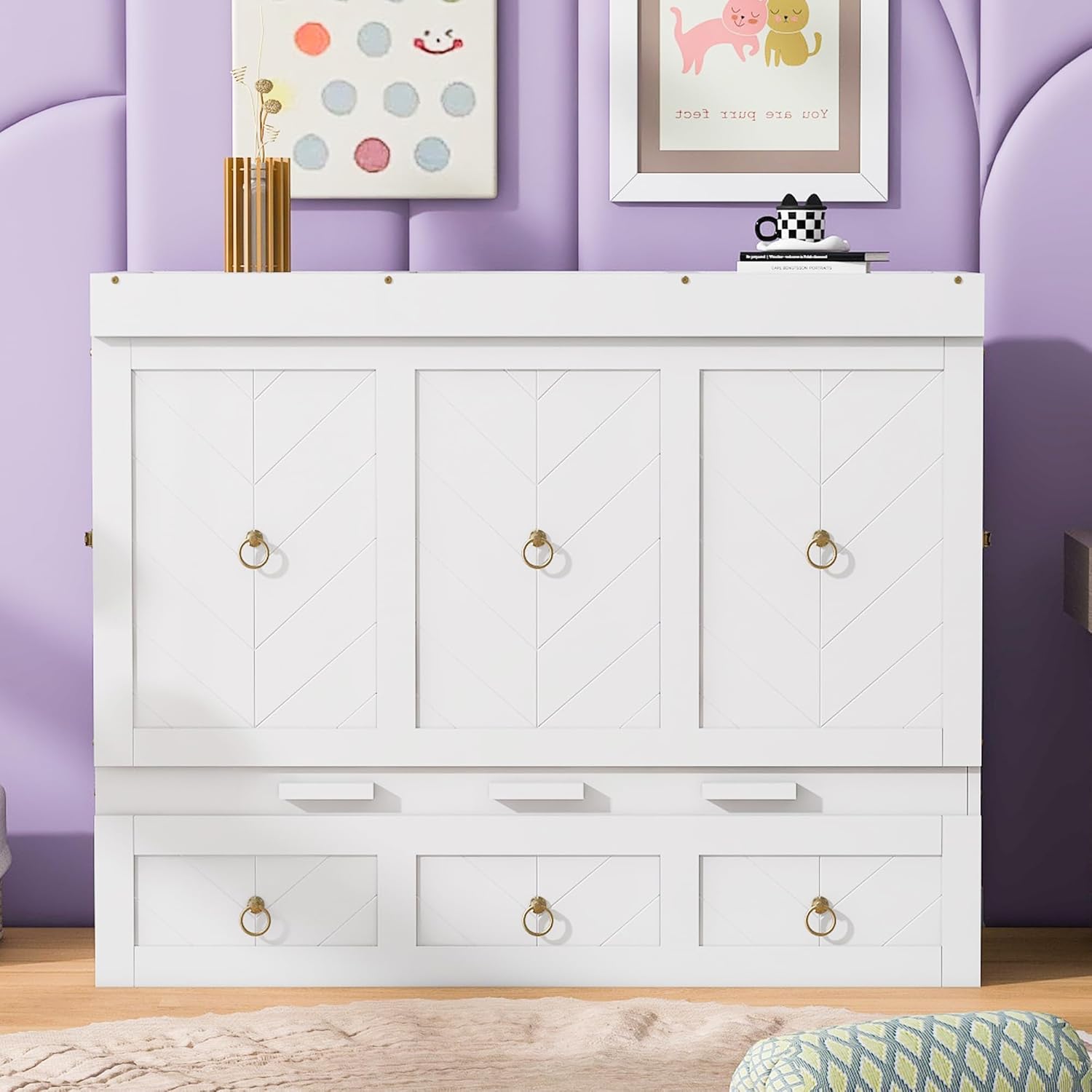
Figure 7.1: The Murphy Bed in its cabinet configuration.

Figure 7.2: Top view of the Murphy Bed in cabinet mode.
7.2. Converting from Bed to Cabinet Mode
- Remove any bedding or items from the bed platform.
- Push the storage drawer fully back into its compartment.
- Lift the bed platform from the foot end, guiding the support legs to fold inward.
- Continue to lift and push the bed platform back into the cabinet until it is fully upright and securely latched. This is a two-person operation.
7.3. Using the USB Charging Station
The built-in dual power/USB module is located on the side of the cabinet/bed frame. Simply plug the bed's power cord into a wall outlet, then connect your devices to the available USB ports or power outlets.

Figure 7.3: Integrated USB and power outlets for convenient charging.
8. Maintenance
- Cleaning: Wipe surfaces with a soft, damp cloth. Avoid harsh chemicals or abrasive cleaners that may damage the finish.
- Hardware Check: Periodically inspect all screws and bolts to ensure they remain tight. Retighten as needed to maintain structural integrity.
- Mechanism Care: Keep the folding mechanisms free of dust and debris. Do not lubricate unless specifically instructed by the manufacturer.
- Weight Distribution: Distribute weight evenly on the bed platform to prevent stress on the frame.
9. Troubleshooting
- Bed is difficult to convert: Ensure all components are correctly aligned and no obstructions are present. Verify that all hardware is properly installed and tightened.
- Bed feels unstable: Recheck all assembly connections. Ensure the bed is on a flat, level surface. Confirm that the weight capacity is not exceeded.
- USB ports not working: Ensure the bed's main power cord is securely plugged into a functional wall outlet. Check for any loose connections within the USB module itself.
- Drawer not sliding smoothly: Check for any debris in the drawer glides. Ensure the drawer is assembled correctly and not overloaded.
10. Warranty and Support
For warranty information or if you encounter any issues not covered in this manual, please contact Harper & Bright Designs customer service. Refer to your purchase documentation for specific warranty terms and contact details.
Customer Service: Please refer to the contact information provided with your purchase or visit the Harper & Bright Designs official website.