
1. Introduction
This manual provides detailed instructions for the installation, configuration, operation, and maintenance of the BAISULI FX2N-14MT PLC Programmable Controller Board. It is designed to assist users in understanding the product's capabilities and ensuring its safe and efficient use in industrial control applications. Please read this manual thoroughly before operating the device.
2. Product Overview
The BAISULI FX2N-14MT is a compact and robust Programmable Logic Controller (PLC) designed for various industrial automation tasks. It features a relay output module, RS232 communication, and 2-channel 0-10V analog input capabilities, making it suitable for diverse control environments.
Key Features:
- Compact size and stable structure for reliable performance.
- Designed to operate effectively in environments with electromagnetic interference.
- Suitable for industrial control equipment in production machinery, assembly lines, and various machine tools.
- Flexible application in diverse industrial automatic control occasions, including metallurgy, chemical industry, plastics, textile, food, packaging, printing, building materials, woodworking, central air conditioning, and environmental protection equipment.
- Equipped with RS232 communication port.
- Includes 2-channel 0-10V analog input (2AD).
Component Identification:
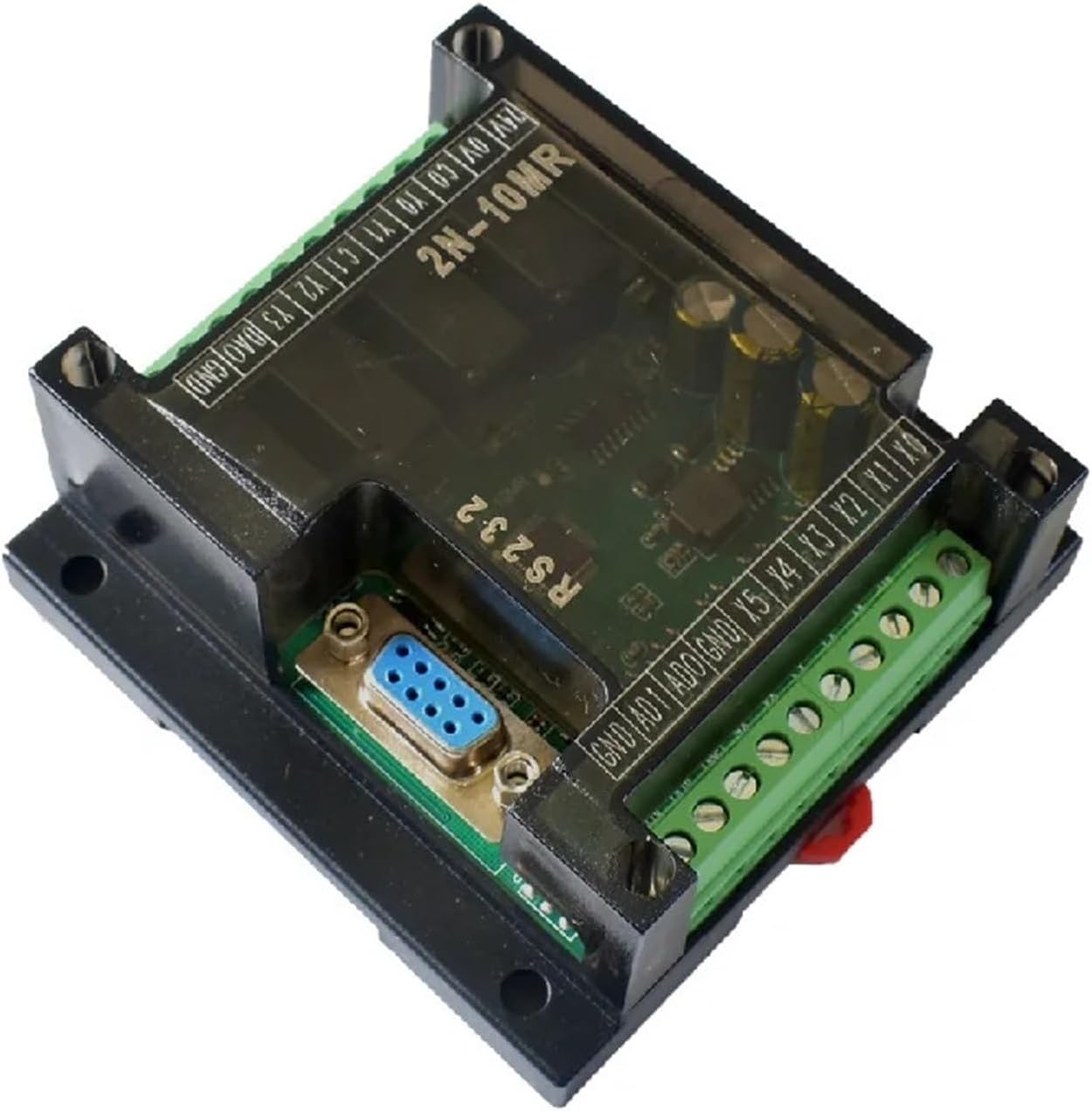
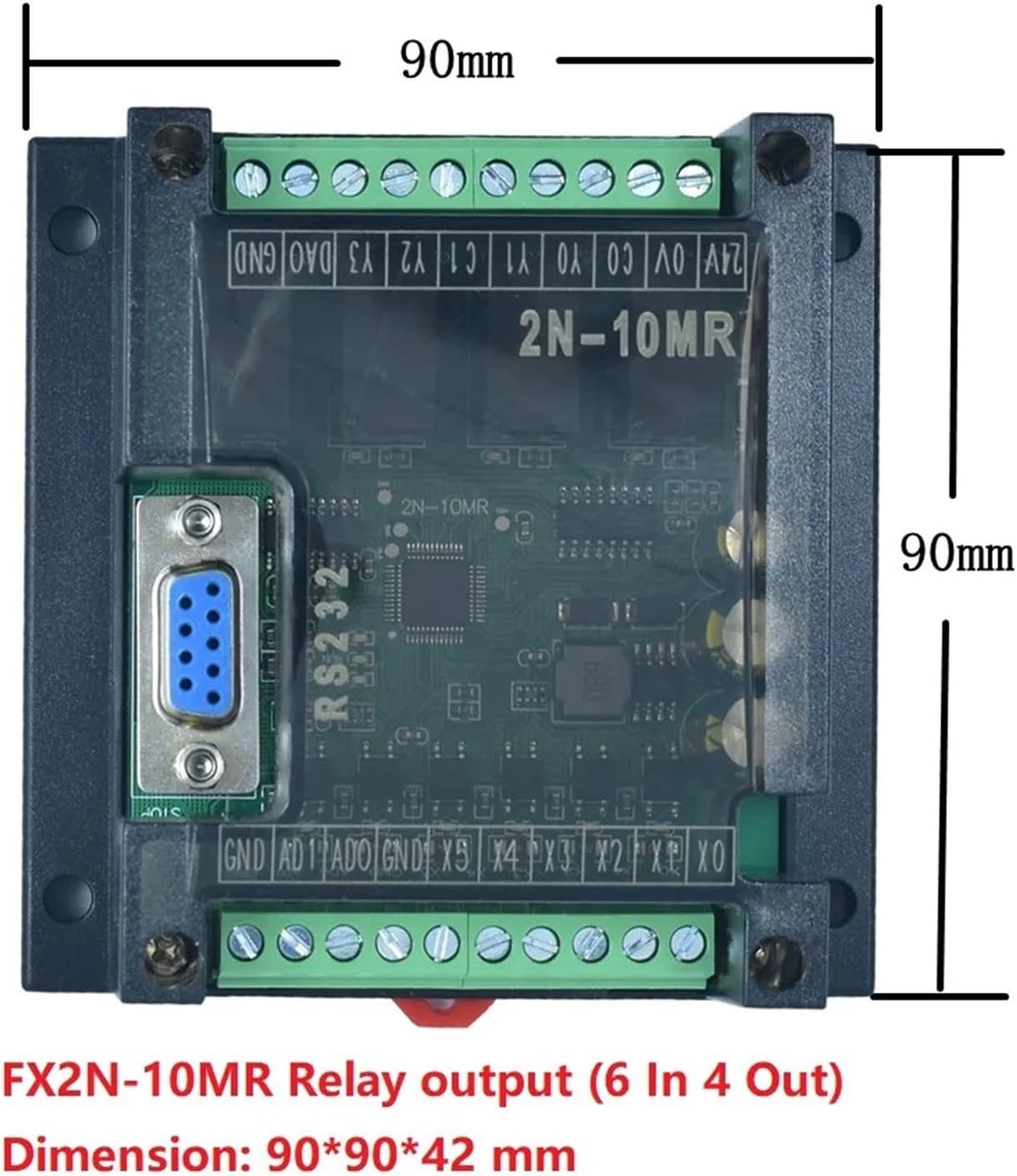
The following images illustrate the general layout and key components of the PLC board. Specific terminal configurations may vary slightly between models in the FX2N series.

3. Specifications
| Specification | Value |
|---|---|
| Model | FX2N-14MT (with 2AD Input 0-10V) |
| Input Voltage | DC24V |
| Analog Input | 2 channels, 0-10V |
| Output Type | Transistor (MT) |
| Communication Port | RS232 |
| Package Dimensions | Approximately 1.18 x 0.79 x 0.39 inches (30 x 20 x 10 mm) |
| Item Weight | Approximately 14.1 ounces (400 grams) |
| Manufacturer | BAISULI |
4. Setup
4.1 Unpacking and Inspection
- Carefully remove the PLC board from its packaging.
- Inspect the board for any visible damage during transit. If damage is found, contact your supplier immediately.
- Verify that all components listed in the packing list are present.
4.2 Mounting
The PLC board is designed for panel mounting. Ensure a stable and vibration-free location with adequate ventilation to prevent overheating. Use appropriate screws to secure the board through the mounting holes provided on the shell.
4.3 Wiring
All wiring should be performed by qualified personnel and in accordance with local electrical codes and safety regulations. Ensure power is disconnected before making any connections.
- Power Supply: Connect a stable DC24V power supply to the designated power terminals (typically labeled 24V and GND). Observe correct polarity.
- Digital Inputs: Connect input devices (e.g., switches, sensors) to the digital input terminals (e.g., X0, X1, X2...). Refer to the wiring diagram for your specific application.
- Digital Outputs: Connect output devices (e.g., relays, indicators) to the digital output terminals (e.g., Y0, Y1, Y2...). The FX2N-14MT uses transistor outputs. Ensure the load current does not exceed the specified limits for each output.
- Analog Inputs (2AD 0-10V): Connect analog sensors or signal sources providing a 0-10V signal to the dedicated analog input terminals (e.g., AD1, AD2). Ensure proper shielding for analog signal cables to minimize noise.
- RS232 Communication: Connect the RS232 port to a programming device (e.g., PC) using a compatible serial cable for programming and monitoring.

5. Operating Instructions
5.1 Programming Software
The BAISULI FX2N-14MT PLC is typically programmed using compatible PLC programming software (e.g., GX Developer or similar software for FX2N series PLCs). Refer to the software's documentation for detailed programming instructions.
5.2 Connecting to PC
- Connect the PLC's RS232 port to your PC's serial port (or a USB-to-serial adapter) using a suitable programming cable.
- Open the programming software on your PC.
- Configure the communication settings in the software to match the PLC (e.g., COM port, baud rate).
5.3 Program Download and Upload
- Download: To transfer a program from the PC to the PLC, select the 'Write to PLC' or 'Download' option in the software. Ensure the PLC is in STOP mode before downloading.
- Upload: To retrieve a program from the PLC to the PC, select the 'Read from PLC' or 'Upload' option.
5.4 Running the PLC
- After successfully downloading a program, switch the PLC to RUN mode using the programming software or a physical switch if available.
- Monitor the PLC status and I/O values through the programming software to verify correct operation.
5.5 Analog Input (2AD 0-10V) Usage
The two analog input channels convert 0-10V signals into digital values that can be processed by the PLC program. Refer to the programming software's manual for instructions on reading and scaling analog input values within your PLC program.
6. Maintenance
6.1 Environmental Conditions
To ensure long-term reliability, operate the PLC within its specified environmental conditions. Avoid exposure to:
- Excessive dust or corrosive gases.
- High humidity or direct water splashes.
- Extreme temperatures or rapid temperature changes.
- Strong electromagnetic fields or excessive vibration.
6.2 Cleaning
Periodically clean the exterior of the PLC board with a soft, dry cloth. Do not use solvents or abrasive cleaners. Ensure power is off before cleaning.
6.3 Firmware Updates
Check the manufacturer's website for any available firmware updates. Follow the provided instructions carefully when performing updates to avoid damaging the device.
7. Troubleshooting
This section provides solutions to common issues encountered during the operation of the BAISULI FX2N-14MT PLC.
| Problem | Possible Cause | Solution |
|---|---|---|
| PLC does not power on. | No power supply, incorrect wiring, faulty power supply. | Check DC24V power connection and polarity. Verify power supply functionality. |
| Cannot establish RS232 communication. | Incorrect cable, wrong COM port, incorrect baud rate, driver issues. | Ensure correct RS232 cable. Verify COM port and baud rate settings in software. Install/update USB-to-serial adapter drivers. |
| Digital inputs not responding. | Input device faulty, incorrect wiring, input not configured in program. | Check input device functionality. Verify wiring to input terminals. Ensure input is correctly addressed and used in the PLC program. |
| Digital outputs not activating. | Output device faulty, incorrect wiring, output not configured in program, overload. | Check output device. Verify wiring. Ensure output is correctly addressed and activated in the PLC program. Check for output overload. |
| Analog input values are incorrect or unstable. | Sensor faulty, incorrect wiring, noise interference, incorrect scaling in program. | Verify analog sensor output. Check wiring for proper connection and shielding. Ensure correct scaling and conversion in the PLC program. |
If the problem persists after attempting these solutions, please contact technical support.
8. Warranty and Support
8.1 Warranty Information
Warranty terms and conditions for the BAISULI FX2N-14MT PLC Programmable Controller Board are typically provided at the time of purchase or can be obtained directly from the manufacturer or authorized reseller. Please retain your proof of purchase for warranty claims.
8.2 Technical Support
For technical assistance, programming queries, or advanced troubleshooting, please contact your product supplier or the BAISULI customer support team. Have your product model number and purchase details ready when contacting support.