
Yahboom Raspbot V2
Yahboom AI Vision Robot Raspberry Pi 5 Car
Model: Raspbot V2
Brand: Yahboom
Introduction
The Yahboom AI Vision Robot Raspberry Pi 5 Car, Model Raspbot V2, is an advanced open-source DIY robot kit designed for students and enthusiasts aged 16 and up. It leverages the powerful Raspberry Pi 5 for enhanced AI performance and smooth camera operation. This manual provides detailed instructions for assembly, operation, and programming to help you explore the exciting world of robotics and artificial intelligence.
Key Features:
- Powerful Control System: Based on the Raspberry Pi 5 main control, significantly enhancing AI performance and camera fluidity.
- AI Visual Technology: Utilizes OpenCV for image processing, enabling human posture estimation, three-dimensional object recognition, face detection, and interactive gameplay such as tag code recognition/tracking/following, face following, garbage recognition, and autonomous driving.
- Multiple Control Methods: Can be controlled via APP (Android and iOS), PC, remote control, and handle, with FPV image transmission.
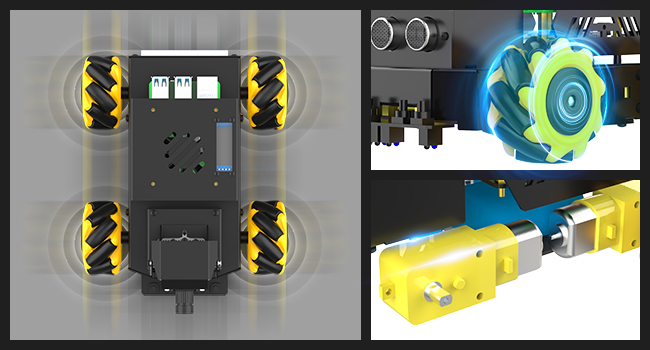
- Excellent Hardware Configuration: Equipped with a Pi5 robot driver board, metal chassis with TT motors and Mecanum wheels for 360° movement, a four-way patrol module, infrared patrol sensors, ultrasonic sensors for distance measurement and obstacle avoidance, and an OLED screen for real-time data display.
- Comprehensive Learning Platform: Comes with rich tutorials and open-source Python code, making it a perfect platform for learning ROS, Python programming, OpenCV technology, and AI vision.
Product Components
The Raspbot V2 kit includes the following main components. Please verify all parts upon unboxing.
- Robot Chassis
- Expand Driver Board
- 2DOF Camera PTZ
- OLED Display
- Mecanum Wheels (4x)
- TT Motors (4x)
- 7.4V Lithium Battery Pack
- Power Charger
- Cooling Fan
- Infrared Remote Control
- Screwdriver and Accessories Package
- Instruction Manual
- Various Wires and Connectors
- Wooden Blocks (for AI vision exercises)


Setup and Assembly
The robot chassis is pre-assembled. You will need to assemble the camera, main control (Raspberry Pi 5, if included), and expansion board. Follow these steps carefully:
Step-by-Step Assembly:
- Install Raspberry Pi 5 (Optional): Carefully insert your Raspberry Pi 5 into the designated slot on the robot chassis. Ensure proper alignment with the mounting holes.
- Connect Robot Driver Board: Attach the Pi5 robot driver board to the Raspberry Pi 5 via the I2C interface. Secure it with the provided screws.
- Install 2DOF Camera PTZ: Mount the 2DOF camera PTZ (Pan-Tilt-Zoom) module to the front of the robot. Connect its cables to the driver board.
- Connect OLED Display: Connect the OLED display to the driver board. This display will show real-time data.
- Connect Ultrasonic Sensors: Attach the ultrasonic sensors to the front of the robot and connect them to the driver board.
- Connect 4-Channel Tracking Module: Install the 4-channel tracking module underneath the robot chassis and connect it to the driver board.
- Battery Installation: Insert the 7.4V 2S lithium battery pack into its compartment, ensuring it is secured by the dedicated protection box. Connect the battery to the driver board.
- Cooling Fan Installation: Install the cooling fan on top of the Raspberry Pi 5 housing to ensure optimal temperature regulation.
- Final Checks: Double-check all connections and ensure all components are securely fastened.

Operating the Robot
Powering On:
Ensure the battery is fully charged. Locate the power switch on the robot driver board and turn it on. The OLED display should light up, showing system information.
Control Methods:
The Raspbot V2 supports multiple control interfaces:
- APP Control: Download the official Yahboom APP for Android or iOS. Connect your smartphone to the robot's Wi-Fi network. The APP allows real-time control and switching between various AI games.
- PC Control: Connect the robot to your computer via USB or network. Utilize the provided software and Python scripts for advanced control and programming.
- Infrared Remote Control: Use the included infrared remote control for basic movement and function commands.

Omnidirectional Movement:
The Mecanum wheels allow for 360° movement, including forward, backward, sideways, diagonal, and rotation. This provides exceptional maneuverability for complex routes.

AI Visual Interaction and Recognition:
The 2DOF HD camera and OpenCV library enable various AI vision functions:
- Color Recognition/Tracking/Following: Identify and track objects based on color.
- Face Detection/Following: Detect human faces and follow them.
- Gesture Control: Control the robot's movements using predefined hand gestures.
- QR Code Control: Recognize and interpret QR codes for specific commands.
- Tag Code Recognition/Tracking/Following: Interact with specific tag codes.
- Human Posture Estimation: Analyze and estimate human body postures.
- Object Recognition (Yolov5-lite): Identify various objects in the environment.
- Garbage Recognition: Classify different types of garbage.
- License Plate Recognition: Identify and read vehicle license plates.


Line Tracking and Obstacle Avoidance:
The 4-channel tracking sensor allows the robot to follow lines accurately, while ultrasonic sensors enable distance measurement, obstacle avoidance, and following.

Programming and Development
The Raspbot V2 is an open-source platform that supports Python programming and ROS2 system development.
Python Programming:
The kit comes with rich tutorials and open-source Python code, making it accessible for beginners to dive into AI vision projects.

ROS2 System Development:
Yahboom adopts the Humble version of ROS2, providing stability and extensive tutorials for advanced users to develop complex robotics applications.

Official Video Tutorials:
For detailed visual guidance, refer to the official product video provided by Yahboom.
Maintenance
To ensure the longevity and optimal performance of your Raspbot V2, follow these maintenance guidelines:
- Cleaning: Regularly clean the robot's chassis and components with a soft, dry cloth. Avoid using harsh chemicals or abrasive materials.
- Battery Care: Always use the provided charger. Do not overcharge or completely drain the battery. Store the battery in a cool, dry place when not in use.
- Component Inspection: Periodically check all screws, connections, and moving parts (especially the Mecanum wheels and camera PTZ) for any looseness or damage. Tighten as necessary.
- Software Updates: Keep your Raspberry Pi OS and all installed libraries/software up to date to benefit from performance improvements and bug fixes.
Troubleshooting
If you encounter issues with your Raspbot V2, try the following troubleshooting steps:
- Robot Not Powering On:
- Check battery charge level.
- Ensure battery is correctly connected to the driver board.
- Verify the power switch is in the "ON" position.
- Movement Issues:
- Check motor connections to the driver board.
- Ensure Mecanum wheels are free from obstructions.
- Recalibrate if omnidirectional movement is erratic.
- Camera/AI Vision Problems:
- Verify camera cable connection to Raspberry Pi.
- Ensure camera PTZ servos are properly connected.
- Check software configuration for camera and OpenCV.
- Ensure adequate lighting for AI vision tasks.
- Connectivity Issues (APP/PC):
- Confirm the robot's Wi-Fi hotspot is active and your device is connected.
- Check IP addresses and network settings.
- Restart the robot and your control device.
- OLED Display Not Working:
- Check the display's connection to the driver board.
- Ensure the Raspberry Pi is powered on and running.
For more detailed troubleshooting or persistent issues, please refer to the official Yahboom tutorials link provided in the Support section.
Specifications
| Feature | Detail |
|---|---|
| Product Dimensions | 8.18 x 6.49 x 5 inches |
| Item Weight | 7.95 pounds |
| Item Model Number | Raspbot V2 |
| Manufacturer Recommended Age | 16 years and up |
| Battery Type | 7.4V 2S Lithium Battery Pack (included) |
| Manufacturer | Yahboom |

Warranty and Support
Yahboom provides comprehensive support for its products. For detailed information on warranty terms, please refer to the documentation included with your purchase or contact Yahboom customer support directly.
Online Resources:
Access detailed tutorials, open-source code, and additional resources via the official Yahboom website:
http://www.yahboom.com/study/RASPBOT-V2

Contact Support:
For further assistance or warranty inquiries, please contact Yahboom customer support through their official channels, typically found on their website.