
1. Introduction
Thank you for choosing the Rtktoup MCSJ-1640X2 RGBW LED Par Spotlight. This manual provides essential information for the safe and effective operation of your new stage lighting system. Please read it thoroughly before use and retain it for future reference.
The Rtktoup MCSJ-1640X2 is a versatile 40W RGBW LED Par spotlight designed for various lighting applications. It features four 10W RGBW LED lamp beads, offering vibrant color mixing and linear dimming capabilities. The unit supports multiple control modes, including automatic, sound-activated, DMX, master-slave, and remote control, making it suitable for DJs, bars, weddings, parties, and other events.
2. Safety Information
To ensure safe operation and prolong the lifespan of your device, please observe the following safety precautions:
- Read all instructions carefully before installation and operation.
- This device is for indoor use only. Do not expose it to rain or moisture.
- Ensure the power supply voltage matches the device's requirements (AC100V-240V 50/60Hz).
- Always disconnect from the main power supply before cleaning, maintenance, or when not in use.
- Do not operate the device if the power cord is damaged.
- Avoid direct eye exposure to the light source.
- Ensure proper ventilation around the unit to prevent overheating.
- CAUTION: DO NOT OPEN THE HOUSING. RISK OF ELECTRIC SHOCK. There are no user-serviceable parts inside. Refer all servicing to qualified personnel.

3. Package Contents
The Rtktoup MCSJ-1640X2 package includes the following items:
- LED Par Spotlight x 2 units
- Remote Control x 2 units (1 Lithium Metal battery included per remote)
- Mounting Bracket x 2 units
- Instruction Manual x 2 copies
4. Product Overview
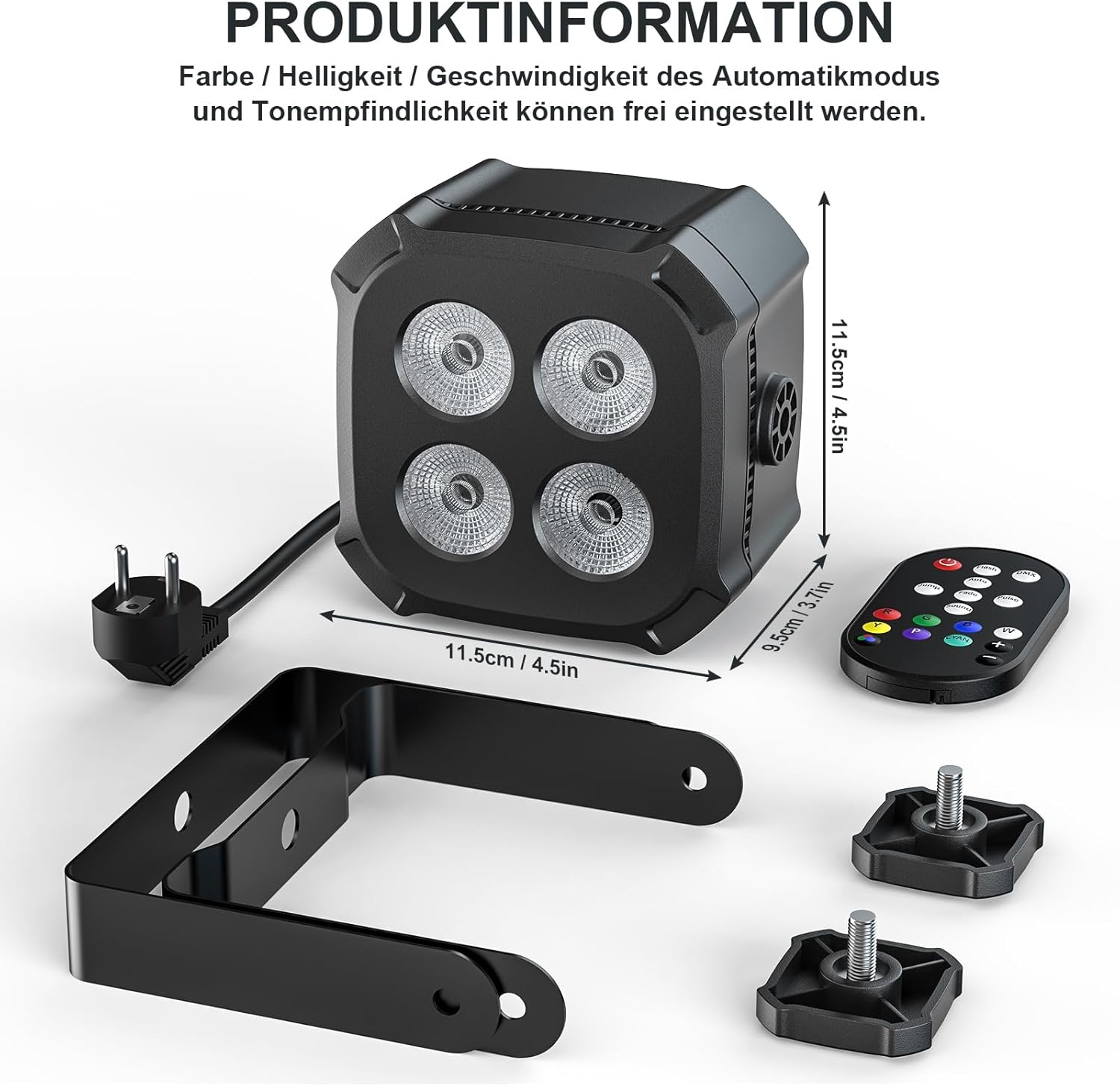
The Rtktoup MCSJ-1640X2 LED Par Spotlight features a compact design with robust functionality. Each unit is equipped with four powerful 10W RGBW LEDs, allowing for a wide spectrum of colors and effects.

5. Setup
The Rtktoup LED Par Spotlight offers flexible installation options to suit various event requirements:
- Floor Stand: Use the included mounting bracket as a stand to position the light on a flat surface.
- Floor Laying: The compact design allows the unit to be placed directly on the floor without the bracket for uplighting effects.
- Truss Mounting: Secure the mounting bracket to a lighting truss or ceiling fixture using appropriate clamps (not included). Ensure the fixture is securely fastened and can support the weight of the light.
After positioning, connect the power cable to a suitable power outlet (AC100V-240V 50/60Hz).

6. Operating Modes
The Rtktoup MCSJ-1640X2 offers several operating modes, which can be selected via the remote control or DMX controller:
- Auto Mode: The light cycles through pre-programmed lighting effects automatically. You can adjust the speed of color changes.
- Sound Activated Mode: The light reacts to ambient sound or music, changing colors and patterns in sync with the beat. The sensitivity of the sound activation can be adjusted.
- Master-Slave Mode: Connect multiple units using DMX cables. One unit acts as the master, controlling all connected slave units to synchronize their lighting effects.
- DMX Mode (4/8 Channels): For professional control, connect the light to a DMX512 controller. This allows precise control over individual parameters such as color, dimming, strobe, and effects via 4 or 8 DMX channels.
- Remote Control Mode: Use the included infrared remote control to easily switch between modes, adjust colors, brightness, and other settings from a distance.

7. Remote Control Functions
The included remote control provides convenient access to the spotlight's functions. Ensure the remote is pointed towards the infrared receiver on the light unit.
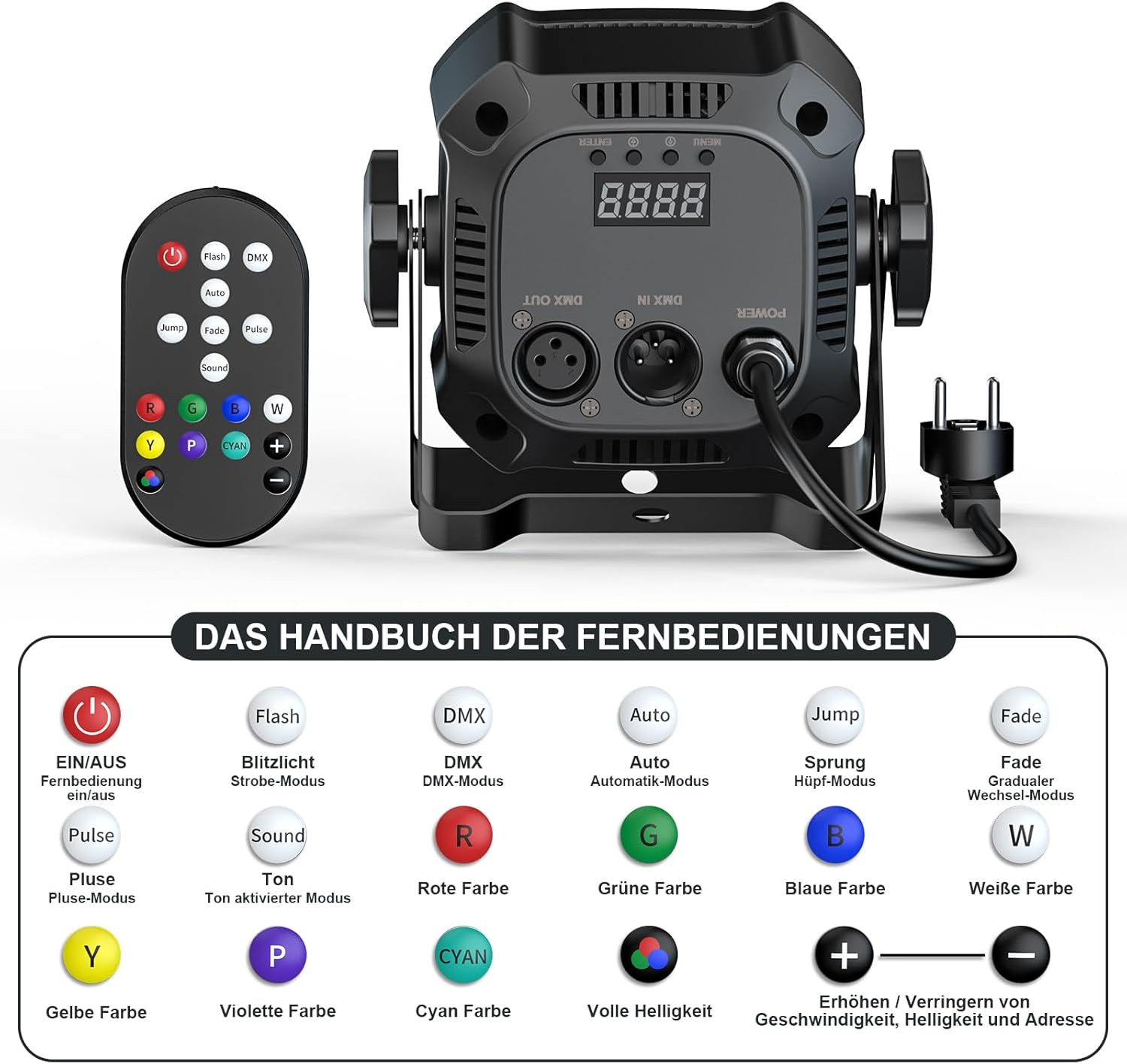
- ON/OFF: Power on or off the light.
- Flash: Activates strobe mode.
- DMX: Selects DMX control mode.
- Auto: Activates automatic program mode.
- Jump: Activates color jump mode.
- Fade: Activates color fade mode.
- Pulse: Activates pulse mode.
- Sound: Activates sound-activated mode.
- R, G, B, W, Y, P, CYAN: Selects individual static colors (Red, Green, Blue, White, Yellow, Purple, Cyan).
- Full Brightness: Sets the light to maximum brightness.
- +/-: Adjusts speed for automatic modes, sensitivity for sound mode, or DMX address.
8. Maintenance
Regular maintenance helps ensure optimal performance and longevity of your LED Par Spotlight:
- Cleaning: Periodically clean the lens and housing with a soft, lint-free cloth. Do not use abrasive cleaners or solvents. Ensure the device is unplugged before cleaning.
- Inspection: Regularly check power cables and DMX cables for any signs of damage. Replace damaged cables immediately.
- Storage: When not in use, store the device in a dry, dust-free environment, preferably in its original packaging or a protective case.
9. Troubleshooting
If you encounter issues with your Rtktoup LED Par Spotlight, refer to the following common problems and solutions:
- No Power:
- Check if the power cable is securely connected to both the light and the power outlet.
- Verify that the power outlet is functional.
- Light Not Responding to Remote Control:
- Ensure the remote control's battery is not depleted.
- Point the remote directly at the light's infrared receiver.
- Ensure there are no obstructions between the remote and the light.
- DMX Control Issues:
- Check DMX cable connections for proper seating and damage.
- Verify the DMX address setting on the light matches your controller's output.
- Ensure the DMX controller is functioning correctly.
- Fan Noise:
- A slight fan noise is normal during operation as it helps dissipate heat. If the noise is excessively loud or unusual, ensure the fan vents are not obstructed.
10. Specifications
| Feature | Specification |
|---|---|
| Model Number | MCSJ-1640X2 |
| Housing Color | Black |
| Material | Plastic Body |
| Voltage | AC100V-240V 50/60Hz |
| Rated Power | 40W |
| Light Source | 4 x 10W RGBW LED |
| Flash Rate | 1-20Hz |
| Control Protocol | 433 MHz (for remote control), DMX512 Standard Protocol |
| Control Modes | Auto, Sound Activated, Master-Slave, DMX, Remote Control |
| Control Channels | 4/8CH (DMX) |
| Effective Remote Control Distance | 5-10M |
| Output Light Angle | 20° |
| Average LED Lifespan | 50,000 hours |
| Protection Rating | IP20 |
| Working Environment Temperature | -20℃ to 40℃ |
| Product Dimensions (per unit) | 11.5 x 11.5 x 9.5 cm (approximate, based on image) |
| Item Weight (per unit) | 1.58 kg (approximate, based on product specifications) |
| Batteries (for remote) | 1 Lithium Metal battery (included) |

11. Warranty and Support
Rtktoup products are manufactured to high-quality standards. For any warranty claims or technical support, please contact your retailer or the manufacturer directly. Keep your purchase receipt as proof of purchase.