1. Introduction
This manual provides essential information for the installation, operation, maintenance, and troubleshooting of your new BXParts carburetor. This carburetor is designed as a replacement part for specific Ryobi string trimmer and brushcutter models. Please read this manual thoroughly before attempting any installation or maintenance to ensure safe and correct usage.
2. Safety Information
WARNING:
- Always disconnect the spark plug wire before performing any maintenance or installation to prevent accidental starting.
- Wear appropriate personal protective equipment (PPE) such as gloves and eye protection during installation.
- Work in a well-ventilated area. Fuel and carburetor cleaner fumes can be hazardous.
- Ensure the engine is cool before working on the carburetor to avoid burns.
- Keep all fuel and flammable materials away from open flames or sparks.
- If you are unsure about any step, consult a qualified service technician.
3. Package Contents
Verify that all items listed below are present in your package:
- 1 x BXParts Carburetor
- 2 x Gaskets
- 1 x Fuel Line Kit
- 1 x Primer Bulb
- 1 x Spark Plug
- 1 x Fuel Line
- 2 x Air Filters
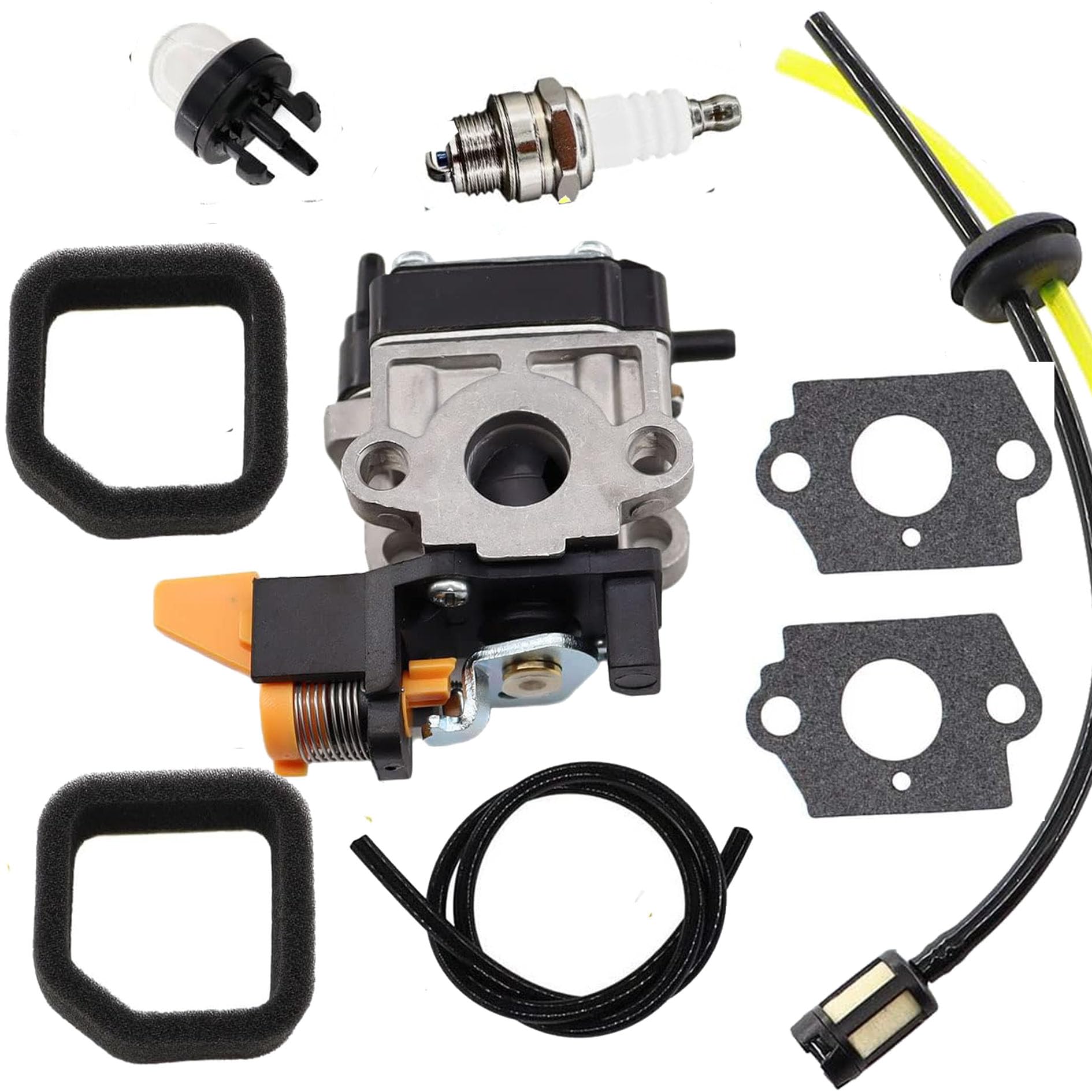
Image 1: BXParts Carburetor with accompanying parts including gaskets, fuel line, primer bulb, spark plug, and air filters.
4. Compatibility
This BXParts carburetor is compatible with the following Ryobi string trimmer and brushcutter models:
- Ryobi RY30040, RY30040A, RY30040B
- Ryobi RY30060A, RY30060B, RY30060
- Ryobi RY52002, RY52002A, RY52004, RY52004A
- Ryobi RY30020, RY30020A, RY30020B
- Ryobi SS30
- Ryobi RY30023, RY30063
Important Note: Always compare the appearance and dimensions of the new carburetor with your original part to ensure a correct match before installation. Variations may exist even within listed models.
5. Installation Instructions
The following steps outline the general procedure for replacing a carburetor. Specific steps may vary slightly depending on your Ryobi model. Refer to your tool's original service manual for detailed instructions if available.
- Prepare the Tool: Ensure the engine is off and cool. Disconnect the spark plug wire. Drain any fuel from the tank into an approved container.
- Access the Carburetor: Locate and remove the air filter cover and air filter. You may need to remove other components like the engine cover or throttle linkage to gain full access to the carburetor.
- Disconnect Components: Carefully disconnect the fuel lines, throttle linkage, and choke linkage from the old carburetor. Note their positions for reassembly.
- Remove Old Carburetor: Unscrew the mounting bolts or nuts that secure the carburetor to the engine manifold. Remove the old carburetor and any old gaskets.
- Clean Mounting Area: Clean any debris or old gasket material from the engine manifold and air filter housing surfaces.
- Install New Gaskets: Place the new gaskets in their correct positions between the engine manifold, carburetor, and air filter housing. Ensure they are properly aligned.
- Mount New Carburetor: Position the new BXParts carburetor onto the mounting studs/bolts. Secure it with the mounting bolts/nuts, tightening them evenly to prevent air leaks.
- Reconnect Components: Reconnect the fuel lines, throttle linkage, and choke linkage to the new carburetor. Double-check all connections for security.
- Install Air Filter and Cover: Install the new air filter (if replacing) and reattach the air filter cover.
- Refuel and Test: Refill the fuel tank with the appropriate fuel mixture. Reconnect the spark plug wire. Prime the carburetor using the primer bulb until fuel is visible. Start the engine and allow it to warm up.
- Adjust Carburetor (if necessary): If the engine does not run smoothly, minor adjustments to the idle speed and fuel mixture screws may be required. Refer to your tool's original manual for specific adjustment procedures.

Image 2: Side view of the BXParts carburetor, showing the choke lever and fuel line connections. This view is helpful for identifying connection points during installation.
6. Operating Considerations
Once the carburetor is installed, proper operation of your Ryobi tool depends on several factors:
- Fuel Mixture: Always use the correct fuel-to-oil mixture specified by your Ryobi tool's manufacturer. Incorrect mixtures can damage the engine and carburetor.
- Priming: Before starting a cold engine, use the primer bulb to draw fuel into the carburetor until it is firm.
- Choke: Use the choke for cold starts as per your tool's instructions. Gradually open the choke as the engine warms up.
- Air Filter: Ensure the air filter is clean and properly installed to prevent dirt from entering the carburetor and engine.
7. Maintenance
Regular maintenance of your carburetor and associated components will ensure optimal performance and longevity.
- Air Filter: Inspect and clean or replace the air filter regularly, especially in dusty conditions. A dirty air filter can restrict airflow and affect carburetor performance.
- Fuel Filter: Check and replace the in-tank fuel filter periodically to prevent contaminants from reaching the carburetor.
- Fuel Lines: Inspect fuel lines for cracks, leaks, or hardening. Replace them as needed to prevent fuel delivery issues.
- Spark Plug: Replace the spark plug annually or as recommended by your tool's manufacturer to ensure efficient combustion.
- Fuel Storage: Use fresh fuel and a fuel stabilizer if storing the tool for extended periods. Old or stale fuel can cause carburetor issues.
8. Troubleshooting
If you encounter issues after installing the new carburetor, consider the following common problems and solutions:
| Problem | Possible Cause | Solution |
|---|---|---|
| Engine won't start | No fuel, incorrect choke position, clogged fuel filter, faulty spark plug, air leak. | Check fuel level, ensure primer bulb is firm, adjust choke, replace fuel filter, check spark plug, inspect gaskets for air leaks. |
| Engine starts then dies | Improper fuel mixture, air leak, clogged fuel line, carburetor adjustment needed. | Verify fuel mixture, check for air leaks, inspect fuel lines, adjust carburetor idle/mixture screws. |
| Engine runs rough/lacks power | Dirty air filter, incorrect carburetor adjustment, old fuel, clogged fuel filter. | Clean/replace air filter, adjust carburetor, use fresh fuel, replace fuel filter. |
| Fuel leaks | Loose fuel line connections, damaged fuel lines, faulty primer bulb. | Tighten fuel line clamps, replace damaged fuel lines, replace primer bulb. |
For persistent issues, it is recommended to consult a professional service technician.
9. Specifications
- Manufacturer: BXParts
- Carburetor Model Numbers: WYC-12-1, WYC-3, WYC-3-1, WYC-9-1
- Compatible Ryobi Models: RY30040, RY30040A, RY30040B, RY30060A, RY30060B, RY52002, RY52002A, RY52004, RY52004A, RY30020, RY30060, SS30, RY30023, RY30063, RY30020B, RY30020A
- Item Weight: Approximately 8 ounces (0.23 kg)
- Package Dimensions: Approximately 6 x 4 x 4 inches (15.24 x 10.16 x 10.16 cm)
10. Support
For further assistance or inquiries regarding your BXParts carburetor, please contact your retailer or the manufacturer directly. Ensure you have your product details and any relevant purchase information available.
Manufacturer: BXParts
Seller: BXParts-USA Direct Shipping
Note: Warranty information is not provided in the product details. Please refer to your purchase documentation for any applicable warranty terms.