
Scttomon HT-933
Scttomon Electric Foil Shaver HT-933 User Manual
Model: HT-933 | Brand: Scttomon
1. Introduction
Thank you for choosing the Scttomon Electric Foil Shaver HT-933. This device is designed for efficient and comfortable shaving of beards and bald heads, offering both wet and dry shaving capabilities. Please read this manual thoroughly before first use to ensure proper operation, maintenance, and safety.
2. Safety Information
WARNING: To reduce the risk of burns, electrocution, fire, or injury to persons:
- Always unplug the shaver from the power outlet immediately after charging and before cleaning.
- Do not use while charging.
- Do not use the shaver near water (e.g., in a bathtub, shower, or sink) unless specifically designed for wet use and disconnected from power. This product is IPX6 waterproof, allowing for wet shaving and rinsing, but should not be submerged for extended periods.
- Always clean and dry thoroughly after wet use to prevent bacterial growth and maintain hygiene.
- Avoid contact with eyes and broken skin.
- This appliance is not intended for use by persons (including children) with reduced physical, sensory or mental capabilities, or lack of experience and knowledge, unless they have been given supervision or instruction concerning use of the appliance by a person responsible for their safety.
- Children should be supervised to ensure that they do not play with the appliance.
- Use this appliance only for its intended use as described in this manual. Do not use attachments not recommended by the manufacturer.
- Keep the cord away from heated surfaces.
- Never drop or insert any object into any opening.
- Do not operate where aerosol (spray) products are being used or where oxygen is being administered.
- Always check the shaver head for damage before use. Do not use if the foil or blades are damaged, as this may cause injury.
3. Product Overview & Components
The Scttomon HT-933 Electric Foil Shaver is a versatile grooming tool. Familiarize yourself with its parts:

Image: The Scttomon HT-933 Electric Foil Shaver shown with its included accessories: USB charging cable, cleaning brush, and protective cover.
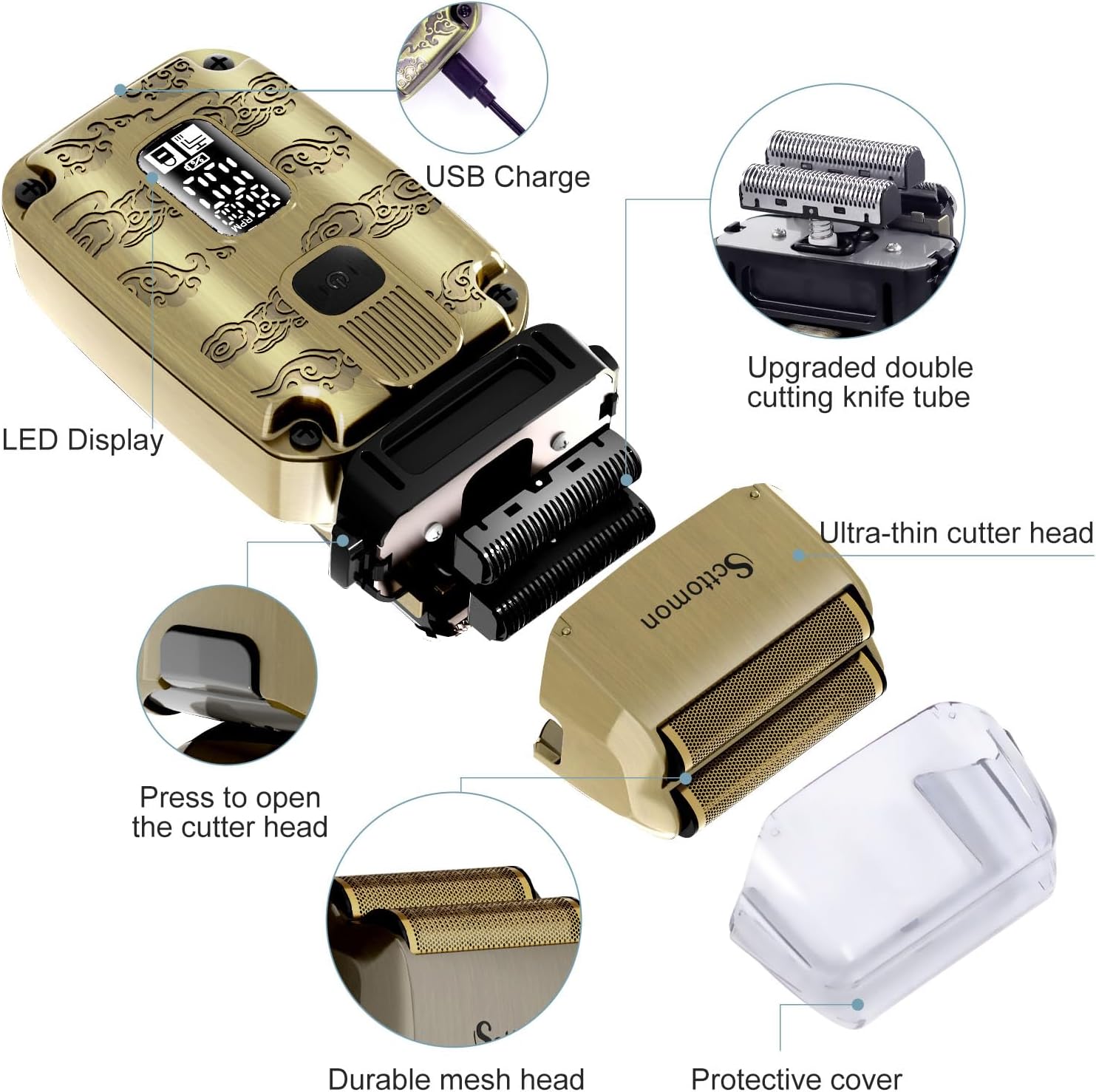
Image: An exploded view of the shaver highlighting key components such as the USB charging port, LED display, pop-up trimmer, detachable ultra-thin cutter head, durable mesh head, and protective cover.
Key Features:
- 2-in-1 Design: Combines a foil shaver with a pop-up beard trimmer for versatile grooming.
- Double Floating Foil Shaver: Features independent dual cutting blades and a 0.02mm ultra-thin cutter head net for a close shave.
- Powerful Motor: Equipped with an 8500 RPM motor, adjustable between 7000 RPM and 8000 RPM.
- Rechargeable Battery: 1.5 hours full charge provides approximately 75 minutes of working time.
- Wet & Dry Shaving: IPX6 waterproof rating allows for use with shaving cream or foam, and easy cleaning under running water.
- Smart LED Display: Shows battery level, motor speed, cleaning reminder, and travel lock status.
4. Setup
4.1 Charging the Shaver
Before first use, fully charge the shaver. The LED display will indicate the battery level.
- Ensure the shaver is turned off.
- Connect the USB charging cable to the shaver's charging port.
- Plug the other end of the USB cable into a compatible USB power source (e.g., computer, wall adapter, power bank).
- The LED display will show a charging indicator. A full charge takes approximately 1.5 hours and provides about 75 minutes of cordless operation.

Image: The shaver being charged via a USB cable connected to a laptop, illustrating the USB rechargeable endurance with 1.5 hours for full charge and 75 minutes working time.
4.2 Initial Cleaning
It is recommended to clean the shaver head before the first use. Refer to the "Maintenance and Cleaning" section for detailed instructions.
5. Operating Instructions
5.1 Power On/Off and Speed Adjustment
- Press the power button to turn the shaver on or off.
- The LED display will show the current motor speed (RPM).
- To adjust the motor speed between 7000 RPM and 8000 RPM, press the power button briefly while the shaver is on.
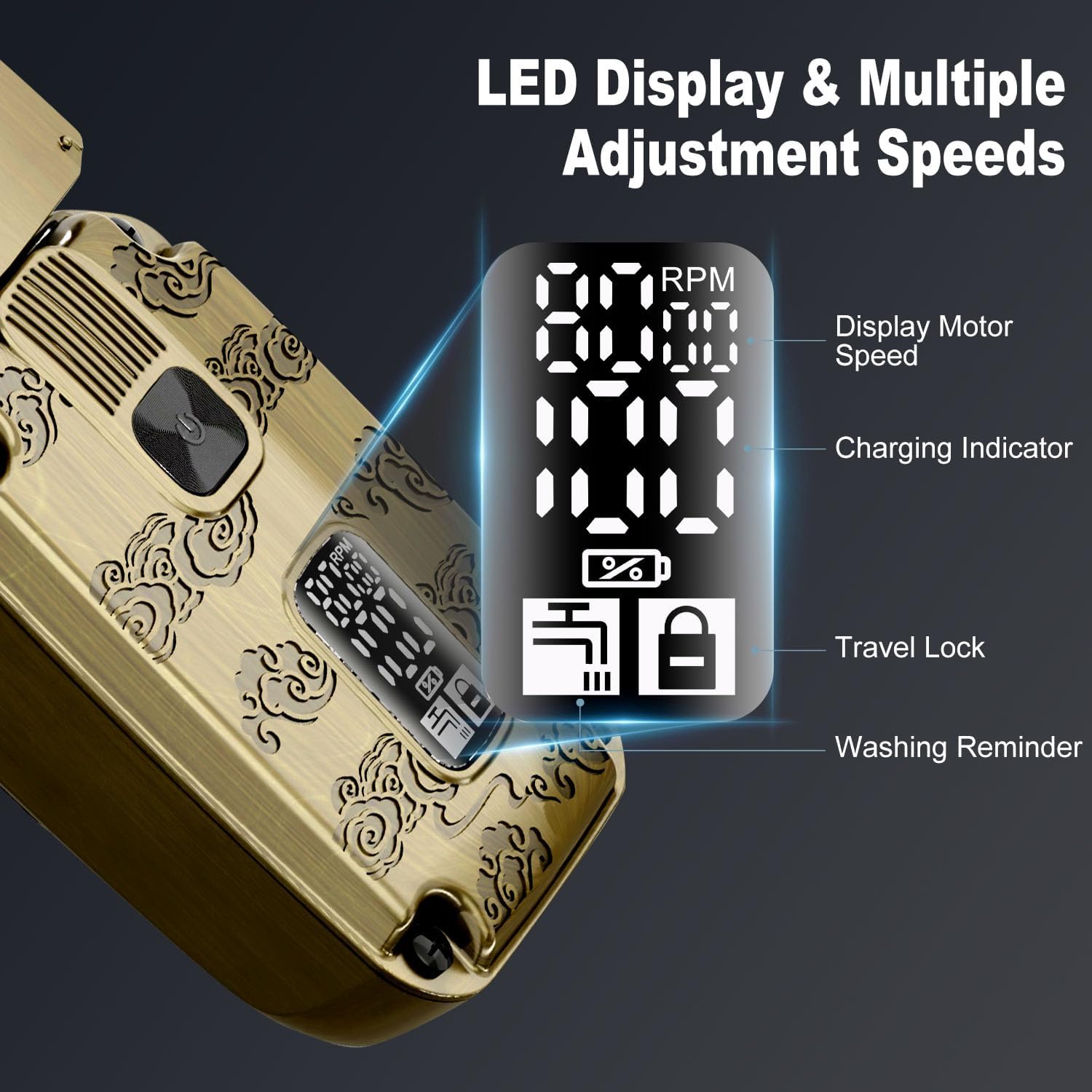
Image: A detailed view of the smart LED display, indicating motor speed (RPM), charging status, travel lock activation, and a cleaning reminder icon.
5.2 Shaving Your Beard
For best results, ensure your skin is clean and dry, or apply shaving cream for a wet shave.

Image: A visual guide demonstrating the steps for shaving a beard. Step 1: Open the pop-up trimmer. Step 2: Trim long and curly hair. Step 3: Leave some stubble. Step 4: Use the foil head part. Step 5: Shave off the stubble. Step 6: Complete shaving.
- If your beard is long, first use the pop-up trimmer to shorten the hair. To activate the pop-up trimmer, slide the switch located on the side of the shaver.
- Hold the shaver at a right angle to your skin.
- Move the shaver in short, circular motions or straight strokes against the direction of hair growth.
- Stretch your skin with your free hand to ensure a smooth surface for the shaver.
- Apply light pressure; excessive pressure is not necessary and can cause irritation.
5.3 Shaving Your Bald Head
For optimal results, it is recommended to trim longer hair short with the pop-up trimmer before using the foil shaver for a bald head shave.

Image: A visual guide demonstrating the steps for shaving a bald head. Step 1: Open the pop-up trimmer. Step 2: Trim the side hair. Step 3: Trim the top hair. Step 4: Trim the final hair. Step 5: Use the foil head part. Step 6: Complete shaving the bald head.
- If your hair is long, use the pop-up trimmer to cut it short first.
- Hold the shaver firmly and move it gently over your scalp in circular or linear motions.
- Ensure the foil head maintains contact with your skin for an even shave.
- The flexible foil system adapts to the contours of your head for a smooth finish.
5.4 Wet & Dry Shaving
The HT-933 is designed for both wet and dry use:
- Dry Shaving: Use on dry skin for a quick and convenient shave.
- Wet Shaving: Apply shaving cream or foam to your skin before shaving for a more comfortable experience, especially for sensitive skin. Rinse the shaver head under running water during and after use.

Image: Two panels illustrating the shaver's capability for both dry shaving (on a clean, dry face) and wet shaving (with shaving cream on the head).
5.5 Travel Lock Function
To prevent accidental activation during travel, the shaver features a travel lock:
- To activate: Press and hold the power button for 3 seconds. The travel lock icon will appear on the LED display.
- To deactivate: Press and hold the power button for 3 seconds again. The travel lock icon will disappear, and the shaver will be ready for use.
6. Maintenance and Cleaning
Regular cleaning ensures optimal performance and extends the lifespan of your shaver.
6.1 Daily Cleaning (After Each Use)
- Turn off the shaver.
- Press the hood release button to detach the cutter head.
- Use the included cleaning brush to remove loose hair from the foil and blades.
- Rinse the cutter head and the shaver body under running water. The IPX6 waterproof design allows for easy rinsing.
- Shake off excess water and allow all parts to air dry completely before reattaching the cutter head and placing the protective cover.
- For best maintenance, add a few drops of lubricating oil (not included) to the blades after drying.

Image: The shaver head being rinsed under running water in a sink, demonstrating its IPX6 waterproof design for easy cleaning.
6.2 Replacing the Shaver Head
For continued optimal performance, it is recommended to replace the shaver head every 12-18 months, or sooner if you notice reduced performance or damage.
- Turn off the shaver.
- Press the hood release button to detach the old cutter head.
- Align the new shaver head with the shaver body and press it down until it clicks into place.
7. Troubleshooting
| Problem | Possible Cause | Solution |
|---|---|---|
| Shaver does not turn on. | Battery is depleted. Travel lock is activated. | Charge the shaver. Deactivate the travel lock by pressing and holding the power button for 3 seconds. |
| Poor shaving performance. | Shaver head is dirty or clogged. Blades are dull or damaged. Hair is too long. | Clean the shaver head thoroughly. Consider replacing the shaver head. Use the pop-up trimmer to shorten long hair before shaving. |
| Shaver stops during use. | Battery is low. | Recharge the shaver. |
| Skin irritation after shaving. | Excessive pressure. Dry shaving on sensitive skin. Damaged foil. | Apply lighter pressure. Try wet shaving with foam/gel. Inspect foil for damage and replace if necessary. |
8. Specifications
| Feature | Detail |
|---|---|
| Model Number | HT-933 |
| Brand | Scttomon |
| Power Source | Battery Powered (Rechargeable) |
| Battery Type | Internal rechargeable battery (Note: Product specifications mention "1 AA batteries required. (included)" which may be a generic description; the product operates with a built-in rechargeable battery.) |
| Charging Time | Approx. 1.5 hours |
| Working Time | Approx. 75 minutes (fully charged) |
| Motor Speed | Adjustable (7000 RPM - 8000 RPM, up to 8500 RPM peak) |
| Waterproof Rating | IPX6 |
| Included Components | Cleaning Brush, USB Charging Cable, Protective Cover |
| Dimensions | 6.81 x 5.28 x 2.52 inches |
| Weight | 1.01 Pounds |
9. Warranty and Support
For warranty information or technical support, please refer to the product packaging or contact Scttomon customer service directly. Contact details are typically provided with your purchase or on the manufacturer's official website.