
YuYolex R11M
YuYolex Smart Ring R11M User Manual
Model: R11M
1. Product Overview
The YuYolex Smart Ring R11M is an advanced wearable device designed to help you monitor various aspects of your health and fitness. It integrates seamlessly into your daily life, providing data on heart rate, blood pressure, blood oxygen levels, and sleep quality. Additionally, it functions as a fitness tracker, recording steps, calories burned, and distance, and supports multiple sport modes. The ring connects to your smartphone via Bluetooth for data synchronization and analysis through the dedicated 'Smart Health' application.
Key features include:
- 24-hour Heart Rate Monitoring
- Blood Pressure and Blood Oxygen Monitoring
- Comprehensive Sleep Tracking (duration, light/deep sleep, awake time)
- Sport Record (Steps, Calories, Distance) and Multiple Sport Modes
- Remote Camera Control
- IP68 Waterproof Rating
- Magnetic Charging
2. Package Contents
Please verify that all items are present in your package:
- 1 x YuYolex Smart Ring (Black)
- 1 x Magnetic Charging Cable
- 1 x User Manual
3. Setup Guide
3.1. Charging the Smart Ring
Before first use, fully charge your Smart Ring. The ring uses magnetic charging for convenience.
- Connect the magnetic charging cable to a USB power source (e.g., computer USB port, wall adapter).
- Align the magnetic end of the cable with the charging contacts on the inside of the ring. The magnets will snap it into place.
- The ring will indicate charging status (e.g., an indicator light). A full charge typically takes a few hours and provides 2-4 days of use.

Image: The YuYolex Smart Ring, highlighting its internal sensors and magnetic charging points.
3.2. App Installation and Device Pairing
To utilize all features of your Smart Ring, you must install the 'Smart Health' application on your smartphone and pair the devices.
- Download the App: Search for 'Smart Health' in your smartphone's app store (compatible with iOS 8.0 or above, and Android 5.0 or above).
- Create Account: Open the app and follow the on-screen instructions to create a new user account or log in if you already have one.
- Enable Bluetooth: Ensure Bluetooth is enabled on your smartphone.
- Pair Device: Within the 'Smart Health' app, navigate to the device pairing section (often found under 'Device' or 'My Device'). Select your Smart Ring from the list of available Bluetooth devices.
- Confirm Pairing: Follow any prompts on both the app and the ring (if applicable) to confirm the pairing.

Image: A smartphone displaying the 'Smart Health' application interface, showing various health data screens.
3.3. Proper Wearing and Sizing
For accurate data collection, it is crucial to wear the Smart Ring correctly and ensure it is the appropriate size. A ring that is too loose may affect the accuracy of readings.
- Choose the Right Finger: Wear the ring on a finger that allows for a snug, but comfortable fit.
- Sensor Placement: Ensure the sensors on the inside of the ring are in good contact with your skin.
- Sizing: If you are unsure of your size, use the provided measuring method to determine the optimal fit.

Image: A step-by-step guide illustrating how to accurately measure your finger for proper ring sizing.
4. Operating Instructions
Once set up, your Smart Ring will automatically begin collecting data. Use the 'Smart Health' app to view and manage your health and fitness information.
4.1. Health Monitoring (Heart Rate, Blood Pressure, Blood Oxygen)
The Smart Ring continuously monitors your heart rate and allows for on-demand measurements of blood pressure and blood oxygen.
- Heart Rate: The ring automatically tracks your heart rate throughout the day. View detailed graphs and historical data in the 'Smart Health' app.
- Blood Pressure & Blood Oxygen: Open the 'Smart Health' app and navigate to the respective monitoring sections. Tap to initiate a real-time measurement. Remain still during the measurement for accurate results.

Image: Visual representation of the Smart Ring's capabilities, including Heart Rate, Blood Oxygen, and Blood Pressure monitoring.
4.2. Sleep Tracking
Wear the Smart Ring to bed, and it will automatically track your sleep patterns.
- The ring records sleep duration, light sleep, deep sleep, and awake times.
- Synchronize data with the 'Smart Health' app to view daily, weekly, and monthly sleep reports and analysis.
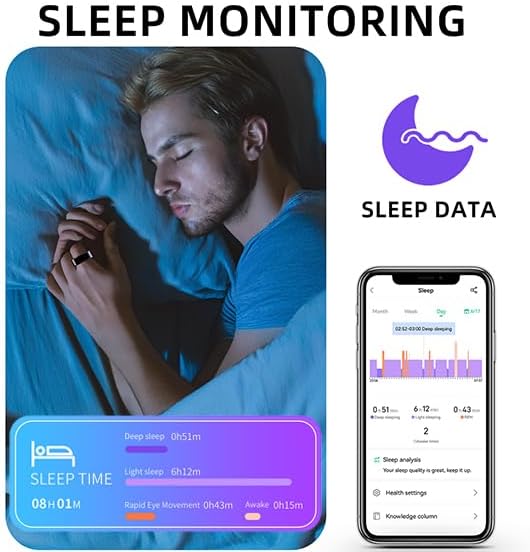
Image: A visual demonstrating the sleep monitoring feature, showing a person wearing the ring while sleeping and the corresponding sleep data displayed on a smartphone app.
4.3. Activity and Sport Tracking
The Smart Ring automatically tracks your daily activity and offers dedicated sport modes for more detailed exercise data.
- Daily Activity: Steps, calories burned, and distance traveled are automatically recorded throughout the day.
- Sport Modes: In the 'Smart Health' app, select a specific sport mode (e.g., cycling, walking) to track real-time heart rate, activity duration, and route (if GPS is enabled on your phone).

Image: A collage illustrating the sport tracking capabilities, showing individuals engaged in physical activity while wearing the ring, and the app displaying detailed sport records like mileage, consumption, and heart rate.
4.4. Remote Camera Function
The Smart Ring can act as a remote shutter for your smartphone's camera.
- Open the camera function within the 'Smart Health' app.
- Follow the app's instructions to use the ring as a remote trigger for taking photos.
5. Care and Maintenance
5.1. Cleaning
To maintain the performance and appearance of your Smart Ring:
- Wipe the ring regularly with a soft, dry, lint-free cloth.
- For stubborn dirt, slightly dampen the cloth with water. Avoid harsh chemicals or abrasive materials.
- Ensure the charging contacts are clean and dry before charging.
5.2. Water Resistance
The Smart Ring has an IP68 waterproof rating, meaning it is resistant to dust and can withstand immersion in water up to 1.5 meters for 30 minutes.
- It is suitable for daily activities such as washing hands, showering (cold water), and swimming.
- Important Note: Do NOT expose the ring to hot water, steam, or saunas, as this can compromise the waterproof seals and damage the device.

Image: A person in water, wearing the Smart Ring, illustrating its IP68 waterproof capability for activities like swimming and washing hands.
5.3. Battery Care
To prolong battery life:
- Avoid fully discharging the battery frequently.
- Store the ring in a cool, dry place when not in use for extended periods.
6. Troubleshooting
If you encounter issues with your Smart Ring, please refer to the following common solutions:
| Problem | Possible Cause | Solution |
|---|---|---|
| Ring not connecting to app | Bluetooth off, ring out of battery, app not updated, pairing issue. | Ensure Bluetooth is on, charge the ring, update 'Smart Health' app, try unpairing and re-pairing the device. |
| Inaccurate health/activity data | Improper fit, dirty sensors, ring not worn during activity/sleep. | Ensure the ring fits snugly, clean the sensors, wear the ring consistently for accurate tracking. |
| Battery drains quickly | Frequent data synchronization, old battery. | Reduce frequency of manual data syncs if possible, ensure background app refresh is optimized. If issue persists, contact support. |
| Ring not charging | Cable not connected properly, dirty contacts, faulty cable/charger. | Check cable connection, clean charging contacts, try a different USB port or charger. |
If you encounter any issues not listed here or if the suggested solutions do not resolve your problem, please contact our customer support for assistance.
7. Product Specifications
| Feature | Specification |
|---|---|
| Model Name | R11M |
| Product Dimensions | 0.39 x 0.39 x 0.39 inches |
| Item Weight | 2.64 ounces |
| Battery Type | Lithium Ion |
| Battery Capacity | 20mAh |
| Charging Type | Magnetic Charging |
| Work Time | 2-4 days (on a full charge) |
| Connectivity | Bluetooth 5.0 |
| Compatible System | iOS 8.0 or above, Android 5.0 or above |
| Waterproof Rating | IP68 |
| Special Features | Heart Rate, Sleep Tracker, Blood Pressure, Blood Oxygen, Pedometer, Sport Mode, Remote Camera |
8. Warranty and Support
Your YuYolex Smart Ring R11M is designed for reliability and performance. While specific warranty details are not provided in this manual, we are committed to providing excellent customer support.
If you have any questions, concerns, or require assistance with your Smart Ring, please do not hesitate to contact us. We aim to offer a satisfied solution within 24 hours of your inquiry.
For support, please refer to the contact information provided with your purchase or on the official YuYolex website.
Ask a question about this manual
Ask about setup, troubleshooting, compatibility, parts, safety, or missing instructions. Manuals+ will review the question and use this page’s manual context to help answer it.