1. Introduction
Welcome to the user manual for your Generic P9 Pro Mini Folding Phone, Model SFV57. This guide provides essential information on setting up, operating, and maintaining your device. Please read this manual thoroughly to ensure proper use and to maximize your phone's capabilities.
2. Product Overview
The Generic P9 Pro Mini Folding Phone is designed for simplicity and portability. It features a classic clamshell design, dual SIM card support, and a compact form factor.
Key Features:
- Clamshell Design: Compact and protective when closed.
- Dual SIM Support: Use two SIM cards simultaneously.
- Independent TF Card Slot: Expand storage with a memory card (not included).
- 1.77-inch Color HD Display: Clear internal screen for navigation.
- External Screen: Conveniently check incoming calls and messages without opening the phone.
- High Definition Camera: Capture photos.
- Professional Audio Speakers: Clear and loud sound for calls and media.
- Flashlight: Built-in utility for illumination.
- Music/Video Player & Radio: Entertainment on the go.
- Long Battery Life: Extended usage between charges.
- Large Buttons: Easy dialing and navigation.
- Speed Dial: Quick access to frequently called numbers.
- Dimensions: 62 x 62 x 20 mm.
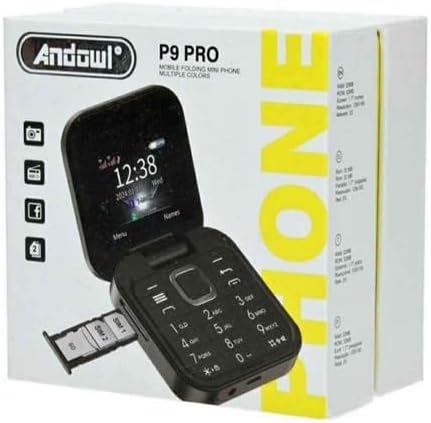
Image 2.1: The P9 Pro Mini Folding Phone in its open position, displaying the 1.77-inch color HD screen and the numeric keypad. This view highlights the phone's compact design and user-friendly button layout.

Image 2.2: The P9 Pro Mini Folding Phone in its closed, folded state. The back of the phone is visible, featuring the camera module. This image demonstrates the phone's compact and portable form factor when not in use.
3. Setup
3.1. Charging the Battery
- Connect the USB Type-C charger cable to the charging port on the phone.
- Plug the other end of the charger into a power outlet.
- The phone will indicate charging status on its display. Allow the phone to charge fully before first use.
3.2. Inserting SIM Cards and Memory Card
The P9 Pro Mini Folding Phone supports dual SIM cards and an independent TF (microSD) card for expandable storage.
- Gently open the phone's back cover.
- Locate the SIM card slots (SIM1, SIM2) and the TF card slot.
- Insert your nano SIM cards into the designated slots with the gold contacts facing down.
- If using, insert a TF (microSD) card into its dedicated slot.
- Ensure all cards are securely seated.
- Replace the back cover until it clicks into place.
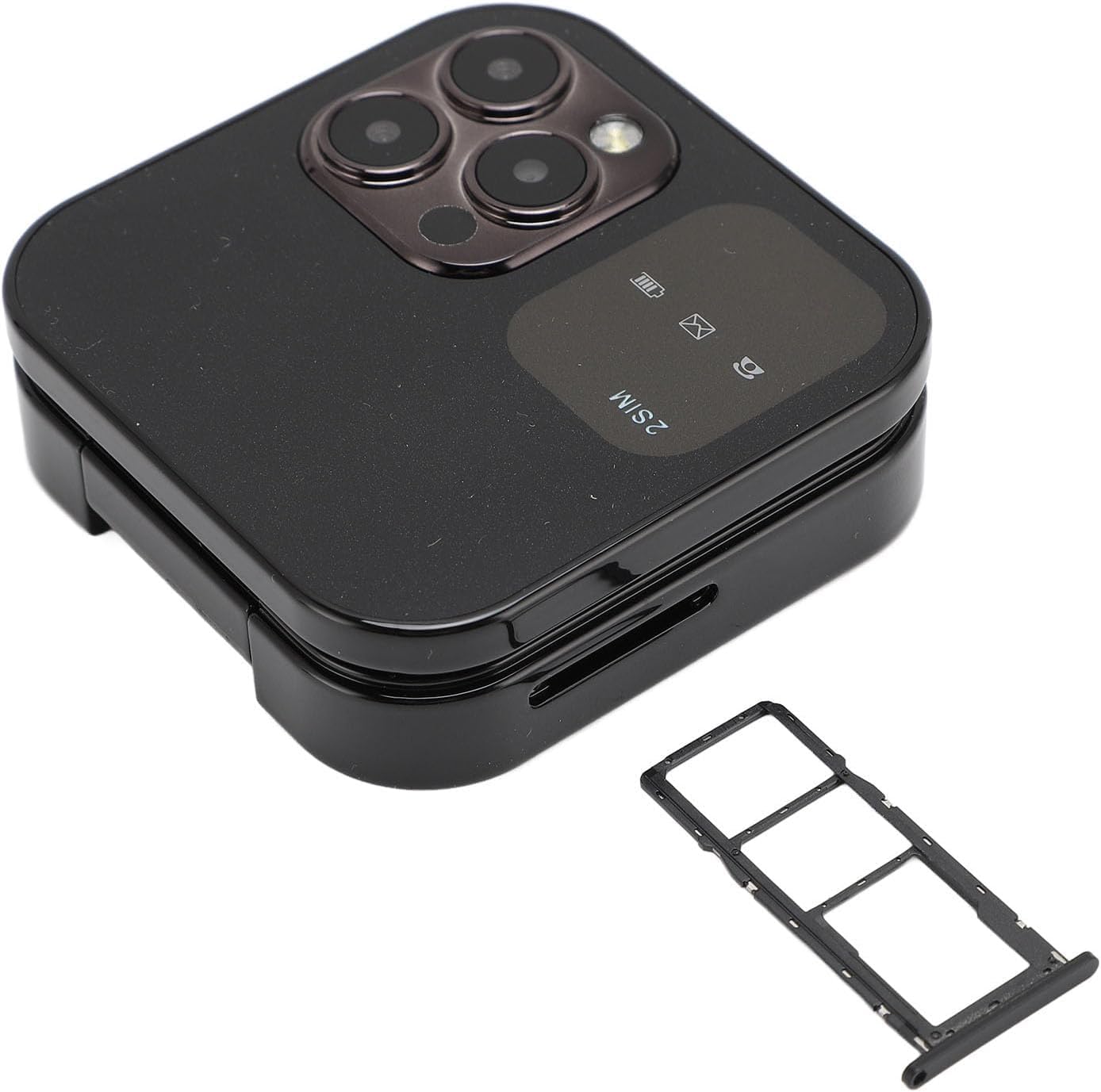
Image 3.1: The P9 Pro Mini Folding Phone shown with its SIM card tray partially ejected, illustrating the location for inserting SIM cards. This image is from the product packaging.
3.3. Powering On/Off
- To Power On: Press and hold the Power/End Call button until the screen lights up.
- To Power Off: Press and hold the Power/End Call button until the power-off options appear, then select "Power Off".
4. Operating Instructions
4.1. Making and Receiving Calls
- Making a Call: Enter the phone number using the keypad and press the Call button (usually green).
- Receiving a Call: When the phone rings, press the Call button to answer. To reject, press the End Call button (usually red).
- Ending a Call: Press the End Call button.
4.2. Sending and Receiving Messages
- Navigate to the "Messages" menu.
- Select "New Message" to compose a text.
- Enter the recipient's number and your message.
- Press "Send".
4.3. Camera Usage
- Access the "Camera" application from the main menu.
- Frame your shot using the display.
- Press the designated button (often the center navigation button) to capture the photo.
4.4. Multimedia Functions
- Music Player: Access the "Music" application to play audio files stored on your phone or memory card.
- Video Player: Access the "Video" application to play video files.
- FM Radio: Plug in headphones (acting as an antenna) and open the "FM Radio" application to listen to local radio stations.
4.5. Flashlight
To activate the flashlight, typically press and hold a specific key on the keypad (refer to your phone's quick guide or on-screen prompts for exact key). Repeat the action to turn it off.
4.6. Speed Dial
You can assign frequently called numbers to specific keys for speed dialing.
- Go to "Contacts" or "Settings" and look for "Speed Dial" options.
- Select an available number key (e.g., 2-9) and assign a contact from your phonebook.
- To use, simply press and hold the assigned number key.
5. Maintenance
5.1. Cleaning Your Phone
- Use a soft, lint-free cloth to wipe the screen and body of the phone.
- Avoid using harsh chemicals, cleaning sprays, or abrasive materials.
- Ensure the phone is powered off and unplugged before cleaning.
5.2. Battery Care
- Avoid exposing the phone to extreme temperatures.
- Do not puncture or disassemble the battery.
- Use only the provided or approved charger.
- For optimal battery life, avoid frequently draining the battery completely or keeping it at 100% charge for extended periods.
6. Troubleshooting
| Problem | Possible Solution |
|---|---|
| Phone does not power on. | Ensure the battery is charged. Connect the charger and try again. |
| No network signal. | Check if SIM card(s) are correctly inserted. Move to an area with better network coverage. |
| Cannot make or receive calls. | Verify network signal. Check if call barring is enabled. Ensure sufficient credit/plan. |
| Sound is too low/high. | Adjust the volume using the side volume buttons during a call or in settings. |
| Phone freezes or becomes unresponsive. | Remove and reinsert the battery (if removable), then power on again. If not removable, press and hold the power button for 10-15 seconds to force a restart. |
7. Specifications
| Feature | Detail |
|---|---|
| Brand | Generic |
| Model Name | SFV57 |
| Product Type | Foldable Screen (Clamshell) |
| Operating System | EMUI 10.0 (Note: This is likely a generic feature phone OS, not actual Huawei EMUI) |
| Display | 1.77 inch Color HD display |
| Resolution | 540 x 960 |
| Memory Storage Capacity | 64 MB (Internal, likely for OS/contacts) |
| Expandable Storage | Independent TF card slot (up to 16GB, card not included) |
| Cellular Technology | 2G |
| Wireless Carrier | Unlocked for All Carriers |
| Connector Type | USB Type C |
| Camera | High definition camera (Effective still resolution: 32.5 MP *Note: This resolution seems unusually high for a basic phone and might be a typo in the source data. Users should manage expectations.*) |
| Dimensions | 62 x 62 x 20 mm |
| Color (Example) | Black (Multiple colors available) |
8. Warranty and Support
8.1. Manufacturer's Warranty
This product comes with a manufacturer's warranty of 2 weeks from the date of purchase. Please retain your proof of purchase for any warranty claims. The warranty covers manufacturing defects under normal use. It does not cover damage caused by misuse, accidents, unauthorized modifications, or normal wear and tear.
8.2. Spare Part Availability
Information regarding the availability of spare parts for this product is currently not available or provided by the manufacturer.
8.3. Customer Support
For further assistance or inquiries, please contact your retailer or the point of purchase.