
Introduction
Thank you for choosing the Generic ST-5525B Wireless Portable Tire Inflator. This device is designed to provide convenient and accurate tire inflation for various vehicles and inflatables. Please read this manual thoroughly before use to ensure safe and optimal performance.
Safety Information
- Always ensure the inflator is fully charged before use, especially for critical situations.
- Do not leave the inflator unattended while in operation.
- Keep out of reach of children.
- Avoid over-inflating tires. The digital display provides real-time pressure monitoring and automatic shut-off to prevent over-inflation.
- Do not operate the device in wet conditions or near flammable liquids or gases.
- If the device becomes unusually hot during operation, turn it off and allow it to cool before resuming use.
- Use only the provided charging cable and accessories.
Package Contents
The ST-5525B Wireless Portable Tire Inflator package includes the following items:
- 1 x Portable Tire Inflator Air Compressor (ST-5525B)
- 1 x Air Hose
- 3 x Air Nozzles (various types for different inflatables)
- 1 x Type-C Charging Cable
- 1 x Instruction Manual

Image: The ST-5525B package contents, including the inflator, air hose, three different nozzles, and a Type-C charging cable.
Product Overview
The ST-5525B is a compact and powerful wireless tire inflator featuring a digital display for precise pressure readings and control. Its portable design allows for easy storage and use anywhere.
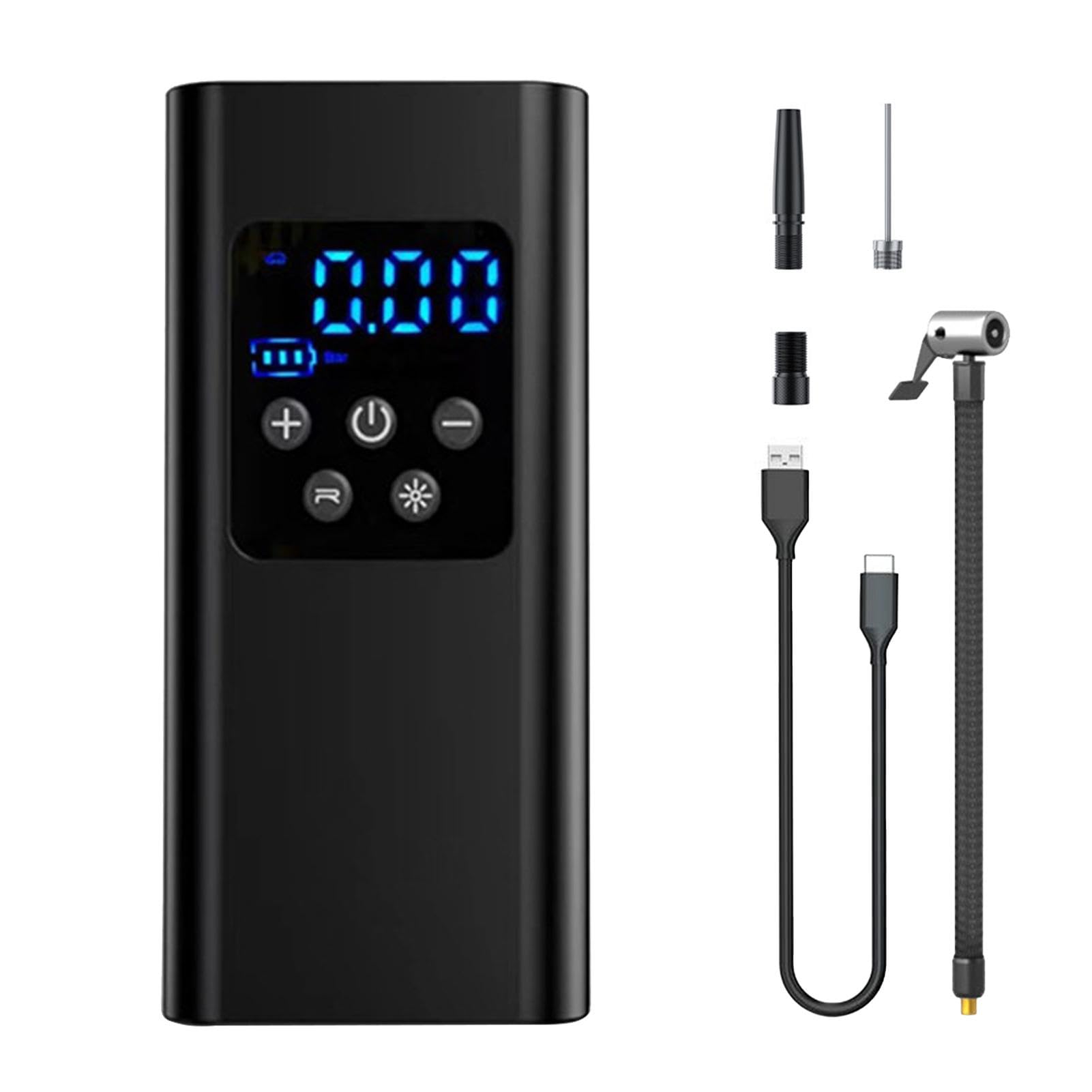
Image: Front view of the ST-5525B Portable Tire Inflator, showcasing its digital display and control buttons.
Compact Design
The inflator's small size makes it easy to store in your car or carry with you, ensuring it's always available when needed. It is approximately one-third the size of a traditional air pump.

Image: The ST-5525B inflator placed next to a smartphone, illustrating its compact and portable size.

Image: Diagram showing the dimensions of the ST-5525B Portable Tire Inflator: 16.2cm (6.38in) height, 8cm (3.14in) width, and 4.7cm (1.85in) depth.
LED Emergency Lighting
Equipped with an integrated LED light, the inflator can serve as a flashlight, emergency warning light, or rescue light, enhancing safety during nighttime or critical situations.

Image: The ST-5525B inflator demonstrating its LED emergency lighting function, useful for tire changes or as a warning signal.
Specifications
| Product Name | Portable Tire Inflator Air Compressor |
| Product Model | ST-5525B (Wireless, 7.4V, 2-cell battery, LCD display) |
| Product Material | ABS |
| Product Size | Approx. 16.2 x 8 x 4.7 cm (6.38 x 3.15 x 1.85 inches) |
| Rated Input | 5V2A |
| Piston Diameter | 19 mm (0.75 inches) |
| Working Power | 60W |
| Pressure Range | 3-150 PSI |
| Accuracy | ±1.5 PSI |
| Air Volume | 19 L/min |
| Continuous Use Time | 8-10 minutes |
| Inflation Time (0-30 PSI for 195/65R15 tire) | 6-7 minutes |
| Inflation Time (0-40 PSI) | 7-8 minutes |
| Type-C Charging Cable Length | Approx. 80 mm (3.15 inches) |
| Charging Time | 3-5 hours |
| Charging Interface | Type-C |
| Usage Time (after full charge) | 30 minutes |
| Air Hose Length | 200 mm ± 10 mm (7.87 ± 0.39 inches) |
| Product Net Weight | 500g |
| Product Gross Weight | 600g (including packaging and accessories) |
Setup
- Charge the Device: Before first use, fully charge the inflator using the provided Type-C charging cable and a 5V2A power adapter (not included). The charging indicator on the display will show charging status.
- Attach Air Hose: Screw the air hose securely onto the inflator's air outlet.
- Select Nozzle: Choose the appropriate air nozzle for the item you wish to inflate and attach it to the other end of the air hose.
Operating Instructions
1. Power On/Off
- Press and hold the power button to turn the device on or off.
2. Connect to Item
- Connect the air hose with the selected nozzle to the tire valve or inflatable item. Ensure a tight seal to prevent air leakage. The digital display will show the current pressure.
3. Select Mode and Set Pressure
- Press the 'M' button to cycle through different inflation modes (e.g., Car, Motorcycle, Bicycle, Ball). Each mode has a default pressure setting.
- Use the '+' and '-' buttons to adjust the target pressure to your desired value.

Image: Visual guide for different inflation applications, including cars (2.2-2.8 bar), motorcycles (1.8-2.8 bar), bicycles (30-90 psi), balls (7-9 psi), swimming rings (1-150 psi), and inflatable boats (1-2.5 psi).
4. Start Inflation
- Press the inflation button (usually indicated by a play/start icon) to begin inflation. The device will automatically stop when the preset pressure is reached.
5. Disconnect
- Once inflation is complete, quickly disconnect the air hose from the item to minimize air loss.
6. LED Light Operation
- Press the light button (often indicated by a lightbulb icon) to cycle through different light modes: LED work light, flashing warning light, and flashing rescue light.
Maintenance
- Cleaning: Wipe the exterior of the inflator with a soft, dry cloth. Do not use harsh chemicals or abrasive cleaners.
- Storage: Store the inflator in a cool, dry place away from direct sunlight and extreme temperatures. Ensure it is fully charged before long-term storage.
- Battery Care: To prolong battery life, avoid completely draining the battery frequently. Recharge the device regularly, even if not in use.
- Hose and Nozzles: Inspect the air hose and nozzles for any damage or blockages before each use. Replace if necessary.
Troubleshooting
| Problem | Possible Cause | Solution |
|---|---|---|
| Inflator does not turn on. | Low battery or device is off. | Charge the device fully. Press and hold the power button to turn on. |
| No air comes out or inflation is slow. | Air hose not securely connected, nozzle blocked, or low battery. | Ensure hose and nozzle are tightly connected. Check for blockages. Recharge the device. |
| Inaccurate pressure reading. | Poor connection to valve. | Ensure the nozzle is firmly attached to the tire valve. |
| Device stops unexpectedly. | Reached preset pressure, low battery, or overheating. | Check if target pressure is reached. Recharge if battery is low. Allow device to cool down if it feels hot. |
Warranty and Support
This product comes with a standard manufacturer's warranty. For specific warranty details, please refer to the documentation provided at the time of purchase or contact your retailer. For technical support or inquiries, please reach out to the seller directly through the platform where the product was purchased.