
1. Introduction
This manual provides comprehensive instructions for the proper installation, operation, and maintenance of the chenyang SFF-8643 Coupler Adapter. This adapter is designed to facilitate internal Mini SAS 4.0 SFF-8643 connections, enabling the expansion of storage and data transfer capabilities within compatible systems. Please read this manual thoroughly before use to ensure optimal performance and safety.
2. Product Overview
The chenyang SFF-8643 Coupler Adapter is an internal Mini Serial Attached SCSI HD x4 (SFF-8643) to SFF-8643 adapter. It allows for the connection of two SFF-8643 connectors, extending or adapting internal SAS pathways. This High Density (HD) system, also known as HD Mini-SAS (SFF-8643) in the SAS4.0 standard, supports data transfer speeds up to 24Gb/s SAS and 8GT/s for PCIe per channel. Its compact design helps save device space, making it suitable for servers, data storage systems, and workstations that meet PCIe Gen3/4 and SAS4.0 specifications.
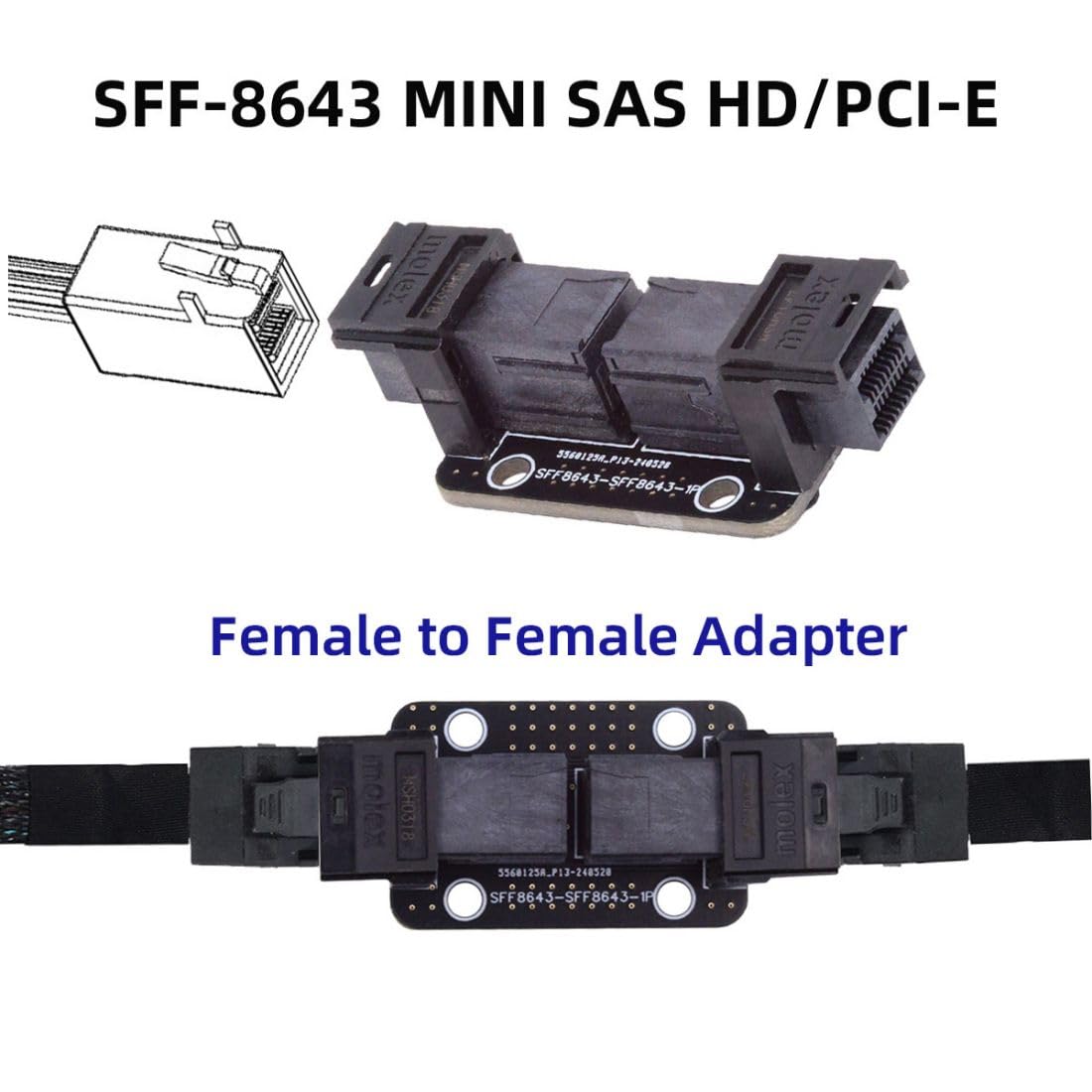
Image 2.1: The chenyang SFF-8643 Coupler Adapter, illustrating its function as a female-to-female adapter for Mini SAS HD/PCI-E connections. This image shows the adapter with a diagram of the SFF-8643 connector and highlights its role in connecting two SFF-8643 cables.

Image 2.2: Front and back views of the SFF-8643 Coupler Adapter. The front view displays the two SFF-8643 female ports, while the back view shows the circuit board and mounting holes, providing a complete visual of the adapter's physical design.
3. Setup and Installation
The SFF-8643 Coupler Adapter is designed for straightforward integration into existing systems. Follow these steps for proper installation:
- Power Off System: Before beginning any installation, ensure your computer or server system is completely powered off and disconnected from the power source to prevent electrical damage or injury.
- Locate Connection Points: Identify the internal SFF-8643 cables or ports within your system that require connection or extension.
- Connect Adapter: Carefully align one end of an SFF-8643 cable with one of the female ports on the coupler adapter. Gently push until it clicks into place, ensuring a secure connection. Repeat this process for the second SFF-8643 cable on the other side of the adapter.
- Secure Adapter (Optional): If your system chassis provides mounting points, you may secure the adapter using appropriate screws to prevent movement.
- Verify Connections: Double-check all connections to ensure they are firm and properly seated.
- Power On System: Once all connections are verified, reconnect the power and power on your system.

Image 3.1: A visual guide demonstrating typical connection scenarios for the SFF-8643 Coupler Adapter. This includes its use with a Mini-SAS RAID card connecting to multiple drives and with a Mini HD PCI-E card, illustrating how the adapter extends or connects SFF-8643 cables within a system.
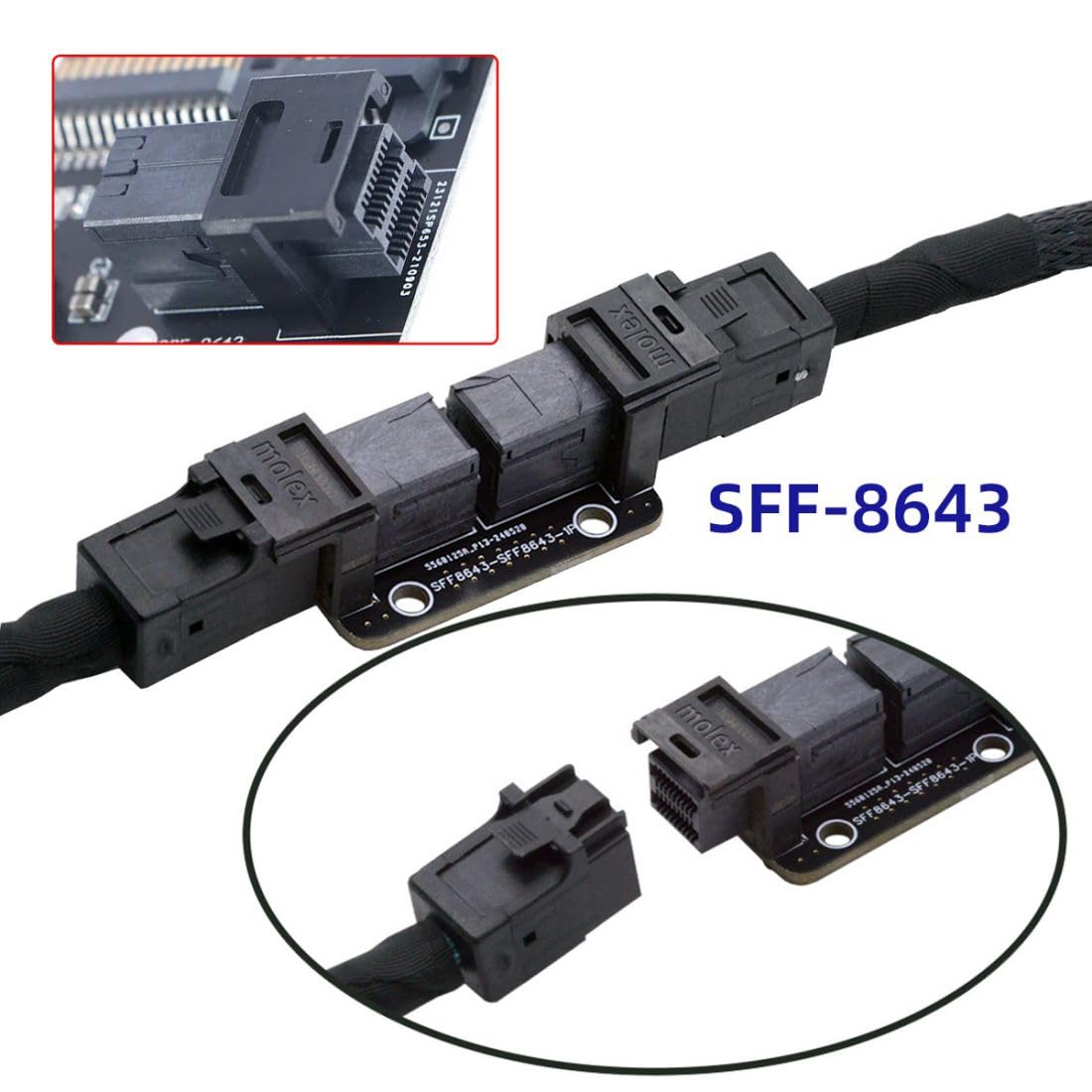
Image 3.2: An example of an SFF-8643 cable connected to the adapter. This image shows the adapter in line with a cable, demonstrating how the female-to-female connection is established to extend or join two SFF-8643 cables.

Image 3.3: This image clarifies the specific compatibility of the adapter, showing that it is designed for MINI SAS HD (SFF-8643) connectors and is not compatible with older MINI SAS, Slim SAS, or standard SATA connectors. This visual distinction helps users identify the correct cable type for use with the adapter.
4. Operating Instructions
The chenyang SFF-8643 Coupler Adapter functions as a passive pass-through device. Once correctly installed, it requires no additional software or drivers for operation. Its primary role is to extend or connect existing SFF-8643 cables, facilitating data transfer between compatible devices such as RAID cards, host bus adapters (HBAs), and storage backplanes.
- Ensure all connected devices are powered on and recognized by the operating system.
- Verify that the connected cables are SFF-8643 compliant to ensure proper data transmission.
- The adapter supports four channels of signal transmission, adhering to industry standards for SAS and PCIe data speeds.
5. Maintenance
The SFF-8643 Coupler Adapter is a low-maintenance component. To ensure its longevity and reliable performance, consider the following:
- Keep Clean: Periodically inspect the adapter and its connectors for dust or debris. Use compressed air or a soft, dry cloth to gently clean the surfaces. Avoid using liquid cleaners.
- Handle with Care: When installing or removing cables, always handle the adapter by its body, not by the connectors or cables. Avoid excessive force.
- Environmental Conditions: Ensure the adapter is used within a stable environment, free from extreme temperatures, high humidity, or corrosive substances.
- Secure Connections: Regularly check that all cable connections remain secure to prevent intermittent signal loss.
6. Troubleshooting
If you encounter issues with the SFF-8643 Coupler Adapter, refer to the following troubleshooting steps:
| Problem | Possible Cause | Solution |
|---|---|---|
| Devices not detected | Loose cable connections Incorrect cable type System not powered on correctly | Ensure all SFF-8643 cables are securely connected to the adapter and devices. Verify that you are using SFF-8643 cables, not other SAS/SATA types. Restart the system and check BIOS/UEFI settings for device recognition. |
| Slow data transfer speeds | Cable quality System limitations Incorrect port usage | Use high-quality SFF-8643 cables. Ensure your RAID card, HBA, and storage devices support the expected data rates (SAS4.0, PCIe Gen3/4). Confirm that the connected ports on your motherboard or expansion card are operating at their full potential. |
| Physical damage to adapter | Improper handling Environmental stress | Handle the adapter carefully during installation and removal. Ensure the adapter is not subjected to physical stress or extreme conditions. If damaged, replace the unit. |
7. Specifications
- Model Number: CY-SF-089
- Connector Type: SFF-8643 Female to SFF-8643 Female
- Data Speed: 24Gbps for SAS, 8GT/s for PCIe per channel
- Channels: Four channels signal transmission
- Compatibility: Internal Mini SAS HD (SFF-8643) systems, PCIe Gen3/4, SAS4.0 specifications
- Compatible Devices: PC, Servers, Data Storage, Workstations
- Color: Black
- Item Weight: 8 Grams (0.28 ounces)
- Package Dimensions: 3.82 x 2.2 x 0.51 inches

Image 7.1: A detailed pinout diagram illustrating the SFF-8643 to SFF-8643 connection. This diagram shows the arrangement of pins (D1-D9, C1-C9, B1-B9, A1-A9) on both sides of the adapter, providing technical insight into its electrical configuration.

Image 7.2: Close-up views of the SFF-8643 connector. This image details the SFF-8643 female port, the mating process with a cable, and the SFF-8643 plug, providing a clear understanding of the physical interface.
8. Warranty and Support
For warranty information and technical support, please refer to the official chenyang website or contact your retailer. Keep your purchase receipt as proof of purchase for any warranty claims.
Contact Information:
For further assistance, please visit the chenyang Store on Amazon or consult the product packaging for specific support details.