
1. Introduction
Thank you for choosing the Erazers XP2 Over The Ear Wireless Earbuds. These earbuds are designed to provide a superior audio experience with advanced features for convenience and versatility. This manual will guide you through the setup, operation, and maintenance of your new earbuds.
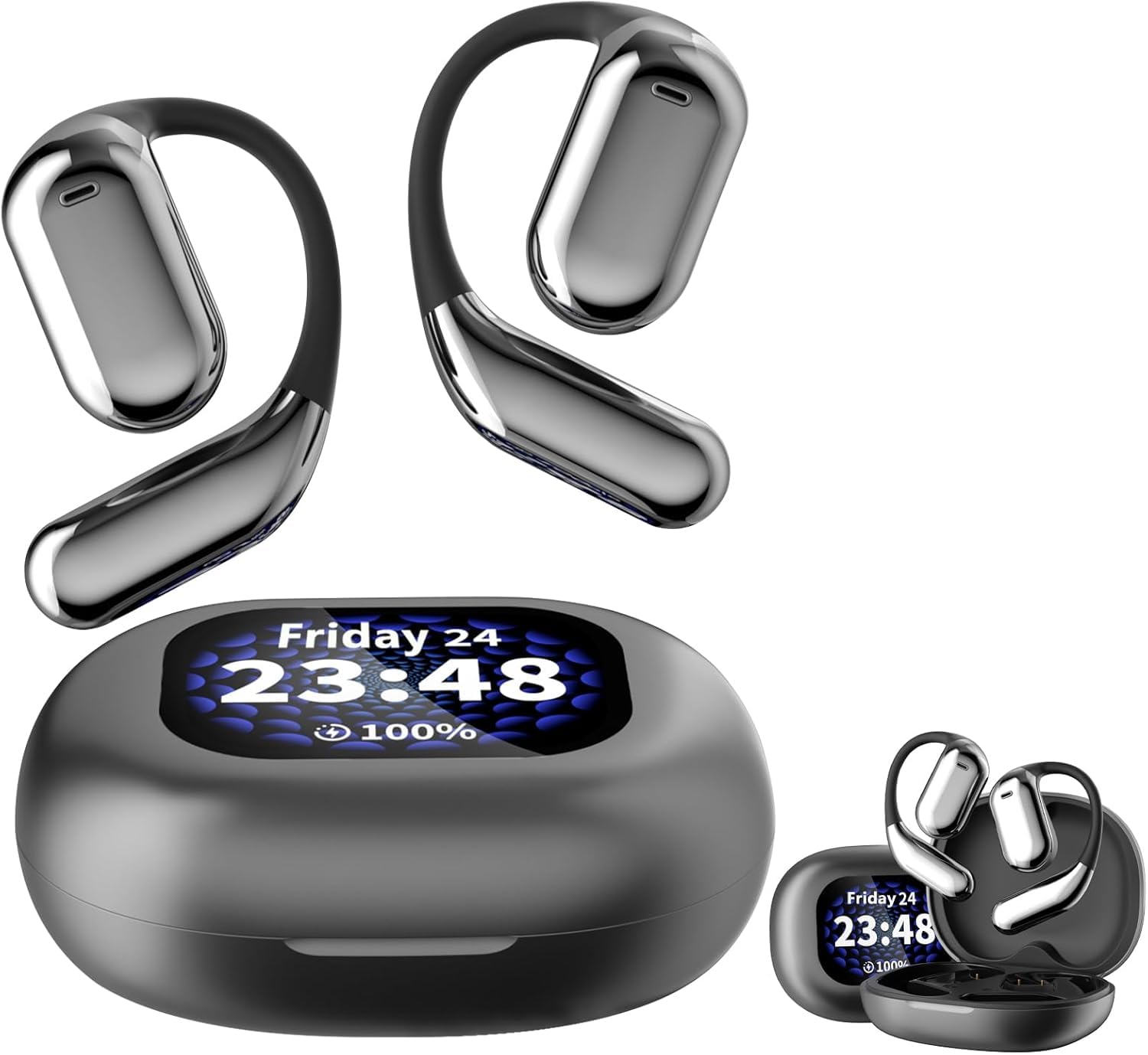
Figure 1: Erazers XP2 Earbuds and Charging Case
2. Package Contents
Ensure all items are present in your package:
- Erazers XP2 Over The Ear Wireless Earbuds (Left and Right)
- Intelligent Touch Screen Charging Case
- USB-C Charging Cable
- User Manual
3. Product Overview
The Erazers XP2 earbuds feature an over-the-ear design for secure and comfortable fit, ideal for various activities including running, exercising, cycling, and gaming. The accompanying charging case is equipped with an intelligent touch screen for enhanced control.
3.1 Earbuds
- Earpiece Shape: Over-ear for secure fit.
- Control Method: Touch-sensitive controls for media and calls.
- Water Resistance: IPX5 rated for sweatproof protection.
- Audio Driver: Dynamic Driver for superior sound quality.
3.2 Charging Case
- Display: Intelligent full-color touch screen for easy navigation.
- Battery Indicator: LED display shows battery life of both earbuds and case.
- Charging Interface: USB-C for fast charging.
- Additional Features: Flashlight, alarm clock, find my earphone function.
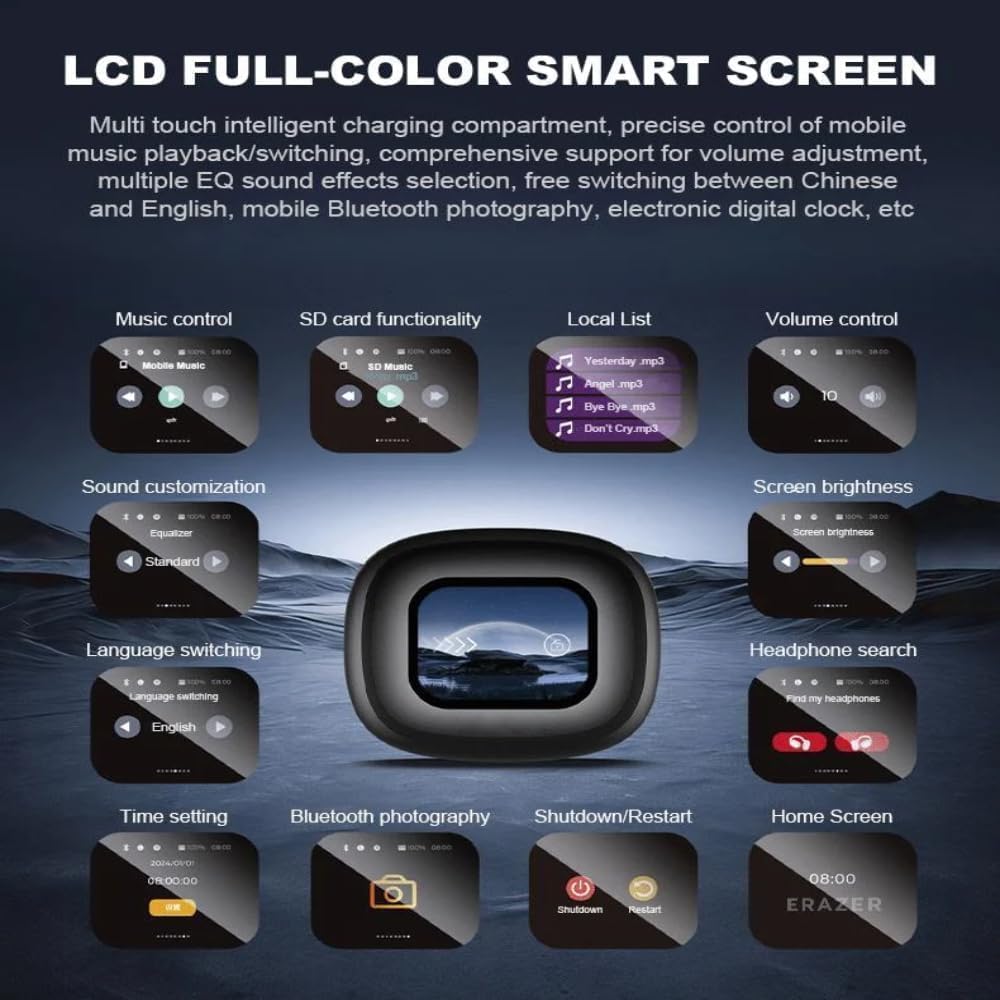
Figure 2: Earbuds in Charging Case
4. Setup
4.1 Initial Charging
Before first use, fully charge the charging case and earbuds.
- Place both earbuds into the charging case.
- Connect the USB-C charging cable to the charging port on the case and to a power source.
- The LED display on the case will show the charging status. A full charge takes approximately 1 hour for the earbuds and 1.5 hours for the case.

Figure 3: Charging Time Overview
4.2 Pairing with Your Device
The earbuds will automatically enter pairing mode when removed from the case.
- Open the charging case and remove both earbuds.
- On your Bluetooth-enabled device (e.g., smartphone, tablet), go to Bluetooth settings.
- Search for "Erazers XP2" in the list of available devices and select it to connect.
- Once connected, the earbuds will indicate successful pairing.
5. Operating Instructions
5.1 Touch Screen Controls (Charging Case)
The intelligent touch screen on the charging case provides intuitive control over various functions:
- Music Control: Play/pause, skip tracks, adjust volume.
- SD Card Functionality: Access and play music directly from a TF card inserted into the case.
- Volume Control: Adjust audio output directly from the case.
- Sound Customization: Select from multiple equalizer presets (Normal, Pop, Rock, Jazz, Classical, Folk, Custom) and spatial sound settings (movie mode, game mode).
- Screen Brightness: Adjust the display brightness for comfort and battery saving.
- Language Switching: Change the display language (English, Mandarin, German, Spanish, Portuguese, French).
- Headphone Search: Use the "Find my earphone" feature to locate misplaced earbuds by emitting a sound.
- Time Setting: Set the current time and use the alarm clock function.
- Bluetooth Photography: Control your phone's camera remotely.
- Shutdown/Restart: Power off or restart the device.

Figure 4: Charging Case Touch Screen Functions
5.2 Earbud Touch Controls
The earbuds themselves feature touch-sensitive areas for direct control:
- Play/Pause: Click Left or Right earbud once.
- Previous Song: Hold Left earbud for 1 second.
- Next Song: Hold Right earbud for 1 second.
- Answer/Hang Up Call: Click Left or Right earbud once.
- Reject Call: Hold Left or Right earbud for 2 seconds.
- Volume +: Double-click Left earbud to increase volume by 1 level.
- Volume -: Double-click Right earbud to decrease volume by 1 level.
- Activate Siri: Three clicks on the Left earbud.
- Switch Games/Movies Musical Pattern: Three clicks on the Right earbud.
- Switch to Transparent/Default ENC/Normal Mode: Four clicks on Left or Right earbud.

Figure 5: Earbud Touch Control Functions
5.3 Sound Customization
The Erazers XP2 offers various sound modes to optimize your listening experience:
- Equalizer Presets: Choose from Normal, Pop, Rock, Jazz, Classical, Folk, or create a Custom setting.
- Spatial Sound: Dedicated modes for movies and games enhance audio immersion.
- Noise Control: Adaptive Noise Cancellation (ANC) and Transparent/Normal modes are available.

Figure 6: Music Preferences and Sound Adjustment

Figure 7: Game Mode and Movie Mode Sound Enhancements
6. Charging
The charging case provides extended battery life for your earbuds. The case itself can be charged via USB-C.
- Earbud Endurance: Approximately 10 hours of single use.
- Overall Endurance (with case): Up to 40 hours.
- Case Battery Capacity: 500mAh.

Figure 8: Battery Life and Charging Case Capacity
7. Maintenance
7.1 Cleaning
Regular cleaning ensures optimal performance and hygiene:
- Wipe the earbuds and charging case with a soft, dry, lint-free cloth.
- Do not use abrasive cleaners, alcohol, or chemical solvents.
- Ensure charging contacts are clean and dry before placing earbuds in the case.
7.2 Storage
Store the earbuds in their charging case when not in use to protect them and keep them charged.
7.3 Water Resistance (IPX5)
The earbuds are IPX5 water resistant, meaning they can withstand splashes and sweat. They are not designed for submersion in water. Avoid exposing them to high-pressure water or prolonged immersion.
8. Troubleshooting
If you encounter issues with your Erazers XP2 earbuds, try the following solutions:
| Problem | Solution |
|---|---|
| Earbuds not pairing | Ensure earbuds are charged. Turn off and on Bluetooth on your device. Try resetting the earbuds (refer to case touch screen options). |
| No sound or low volume | Check device volume and earbud volume controls. Ensure earbuds are properly seated in your ears. Clean any debris from earbud speakers. |
| Charging case not charging | Ensure USB-C cable is securely connected to both the case and power source. Try a different cable or power adapter. |
| Touch controls unresponsive | Ensure earbuds are clean and dry. Restart the earbuds by placing them in the case and closing/opening the lid. |
| "Find my earphone" feature not working | Ensure the earbuds are within Bluetooth range of the charging case. |
9. Specifications
| Feature | Detail |
|---|---|
| Model Name | Erazers Over The Ear Earbuds Xp2 |
| Brand | Generic |
| Connectivity Technology | Wireless (Bluetooth 5.4) |
| Bluetooth Range | 10 meters (Barrier free) |
| Noise Control | Adaptive Noise Cancellation |
| Earbud Battery Life (Single Use) | Approx. 10 hours |
| Total Battery Life (with Case) | Approx. 40 hours |
| Charging Case Battery Capacity | 500mAh |
| Charging Time | Approx. 1 hour (earbuds), 1.5 hours (case) |
| Charging Interface | USB-C |
| Water Resistance Level | IPX5 (Water Resistant) |
| Frequency Range | 20 Hz - 20,000 Hz |
| Impedance | 80 Ohm |
| Material | Plastic, Protein Leather, Silicone, Glass |
| Country of Origin | China |

Figure 9: Detailed Product Parameters
10. Official Product Video
Video 1: Erazers Xp2 Over The Ear Earbuds - An official overview of the product's features and design.
11. Warranty and Support
For warranty information and customer support, please refer to the contact details provided on the product packaging or the official Generic brand website. Keep your purchase receipt for any warranty claims.