
1. Introduction
The Meudeen VC08 / Air-08 is an innovative 3-in-1 multifunction device designed for comprehensive cleaning. It functions as a mini vacuum cleaner, an air duster, and an air blower. This versatile tool is ideal for cleaning computers, keyboards, car interiors, and other hard-to-reach places, offering powerful cleaning capabilities in a compact, cordless design.
This manual provides detailed instructions on how to safely and effectively use, maintain, and troubleshoot your Meudeen Air Duster & Vacuum Cleaner.
2. Safety Information
Please read all safety instructions carefully before using the device. Failure to follow these instructions may result in electric shock, fire, or serious injury.
- Keep the device dry. Do not expose it to rain or moisture.
- Do not operate the device with a damaged cord or plug.
- Keep hair, loose clothing, fingers, and all parts of the body away from openings and moving parts.
- Do not use to pick up flammable or combustible liquids, such as gasoline, or use in areas where they may be present.
- Do not pick up anything that is burning or smoking, such as cigarettes, matches, or hot ashes.
- Use only as described in this manual. Use only manufacturer's recommended attachments.
- Do not disassemble or attempt to repair the device yourself. Contact qualified service personnel for repairs.
- Store the device in a cool, dry place when not in use, out of reach of children.
3. Package Contents
Verify that all items are included in your package:
- Meudeen Air Duster & Vacuum Cleaner Main Unit
- Various Nozzles (e.g., brush nozzle, flat nozzle, round nozzle)
- Flexible Hose
- Reusable HEPA Filter (one pre-installed)
- USB-C Charging Cable

Image: Main unit and included accessories, showing the device in both vacuum and duster configurations.
4. Product Overview
Familiarize yourself with the main components of your device:
- Main Unit: Contains the motor, battery, and control buttons.
- Dust Collection Bin: Transparent compartment for collecting debris in vacuum mode.
- HEPA Filter: Located inside the dust collection bin, filters out fine particles.
- Air Outlet (Blower): Located at the front, for air duster and blower functions.
- Air Inlet (Vacuum): Located at the rear, for vacuum cleaner function.
- Power Button/Speed Control: Controls power and switches between 3 air speeds.
- USB-C Charging Port: For recharging the internal battery.
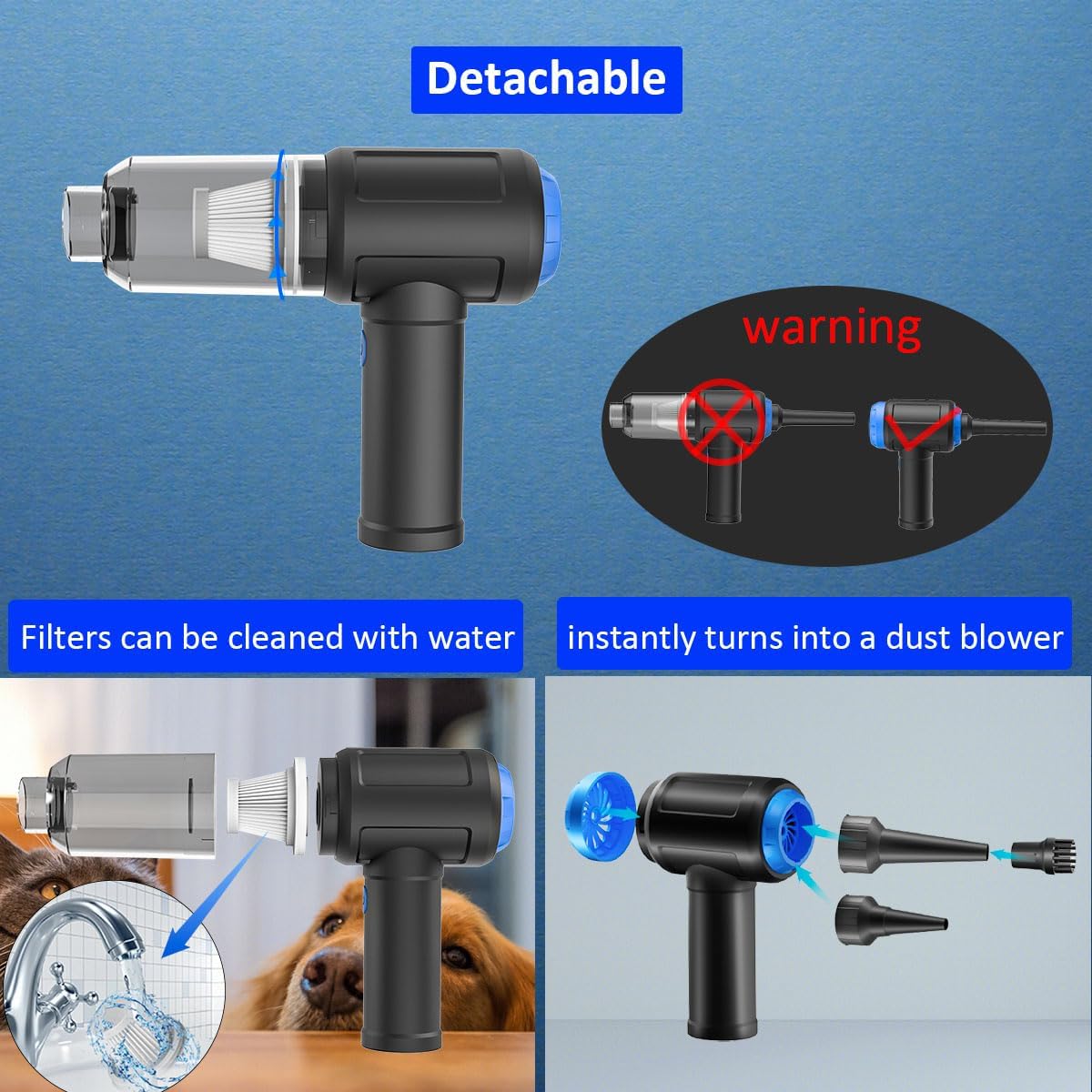
Image: The device disassembled, highlighting the detachable dust bin and filter, and showing how it converts into a dust blower.
5. Setup
5.1 Initial Charging
Before first use, fully charge the device. The built-in 5000mAh lithium battery requires approximately 3-4 hours for a full charge.
- Connect the provided USB-C charging cable to the charging port on the device.
- Connect the other end of the USB-C cable to a compatible USB power adapter (not included) or a computer USB port.
- The indicator light will show charging status (refer to device's LED indicator for specific behavior).
- Once fully charged, disconnect the charging cable.

5.2 Attaching Nozzles
Select the appropriate nozzle for your cleaning task and attach it firmly to either the air outlet (for blowing) or the air inlet (for vacuuming).
- For Air Duster/Blower Mode: Attach the desired nozzle to the front air outlet.
- For Vacuum Cleaner Mode: Attach the desired nozzle to the rear air inlet. Ensure the dust collection bin is securely attached.
- For Air Pump Mode: Connect the vacuum slot to the rear air inlet.
6. Operating Instructions
6.1 Power On/Off and Speed Control
The device features 3 adjustable air speeds.
- To turn on the device, press and hold the power button. It will start at the 1st speed.
- Press the power button again to cycle through the 2nd speed and 3rd speed.
- To turn off the device, press the power button one more time after the 3rd speed, or press and hold the power button from any speed.

Image: Visual representation of the three speed modes (7000Pa, 10000Pa, 14500Pa) and their approximate runtimes.
6.2 Air Duster Mode
Use this mode for blowing dust and debris from surfaces.
- Attach the desired blowing nozzle (e.g., narrow nozzle for concentrated air, brush nozzle for sweeping dust).
- Point the nozzle towards the area to be cleaned.
- Turn on the device and select the appropriate speed.
- Move the device to effectively dislodge and blow away dust.
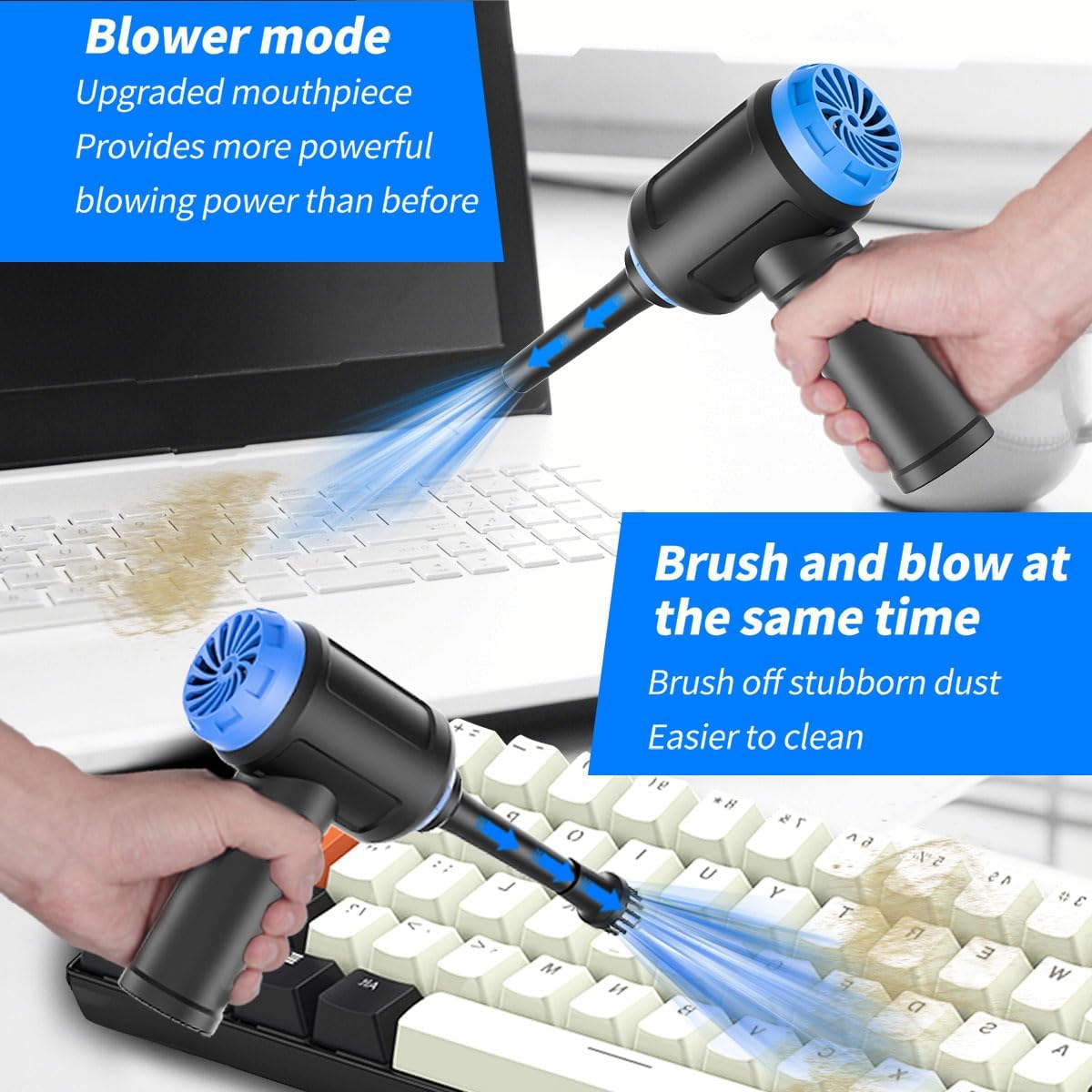
Image: The device in blower mode, demonstrating its use for cleaning a laptop keyboard.

Image: The device being used to clean hard-to-reach areas within a car's interior, highlighting its maneuverability.
6.3 Vacuum Cleaner Mode
Use this mode to suction dust, crumbs, and small debris.
- Ensure the dust collection bin and HEPA filter are properly installed.
- Attach the desired vacuum nozzle to the rear air inlet.
- Turn on the device and select the appropriate speed.
- Move the nozzle over the surface to be vacuumed.

Image: A composite image illustrating both the blower function (top) and the vacuum function (bottom) of the device, demonstrating its dual capability.
6.4 Air Pump Mode (for Vacuum Storage Bags)
The device can also function as an air pump for vacuum storage bags.
- Connect the vacuum slot of your storage bag to the rear air inlet of the device.
- Turn on the device.
- The device will begin to extract air from the storage bag.
7. Maintenance
7.1 Filter Cleaning
The HEPA filter is reusable and washable. Regular cleaning ensures optimal performance.
- Ensure the device is turned off.
- Detach the dust collection bin from the main unit.
- Remove the HEPA filter from the dust collection bin.
- Rinse the filter under running water until clean. Do not use harsh detergents.
- Allow the filter to air dry completely before reinserting it into the dust collection bin. Ensure it is completely dry to prevent mold or damage to the device.
- Reattach the dust collection bin to the main unit.
Image: The filter being rinsed under water, demonstrating the washable and reusable nature of the HEPA filter.
7.2 Unit Cleaning
Wipe the exterior of the device with a soft, damp cloth. Do not immerse the main unit in water or use abrasive cleaners.
8. Troubleshooting
If you encounter issues with your device, refer to the following table for common problems and solutions.
| Problem | Possible Cause | Solution |
|---|---|---|
| Device does not turn on. | Battery is depleted. | Charge the device fully. |
| Power button not pressed correctly. | Press and hold the power button for a few seconds to turn on. | |
| Low suction/blowing power. | Filter is clogged. | Clean the HEPA filter as described in Section 7.1. |
| Dust collection bin is full. | Empty the dust collection bin. | |
| Nozzle or air path is blocked. | Check and clear any obstructions in the nozzles or air inlets/outlets. | |
| Battery not charging. | Charging cable or adapter faulty. | Try a different USB-C cable and/or power adapter. |
| Charging port is dirty or damaged. | Gently clean the charging port. If damaged, contact support. |
If the problem persists after trying these solutions, please contact Meudeen customer support.
9. Specifications
| Feature | Specification |
|---|---|
| Brand | Meudeen |
| Model Number | Air-08 (VC08) |
| Color | Blue |
| Form Factor | Handheld |
| Product Dimensions | 6.6 x 5.9 x 2.2 inches (approx. 16.76 x 14.99 x 5.59 cm) |
| Item Weight | 0.73 lbs (approx. 331 g) |
| Motor Speed | Up to 110,000 RPM |
| Suction Power | Up to 14,500 Pa (Pascals) |
| Battery Type | Lithium Polymer |
| Battery Capacity | 5000 mAh (2x 2500 mAh cells) |
| Charging Time | 3-4 hours |
| Noise Level | <70 dB |
| Filter Type | Reusable and Washable HEPA Filter |

Image: An internal view highlighting the powerful brushless motor, emphasizing its efficiency and performance.
10. Warranty and Support
Meudeen products are designed for reliability and performance. For warranty information, technical support, or any inquiries regarding your device, please visit the official Meudeen store or contact their customer service directly.
You can find more information and contact details by visiting the Meudeen Store on Amazon.