
MettleMatic RM5PRO
MettleMatic Home Rowing Machine User Manual
Model: RM5PRO
1. Introduction
Thank you for choosing the MettleMatic RM5PRO Home Rowing Machine. This revolutionary fitness equipment combines the benefits of a traditional rower with multifunctional training capabilities, allowing you to engage various muscle groups for a comprehensive full-body workout. Designed for durability, comfort, and advanced performance tracking, the RM5PRO is an ideal addition to your home fitness routine. Please read this manual carefully before assembly and operation to ensure safe and effective use of your new rowing machine.

Figure 1: MettleMatic RM5PRO Home Rowing Machine in use, demonstrating both rowing and resistance band exercises.
2. Safety Instructions
To ensure your safety and prolong the life of your MettleMatic RM5PRO, please adhere to the following safety guidelines:
- Consult a physician before starting any new exercise program.
- Keep children and pets away from the equipment during operation.
- Place the rowing machine on a flat, stable surface with adequate clearance around it.
- Ensure all bolts and nuts are securely tightened before each use.
- Do not exceed the maximum user weight of 160 kg (352 lbs).
- The machine is designed for users between 1.2 m (3 ft 11 in) and 2.0 m (6 ft 7 in) in height.
- Wear appropriate athletic footwear and clothing during exercise.
- Stop exercising immediately if you feel faint, dizzy, or experience pain.
- Perform regular maintenance as described in this manual.
3. Package Contents
Carefully unpack your MettleMatic RM5PRO and verify that all components are present and undamaged. If any parts are missing or damaged, please contact customer support immediately.
- MettleMatic RM5PRO Rowing Machine Main Unit
- Resistance Bands and Handles (for multi-functional exercises)
- Assembly Hardware Kit (bolts, nuts, washers)
- Assembly Tools (wrenches, Allen keys)
- User Manual
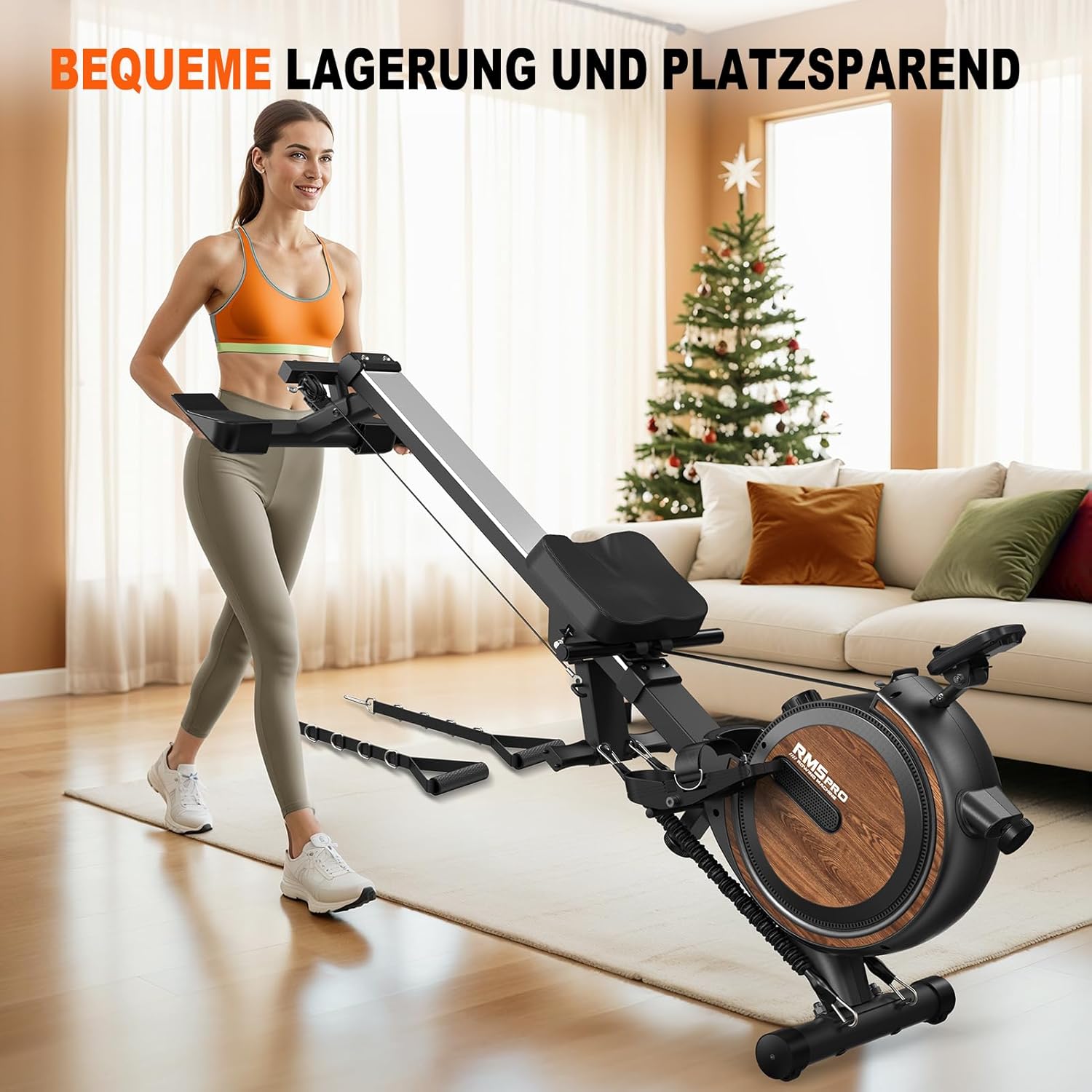
Figure 2: Overview of MettleMatic RM5PRO components before assembly.
4. Setup and Assembly
The MettleMatic RM5PRO is designed for simple assembly. Follow these steps to set up your rowing machine:
- Unpack Components: Remove all parts from the packaging and lay them out on a clean, flat surface. Refer to the package contents list to ensure everything is present.
- Attach Stabilizers: Secure the front and rear stabilizers to the main frame using the provided bolts and tools. Ensure they are firmly attached for stability.
- Install Rail and Seat: Connect the sliding rail to the main unit. Slide the seat onto the rail, ensuring it moves smoothly.
- Connect Pedals: Attach the foot pedals to the main unit. Adjust the foot straps to your shoe size for a secure fit.
- Mount Display Console: Secure the display console to its designated mount on the main unit. Connect any necessary cables.
- Final Check: Before first use, double-check all connections, bolts, and moving parts to ensure they are secure and functioning correctly.
5. Operating Instructions
5.1. Understanding the Display Console
The MettleMatic RM5PRO features a high-tech LED display that provides real-time feedback on your workout. The console tracks various metrics to help you monitor your progress:
- Time: Duration of your workout.
- Counts (Strokes): Total number of rowing strokes.
- Distance: Estimated distance covered.
- Calories: Estimated calories burned.
- SPM (Strokes Per Minute): Your current rowing pace.
- Pulse (Heart Rate): (If connected to a compatible heart rate monitor, not included).

Figure 3: The multifunctional LED display console.
5.2. Adjusting Magnetic Resistance
The RM5PRO utilizes a magnetic resistance system with 16 adjustable levels, providing a smooth and quiet workout experience. To adjust the resistance:
- Locate the resistance adjustment knob on the main unit.
- Turn the knob clockwise to increase resistance (levels 1-16).
- Turn the knob counter-clockwise to decrease resistance.
- Levels 1-4 are suitable for basic training, 5-8 for endurance, 9-12 for strength development, and 13-16 for maximum intensity.

Figure 4: Adjusting the 16-level magnetic resistance.
5.3. Bluetooth Connectivity and Kinomap Integration
Enhance your training experience by connecting your RM5PRO to the Kinomap app via Bluetooth. This allows for interactive and immersive workouts:
- Download the Kinomap app on your smartphone or tablet.
- Ensure Bluetooth is enabled on your device.
- Turn on your RM5PRO display console.
- Open the Kinomap app and follow the instructions to pair with your MettleMatic RM5PRO.
- Once connected, your workout data will synchronize, and you can enjoy virtual routes and structured workouts.
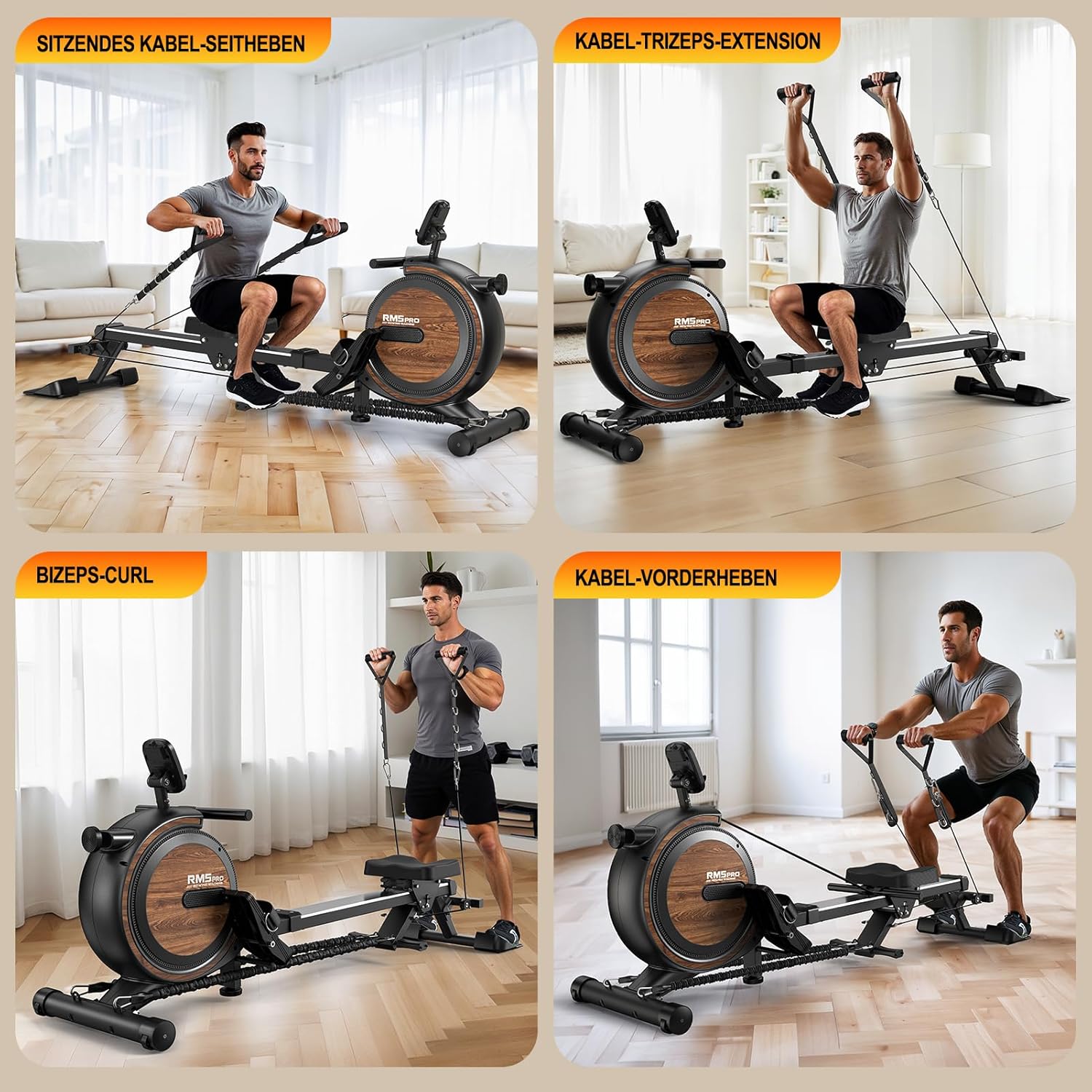
Figure 5: Bluetooth connectivity with Kinomap for interactive training.
5.4. Multi-functional Exercises
Beyond traditional rowing, the RM5PRO allows for a variety of strength training exercises using the integrated resistance bands and handles. These include:
- Seated Cable Side Raises
- Cable Triceps Extensions
- Bicep Curls
- Cable Front Raises
- Functional Squats
- Lateral Lifts
Refer to the included exercise guide or online resources for proper form and technique for these exercises.

Figure 6: Examples of multi-functional exercises using the RM5PRO.
6. Maintenance
Regular maintenance ensures the longevity and optimal performance of your MettleMatic RM5PRO.
- Cleaning: Wipe down the machine with a damp cloth after each use to remove sweat and dust. Do not use abrasive cleaners.
- Rail Cleaning: Periodically clean the sliding rail with a soft cloth to ensure smooth seat movement.
- Bolt Check: Every few weeks, check all bolts and nuts to ensure they are tight. Re-tighten if necessary.
- Storage: The RM5PRO is foldable for convenient storage. To fold, lift the rail until it locks into the upright position. Store in a dry, cool place away from direct sunlight.

Figure 7: The MettleMatic RM5PRO folded for space-saving storage.
7. Troubleshooting
If you encounter any issues with your MettleMatic RM5PRO, refer to the table below for common problems and solutions. If the problem persists, contact customer support.
| Problem | Possible Cause | Solution |
|---|---|---|
| Display not turning on. | Batteries are dead or incorrectly installed. | Replace batteries or ensure they are inserted with correct polarity. |
| Resistance feels inconsistent or too loose/tight. | Resistance knob not properly adjusted; internal mechanism issue. | Adjust the resistance knob. If problem persists, contact support. |
| Seat does not slide smoothly. | Rail is dirty or damaged. | Clean the rail with a soft cloth. Check for obstructions or damage. |
| Bluetooth connection issues. | Bluetooth on device is off; app issue; interference. | Ensure Bluetooth is on. Restart app/device. Move closer to machine. |
8. Specifications
| Feature | Detail |
|---|---|
| Model Name | RM5PRO |
| Resistance Mechanism | Magnetic (16 Levels) |
| Max User Weight | 160 kg (352 lbs) |
| Product Weight | 32 kg (70.5 lbs) |
| Dimensions (L x W x H) | 184 x 55 x 77 cm (72.4 x 21.7 x 30.3 inches) |
| Frame Material | Aluminum |
| Display Type | LED |
| Tracked Metrics | Calories Burned, Distance, Heart Rate (with compatible sensor), Stroke Count, Speed, Time |
| Special Features | Integrated Bottle Holder, Simple Assembly, Adjustable Resistance, Transport Wheels, Digital Display, Multi-functional Training (with resistance bands) |
| Connectivity | Bluetooth (Kinomap compatible) |
9. Warranty and Support
MettleMatic is committed to providing high-quality products and excellent customer service.
- Warranty: Your MettleMatic RM5PRO comes with a comprehensive 2-year warranty covering parts and manufacturing defects.
- Lifetime Customer Support: We offer lifetime customer support for your product. Our professional team is available to assist you with any questions or issues you may encounter.
Contacting Support:
For assistance, please have your product model (RM5PRO) and purchase information ready. You can reach us via:
- Email: Refer to the contact information provided on the MettleMatic official website or your purchase documentation.
- Phone: Refer to the contact information provided on the MettleMatic official website or your purchase documentation.
- Online Platform: If purchased through an online marketplace (e.g., Amazon), you can often contact the seller directly through your order history.

Figure 8: MettleMatic customer support is available to assist you.