
1. Introduction
Thank you for choosing the Jokiro Smart Door Lock with Camera, Model JRWFV01. This device integrates a smart door lock, a 1080p HD camera, and a doorbell into a single unit, offering enhanced security and convenience for your home. This manual provides essential information for proper installation, operation, and maintenance to ensure optimal performance and longevity of your smart lock.

Figure 1: Jokiro Smart Door Lock with Camera, smartphone interface, and chime.
2. Product Overview
The Jokiro Smart Door Lock JRWFV01 is a comprehensive security solution designed for modern homes. It combines three core functionalities:
- Doorbell: Integrated doorbell function with instant notifications.
- HD 1080p Camera: Provides clear video monitoring of your doorstep, day and night.
- WiFi Smart Lock: Offers multiple keyless entry options and remote control via a smartphone application.
Key features include 2-way audio communication, built-in WiFi (no bridge required), auto-lock functionality, and compatibility with voice assistants like Amazon Alexa and Google Assistant.
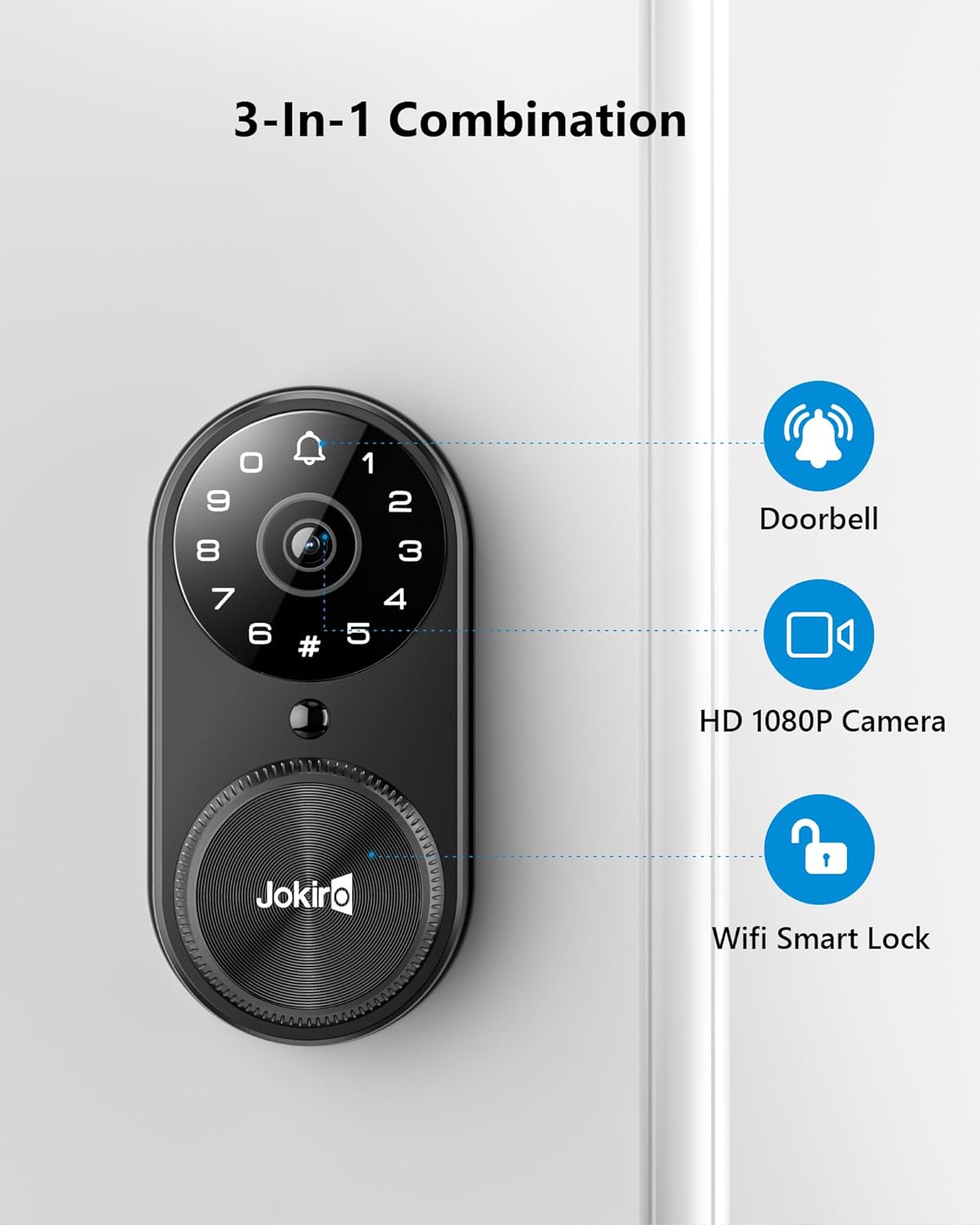
Figure 2: The 3-in-1 combination of the smart door lock.
3. Package Contents
Please verify that all components are present before beginning installation:
- Jokiro Smart Door Lock (Exterior and Interior Units)
- Deadbolt Mechanism
- Mounting Hardware (screws, strike plate, etc.)
- Rechargeable Lithium Ion Battery Pack
- Physical Keys (2x)
- Chime Unit
- Installation Template
- User Manual (this document)
4. Setup and Installation
The Jokiro Smart Door Lock is designed for DIY installation, typically requiring only a screwdriver. Follow the step-by-step instructions provided in the separate installation guide or the KK Home app for detailed visual assistance.
4.1 Pre-Installation Checklist
- Ensure your door is compatible with standard deadbolt installations.
- Confirm door thickness and backset measurements.
- Download the free KK Home app from your smartphone's app store.
- Charge the provided Lithium Ion battery pack fully before installation.
4.2 Installation Steps (Summary)
- Remove your existing deadbolt.
- Install the new deadbolt mechanism.
- Mount the exterior unit of the smart lock.
- Connect the cable from the exterior unit to the interior unit.
- Mount the interior unit.
- Insert the charged battery pack.
- Perform the door handing process as instructed by the app or installation guide.
4.3 App Pairing
After physical installation, open the KK Home app and follow the on-screen instructions to pair your smart lock. This typically involves scanning a QR code located on the lock or in the manual, and connecting to your home's 2.4GHz Wi-Fi network (IEEE802.11 b/g/n).

Figure 3: The smart lock installed on a door, demonstrating doorbell notification.
5. Operating Instructions
5.1 Unlocking and Locking Methods
Your Jokiro Smart Door Lock offers multiple convenient ways to secure and access your home:
- User Codes (PIN): Enter your personalized 4-8 digit code on the keypad. The lock supports up to 20 user codes, which can be permanent, scheduled, or temporary.
- App Remote Control: Use the KK Home app on your smartphone to lock or unlock the door from anywhere with an internet connection.
- Voice Control: Integrate with Amazon Alexa or Google Assistant to lock/unlock your door using voice commands.
- Physical Key: For traditional access or in case of emergency, use the provided physical keys.

Figure 4: Remote lock and unlock via the KK Home app.

Figure 5: Voice control integration with Amazon Alexa and Google Assistant.
5.2 Doorbell and Video Calling
When a visitor presses the doorbell button on the lock, you will receive an instant notification on your smartphone via the KK Home app. You can then view live 1080p HD video and engage in two-way audio communication with the visitor, even if you are not home.

Figure 6: Two-way audio and video calling through the app.
5.3 Auto-Lock Function
The smart lock features an auto-lock function that automatically secures your door after a set period (configurable in the app) once it has been unlocked. This provides an additional layer of security and peace of mind.
5.4 Activity Log
The KK Home app maintains a detailed history log of all lock and unlock activities, including timestamps and the method used (e.g., app, code). This allows you to monitor access to your home.

Figure 7: Activity log in the KK Home app.
6. Maintenance
6.1 Battery Management
The smart lock is powered by a rechargeable Lithium Ion battery. The KK Home app will provide low battery alerts. When the battery is critically low, you can use the emergency charging port (typically a micro-USB port on the exterior unit) with a power bank to temporarily power the lock and gain access, then replace or recharge the main battery pack.
6.2 Cleaning
Clean the exterior of the lock with a soft, damp cloth. Avoid using abrasive cleaners or solvents, as these can damage the finish and electronic components. Ensure the camera lens is clean for optimal video quality.
7. Troubleshooting
If you encounter issues with your Jokiro Smart Door Lock, refer to the following common solutions:
- Lock Not Connecting to Wi-Fi: Ensure your Wi-Fi network is 2.4GHz. Verify the Wi-Fi signal strength at the door location. Restart your router and the smart lock. Re-attempt the pairing process in the KK Home app.
- App Remote Access Issues: Confirm your smartphone has an active internet connection. Check if the lock is connected to Wi-Fi. Weak Wi-Fi signals can limit remote functionality.
- Keypad Not Responding: Check battery levels. If batteries are low, replace or use emergency charging. Ensure the keypad is clean and free from debris.
- Door Not Locking/Unlocking Properly: Verify that the deadbolt mechanism is installed correctly and moves freely. Check for any obstructions in the door frame or strike plate. Perform the door handing process again if necessary.
- Low Battery Alert: Replace the battery pack immediately or recharge it.
- Wrong Entry Limit: If too many incorrect codes are entered, the lock may temporarily disable the keypad. Wait for the lockout period to expire.
- Wandering Alarm: This feature alerts you if the door is left ajar for an extended period. Ensure the door is fully closed.
- Instant Notification Alert: If you are not receiving notifications, check your app settings and phone's notification permissions.
For further assistance, please contact Jokiro customer support.
8. Specifications
| Feature | Specification |
|---|---|
| Model Name | JRWFV01 |
| Brand | Jokiro |
| Mounting Type | Door Mount |
| Video Capture Resolution | 1080p HD |
| Color | Matte Black |
| Material | Zinc |
| Wireless Communication | Wi-Fi (2.4GHz, IEEE802.11 b/g/n) |
| Power Source | Battery Powered |
| Battery Type | 1 Lithium Ion (included) |
| Compatible Devices | Smartphone (KK Home App), Amazon Alexa, Google Assistant |
| Indoor/Outdoor Use | Outdoor (IP65 weatherproof) |
| Certifications | ANSI Grade 2 |
| Product Dimensions (L x W x H) | 16.99 x 7.49 x 19.99 cm |
| Item Weight | 1.91 kg |
9. Warranty and Support
For warranty information and customer support, please refer to the documentation included with your purchase or visit the official Jokiro website. If you experience any issues or have questions regarding your smart door lock, please contact our customer service team for assistance.