
1. Introduction
This manual provides detailed instructions for the Viodmss AS21 2.1 Channel Bluetooth Digital Power Amplifier Module. This high-performance audio amplifier is designed to deliver clear and powerful sound for your home audio setup, featuring Bluetooth connectivity, multiple input options, and adjustable tone controls. Please read this manual thoroughly before use to ensure proper installation and operation.
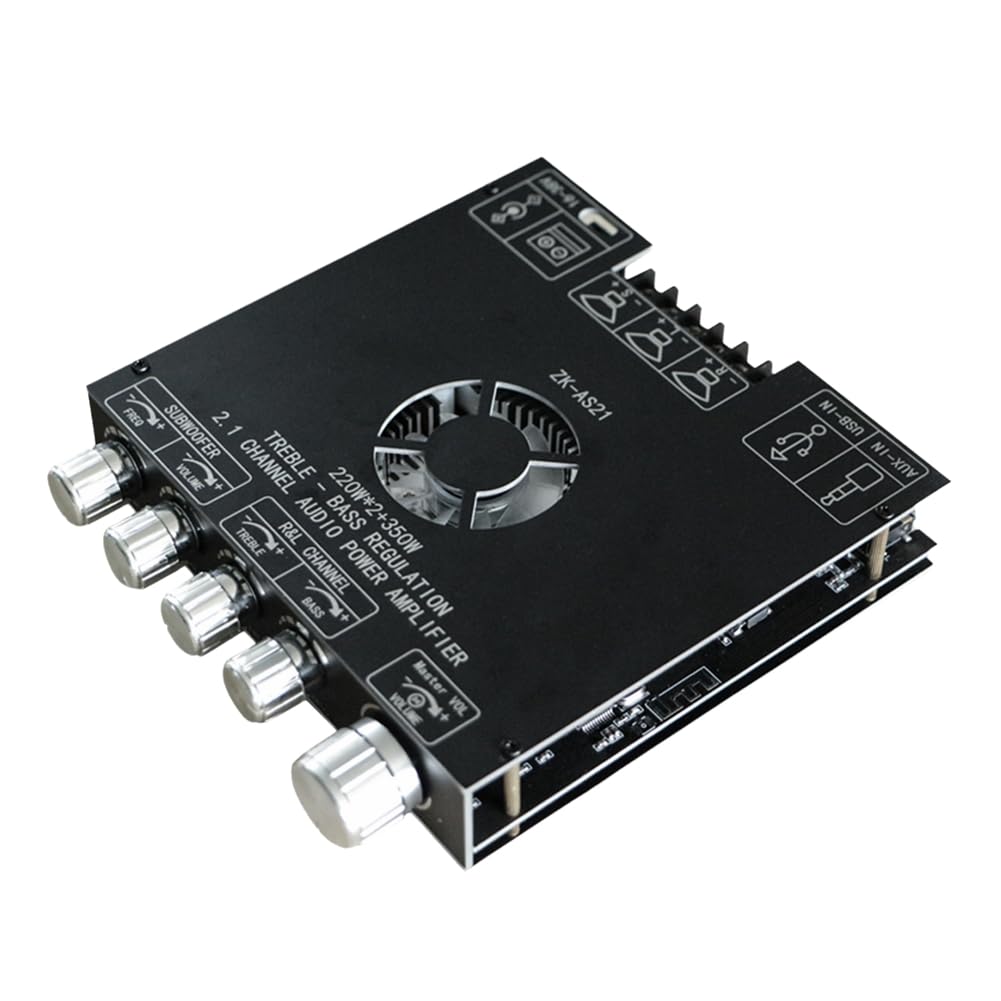
Image 1.1: Viodmss AS21 Amplifier Module, front view.
2. Product Features
- 2.1 Channel Audio Output: Provides dedicated outputs for left, right, and subwoofer channels.
- High Power Output: Delivers 220W x 2 for main channels and 350W for the subwoofer.
- Bluetooth 5.1 Connectivity: Stable wireless audio streaming with an effective range of up to 10 meters.
- Multiple Audio Inputs: Supports AUX (3.5mm), USB disk, and USB sound card inputs.
- Tone Control: Independent adjustment for subwoofer frequency (20-200Hz), subwoofer volume, left/right channel treble, and left/right channel bass.
- Integrated Preamplifier: Features six low-noise 5532 preamplifiers with a 30dB gain for enhanced sound quality.
- DIY Resistance Gain: Allows for custom adjustment of resistance gain.

Image 2.1: Internal view highlighting the low noise preamplifier and DIY resistance gain points.
3. Components Overview
Familiarize yourself with the various inputs, outputs, and controls on your amplifier module.

Image 3.1: Labeled diagram of the AS21 amplifier module's functions.
- Power Input: 5.5x2.1 DC head and 2-pin terminal for power supply connection.
- Subwoofer Output: Connects to your subwoofer speaker.
- Left Channel Output: Connects to your left main speaker.
- Right Channel Output: Connects to your right main speaker.
- U Disk / USB Sound Card Input: USB port for playing audio from a USB drive or connecting as a USB sound card.
- AUX Input: 3.5mm jack for connecting external audio devices via cable.
- Subwoofer Frequency Knob: Adjusts the crossover frequency for the subwoofer (20-200Hz).
- Subwoofer Volume Knob: Controls the volume level of the subwoofer.
- Left and Right Channel Treble Knob: Adjusts the high frequencies for the main speakers.
- Left and Right Channel Bass Knob: Adjusts the low frequencies for the main speakers.
- Master Volume / Switch Knob: Controls the overall volume and acts as the power switch.
4. Setup
Follow these steps to set up your Viodmss AS21 amplifier module.
- Connect Speakers: Connect your passive left, right, and subwoofer speakers to the corresponding output terminals on the amplifier module. Ensure correct polarity (+ to + and - to -).
- Connect Power: Connect a compatible DC power supply (not included) to the power input port (5.5x2.1 DC head or 2-pin terminal). Ensure the power supply meets the voltage and current requirements for the amplifier.
- Select Audio Input: Choose your desired audio input method:
- Bluetooth: Power on the module. It will automatically enter Bluetooth pairing mode.
- AUX: Connect your audio source (e.g., smartphone, MP3 player) to the AUX input using a 3.5mm audio cable.
- USB Disk/Sound Card: Insert a USB flash drive with audio files into the USB port, or connect the module to a computer via USB to use it as an external sound card.

Image 4.1: Example setup showing the amplifier connected to speakers and a smartphone.
5. Operating Instructions
5.1 Power On/Off and Volume Control
- Power On: Rotate the Master Volume / Switch knob clockwise until you hear a click. The indicator light will illuminate.
- Power Off: Rotate the Master Volume / Switch knob counter-clockwise until you hear a click and the indicator light turns off.
- Adjust Volume: Rotate the Master Volume / Switch knob to adjust the overall output volume.
5.2 Tone Adjustment
- Subwoofer Frequency: Use the 'Subwoofer Freq' knob to set the crossover point for your subwoofer, typically between 20Hz and 200Hz.
- Subwoofer Volume: Use the 'Subwoofer Vol' knob to adjust the bass level independently.
- Treble Control: Use the 'Treble' knob to adjust the high frequencies of the main left and right channels.
- Bass Control: Use the 'Bass' knob to adjust the low frequencies of the main left and right channels.
5.3 Bluetooth Connection
- Ensure the amplifier is powered on. It will automatically enter Bluetooth pairing mode.
- On your mobile device (phone, tablet, computer), open Bluetooth settings.
- Search for available devices and select "ZK-BTS.1" (or similar name) from the list.
- Once connected, your device will show "Connected" and you can begin playing audio wirelessly.

Image 5.1: Visual guide for connecting your device via Bluetooth.

Image 5.2: Example of Bluetooth device list and a potential control interface.
6. Specifications
| Feature | Specification |
|---|---|
| Model Number | 500745863 |
| Channels | 2.1 (Left, Right, Subwoofer) |
| Output Power | 220W x 2 (Main) + 350W (Subwoofer) = 570W Total |
| Bluetooth Version | 5.1 |
| Bluetooth Range | Up to 10 meters (unobstructed) |
| Preamplifier | Six low noise 5532 preamplifiers |
| Preamplifier Gain | 30dB |
| Input Options | AUX (3.5mm), USB Disk, USB Sound Card, Bluetooth |
| Product Dimensions (L x W x H) | 16 x 14 x 5 cm (approx. 141mm x 131mm x 27mm) |
| Material | ABS |
| Mounting Type | Surface Mount |

Image 6.1: Product dimensions of the AS21 amplifier module.
7. Troubleshooting
- No Sound:
- Ensure the amplifier is powered on and the indicator light is active.
- Check all speaker connections for proper wiring and polarity.
- Verify the audio source is playing and its volume is turned up.
- Confirm the correct input source is selected (e.g., Bluetooth, AUX).
- Adjust the Master Volume knob on the amplifier.
- Poor Sound Quality / Distortion:
- Reduce the volume from both the audio source and the amplifier.
- Check speaker impedance compatibility with the amplifier.
- Ensure all cables are securely connected and not damaged.
- If using Bluetooth, move the audio source closer to the amplifier to avoid interference.
- Bluetooth Disconnection:
- Ensure the amplifier is within the 10-meter effective range of your device.
- Check for obstacles or other wireless devices that might cause interference.
- Try unpairing and re-pairing the device.
- Restart both the amplifier and your Bluetooth device.
8. Maintenance
- Cleaning: Use a soft, dry cloth to clean the surface of the amplifier module. Do not use liquid cleaners or solvents.
- Ventilation: Ensure the amplifier is placed in a well-ventilated area to prevent overheating. Do not block the cooling fan or vents.
- Storage: When not in use for extended periods, store the amplifier in a cool, dry place away from direct sunlight and moisture.
- Power Off: Always power off the amplifier before connecting or disconnecting any cables.
9. Warranty and Support
For warranty information or technical support, please refer to the documentation provided with your purchase or contact the retailer/manufacturer directly. Keep your proof of purchase for any warranty claims.
Manufacturer: Viodmss