
BBPECO B0DFXW2B85
BBPECO Smart Bird Feeder with Camera User Manual
Model: B0DFXW2B85 | Brand: BBPECO
Introduction
Thank you for choosing the BBPECO Smart Bird Feeder with Camera. This device allows you to observe and interact with local birdlife directly from your smartphone, offering 1080P HD video, AI bird identification, and real-time notifications. This manual provides detailed instructions for setup, operation, and maintenance to ensure optimal performance and enjoyment of your smart bird feeder.
Important Safety Information
Please read all safety warnings and instructions carefully before using the product. Failure to follow these instructions may result in injury or damage to the product.
- May contain small parts. Keep away from children.
- Do not install in areas where it may pose a risk to larger animals.
- Follow local regulations regarding wildlife feeding.
- Consult product manual for detailed safety instructions.
Setup Guide
Package Contents
Before beginning installation, ensure all components are present:
- BBPECO Smart Bird Feeder Unit
- 1080P HD Camera Module
- Mounting Hardware (Wall Mount, Pole Mount clamps, Tree Strap)
- USB Charging Cable
- User Manual (this document)
Assembly and Installation
Follow these steps to assemble and install your bird feeder. For a visual guide, please refer to the 'How to Set Up Your BBPECO Smart Bird Feeder: Installation' video below.
Video Description: This video provides a comprehensive guide on how to set up your BBPECO Smart Bird Feeder, including assembly of components and various installation methods. It demonstrates attaching the camera, assembling the feeder parts, and mounting options.
- Assemble the Feeder Base: Attach the feeding tray to the main feeder body. Ensure it is securely twisted into place to prevent detachment.
- Insert the Camera Module: Carefully slide the 1080P HD camera module into its designated slot within the feeder unit. Ensure it is oriented correctly for optimal viewing. The camera is designed to be easily removable for charging.
- Choose a Mounting Location: Select a suitable location for your bird feeder. Consider visibility for birdwatching, proximity to a Wi-Fi signal (2.4GHz only), and accessibility for refilling and maintenance.
- Mounting Options:
- Wall Mounted: Use the provided wall mount bracket. Mark and drill holes (15/64" or 6mm drill bit recommended, not included), insert wall anchors, and secure the bracket with screws. Then, slide the feeder onto the bracket.
- Pole Mounted: Utilize the included metal clamps to secure the feeder to a pole. Ensure the clamps are tightened firmly for stability.
- Tree Mounted (No Drilling): Use the provided tree strap to secure the feeder to a tree trunk. Thread the strap through the designated slots on the feeder's mounting plate and wrap it around the tree, tightening securely.
- Fill the Feeder: Open the top lid of the feeder and pour your desired bird seed into the reservoir. Close the lid securely to protect the seed from elements.

Image Description: A green BBPECO Smart Bird Feeder with an integrated camera, shown with a blue jay perched on its feeding tray. A smartphone screen next to it displays the live camera feed, highlighting the birdwatching experience.

Image Description: A diagram illustrating the 'Friendly Design' of the bird feeder, showing how the camera module can be easily inserted and removed from the main unit for maintenance or charging.
App Installation and Connection
Download the official BBPECO app from your smartphone's app store. Follow the in-app instructions to connect your smart bird feeder to your 2.4GHz Wi-Fi network. (Note: 5GHz Wi-Fi is not supported).
Operating Instructions
Once your BBPECO Smart Bird Feeder is set up and connected, you can begin enjoying its features.
Live Viewing and Real-Time Notifications
Access the live camera feed through the BBPECO app. The feeder is equipped with motion detection and AI bird identification to provide instant notifications to your phone when birds are detected.
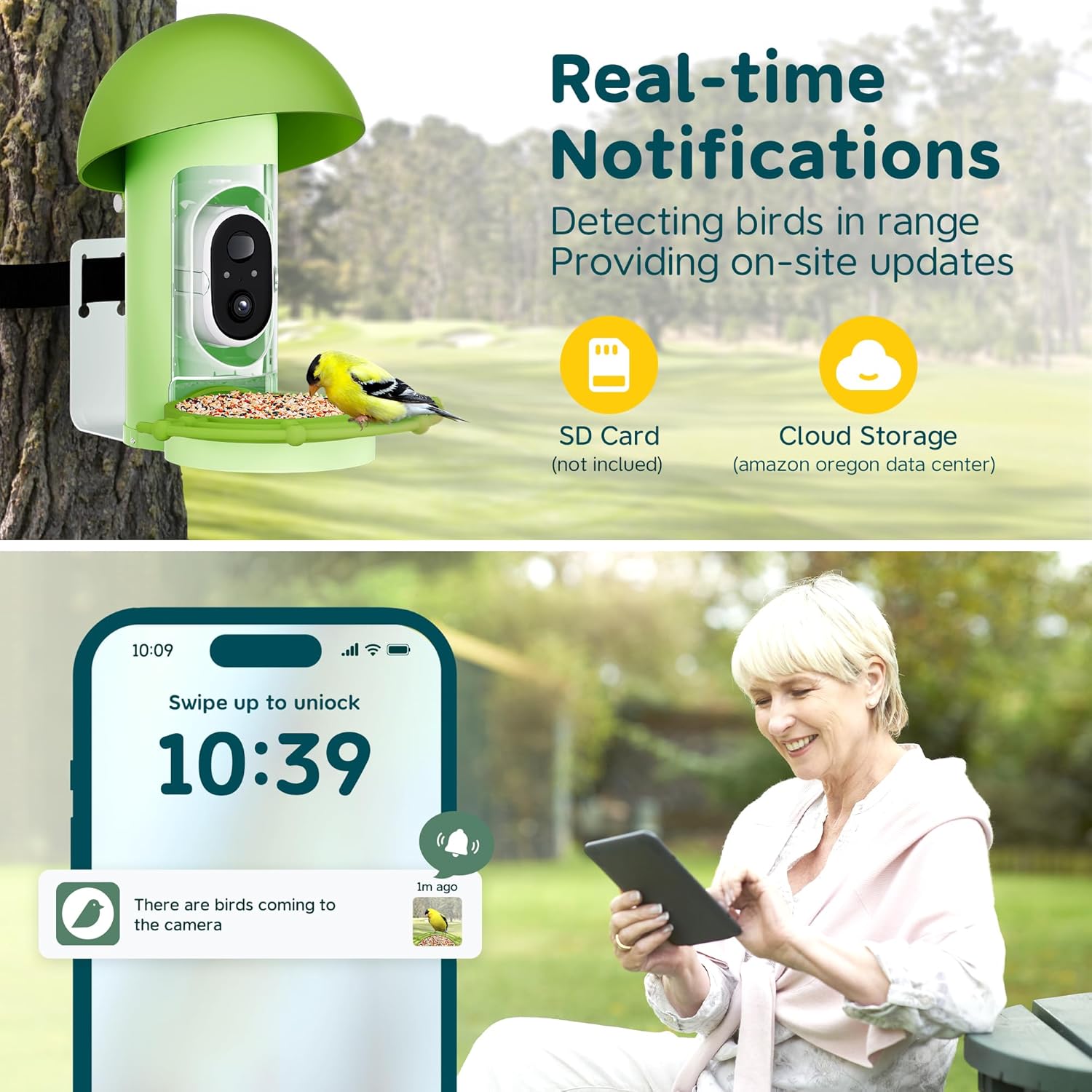
Image Description: A smartphone screen showing a real-time notification indicating bird detection from the smart feeder, with a small thumbnail of a bird. This illustrates the instant alert feature.

Image Description: A blue jay is shown on the feeder, with an overlay indicating 'Bird Detection' and 'Blue Jay' identified by the AI system, demonstrating the accurate recording and identification feature.
Video Capture and Playback
The camera automatically captures videos upon motion detection. You can review these videos within the app's gallery. Options for local storage (SD Card, not included) and cloud storage (subscription may be required) are available.
Video Description: This video showcases the key features of the bird feeder camera, including its ability to capture clear footage of birds, send notifications, and allow users to view activity from their phone.
Night Vision and Wide-Angle View
The 1080P HD camera includes night vision capabilities, allowing for clear observation of birds even in low-light conditions. Its ultra-wide view ensures you capture a broad area around the feeder.

Image Description: An image demonstrating the 1080HD camera's capabilities, showing a split view of day and night vision, highlighting its 2.4GHz Wi-Fi, 144° wide angle, 1080P resolution, and 5200mAh battery.
Sharing Memories
The app allows you to easily store and share captured bird videos and images with friends and family across various devices.

Image Description: Multiple individuals, including families and seniors, are shown viewing content from the bird feeder on their smartphones and tablets, illustrating the multi-viewer and sharing capabilities.
Maintenance
Cleaning the Feeder
Regular cleaning is essential to prevent the spread of disease among birds and maintain feeder hygiene. Disassemble the feeder components (feeding tray, main body, camera module) and wash them with warm, soapy water. Rinse thoroughly and allow to dry completely before reassembly.
Refilling Bird Seed
Monitor the seed level regularly. When the reservoir is low, open the top lid and refill with fresh bird seed. Ensure the lid is securely closed to protect the seed from moisture and pests.
Battery Charging
The camera module is powered by a 5200mAh rechargeable battery. When the battery level is low, remove the camera module from the feeder and charge it using the provided USB cable. A full charge typically takes approximately 8 hours.

Image Description: A graphic illustrating the 5200mAh rechargeable battery, showing its large capacity, 2160 hours runtime, and 8 hours charging time, set against a backyard scene with the bird feeder.
Weather Resistance
The BBPECO Smart Bird Feeder is designed with IP65 weather resistance, protecting it from rain and dust. However, for extreme weather conditions, it is advisable to take precautions to prolong the product's lifespan.
Troubleshooting
- No Live Feed/Connectivity Issues: Ensure your Wi-Fi network is 2.4GHz and the feeder is within range. Restart your router and the feeder. Check the app for any network status indicators.
- No Notifications: Verify app notification settings are enabled on your smartphone. Check the feeder's motion detection sensitivity settings in the app.
- Short Battery Life: Ensure the battery is fully charged. Frequent live viewing or high motion detection sensitivity can drain the battery faster. Consider adjusting settings or charging more frequently.
- AI Identification Not Working: Ensure you have an active subscription if AI bird identification requires one. Check for sufficient lighting and clear camera view.
- Squirrels/Other Animals Triggering Alerts: Adjust the feeder's placement to minimize access for larger animals. Some models may offer 'squirrel eviction' settings in the app (refer to app features).
Specifications
| Feature | Detail |
|---|---|
| Brand | BBPECO |
| Target Species | Birds |
| Recommended Uses | Seed, Feeding Station |
| Special Feature | Easy-Refill Top, Rain Proof |
| Mounting Type | Hanging Mount |
| Product Dimensions | 12"L x 6"W x 14"H |
| Power Source | Battery Powered |
| Included Components | Tray, Mounting Hardware |
| Color | Green No Solar |
| Item Weight | 4.24 pounds |
| Batteries | 1 Lithium Ion batteries required. (included) |
Warranty and Support
For warranty information and technical support, please refer to the contact details provided on the product packaging or visit the official BBPECO website. Keep your purchase receipt for warranty claims.
Ask a question about this manual
Ask about setup, troubleshooting, compatibility, parts, safety, or missing instructions. Manuals+ will review the question and use this page’s manual context to help answer it.