
Introduction
Thank you for choosing the Heelay 1200 ml Electric Portable Dehumidifier. This device is designed to efficiently reduce humidity in small spaces, creating a more comfortable environment. It features ultra-quiet operation, automatic shut-off, and optional 7-color ambient lighting. Please read this manual thoroughly before operating the dehumidifier to ensure safe and optimal performance.
Important Safety Instructions
- Always use the dehumidifier on a stable, level surface.
- Ensure the power cord is not damaged and is properly connected to a suitable power outlet.
- Do not block the air inlet or outlet. Maintain at least 10 cm (4 inches) clearance from walls or other objects.
- Do not immerse the unit, power cord, or plug in water or other liquids.
- Unplug the dehumidifier before cleaning or when not in use for extended periods.
- Keep out of reach of children and pets.
- Do not operate the dehumidifier in temperatures below 5°C (41°F) or above 40°C (104°F).
- Avoid using the dehumidifier in areas with open windows or doors, as this reduces efficiency.
Product Overview
Familiarize yourself with the components of your Heelay dehumidifier.

Figure 1: The Heelay 1200 ml Dehumidifier (black unit) shown next to its packaging (white box). Note that the product inside the box is black, as depicted, despite the box illustration.
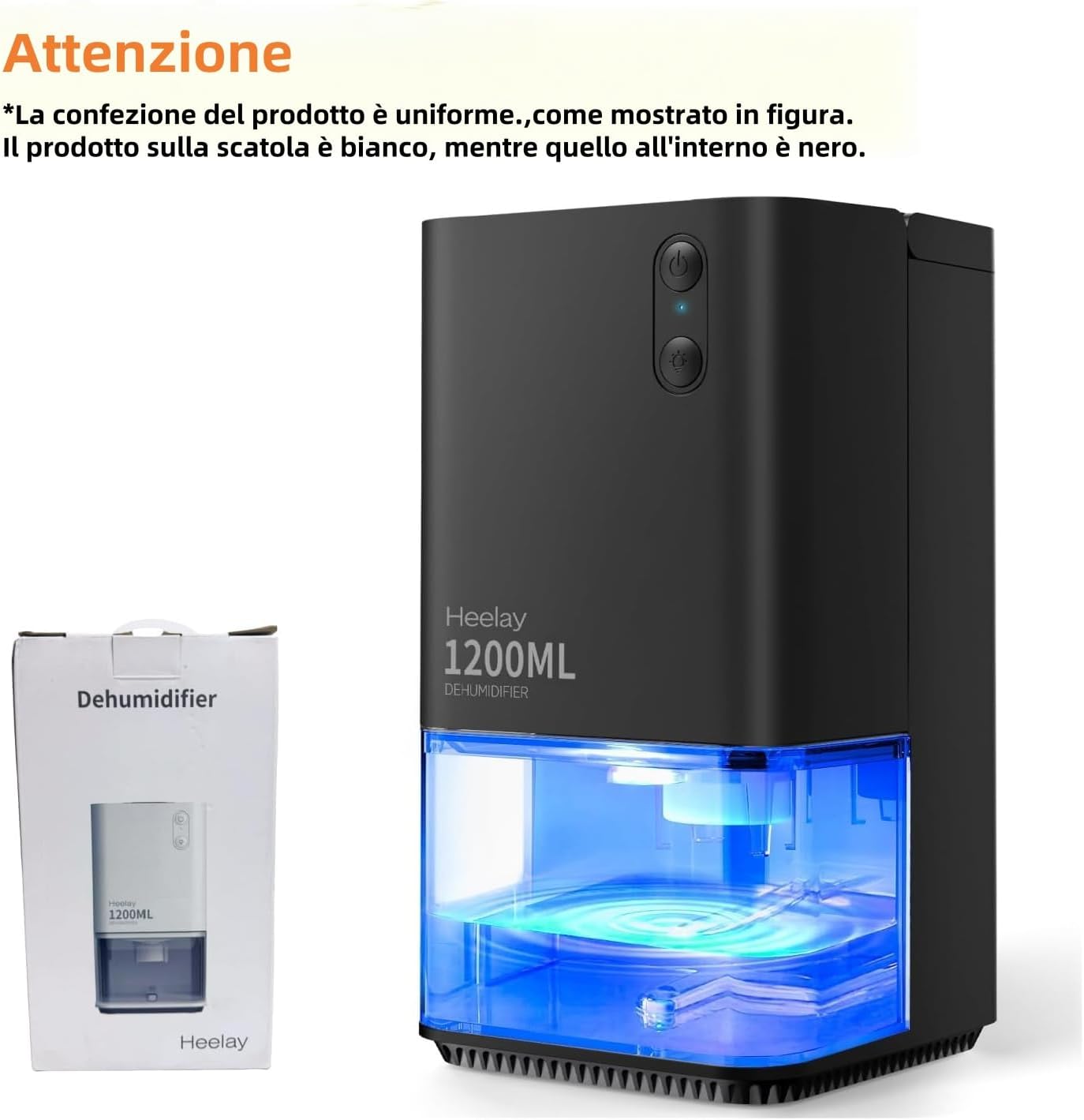
Figure 2: Front view of the Heelay 1200 ml Dehumidifier, showing the control panel at the top and the transparent water tank at the bottom.

Figure 3: Diagram illustrating the efficient semiconductor dehumidification process within the unit, highlighting air intake, condensation, and dry air output.
Key Components:
- Control Panel: Power button and light button.
- Air Inlet/Outlet: Located at the rear and top for air circulation.
- Water Tank: 1200 ml (40 oz) capacity, transparent for easy monitoring, removable for emptying.
- Handle: Integrated for easy portability.
- Power Port: For connecting the power adapter.
Setup
- Unpack: Carefully remove the dehumidifier from its packaging. Retain packaging for future storage or transport.
- Placement: Place the dehumidifier on a firm, level surface in the desired room. Ensure there is at least 10 cm (4 inches) of space around the air inlet (rear) and outlet (top) for optimal airflow. The unit is suitable for rooms between 50 to 220 sq ft². Avoid placing it too close to walls or in areas with open windows, as this can reduce its effectiveness.
- Power Connection: Connect the power adapter to the dehumidifier's power port, then plug the adapter into a standard electrical outlet.

Figure 4: The dehumidifier positioned in a bedroom, illustrating suitable placement for effective operation in small rooms.
Operating Instructions

Figure 5: The control panel showing the power button (top) and the light button (bottom). The image also depicts the red warning light when the water tank is full.
- Power On/Off: Press the Power Button (top button on the control panel) once to turn the dehumidifier on. Press it again to turn the unit off.
- 7-Color Ambient Light: Press the Light Button (bottom button on the control panel) to cycle through the 7 available colors or to turn the light off. The colors can be set to cycle continuously or remain on a single color.
- Automatic Shut-Off: The dehumidifier is equipped with an automatic shut-off function. When the 1200 ml water tank is full, the unit will automatically stop operating, and a red indicator light will flash to alert you. This prevents water overflow.
- Water Tank Monitoring: The transparent water tank allows for easy visual monitoring of the collected water level.

Figure 6: Illustration of the dehumidifier's energy efficiency, consuming only 0.79 kWh over 24 hours of operation.
Maintenance

Figure 7: Visual guide demonstrating the removal of the water tank and the detachable rear cover for easy cleaning and maintenance.
- Emptying the Water Tank:
- When the red indicator light flashes, the water tank is full.
- Turn off the dehumidifier and unplug it from the power outlet.
- Carefully pull out the water tank from the front of the unit.
- Pour out the collected water.
- Slide the empty water tank back into the dehumidifier until it clicks into place.
- Plug in and restart the dehumidifier.
- Cleaning the Unit and Filter:
- Ensure the dehumidifier is turned off and unplugged before cleaning.
- Wipe the exterior of the unit with a soft, damp cloth. Do not use abrasive cleaners or solvents.
- The rear air inlet cover is removable for access to the filter. Gently detach the rear cover and clean the filter with a soft brush or vacuum cleaner to remove dust and debris.
- The water tank can be rinsed with clean water. Ensure it is completely dry before reinserting.
- Regular cleaning of the filter and water tank helps maintain optimal performance and extends the lifespan of the unit.
Troubleshooting
If you encounter issues with your dehumidifier, refer to the following common problems and solutions:
| Problem | Possible Cause | Solution |
|---|---|---|
| Dehumidifier not collecting water or collecting very little water. |
|
|
| Dehumidifier not turning on. |
|
|
| Unusual noise during operation. |
|
|
Specifications
| Feature | Detail |
|---|---|
| Brand | Heelay |
| Model Number | CSDE-1200BL2 |
| Capacity | 1200 Milliliters (40 oz) |
| Product Dimensions | 13.8 x 13.7 x 25.5 cm |
| Item Weight | 1.35 kg |
| Power/Wattage | 33 Microwatts (0.79 kW/day) |
| Auto Shut-off | Yes |
| Special Features | Automatic shutdown, Low noise (<35 dB), Quiet operation, 7-color ambient light |
| Recommended Floor Area | 50 to 220 sq ft² |
Warranty and Support
Heelay is committed to providing high-quality products and customer satisfaction. While specific warranty details are not provided in this manual, we stand behind every electric dehumidifier sold.
If you have any questions, concerns, or require assistance with your Heelay dehumidifier, please do not hesitate to contact our customer support. We guarantee to resolve any issues you may encounter.
For support, please refer to the contact information provided with your purchase or visit the official Heelay store on Amazon: Heelay Store.