Introduction
This manual provides instructions for the Generic Replacement Remote Control, Model N2QAYB000672. This remote is designed to be compatible with various Panasonic Viera TV models, including but not limited to TX-P42G30B, TX-P42G30E, TX-P42G30J, TX-P42G30Y, TX-P42GW30, TX-P42GW30J, TX-P42S30B, TX-P42S30Y, TX-P42S31B, TX-P46G30E, TX-P46G30J, TX-P46G30Y, TX-P46GW30, TX-P46GW30J, TX-P50G30B, TX-P50G30E, TX-P50G30J, TX-P50G30Y, TX-P50GW30, TX-P50S30B, TX-PF42G30, TX-PF42S30, and TX-PF50G30. No programming is required; simply insert batteries for immediate use.
Setup
Battery Installation
The remote control requires two (2) AAA batteries for operation. Batteries are not included with the remote control.
- Locate the battery compartment on the back of the remote control.
- Slide the battery compartment cover downwards or press the latch and lift to open.
- Insert two AAA batteries, ensuring the positive (+) and negative (-) terminals align correctly with the markings inside the compartment.
- Replace the battery compartment cover by sliding it back into place until it clicks securely.

Figure 1: Back of the remote control with the battery compartment open, illustrating the correct orientation for AAA battery insertion.
After installing the batteries, the remote control is ready for use with your compatible Panasonic Viera TV.
Operating Instructions
This remote control provides comprehensive command over your Panasonic Viera TV's functions. Point the remote control directly at the TV's infrared sensor for optimal performance.
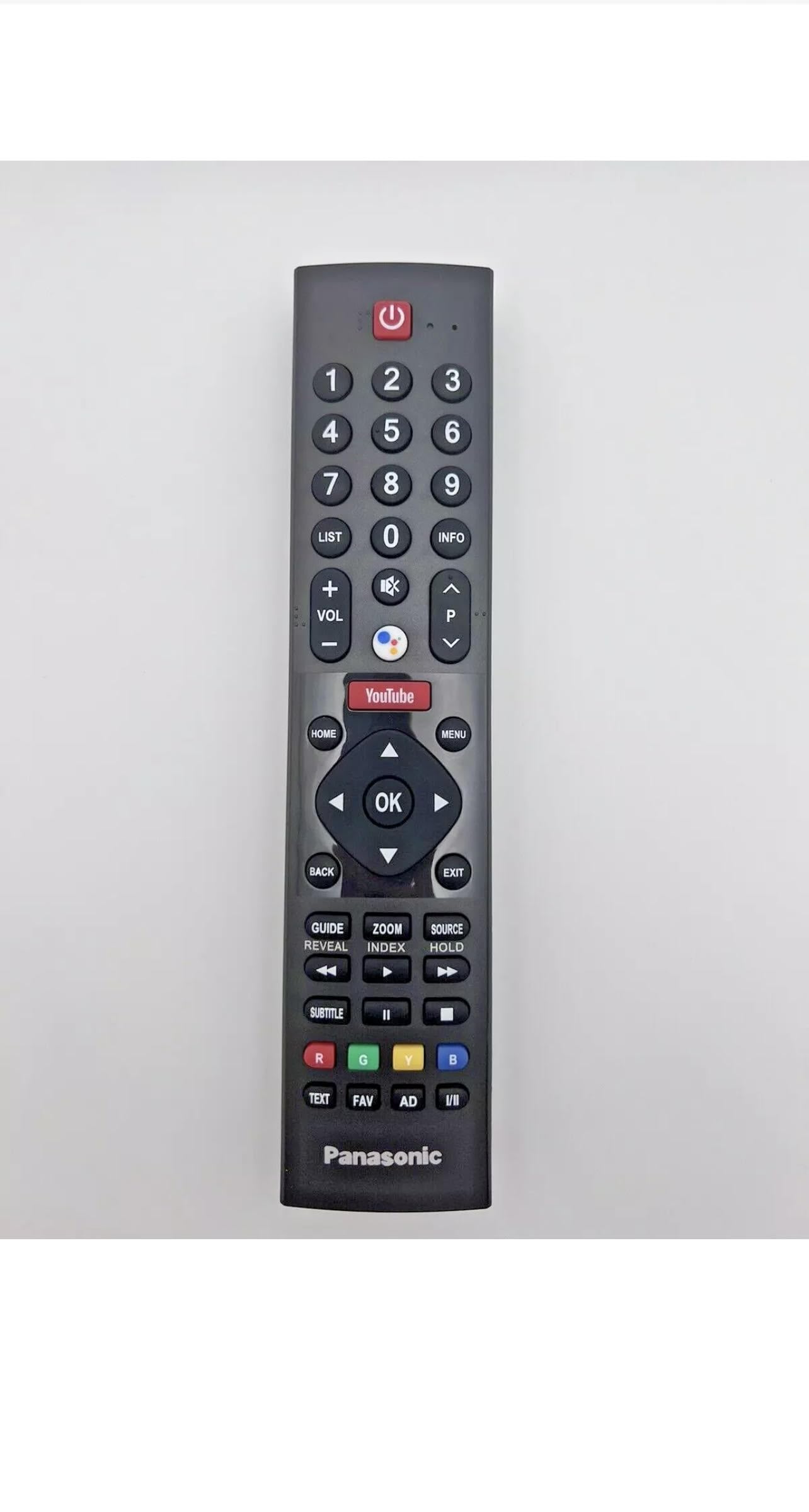
Figure 2: Front view of the remote control, displaying the full array of buttons.
Key Functions:
- Power Button: Located at the top, typically red, to turn the TV on or off.
- Volume Control (+/-): Adjusts the audio output level.
- Channel Navigation (CH +/-): Changes TV channels sequentially.
- Number Pad (0-9): Directly input channel numbers or other numerical selections.
- Menu/Home Button: Accesses the TV's main menu or smart TV interface.
- Navigation Buttons (Up, Down, Left, Right, OK/Enter): Used to navigate through menus and confirm selections.
- Input/Source Button: Switches between different input sources (e.g., HDMI 1, AV, Component).
- Dedicated Shortcut Buttons: Buttons like 'YouTube' provide quick access to popular streaming services or smart TV features, if supported by your TV model.
For specific functions, refer to your Panasonic Viera TV's user manual.
Maintenance
Proper care and maintenance will extend the life of your remote control.
- Cleaning: Use a soft, dry cloth to clean the remote control. For stubborn dirt, slightly dampen the cloth with water or a mild, non-abrasive cleaner. Avoid using harsh chemicals or solvents.
- Battery Replacement: Replace batteries when the remote's responsiveness decreases or it stops functioning. Always replace both batteries at the same time with new ones of the same type (AAA). Do not mix old and new batteries or different battery types.
- Storage: Store the remote control in a cool, dry place away from direct sunlight, extreme temperatures, and high humidity. If the remote will not be used for an extended period, remove the batteries to prevent leakage.
- Avoid Drops and Impacts: Protect the remote from physical damage by avoiding drops and impacts.

Figure 3: Back view of the remote control, illustrating its overall design.
Troubleshooting
If you experience issues with your remote control, try the following troubleshooting steps:
- Remote Not Responding:
- Check the batteries. Ensure they are inserted correctly with the correct polarity (+/-).
- Replace old batteries with new AAA batteries.
- Ensure there is a clear line of sight between the remote control and the TV's infrared sensor. Remove any obstructions.
- Confirm the TV's infrared sensor is not blocked or dirty.
- Buttons Not Working:
- Press the button firmly.
- Clean the remote control, especially around the unresponsive buttons, to remove any dirt or debris that might be interfering.
- Short Operating Range:
- Ensure batteries are fresh.
- Verify there are no strong light sources (like direct sunlight or bright fluorescent lights) interfering with the infrared signal.
If the problem persists after trying these steps, the remote control may be faulty. Contact the seller for further assistance.
Specifications
| Feature | Specification |
|---|---|
| Brand | Generic |
| Model Name | Panasonic Remote Control |
| Model Number | N2QAYB000672 |
| Connectivity Technology | Infrared |
| Compatible Devices | Television (Panasonic Viera TV models) |
| Number of Supported Devices | 1 |
| Number of Buttons | 46 |
| Maximum Range | 10 Feet (approximately 3 meters) |
| Battery Type | AAA (2 required, not included) |
| Color | Black |
| Item Dimensions (L x W x H) | 2"L x 1"W x 8"H (approximately) |
| Item Weight | 5 Ounces (approximately 142 grams) |
Warranty Information
No specific warranty information is provided for this product. Please refer to the seller's return policy or contact the seller directly for details regarding returns or defects.
Support
For any questions, issues, or further assistance regarding this remote control, please contact the seller through the platform where the purchase was made. Provide your order details and a clear description of the issue for prompt support.


