
1. Safety Instructions
Read all instructions carefully before operating the meat grinder. Failure to follow these instructions may result in injury or damage to the appliance.
- Always ensure the machine is unplugged before assembly, disassembly, or cleaning.
- Keep hands and utensils away from the feeding port and grinding components during operation. Use the provided meat push rod only.
- Do not operate the machine with wet hands or in wet conditions.
- Ensure the machine is placed on a stable, level surface during use.
- Do not overload the motor. If the machine jams, turn it off immediately, unplug it, and clear the obstruction.
- This appliance is for commercial and heavy-duty use.
- Keep out of reach of children.
- Only use original Newhai replacement parts and accessories.
2. Product Overview
The Newhai WWX80 Commercial Meat Grinder is a heavy-duty appliance designed for efficient meat processing. It features a powerful 1100W (1.5HP) copper motor and durable stainless steel construction.
Components
- Motor Unit: The main body housing the 1100W copper motor.
- Feeding Tray: Large capacity tray for holding meat before grinding.
- Grinding Head (#22 Port): The assembly where meat is processed, including the auger, cutting blade, grinding plates, and locking nut.
- Grinding Plates: Interchangeable plates (3mm, 6mm, 8mm) for different grinding consistencies.
- Cutting Blades: Two blades for efficient cutting.
- Auger: The spiral component that pushes meat through the grinding head.
- Sausage Stuffer Tube: An attachment for making sausages.
- Meat Push Rod: For safely guiding meat into the feeding port.
- Control Switch: On/Off switch for operation.
- Power Cord with Hidden Plug: For electrical connection.
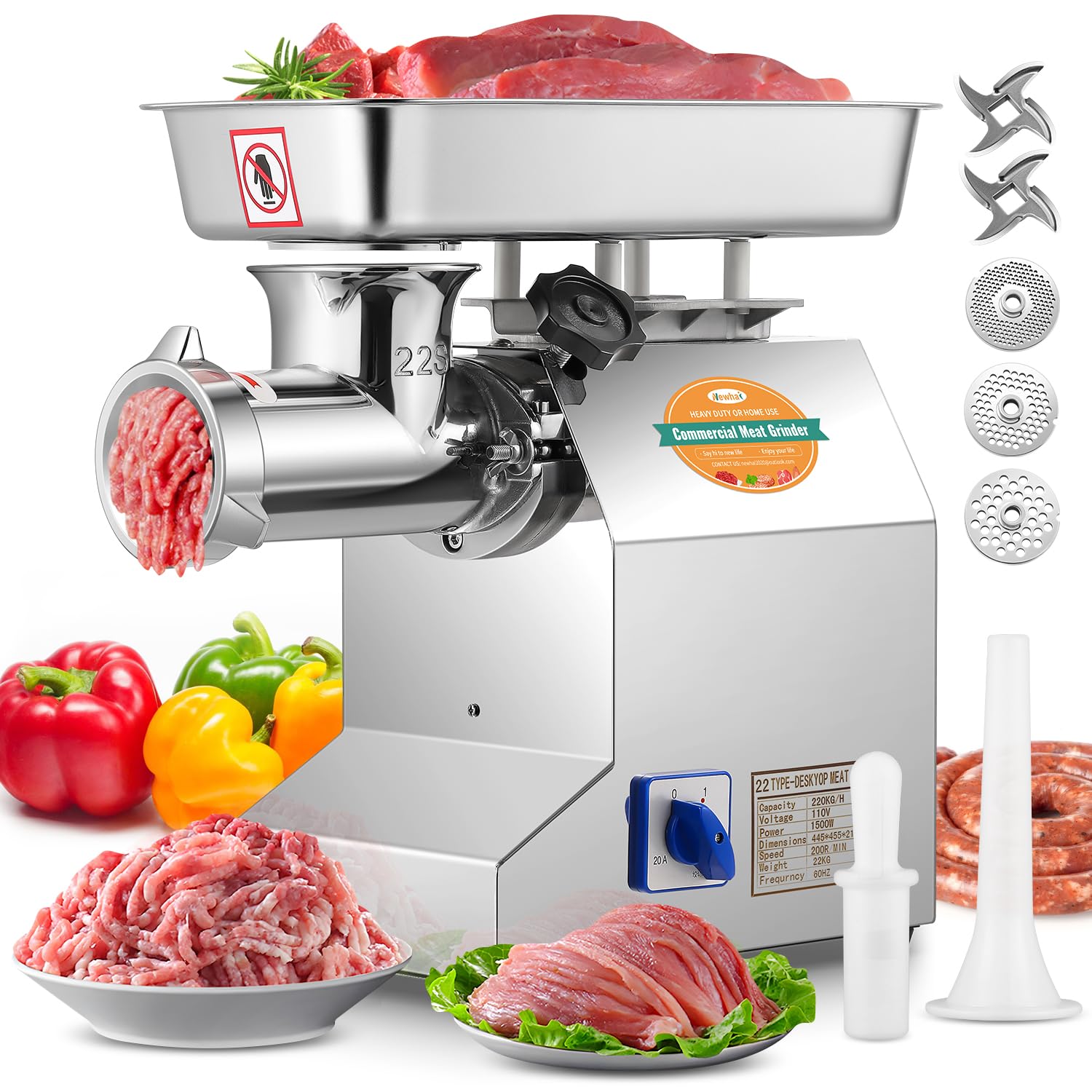
Image: Overview of the Newhai WWX80 Commercial Meat Grinder, highlighting the 1100W copper motor, #22 feeding port, and 11.8-inch discharge height.

Image: Close-up details of the grinder, showing the convenient control knob, the detachable grinding port, and the hidden power plug for electrical safety.
3. Setup and Assembly
Follow these steps to assemble your Newhai WWX80 Commercial Meat Grinder before first use.
- Install the #22 Port: Attach the grinding head (#22 port) to the motor unit. Ensure it is securely fastened.
- Install the Auger: Insert the auger (spiral shaft) into the grinding head, ensuring it seats correctly.
- Install the Cutting Blade: Place the cutting blade onto the auger shaft, ensuring the sharp edges face outwards towards the grinding plate.
- Install the Grinding Plate: Select the desired grinding plate (3mm, 6mm, or 8mm) and place it over the cutting blade and auger shaft.
- Install the Nut: Screw the locking nut onto the grinding head to secure all components. Do not overtighten.
- Attach Feeding Tray: Place the large capacity feeding tray onto the top of the grinding head.

Image: Visual guide demonstrating the five steps for installing the grinding components: #22 port, auger, cutting blade, grinding plate, and locking nut.
4. Operating Instructions
This section provides guidance on how to effectively use your meat grinder for various applications.
General Grinding
- Prepare meat by cutting it into pieces that fit easily into the feeding port. Remove any large bones or tough sinews.
- For frozen meat, allow it to thaw partially before grinding to prevent damage to the machine and ensure optimal performance.
- Ensure the machine is properly assembled and plugged into a 110V power outlet.
- Turn on the machine using the control switch.
- Place meat into the feeding tray and use the meat push rod to gently guide it into the grinding port. Never use your hands or other utensils.
- The machine can process up to 600 pounds of meat per hour.
- After grinding, turn off the machine and unplug it.

Image: The meat grinder in operation, demonstrating its fast processing capability of up to 600 lbs/hour, suitable for commercial use.
Processing Meat with Soft Bones
The Newhai WWX80 is capable of grinding meat that includes soft bones, such as chicken and fish bones, making it suitable for pet food production.

Image: Illustration showing the grinder's capability to process meat with soft bones like chicken and fish, and the recommendation to partially thaw frozen meat before grinding.
Using the Sausage Stuffer Tube
To make sausages, replace the grinding plate and cutting blade with the sausage stuffer tube. Prepare your seasoned ground meat mixture and feed it into the machine. Guide the sausage casing onto the tube and allow the machine to fill it evenly.

Image: A user demonstrating the use of the sausage stuffer tube attachment to create homemade sausages.
Applications
- Commercial Use: Ideal for restaurants, butcher shops, and other food processing operations requiring high volume.
- Home Use: Suitable for preparing fresh ground meat for daily meals, free of preservatives.
- Pet Food Making: Grinds meat with soft bones for homemade pet food.
- Specialty Foods: Excellent for dumpling stuffing, meat patties, shrimp balls, baby food, and elderly meals.
5. Maintenance and Cleaning
Proper cleaning and maintenance ensure the longevity and hygienic operation of your meat grinder.
- Disassembly: After each use, unplug the machine and carefully disassemble the grinding head components (locking nut, grinding plate, cutting blade, auger, and grinding head).
- Cleaning: Wash all removable parts with warm, soapy water. The stainless steel components are designed for easy cleaning. Some removable parts may be dishwasher safe; refer to specific care instructions if provided.
- Drying: Thoroughly dry all components immediately after washing to prevent rust and maintain hygiene.
- Motor Unit: Wipe the motor unit with a damp cloth. Do not immerse the motor unit in water.
- Storage: Store the clean and dry components in a safe place.

Image: Illustration of the easy cleaning process for the stainless steel components, with removable parts being dishwasher safe.
6. Troubleshooting
If you encounter issues with your meat grinder, refer to the following common problems and solutions.
- Machine does not start:
- Ensure the power cord is securely plugged into a functional 110V outlet.
- Check the control switch is in the 'ON' position.
- Verify there are no tripped circuit breakers.
- Meat is not grinding or grinding slowly:
- Ensure meat is cut into appropriate sizes and free of excessively tough sinews or large bones.
- Check if the grinding plate or cutting blade is clogged. Disassemble and clean if necessary.
- Verify the auger, cutting blade, and grinding plate are assembled correctly.
- Ensure the locking nut is tightened sufficiently, but not excessively.
- Unusual noise or vibration:
- Turn off the machine immediately and unplug it.
- Check for any foreign objects in the grinding head.
- Ensure all components are correctly assembled and tightened.
If problems persist after attempting these solutions, please contact customer support.
7. Specifications
Key technical specifications for the Newhai WWX80 Commercial Meat Grinder.

Image: A table summarizing the key product parameters including power, speed, voltage, output, and materials.
| Parameter | Value |
|---|---|
| Model Number | WWX80 |
| Motor Power | 1100W / 1.5HP |
| Voltage | 110 Volts |
| Machine Speed | 200 r/min |
| Meat Output Capacity | 600 lb/h |
| Grinding Plate Sizes | 3mm, 6mm, 8mm |
| Discharge Port Size | #22 |
| Machine Material | Stainless Steel |
| Machine Dimensions (L x W x H) | 17.7" x 11" x 9" |
| Item Weight | Approximately 50 lbs |
| Color | Silver |
8. Warranty and Support
For warranty information, technical support, or to inquire about replacement parts, please contact Newhai customer service. Keep your purchase receipt and model number (WWX80) handy when contacting support.
You can typically find contact information on the manufacturer's website or through your retailer.