
ORCOW SDJ01RM
Instruction Manual for ORCOW Compatible Roidmi Eve Plus SDJ01RM Robotic Vacuum Cleaner Spare Parts
Model: SDJ01RM Compatible Parts | Brand: ORCOW
1. Introduction
This manual provides detailed instructions for the installation, operation, and maintenance of ORCOW compatible replacement parts for the Roidmi Eve Plus SDJ01RM Robotic Vacuum Cleaner. These accessories are designed to ensure your robotic vacuum continues to operate efficiently, maintaining a clean and healthy environment.
Regular replacement and maintenance of these parts are crucial for optimal performance and longevity of your vacuum cleaner.
2. Product Components
This set of compatible accessories includes various essential components for your Roidmi Eve Plus SDJ01RM robotic vacuum cleaner. Familiarize yourself with each part:
2.1. Mop Cloths

Image: Six grey mop cloths, designed for wet mopping.
The mop cloths are essential for the vacuum's mopping function, effectively cleaning hard floors. They are designed for easy attachment and removal.
2.2. HEPA Filter

Image: A rectangular HEPA filter with indicated dimensions.
The HEPA filter captures fine dust particles, allergens, and pet dander, ensuring cleaner air is expelled from the vacuum. Regular replacement is vital for maintaining filtration efficiency.
2.3. Main Brush

Image: Close-up view of the main brush, showing its bristles and orange frame.
The main brush is the primary component for sweeping and agitating debris from floors, directing it into the vacuum's suction path. It features a combination of bristles and rubber fins for effective cleaning.
2.4. Side Brush
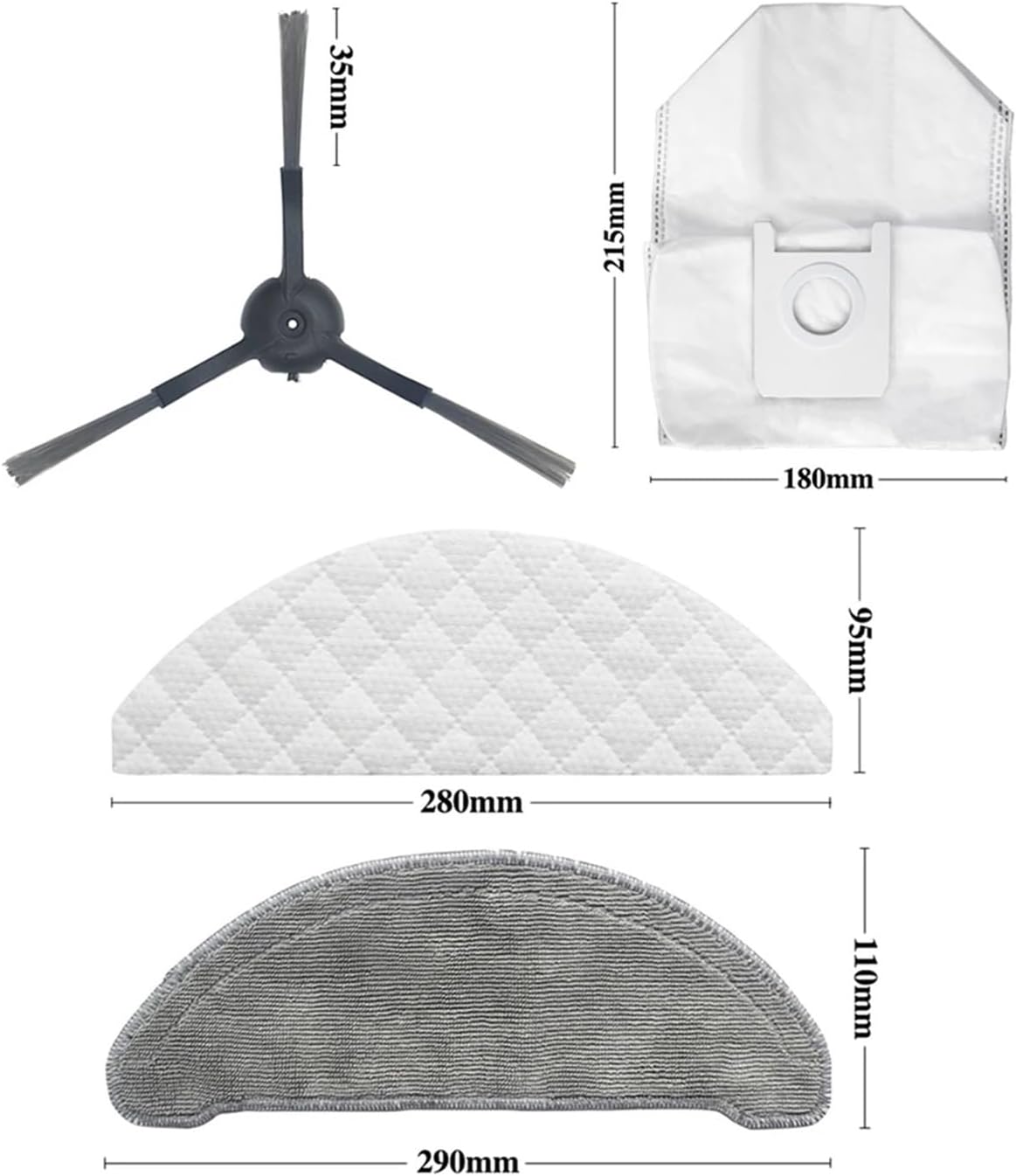
Image: A three-armed side brush, part of an image showing various accessory dimensions.
The side brush sweeps debris from edges and corners into the main cleaning path of the vacuum. It is designed with three arms for efficient collection.
2.5. Dust Bag
Image: A white dust bag with a circular opening, part of an image showing various accessory dimensions.
The dust bag collects dirt and debris vacuumed by the robot. It is designed for easy disposal and replacement, preventing dust leakage.
3. Installation and Setup
Follow these steps to correctly install or replace the compatible parts in your Roidmi Eve Plus SDJ01RM robotic vacuum cleaner. Always ensure the vacuum is powered off before performing any maintenance.
3.1. Dust Bag Replacement
- Locate the dustbin compartment on your Roidmi Eve Plus SDJ01RM.
- Open the dustbin compartment cover.
- Carefully remove the full dust bag from its slot.
- Insert a new ORCOW compatible dust bag into the slot, ensuring it is securely seated.
- Close the dustbin compartment cover until it clicks into place.
3.2. HEPA Filter Replacement
- Open the dustbin of your vacuum cleaner.
- Locate the HEPA filter within the dustbin.
- Gently pull out the old filter.
- Insert the new ORCOW compatible HEPA filter, ensuring the pleated side faces upwards and it fits snugly.
- Close the dustbin.
3.3. Main Brush Replacement
- Flip the robotic vacuum cleaner over to access its underside.
- Locate the main brush cover, usually secured by latches or screws.
- Open or remove the main brush cover.
- Lift out the old main brush.
- Insert the new ORCOW compatible main brush, aligning its ends with the corresponding slots.
- Replace the main brush cover and secure it.
3.4. Side Brush Replacement
- Turn the vacuum cleaner upside down.
- Locate the side brush. It is typically held by a single screw.
- Unscrew and remove the old side brush.
- Place the new ORCOW compatible side brush into position and secure it with the screw.
3.5. Mop Cloth Installation

Image: The reverse side of a mop cloth, illustrating the hook-and-loop fastener strips for attachment.

Image: A mop cloth securely attached to the mopping module of a robotic vacuum cleaner.
- Ensure the mopping module is clean and free of debris.
- Align the ORCOW compatible mop cloth with the hook-and-loop fasteners on the mopping module.
- Press the mop cloth firmly onto the module to ensure it is securely attached.
- Attach the mopping module to the vacuum cleaner if it was removed.
4. Operating Considerations
Once the compatible parts are installed, your Roidmi Eve Plus SDJ01RM robotic vacuum cleaner is ready for operation. These parts work in conjunction to provide efficient cleaning:
- The main brush and side brushes work together to sweep and collect dirt, dust, and debris from various floor types.
- The collected debris is then drawn into the vacuum and stored in the dust bag.
- The HEPA filter ensures that fine particles are trapped, preventing them from being released back into the air.
- When the mopping function is active, the mop cloth, once dampened, cleans hard floor surfaces.
Always refer to your Roidmi Eve Plus SDJ01RM's original user manual for specific operating modes and schedules.
5. Maintenance
Regular maintenance of these compatible parts will extend their lifespan and ensure your vacuum cleaner performs at its best.
5.1. Mop Cloth Cleaning
- After each mopping session, remove the mop cloth from the mopping module.
- Rinse the mop cloth thoroughly under running water until clean.
- Allow the mop cloth to air dry completely before reattaching or storing.
- For deeper cleaning, the mop cloths can be hand-washed with mild detergent.
5.2. HEPA Filter Cleaning and Replacement
- Tap the filter gently over a trash can to remove loose dust and debris.
- Do not wash the HEPA filter with water, as this can damage the filtration material.
- It is recommended to replace the HEPA filter every 3-6 months, depending on usage and household environment (e.g., presence of pets, allergies).
5.3. Main Brush and Side Brush Cleaning
- Regularly check the main brush and side brushes for tangled hair or debris.
- Use a cleaning tool (often provided with the vacuum) or scissors to cut and remove tangled hair from the brushes.
- Wipe the brushes with a dry cloth to remove any accumulated dust.
- Replace brushes if bristles are worn down or bent, typically every 6-12 months for the main brush and 3-6 months for side brushes.
5.4. Dust Bag Disposal
- Replace the dust bag when the vacuum's indicator signals it is full, or when suction power noticeably decreases.
- Dispose of the full dust bag according to local waste disposal guidelines.
6. Troubleshooting
If you experience issues with your Roidmi Eve Plus SDJ01RM after installing these compatible parts, consider the following common troubleshooting steps:
| Problem | Possible Cause | Solution |
|---|---|---|
| Reduced Suction Power | Full dust bag, clogged HEPA filter, main brush tangled. | Replace dust bag. Clean or replace HEPA filter. Clean main brush. |
| Poor Mopping Performance | Mop cloth dirty or not properly attached. | Clean or replace mop cloth. Ensure mop cloth is securely attached to the mopping module. |
| Brushes Not Rotating | Brushes tangled with hair/debris, or improperly installed. | Remove and clean main and side brushes. Reinstall them correctly, ensuring they click into place. |
| Unusual Noises | Debris caught in brushes or filter area. | Inspect and clean all brushes and filter compartments for obstructions. |
If issues persist, consult the original Roidmi Eve Plus SDJ01RM user manual or contact the vacuum cleaner's manufacturer for further assistance.
7. Specifications
The following specifications pertain to the ORCOW compatible replacement parts:
- Brand: ORCOW
- Compatible Model: Roidmi Eve Plus SDJ01RM
- Part Type: Vacuum Cleaner Spare Parts (Mop Cloth, HEPA Filter, Main Brush, Side Brush, Dust Bag)
- Item Weight (Set 18): Approximately 1.76 ounces (50 grams)
- Package Dimensions (Set 18): Approximately 1.18 x 0.79 x 0.39 inches (30 x 20 x 10 mm)
- Manufacturer: FJSKMA
- Color: Set 18 (Refers to the specific accessory combination)
Note: Dimensions and weight may vary slightly depending on the specific accessory included in the set.
8. Warranty and Support
These are compatible replacement parts manufactured by ORCOW. For any issues related to the quality or fit of these specific accessories, please contact the seller or ORCOW directly.
For warranty information or technical support regarding your Roidmi Eve Plus SDJ01RM robotic vacuum cleaner itself, please refer to the original manufacturer's documentation or contact Roidmi customer service.
Ask a question about this manual
Ask about setup, troubleshooting, compatibility, parts, safety, or missing instructions. Manuals+ will review the question and use this page’s manual context to help answer it.