
1. Introduction
This manual provides detailed instructions for the installation, operation, and maintenance of your AZUIQiMeng Car Radio Stereo. This head unit is specifically designed for Hyundai I20 Left-Hand Drive (LHD) models from 2015 to 2018. It features an Android 13 operating system, a 9-inch IPS touch screen, and integrated navigation capabilities.
Please read this manual thoroughly before using the product to ensure proper functionality and to maximize your user experience.

Image 1.1: Front view of the AZUIQiMeng Car Radio Stereo head unit.
2. Package Contents
Verify that all items listed below are included in your package:
- Main Head Unit (Machine)
- Power Cable
- RCA Cable
- Reversing Camera Cable
- USB Cable (for 4-Core models)
- Microphone (MIC)
- GPS Antenna
- Additional USB plugs, Audio Out, and 4G Antenna (for 8-Core models, not applicable to this 4-Core model)

Image 2.1: Contents of the product package.
3. Setup and Installation
3.1 Vehicle Compatibility
This head unit is designed for Hyundai I20 LHD models manufactured between 2015 and 2018. Before installation, ensure your vehicle's center console matches the provided images for proper fitment.
3.2 Installation Process
The unit features a plug-and-play design for simplified installation. Connect the provided cables to their corresponding ports on the head unit and your vehicle's wiring harness. Secure the unit within the dashboard opening.
For optimal performance and to avoid potential damage, it is recommended to have the installation performed by a qualified professional if you are unfamiliar with car audio system installations.
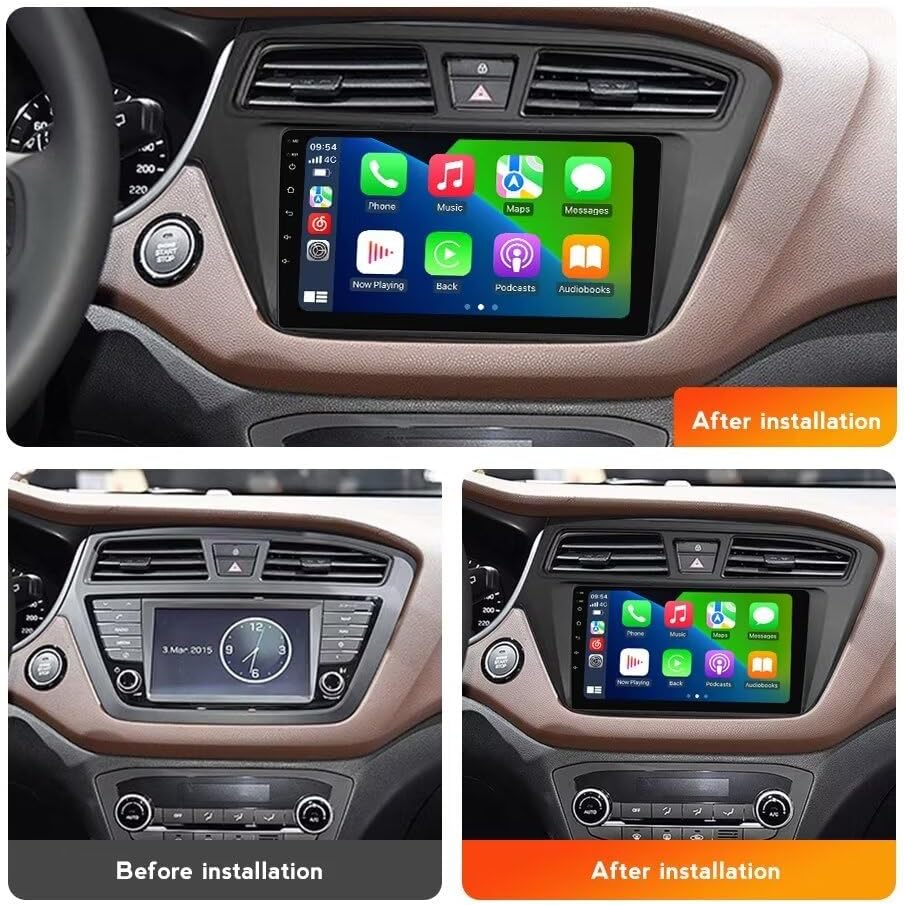
Image 3.1: Before and after installation view of the head unit in a Hyundai I20 dashboard.
4. Operating Instructions
4.1 CarPlay and Android Auto
The head unit supports both Apple CarPlay and Android Auto for seamless smartphone integration. Connect your device via a USB cable for wired access, or wirelessly via Bluetooth for compatible devices. This allows access to navigation, music, calls, and messaging directly from the head unit's display.

Image 4.1: CarPlay and Android Auto interfaces on the head unit.
4.2 GPS Navigation
The unit includes a built-in GPS module and an external GPS antenna for accurate positioning. It supports online and offline navigation using pre-installed maps or downloaded map applications. This feature provides real-time traffic information and route guidance.

Image 4.2: GPS navigation display on the head unit.
4.3 WiFi Connectivity
Utilize the built-in WiFi receiver to connect to a WiFi network or a mobile hotspot. This enables access to online content, app downloads, and internet browsing directly from the head unit.

Image 4.3: WiFi connectivity and online application access.
4.4 Split Screen Function
The head unit supports a split-screen mode, allowing two applications to be displayed simultaneously. For example, you can view navigation on one side and control music playback on the other.
4.5 Steering Wheel Control (SWC)
The unit is compatible with your vehicle's existing steering wheel controls. This allows for safe and convenient operation of functions such as volume adjustment, track skipping, and answering calls without taking your hands off the steering wheel.
4.6 FM/RDS Radio
Access FM radio stations with automatic and manual search functions. The RDS (Radio Data System) feature provides additional information such as station names and program types where available.
4.7 Bluetooth Function
The built-in Bluetooth module supports hands-free calling and audio streaming. Pair your smartphone to make and receive calls directly through the head unit and play music from your device. The unit includes a built-in microphone and supports an external microphone for enhanced call clarity.

Image 4.4: Demonstrations of split screen, steering wheel control, FM radio, and Bluetooth features.
5. Maintenance
To ensure the longevity and optimal performance of your car radio stereo, follow these maintenance guidelines:
- Cleaning: Use a soft, dry cloth to clean the screen and exterior surfaces. Avoid abrasive cleaners or solvents that may damage the finish.
- Software Updates: Periodically check for available software updates to ensure the system has the latest features and security enhancements. Follow the on-screen instructions for any update procedures.
- Environmental Conditions: Avoid exposing the unit to extreme temperatures, direct sunlight for prolonged periods, or excessive moisture.
6. Troubleshooting
If you encounter issues with your head unit, refer to the following common troubleshooting steps:
- No Power: Check all power connections to ensure they are securely fastened. Verify the vehicle's fuse for the radio is intact.
- Touch Screen Unresponsive: Try restarting the unit. If the issue persists, a factory reset may be necessary (refer to system settings).
- No GPS Signal: Ensure the GPS antenna is properly connected and positioned with a clear view of the sky.
- Bluetooth Connection Issues: Ensure Bluetooth is enabled on both the head unit and your smartphone. Try unpairing and re-pairing the devices.
- Sound Issues: Check speaker connections and volume settings. Ensure the correct audio source is selected.
For persistent issues not resolved by these steps, please contact customer support.
7. Specifications
| Feature | Specification |
|---|---|
| Model Number | JGMCMXECA-4CORE2+32GB |
| Operating System | Android 13.0 |
| Screen Type | 9-inch IPS Capacitive Touch Screen |
| Screen Resolution | 1280*720 |
| Processor | 4-Core |
| Memory (RAM) | 2GB |
| Storage (ROM) | 32GB |
| Connectivity | Built-in WiFi, Bluetooth |
| Navigation | Built-in GPS Module, External GPS Antenna |
| Smartphone Integration | Wireless/Wired CarPlay & Android Auto |
| Radio | FM & RDS |
| Steering Wheel Control | Supported |
| Rear View Camera Input | Supported (Camera not included) |
| Item Weight | 1.76 ounces (50 Grams) |
| Package Dimensions | 1.18 x 0.79 x 0.39 inches |
8. Warranty and Support
This AZUIQiMeng Car Radio Stereo is backed by a 1-year warranty from the date of purchase. This warranty covers manufacturing defects and ensures the product meets its specified performance standards.
For technical assistance, installation guidance, or any questions regarding your product, professional technical support is available. Please refer to your purchase documentation or the seller's contact information for support details.


