
1. Introduction
The BLACK+DECKER CS1200 Circular Saw is a powerful and versatile tool designed for efficient cutting in wood and wood-based materials. This manual provides essential information for safe operation, proper setup, maintenance, and troubleshooting to ensure optimal performance and user safety.
This circular saw features a robust 1200W motor, a 165mm blade, and offers cutting depths of up to 55mm at 90 degrees and 37mm at 45 degrees. Its ergonomic design and integrated dust extraction port enhance user comfort and maintain a cleaner work environment.
2. Safety Instructions
Always adhere to the following safety guidelines to prevent injury and ensure safe operation of your circular saw:
- Wear Personal Protective Equipment: Always wear safety glasses, hearing protection, and appropriate gloves.
- Maintain a Clean Work Area: Cluttered or dark areas invite accidents.
- Secure Workpiece: Always clamp or secure the workpiece to prevent movement during cutting.
- Unplug Before Adjustments: Disconnect the saw from the power source before changing blades, making adjustments, or performing maintenance.
- Avoid Accidental Starting: Ensure the switch is in the off position before plugging in the tool.
- Keep Hands Clear: Never place hands near the cutting area or the rotating blade.
- Use Correct Blade: Only use blades suitable for the material being cut and rated for the saw's speed.
- Check for Damage: Inspect the tool and power cord for any damage before each use.
3. Components Overview
Familiarize yourself with the main parts of your BLACK+DECKER CS1200 Circular Saw:
- Blade: The cutting element, typically 165mm in diameter.
- Upper and Lower Blade Guards: Protect the user from the blade. The lower guard retracts during cutting.
- Main Handle: For gripping and controlling the saw.
- Trigger Switch: Activates the motor.
- Depth Adjustment Lever: Allows setting the cutting depth.
- Bevel Adjustment Lever: Allows setting the cutting angle (bevel).
- Base Plate (Shoe): Supports the saw on the workpiece.
- Dust Extraction Port: For connecting a vacuum cleaner.
- Spindle Lock Button: Locks the blade for easy changing.
- Parallel Guide: For making straight cuts parallel to an edge.
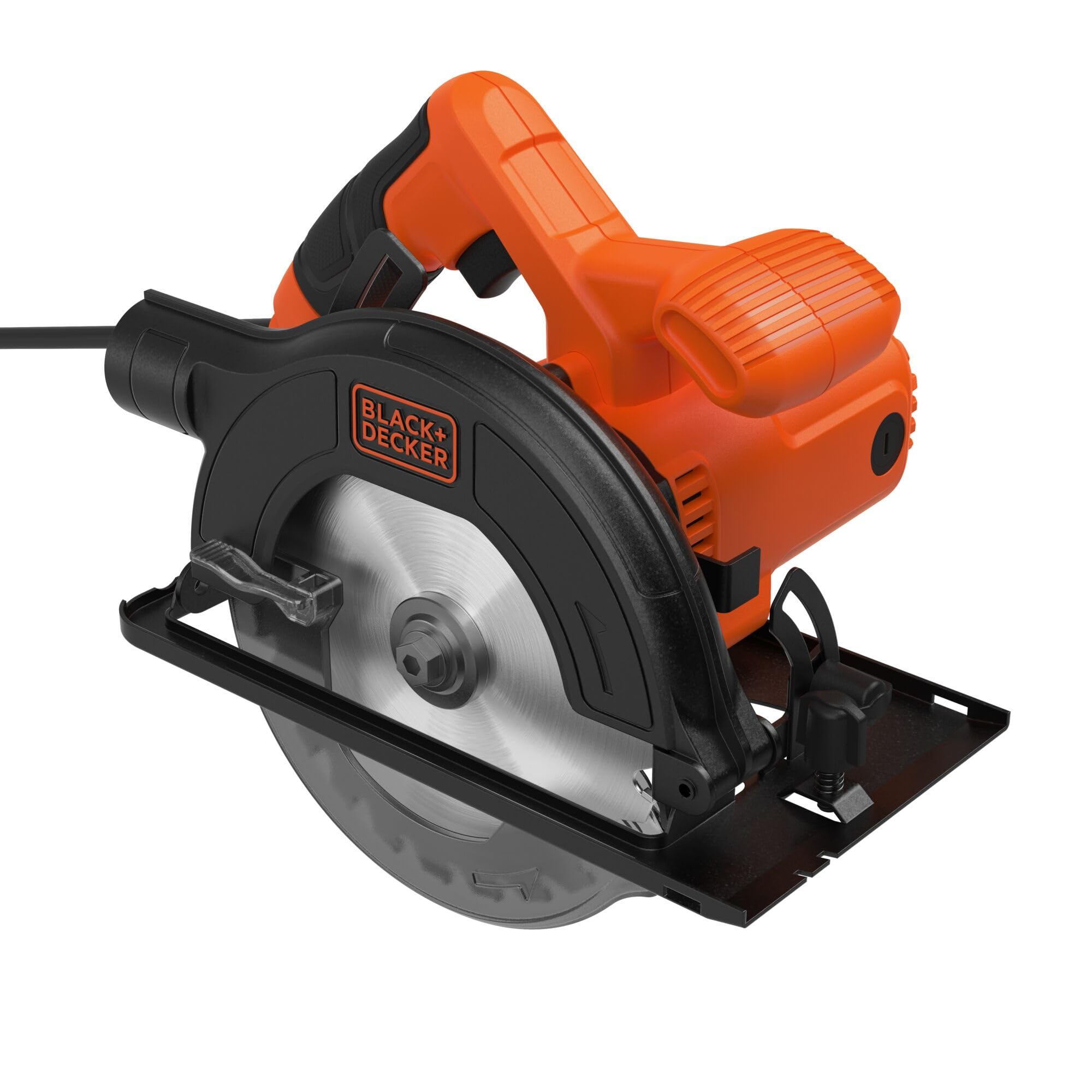
Image 1: Side view of the BLACK+DECKER CS1200 Circular Saw, highlighting the blade, handle, and guards.

Image 2: Front view of the BLACK+DECKER CS1200 Circular Saw, showing the blade and its protective guard.
4. Setup
4.1 Blade Installation and Removal
- Disconnect Power: Always unplug the saw from the power outlet.
- Retract Lower Guard: Lift the lower blade guard lever to expose the blade.
- Engage Spindle Lock: Press and hold the spindle lock button to prevent the blade from rotating.
- Loosen Arbor Nut: Use the provided wrench to loosen the arbor nut by turning it counter-clockwise.
- Remove Blade: Carefully remove the outer flange and the old blade.
- Install New Blade: Place the new 165mm TCT saw blade onto the arbor, ensuring the teeth are pointing in the direction of rotation indicated by the arrow on the guard.
- Secure Blade: Replace the outer flange and tighten the arbor nut clockwise with the wrench while holding the spindle lock button. Do not overtighten.
4.2 Adjusting Cutting Depth
To set the desired cutting depth:
- Disconnect Power: Unplug the saw.
- Loosen Lever: Loosen the depth adjustment lever located on the side of the saw.
- Set Depth: Raise or lower the base plate until the blade extends approximately 3mm below the workpiece.
- Tighten Lever: Securely tighten the depth adjustment lever.
4.3 Adjusting Bevel Angle
To make angled cuts (bevel cuts):
- Disconnect Power: Unplug the saw.
- Loosen Lever: Loosen the bevel adjustment lever, usually located at the front of the saw.
- Set Angle: Tilt the base plate to the desired angle (up to 45 degrees) using the angle scale.
- Tighten Lever: Securely tighten the bevel adjustment lever.
4.4 Dust Extraction
The saw is equipped with a dust extraction port. For a cleaner work area, connect a suitable vacuum cleaner hose to this port. This helps to collect sawdust and maintain visibility of the cutting line.
5. Operating Instructions
5.1 Starting and Stopping the Saw
- To Start: Plug the saw into a power outlet. Depress the trigger switch.
- To Stop: Release the trigger switch. Allow the blade to come to a complete stop before setting the saw down.
5.2 Making a Cut
- Prepare Workpiece: Mark your cutting line clearly and secure the workpiece firmly.
- Position Saw: Place the front of the base plate on the workpiece, ensuring the blade is clear of the material. Align the blade with your cutting line.
- Start Saw: Depress the trigger switch and allow the blade to reach full speed before entering the material.
- Begin Cut: Slowly and steadily push the saw forward along the cutting line. Maintain a firm grip and keep the base plate flat against the workpiece.
- Complete Cut: Continue pushing until the cut is complete. Release the trigger switch and wait for the blade to stop before removing the saw.
5.3 Using the Parallel Guide
The parallel guide assists in making straight cuts parallel to an edge of the workpiece.
- Insert Guide: Slide the parallel guide into the slots on the front of the base plate.
- Adjust Distance: Adjust the guide to the desired distance from the blade.
- Secure Guide: Tighten the locking screw to hold the guide in place.
- Perform Cut: During cutting, keep the guide firmly against the edge of the workpiece.
6. Maintenance
Regular maintenance ensures the longevity and safe operation of your circular saw.
- Cleaning: After each use, unplug the saw and use a soft brush or compressed air to clean dust and debris from the motor vents and blade guard area. Do not use water or solvents.
- Blade Inspection: Regularly inspect the saw blade for sharpness, cracks, or missing teeth. Replace dull or damaged blades immediately.
- Cord Inspection: Check the power cord for cuts, fraying, or damage. If damaged, have it repaired by a qualified service technician.
- Lubrication: This tool is designed for maintenance-free operation. No additional lubrication is required.
7. Troubleshooting
If you encounter issues with your BLACK+DECKER CS1200 Circular Saw, refer to the following common problems and solutions:
| Problem | Possible Cause | Solution |
|---|---|---|
| Saw does not start | No power supply; Faulty switch; Damaged cord | Check power connection; Contact service center; Inspect cord for damage |
| Poor cut quality (rough, splintering) | Dull or incorrect blade; Incorrect cutting depth; Too fast feed rate | Replace blade; Adjust cutting depth; Reduce feed rate |
| Excessive vibration | Loose blade; Damaged blade; Worn bearings | Tighten arbor nut; Replace blade; Contact service center |
| Blade binds in material | Workpiece not supported correctly; Incorrect feed rate; Blade not sharp | Ensure proper workpiece support; Adjust feed rate; Replace blade |
If the problem persists after attempting these solutions, please contact BLACK+DECKER customer support or an authorized service center.
8. Specifications
Technical specifications for the BLACK+DECKER CS1200 Circular Saw:
| Feature | Specification |
|---|---|
| Model Number | CS1200-QS |
| Power Input | 1200 Watts |
| Blade Diameter | 165 mm |
| Max Cutting Depth (90°) | 55 mm |
| Max Cutting Depth (45°) | 37 mm |
| Bevel Capacity | 0-45 Degrees |
| Power Source | Corded Electric |
| Blade Material | Tungsten Carbide |
| Weight | 4.8 Kilograms |
| Included Components | 1 Circular Saw, 1 TCT Saw Blade, 1 Parallel Guide |
9. Warranty and Support
BLACK+DECKER products are manufactured to high-quality standards and are guaranteed against manufacturing defects. For specific warranty terms and conditions, please refer to the warranty card included with your product or visit the official BLACK+DECKER website.
For technical assistance, spare parts, or service inquiries, please contact BLACK+DECKER customer support. Contact information can typically be found on the official website or in the product packaging.


