
T1StoM68395
User Manual for Compatible with Caterpillar 1029591 Power Panel
This manual provides essential information for the safe and effective use of the T1StoM68395 Power Panel, compatible with Caterpillar 1029591 systems. Please read thoroughly before installation and operation.
Introduction
The Generic T1StoM68395 Power Panel is engineered for robust and reliable performance in demanding automotive, marine, and industrial environments. Crafted from high-quality, corrosion-resistant materials, this component ensures long-lasting durability and optimal efficiency for your equipment. Its design facilitates seamless integration and dependable operation under various conditions.
Safety Information
Always disconnect power before installing, servicing, or removing the power panel. Failure to do so may result in electric shock, injury, or damage to equipment.
Installation should be performed by qualified personnel familiar with electrical systems and safety procedures.
Ensure proper grounding and wiring according to local electrical codes and equipment specifications.
Do not operate the power panel if it appears damaged or has been exposed to excessive moisture.
Product Overview and Components
The T1StoM68395 Power Panel is a critical component designed to manage and distribute power within compatible systems. It features various connection points and protective elements.
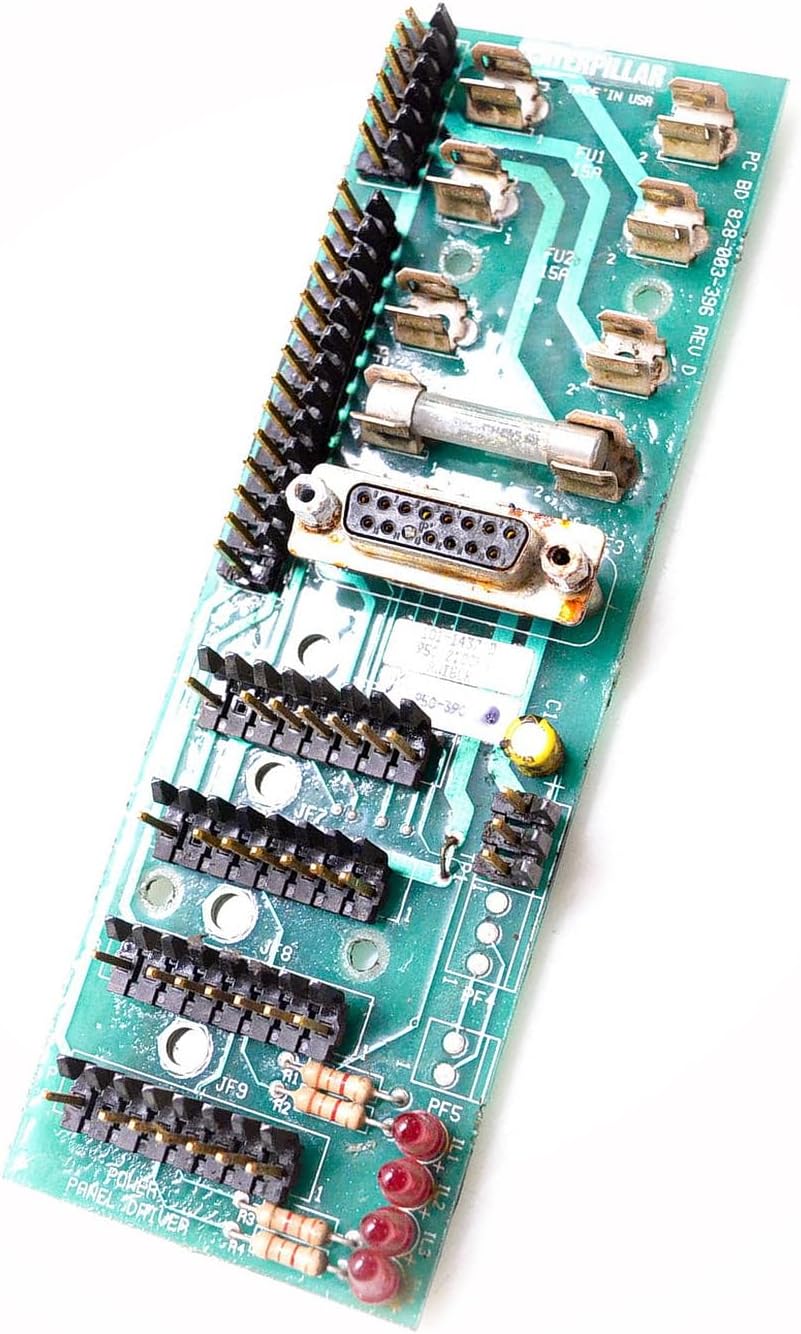
Image: T1StoM68395 Power Panel. This image displays the green circuit board with multiple pin headers (JF7, JF8, JF9), a D-sub connector, two fuse holders (FU1, FU2, rated 15A), and several red indicator LEDs (IL1, IL2, IL3) along with resistors. The board is labeled "POWER PANEL DRIVER" and includes a "CATERPILLAR" marking.
Key Components:
- Connectors (JF7, JF8, JF9): Multiple pin headers for various input/output connections.
- D-sub Connector: A multi-pin connector for data or control signals.
- Fuses (FU1, FU2): Two 15A fuses providing overcurrent protection for connected circuits.
- Indicator Lights (IL1, IL2, IL3): Red LEDs indicating power status or specific circuit activity.
- Power Panel Driver Circuitry: Integrated components for power management and distribution.
Setup and Installation
The T1StoM68395 Power Panel is designed for quick and hassle-free installation. Follow these general steps for integration into your system:
- Preparation: Ensure all power to the system is disconnected. Gather necessary tools and verify compatibility with your existing equipment.
- Mounting: Securely mount the power panel in the designated location within your equipment enclosure. Ensure adequate ventilation.
- Wiring Connections: Carefully connect all necessary power input, output, and signal wires to the appropriate pin headers (JF7, JF8, JF9) and the D-sub connector. Refer to your equipment's wiring diagram for specific connections.
- Fuse Installation: Verify that the 15A fuses (FU1, FU2) are correctly seated in their holders.
- Final Check: Before restoring power, double-check all connections for security and correct polarity. Ensure no loose wires or potential short circuits.
- Power Restoration: Carefully restore power to the system and observe the indicator lights (IL1, IL2, IL3) for proper operation.
Operation
Once properly installed and powered, the T1StoM68395 Power Panel operates automatically to provide stable power distribution and protection to connected components. The indicator lights (IL1, IL2, IL3) will illuminate to signify operational status or specific circuit activity, as defined by the system it is integrated into.
This panel is engineered to provide consistent, dependable operation under harsh and demanding conditions, ensuring safety and efficiency for your applications.
Maintenance
Regular maintenance helps ensure the longevity and reliable performance of your power panel:
- Periodic Inspection: Visually inspect the panel and its connections regularly for any signs of wear, corrosion, or damage.
- Cleaning: If necessary, gently clean the surface of the board with a soft, dry, lint-free cloth. Avoid using liquids or abrasive cleaners. Ensure power is disconnected before cleaning.
- Fuse Check: If a circuit fails to operate, check the corresponding 15A fuse (FU1 or FU2) for continuity. Replace blown fuses only with fuses of the same type and rating.
- Connection Integrity: Periodically check that all wire connections are secure and free from looseness.
Troubleshooting
| Problem | Possible Cause | Solution |
|---|---|---|
| No power to connected components. | Blown fuse (FU1 or FU2). Loose power connection. No input power to the panel. | Check and replace blown 15A fuses. Verify all power connections are secure. Ensure main power supply is active. |
| Indicator lights (IL1, IL2, IL3) not illuminating. | No power to the panel. Faulty indicator light. | Check power supply and fuses. If power is present, the light may require professional service. |
| Intermittent operation. | Loose connections. Environmental factors (e.g., vibration, extreme temperature). | Inspect and secure all connections. Ensure the operating environment is within specified limits. |
If troubleshooting steps do not resolve the issue, contact a qualified technician or the product supplier for assistance.
Specifications
| Model Number | T1StoM68395 |
| Compatible With | Caterpillar 1029591 Systems |
| Manufacturer | Generic |
| Part Number | T1StoM68395 |
| ASIN | B0DFWVRHM9 |
| Fuse Rating | 15A (FU1, FU2) |
| Materials | Durable, corrosion-resistant |
Warranty Information
For specific warranty details regarding the T1StoM68395 Power Panel, please refer to the documentation provided at the time of purchase or contact the seller directly. Warranty terms may vary based on region and distributor.
Customer Support
If you require further assistance, have questions about installation, or need to report an issue, please contact your product supplier or the manufacturer. Provide your model number (T1StoM68395) and ASIN (B0DFWVRHM9) for quicker service.
Ask a question about this manual
Ask about setup, troubleshooting, compatibility, parts, safety, or missing instructions. Manuals+ will review the question and use this page’s manual context to help answer it.