1. Safety Instructions
Please read and understand all safety instructions before installing or operating this product. Failure to do so may result in injury or property damage.
- This product is designed for indoor use only (IP20 rating).
- Ensure the power supply voltage matches the product's requirements (AC100-240V, 50/60Hz).
- Always disconnect from the power source before cleaning, servicing, or installing.
- Do not operate the device if the power cord is damaged.
- Avoid direct eye exposure to the light source, especially the laser. The laser level is Class I, with a maximum output of <0.39mW.
- Keep the device away from flammable materials and excessive heat.
- Ensure proper ventilation to prevent overheating.
- This device should only be repaired by qualified personnel.
2. Package Contents
Verify that all items listed below are included in your package:
- Power Cord x 1
- LED Stage Light Unit x 1
- Remote Control x 1
- Mounting Handle x 1
- Screws + Gaskets x 2
- Instruction Manual x 1

Figure 2.1: Included Package Contents
3. Product Overview
The Sparklingtrack ZQ05203 is a versatile 5-in-1 LED Stage Light designed to create dynamic lighting effects for various events. It integrates multiple lighting technologies into a single compact unit.

Figure 3.1: Sparklingtrack ZQ05203 LED Stage Light
3.1 Key Features
- 5-in-1 Functionality: Combines LED patterns, UV effects, strobe light, LED par/wash light, and red/green laser light patterns.
- Multiple Control Options: Supports DMX512 (7-channel), remote control, sound activation, auto mode, and master/slave operation.
- Rich Lighting Effects: Offers 30 LED pattern combinations, 15 color wash effects, 36 laser patterns, and adjustable strobe (1-20Hz).
- Professional-Grade Performance: 24W power with 4-in-1 LEDs, operating in a wide temperature range (-10℃ to 40℃).
- Easy Setup: Includes a sturdy bracket for flexible mounting options.

Figure 3.2: 5-in-1 LED Effect DJ Light Features
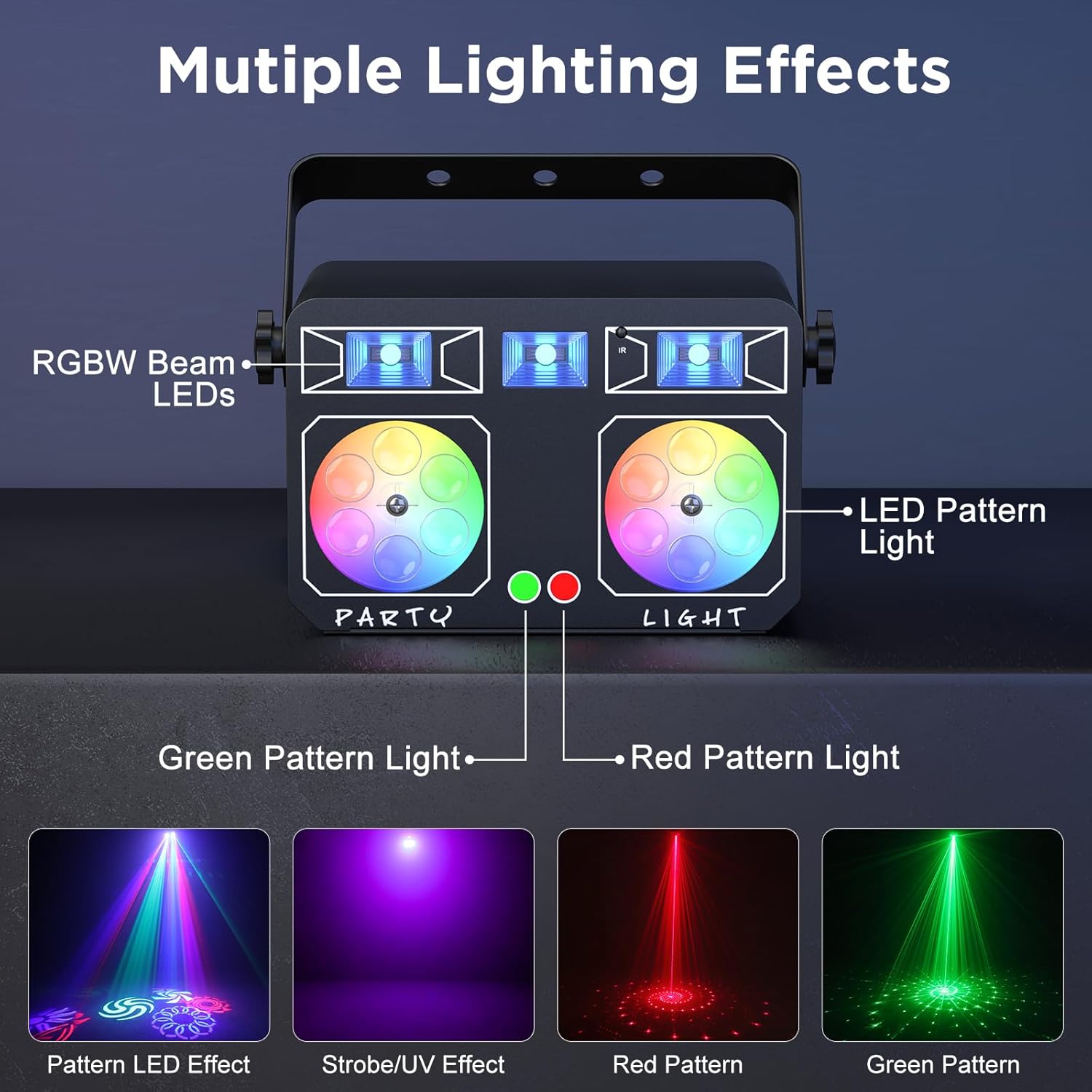
Figure 3.3: Multiple Lighting Effects Overview

Figure 3.4: RGBW LED Pattern Effects
3.2 Product Components
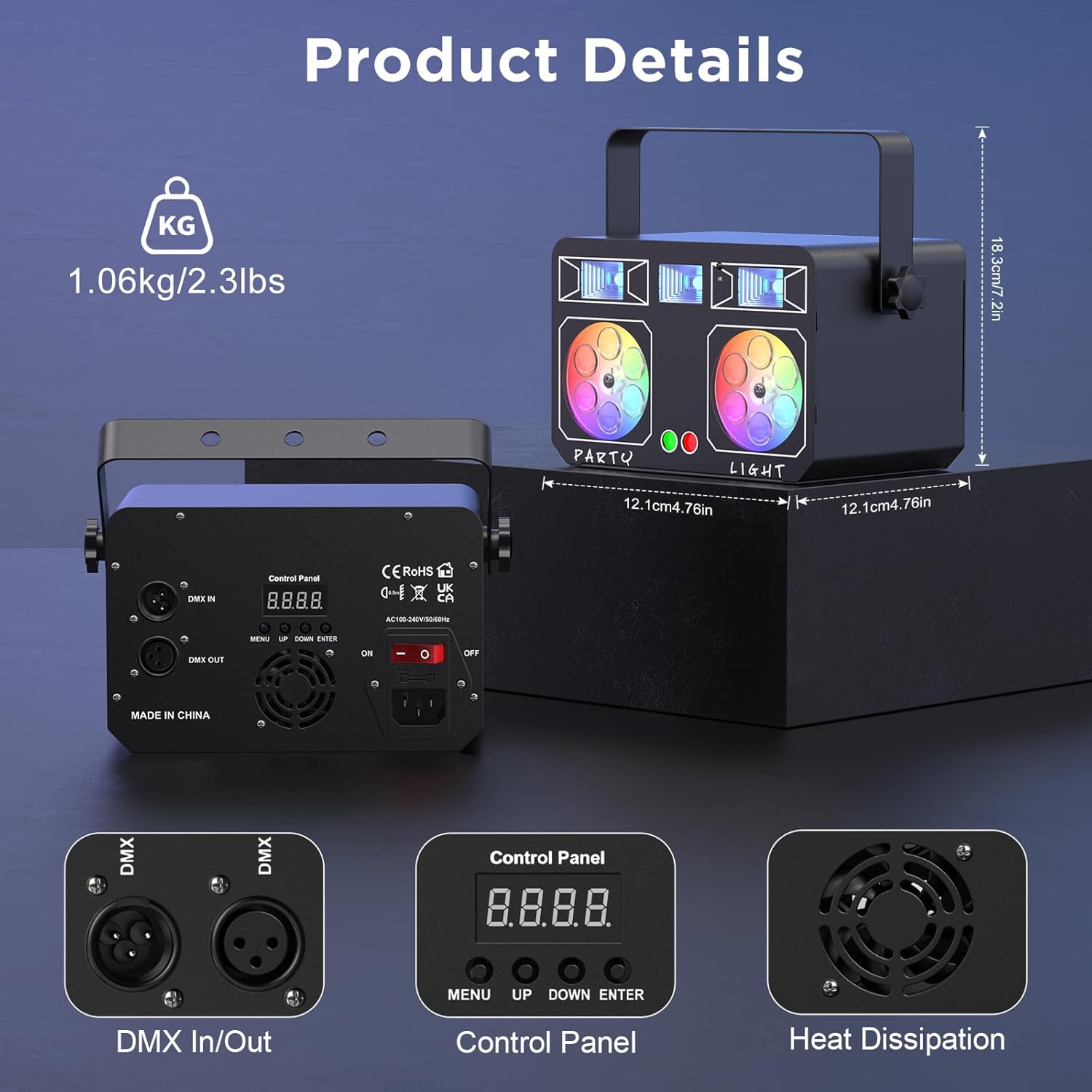
Figure 3.5: Product Details and Connections
The device features DMX In/Out ports for professional control, an onboard control panel with an LCD display, and a heat dissipation fan for optimal performance.
3.3 Official Product Video
Video 3.1: Official product video demonstrating the various lighting effects and features of the 5-in-1 LED Stage Light, including LED patterns, UV, strobe, par, and laser effects.
4. Setup
The LED Stage Light offers flexible installation options to suit your event space.
4.1 Mounting Options
The included bracket allows for various mounting configurations:
- Floor Standing: Place the unit directly on a stable surface.
- Floor Mounting: Use the bracket to secure the unit to the floor.
- Ceiling Mounting: Attach the bracket to a ceiling truss or fixture. Ensure the mounting point can support the device's weight.
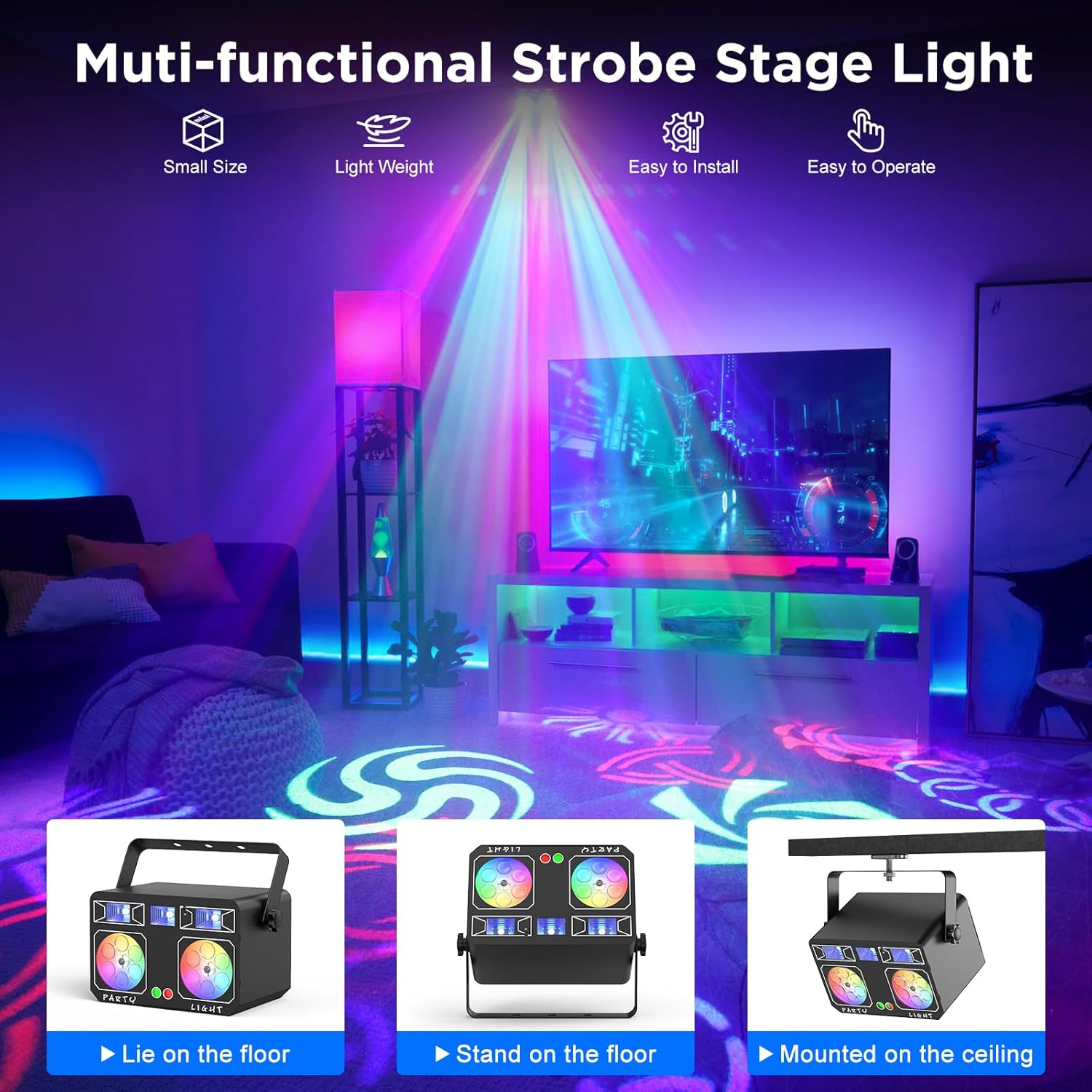
Figure 4.1: Mounting Configurations
4.2 Power Connection
Connect the provided power cord to the device's power input and then to a standard AC outlet (100-240V, 50/60Hz).
4.3 DMX Connection (Optional)
For advanced control, connect the DMX IN port to a DMX controller using a standard DMX cable. You can daisy-chain multiple units by connecting the DMX OUT of one unit to the DMX IN of the next.
5. Operating Modes
The Sparklingtrack ZQ05203 offers several operating modes for diverse applications.

Figure 5.1: Available Control Methods
5.1 Remote Control Operation
The included remote control provides convenient access to various functions from up to 16.4ft away.

Figure 5.2: Remote Control Functions
Key remote functions include:
- Power On/Off: Turns the unit on or off.
- DMX Mode: Activates DMX control.
- AUTO Mode (1-3): Cycles through automatic light sequences.
- Sound Activated (1-3): Activates light effects in response to music or sound.
- Strobe Mode (1-3): Controls strobe intensity and speed.
- LED Pattern Effect Automatic: Automatically changes LED patterns.
- Eye LED Color Automatic Jump: Automatically cycles through LED colors.
- Grating Pattern Automatic: Automatically changes grating patterns.
- Pattern Rotation/Stop: Controls rotation of patterns.
- LED Pattern Effect Selection: Manually select LED patterns.
- Grating Pattern Effect Selection: Manually select grating patterns.
- Dye LED Color Selection: Manually select LED colors.
- Speed +/-: Adjusts the speed of effects.
- Light Mode Speed +/-: Adjusts the speed of the current light mode.
5.2 DMX512 Control
The unit supports 7-channel DMX512 protocol for precise control over individual light functions. Refer to the DMX channel chart in the full manual for detailed programming information.
5.3 Onboard Control Panel
Use the MENU, UP, DOWN, and ENTER buttons on the rear panel to navigate settings and select operating modes directly on the device's LCD display.
5.4 Sound Activation Mode
In sound activation mode, the light effects will synchronize with the beat of the music or ambient sound. Adjust sensitivity via the remote or control panel if available.
5.5 Auto Mode
The device will automatically cycle through its pre-programmed light shows and effects.
5.6 Master/Slave Mode
Connect multiple units via DMX cables. Set one unit as the 'Master' and others as 'Slave' units. The slave units will then mirror the master's operations, creating a synchronized light show.
6. Maintenance
Regular maintenance ensures optimal performance and longevity of your LED Stage Light.
- Cleaning: Periodically clean the lenses and housing with a soft, lint-free cloth. Do not use abrasive cleaners or solvents.
- Inspection: Regularly check the power cord and DMX cables for any signs of damage.
- Ventilation: Ensure the heat dissipation fan and vents are free from dust and obstructions.
- Storage: When not in use, store the device in a cool, dry place, away from direct sunlight and extreme temperatures.
7. Troubleshooting
If you encounter issues with your LED Stage Light, refer to the following common problems and solutions:
| Problem | Possible Cause | Solution |
|---|---|---|
| No power | Power cord not connected; Power outlet faulty; Device switch off. | Check power cord connection; Test outlet with another device; Ensure power switch on the unit is ON. |
| Remote control not working | Remote battery low or dead; Obstruction between remote and unit; Remote sensor blocked. | Replace remote battery; Ensure clear line of sight to the unit's IR sensor; Clean the remote sensor area. |
| Lights not responding in DMX mode | Incorrect DMX address; DMX cable fault; DMX controller issue. | Verify DMX address setting; Check DMX cable connections; Test with a different DMX controller if possible. |
| Sound activation not working | No sound input; Microphone sensitivity too low. | Ensure music is playing loudly enough near the unit; Adjust microphone sensitivity settings. |
| Overheating | Blocked ventilation; Prolonged use in high temperatures. | Clear any obstructions from vents; Ensure adequate airflow around the unit; Allow unit to cool down. |
8. Specifications
- Model Number: ZQ05203
- Color: Black
- Shape: Rectangular
- Material: Aluminum
- Finish Type: Brushed
- Light Source Type: Light Emitting Diode (LED)
- Power Source: Corded Electric
- Light Source Wattage: 24 Watts
- Mounting Type: Bracket mount
- Number of Light Sources: 5 (5-in-1 effects)
- Product Dimensions: 10.2"L x 2.6"W x 6.3"H
- Item Weight: 2.99 pounds (1.36 kg)
- Operating Temperature: -10℃ to 40℃
- Protection Rating: IP20 (Indoor use)
- Laser Level: Class I, max output: <0.39mW
9. Warranty and Support
For warranty information and customer support, please refer to the documentation provided with your purchase or contact Sparklingtrack customer service directly. Keep your purchase receipt as proof of purchase.