
Maozhren BN96-36499F BN63-13872X BN63-13875X
Maozhren TV Stand Legs Instruction Manual
Model: BN96-36499F, BN63-13872X, BN63-13875X
1. Product Overview
These TV stand legs are designed as replacement feet for specific 32-inch Samsung TV models. They provide a stable and secure base for your television, allowing for tabletop placement without the need for wall mounting. The design emphasizes ease of installation and protection for furniture surfaces.
2. Compatible Models
These replacement TV stand legs are compatible with the following 32-inch Samsung TV models. Please verify your TV model number before installation to ensure compatibility.
- UN32M4500, UN32M4500AF, UN32M4500BF, UN32M4500BFXZA, UN32M5300AF
- UN32N5300, UN32N5300AF, UN32N5300AFXZA, UN32N4000AG
- UN32J4000, UN32J4000AF, UN32J400DAF, UN32J4000AFXZA, UN32J4000BFXZA, UN32J4000AFXZC, UN32J4000AFXZP, UN32J4000BF, UN32J4500AF, UN32J4002AF, UN32J4002FXZA, UN32J4001AF

This image displays a clear list of Samsung TV models that are compatible with these replacement stand legs. It emphasizes the importance of checking your TV model before purchase.
3. Package Contents
The package includes all necessary components for a quick and easy installation:
- 2 x TV Stand Legs (Left and Right)
- 4 x Anti-Rust Screws
- Installation Instructions (this manual)

This image illustrates the complete contents of the package: two TV stand legs, four screws, and the installation instructions.

A detailed view of the four anti-rust screws included in the package, designed for durability and longevity.
4. Setup and Installation
The TV stand legs are designed for swift and drill-free installation. Follow these steps to securely attach them to your television:
- Carefully place your TV screen face down on a soft, clean surface to prevent scratches. Ensure the surface is stable.
- Locate the mounting holes on the bottom rear of your TV. These are typically two holes on each side.
- Identify the 'L' (Left) and 'R' (Right) markings on the TV stand legs. Match them to the corresponding sides of your TV.
- Align each stand leg with the designated mounting holes. Insert the provided anti-rust screws into the holes and tighten them securely with a screwdriver. Do not overtighten.
- Once both legs are firmly attached, carefully lift the TV and place it upright on a flat, stable surface. Ensure the TV is balanced before releasing it.

This image demonstrates the simple process of attaching the TV stand legs using only four screws, highlighting the ease of installation.

This image contrasts the drill-free installation of these TV stand legs with traditional wall mounting, emphasizing the benefit of protecting your walls from damage.

A visual comparison highlighting the 'hole-free' installation of the TV stand legs, which protects walls from damage often associated with wall mounts.

This diagram visually represents the straightforward process of attaching the TV stand legs, indicating that the TV will be securely supported within minutes.
5. Operating and Placement
Once installed, the TV stand legs provide a stable base for your television on various furniture surfaces. The integrated 4mm non-slip pads ensure a firm grip and prevent scratches.
- Ensure the surface where the TV is placed is level and sturdy enough to support the weight of the television.
- The non-slip pads are designed to work effectively on wooden, glass, marble, and metal surfaces.
- These stand legs are suitable for various room settings, including bedrooms, living rooms, meeting rooms, and yoga studios, offering flexible placement options.
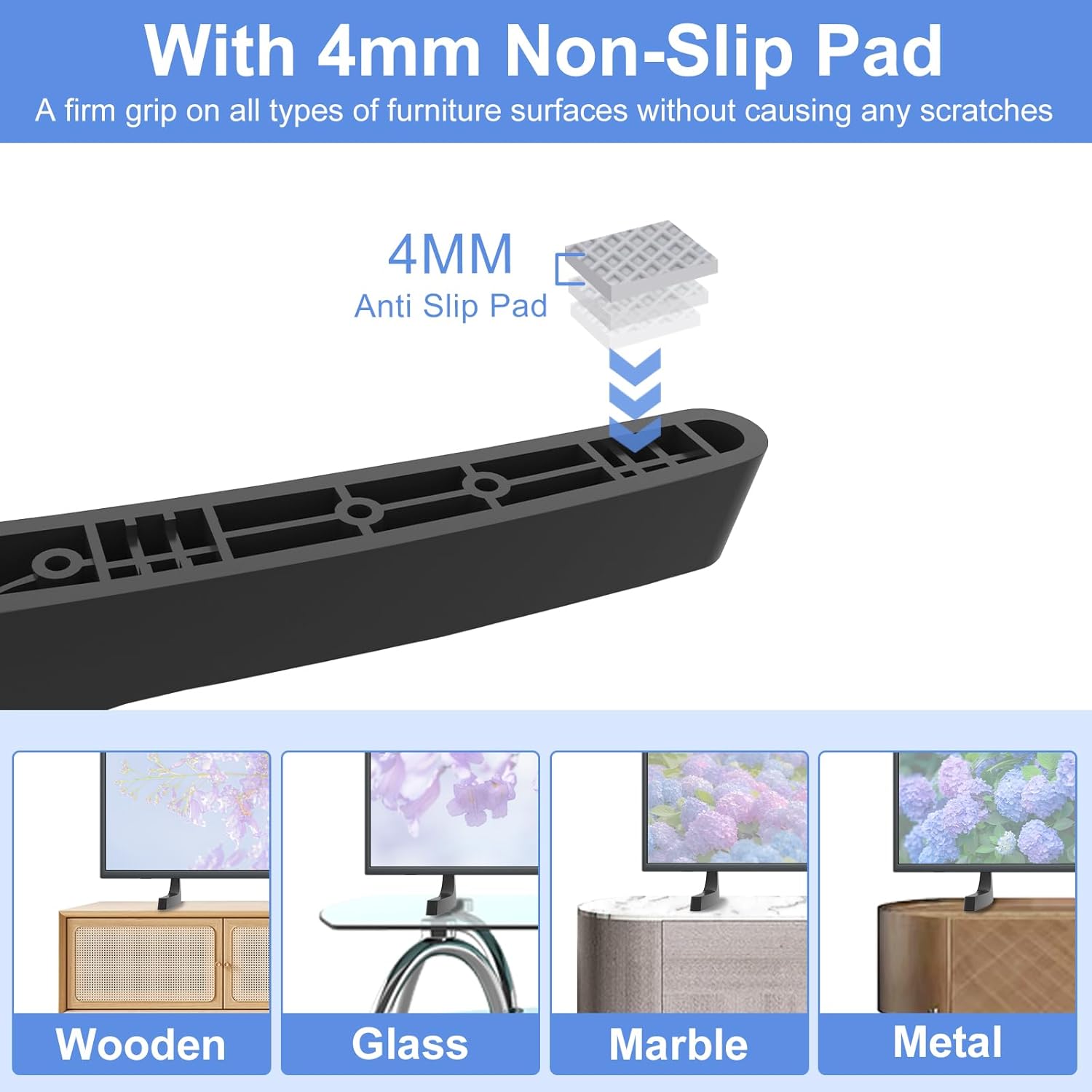
This image highlights the 4mm non-slip pad feature, demonstrating its effectiveness on various furniture materials like wood, glass, marble, and metal, preventing scratches.

A visual representation of the 4mm non-slip pad, emphasizing its ability to provide a firm grip on various furniture surfaces without causing damage.

This image demonstrates the versatility of the TV stand legs, showing how they can be used in various room types to provide a stable and aesthetically pleasing setup.

An example of the TV stand legs in a living room setting, showcasing their integration with home decor.

An example of the TV stand legs in a yoga room, demonstrating their adaptability to different personal spaces.

An example of the TV stand legs in a bedroom, illustrating their suitability for private living areas.

An example of the TV stand legs in a meeting room, showing their utility in professional or communal spaces.
6. Maintenance
To ensure the longevity and continued stability of your TV stand legs, follow these simple maintenance guidelines:
- Regularly check that the screws attaching the legs to the TV are tight. Retighten if necessary, but do not overtighten.
- Clean the legs with a soft, dry cloth. Avoid abrasive cleaners or solvents that could damage the material.
- Ensure the non-slip pads are free of debris to maintain their grip on the furniture surface.
7. Troubleshooting
If you encounter any issues with your TV stand legs, consider the following common solutions:
Issue: TV feels unstable after installation.
- Solution 1: Verify that all four screws are securely tightened.
- Solution 2: Ensure the TV is placed on a completely flat and level surface. Uneven surfaces can cause instability.
- Solution 3: Confirm that the correct 'L' and 'R' legs are installed on the appropriate sides of the TV.
Issue: Scratches appearing on furniture surface.
- Solution 1: Check if the 4mm non-slip pads are properly attached to the bottom of the legs and are not damaged.
- Solution 2: Ensure no debris is trapped between the non-slip pads and the furniture surface.
8. Specifications
| Feature | Detail |
|---|---|
| Model Numbers | BN96-36499F, BN63-13872X, BN63-13875X |
| Material | Acrylonitrile Butadiene Styrene (ABS) |
| Color | Black |
| Non-Slip Pad Thickness | 4mm |
| Package Dimensions | 8.11 x 5.67 x 1.14 inches |
| Item Weight | 3.2 ounces |

This image highlights the high-quality ABS material used in the TV stand legs, indicating its strength and ability to support TVs up to 60 lbs.
9. Warranty and Support
For any questions, concerns, or support needs regarding your Maozhren TV Stand Legs, please contact the manufacturer directly through their official channels. Information regarding warranty coverage, if applicable, will be provided by the manufacturer at the time of purchase or upon request.
Manufacturer: Maozhren
Ask a question about this manual
Ask about setup, troubleshooting, compatibility, parts, safety, or missing instructions. Manuals+ will review the question and use this page’s manual context to help answer it.