1. Introduction
Thank you for choosing the BBianLyy PD08DW Smart Compressor Dehumidifier. This manual provides essential information for the safe and efficient operation of your new appliance. Please read it thoroughly before use and retain it for future reference.
Key Features:
- Coverage Area: Up to 2500 Sq.Ft.
- Dehumidification Capacity: 34 Pints per day (at 95°F, 90%RH).
- Energy Efficiency: Energy Star Certified.
- Smart Control: Wi-Fi enabled via SmartLife app (iOS/Android).
- Operation Modes: DEHU (precise humidity control), DRY (clothes drying), CONT (continuous dehumidification).
- Drainage Options: Manual (2.5L water tank) or Continuous (with included 6.56 ft drain hose).
- Additional Functions: 24H Timer, Automatic Defrost, Memory Function, Child Lock.
- Portability: Hidden handles and four wheels for easy movement.

Image 1.1: The BBianLyy PD08DW Dehumidifier with its accompanying Smart Life app icon.
2. Safety Instructions
To reduce the risk of fire, electric shock, or injury, always follow these basic precautions:
- Read all instructions before using the appliance.
- Do not operate the dehumidifier with a damaged cord or plug.
- Ensure the unit is placed on a level, stable surface to prevent tipping.
- Maintain at least 8 inches (20 cm) of clearance around the unit for proper airflow.
- Do not insert fingers or foreign objects into the air inlet or outlet.
- Unplug the unit before cleaning or performing any maintenance.
- Do not use the appliance near water or in excessively wet environments.
- This appliance is for residential use only.
3. Product Overview and Components
Familiarize yourself with the main parts of your dehumidifier:
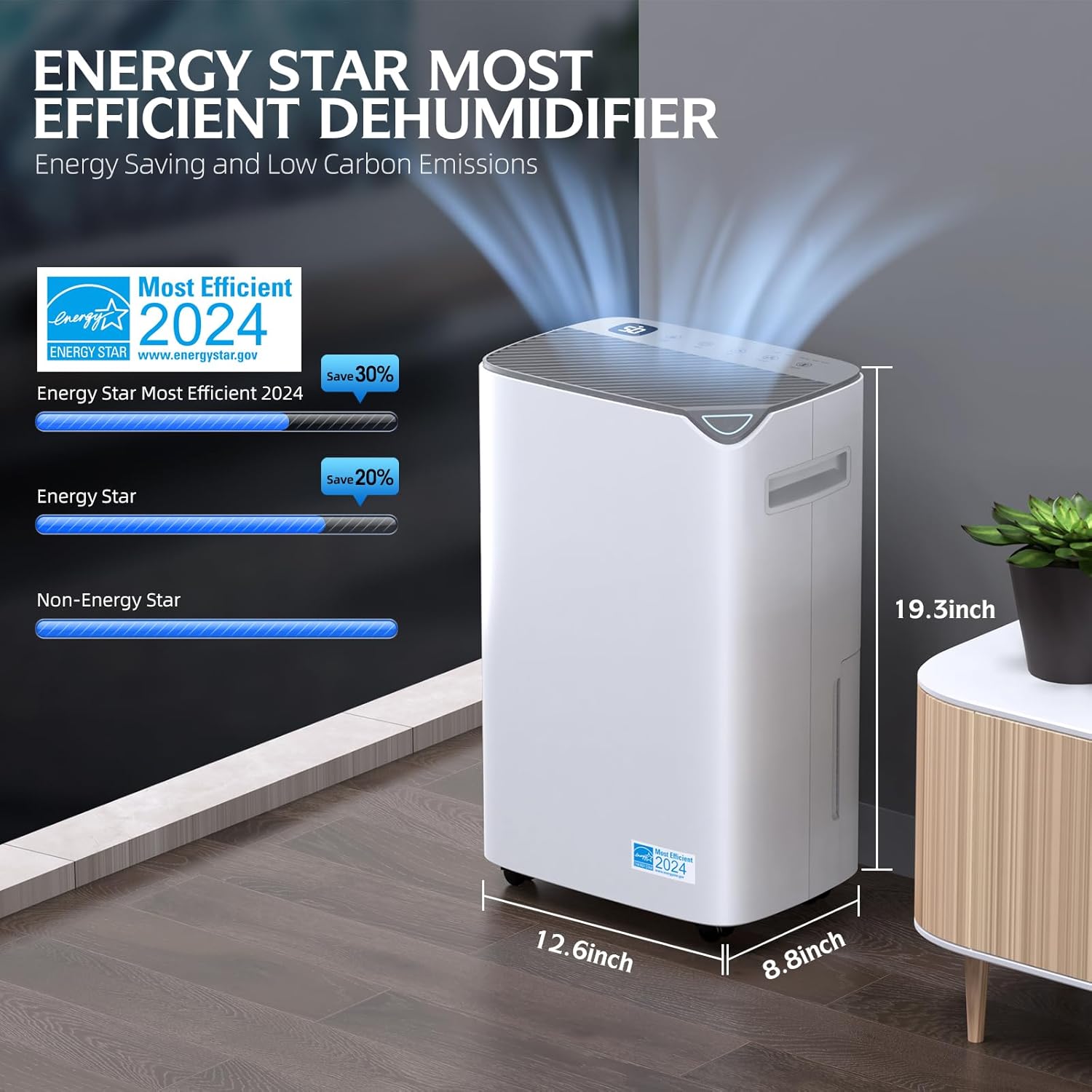
Image 3.1: Front view of the dehumidifier with key dimensions: 8.8 inches depth, 12.6 inches width, 19.3 inches height.

Image 3.2: The intelligent control panel features a digital display and touch controls for Child Lock, Timer, Humidity setting, Fan Speed, and Mode selection.
Main Components:
- Control Panel: Digital display and touch buttons for settings.
- Air Outlet: Located at the top, releases dry air.
- Air Inlet: Located at the rear, draws in humid air.
- Water Tank: Removable tank for manual water collection.
- Drain Port: For continuous drainage hose connection.
- Filter: Detachable and washable air filter.
- Wheels & Handles: For easy mobility.
4. Setup Instructions
4.1 Unpacking and Placement
- Carefully remove the dehumidifier from its packaging.
- Place the unit upright on a firm, level surface in the desired location (e.g., basement, bedroom, bathroom, garage).
- Ensure there is at least 8 inches (20 cm) of clear space around all sides of the unit for optimal air circulation.
4.2 Power Connection
Plug the power cord into a grounded electrical outlet. The unit will enter standby mode.
4.3 SmartLife App Installation and Pairing
The dehumidifier is Wi-Fi enabled for remote control via the SmartLife app.
- Preparation: Connect the device to the power supply. Ensure your phone is connected to a 2.4GHz Wi-Fi network.
- Download and Install: Search for "Smart Life" in your device's app store (iOS or Android) or scan the QR code provided in the physical user manual to download the app.
- App Registration: If you are a first-time user, click "Register" and follow the prompts to create an account. Existing users can log in.
- Configure the Smart Device:
- Open the Smart Life app and go to the "My Home" page. Tap the "+" button at the top right to add a device.
- On the manual add page, select "Small Appliances," then choose "Dehumidifier."
- Ensure the device is powered on but turned off. Long press the "Fan Speed" button on the device's control panel for more than 5 seconds until you hear a "whoosh" sound, and the "WiFi" or "Indicator" light starts flashing, signaling the device is in pairing mode.
- In the Smart Life app, tap "Confirm the light is flashing quickly," choose the Wi-Fi network in the device's location, and enter the Wi-Fi password. Tap "Confirm" to start the pairing process.
- After a few seconds, the device will automatically connect to the Wi-Fi network, and the "WiFi" or "Indicator" light will stay on.

Image 4.1: The Smart Life app allows for real-time humidity monitoring and custom scene creation for automated operation.
5. Operating Instructions
5.1 Power On/Off
Press the Power button on the control panel or via the SmartLife app to turn the unit on or off.
5.2 Setting Desired Humidity
In DEHU mode, press the Humidity button to adjust the desired humidity level from 30% to 80% in 5% increments. The unit will operate until the set humidity is reached, then cycle off. It will restart when humidity rises above the set level.
5.3 Mode Selection
Press the Mode button to cycle through the available operation modes:
- DEHU Mode: Standard dehumidification, automatically starting and stopping based on the target humidity.
- DRY Mode: Designed for quickly drying clothes by continuously running the fan and compressor.
- CONT Mode: Continuous dehumidification, ideal for very damp spaces, reducing room humidity to the lowest possible level without stopping.

Image 5.1: Visual representation of the three operation modes: DEHU for humidity control, DRY for clothes, and CONT for continuous operation.
5.4 Fan Speed
Press the Fan Speed button to select between low, medium, or high fan speeds. Higher speeds result in faster dehumidification but may produce more noise.
5.5 Timer Function
The 24H Timer allows you to set a specific time (1 to 24 hours) for the unit to turn on or off automatically. This feature helps in scheduling operation and saving energy.

Image 5.2: The 24-hour timer function enables scheduled operation for convenience and energy efficiency.
5.6 Child Lock Function
To activate the Child Lock, press and hold the Child Lock button for 2 seconds. This prevents accidental changes to settings. Repeat the action to deactivate.

Image 5.3: The Child Safety Lock prevents unintended changes to settings, ensuring safety in households with children.
5.7 Automatic Defrost
The unit features an automatic defrost function. If frost builds up on the evaporator coils, the compressor will temporarily turn off, and the fan will continue to run until the frost melts. This ensures efficient operation in cooler environments.
5.8 Auto Restart
In the event of a power outage, the dehumidifier will automatically restart with its previous settings once power is restored.

Image 5.4: The Auto Restart feature ensures the dehumidifier resumes operation with previous settings after a power interruption.
6. Drainage Options
Your dehumidifier offers two convenient methods for water removal:
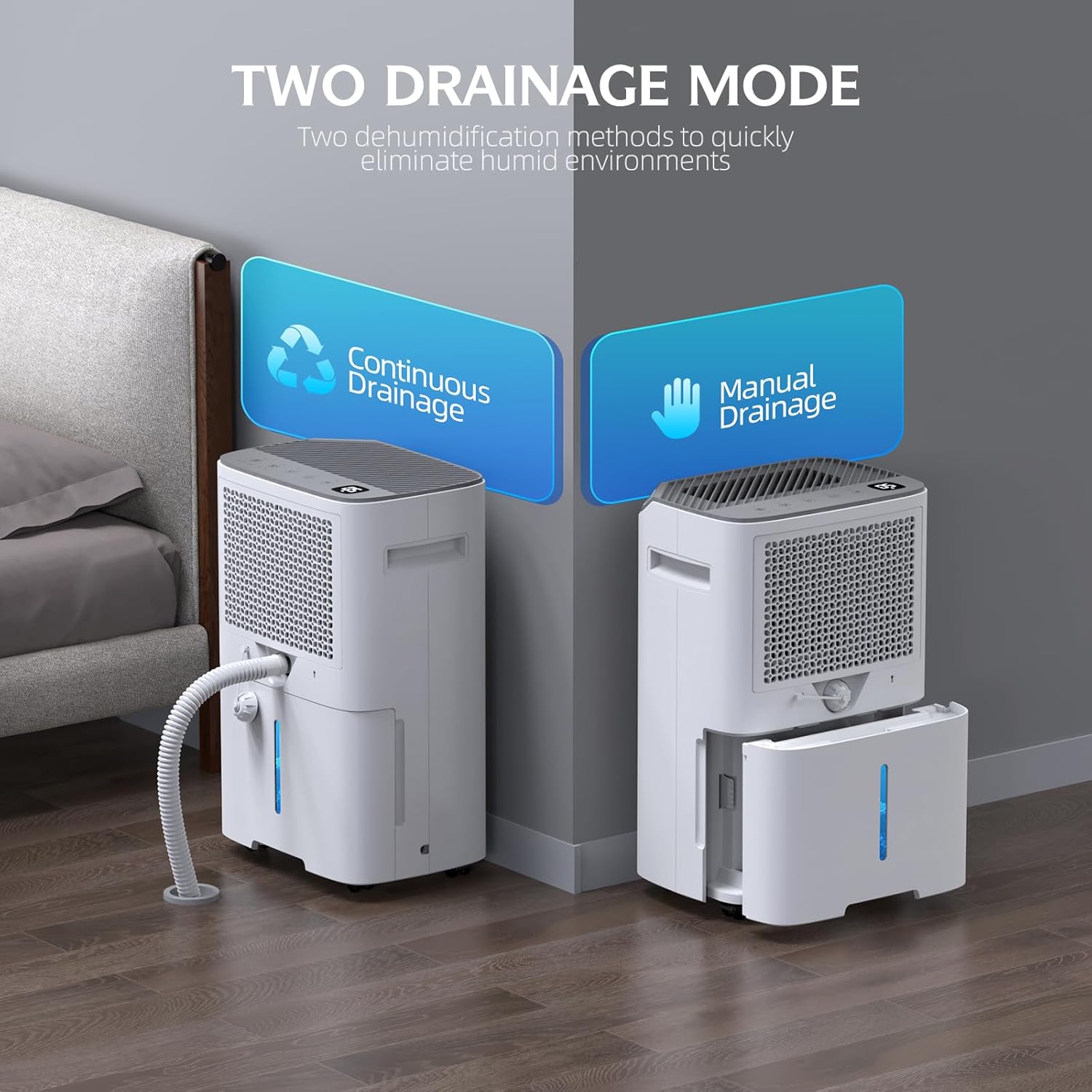
Image 6.1: The dehumidifier supports both continuous drainage via a hose and manual drainage by emptying the water tank.
6.1 Manual Drainage (Water Tank)
When the 2.5L (0.66 gal) water tank is full, the unit will automatically shut off, and the "Water Full" indicator will illuminate. To empty:
- Gently pull out the water tank from the front of the unit.
- Carefully empty the collected water.
- Slide the empty tank back into the unit until it clicks into place. The unit will resume operation.
Caution: If using the water tank for drainage, please ensure the switch on the water pipe is securely tightened to prevent leaks.
6.2 Continuous Drainage (Drain Hose)
For continuous operation without needing to empty the water tank, use the included 6.56 ft drain hose:
- Locate the drain port at the back of the unit.
- Remove the rubber stopper from the drain port.
- Securely attach one end of the drain hose to the drain port.
- Direct the other end of the hose to a suitable drain (e.g., floor drain, large bucket), ensuring the hose is sloped downwards to allow gravity drainage.
- Ensure the hose is not kinked or blocked.
7. Maintenance
Regular maintenance ensures optimal performance and longevity of your dehumidifier.
7.1 Cleaning the Air Filter
The detachable air filter should be cleaned approximately once a month, or more frequently depending on usage and air quality.
- Turn off the dehumidifier and unplug it from the power outlet.
- Remove the air filter from the back of the unit.
- Wash the filter with warm, soapy water. Rinse thoroughly.
- Allow the filter to air dry completely before reinstalling it. Do not use a dryer or direct heat.
7.2 Cleaning the Water Tank
Clean the water tank regularly to prevent mold and mildew growth.
- Remove the water tank as described in Section 6.1.
- Wash the tank with mild detergent and warm water.
- Rinse thoroughly and dry before placing it back into the unit.
7.3 Exterior Cleaning
Wipe the exterior of the unit with a soft, damp cloth. Do not use harsh chemicals or abrasive cleaners.
7.4 Long-Term Storage
If the unit will not be used for an extended period:
- Empty the water tank and ensure it is clean and dry.
- Clean the air filter.
- Unplug the unit and coil the power cord neatly.
- Store the dehumidifier in an upright position in a cool, dry place, away from direct sunlight.
8. Troubleshooting
Before contacting customer support, please refer to the following troubleshooting guide for common issues:
| Problem | Possible Cause | Solution |
|---|---|---|
| Unit does not turn on. | No power; Power cord loose; Water tank full. | Check power supply; Ensure cord is securely plugged in; Empty water tank. |
| No dehumidification. | Air filter clogged; Room temperature too low; Humidity setting too high. | Clean air filter; Ensure room temperature is above 41°F (5°C); Lower desired humidity setting. |
| Unit runs continuously. | In CONT mode; Humidity setting too low for current conditions; Large room size. | Switch to DEHU mode; Increase humidity setting; Ensure unit is appropriately sized for the space. |
| Water tank full indicator on, but tank not full. | Float switch stuck; Tank not properly seated. | Check float switch for obstructions; Reinsert water tank firmly. |
| Wi-Fi connection issues. | Incorrect Wi-Fi password; Router too far; 5GHz network. | Verify password; Move unit closer to router; Ensure connection to 2.4GHz Wi-Fi. |
9. Specifications
| Feature | Specification |
|---|---|
| Brand | BBianLyy |
| Model Name | 34 Pint 2,500 Sq.Ft Dehumidifier |
| Item Model Number | PD08DW |
| Floor Area Coverage | 2500 Square Feet |
| Dehumidification Capacity | 34 Pints per Day |
| Water Tank Volume | 0.66 Gallons (2.5 Liters) |
| Product Dimensions (D x W x H) | 8.8"D x 12.6"W x 19.3"H |
| Item Weight | 34 Pounds |
| Wattage | 350 watts |
| Number of Speeds | 3 |
| Color | White |
| Material | Plastic |
| UPC | 749614626212 |
| Included Components | Dehumidifier, Drain Hose, User Manual |
10. Warranty and Support
This BBianLyy dehumidifier is backed by a manufacturer's warranty. Please refer to the warranty card included with your product for specific terms and conditions, including coverage duration and limitations.
For technical support, troubleshooting assistance beyond this manual, or warranty claims, please contact BBianLyy customer service through the retailer where the product was purchased or visit the official BBianLyy website for contact information.