
1. Important Safety Instructions
Please read all instructions carefully before operating this appliance. Failure to follow these instructions may result in electric shock, fire, or serious injury. Retain this manual for future reference.
- Ensure the power supply voltage matches the rating label on the appliance.
- Do not immerse the appliance, cord, or plug in water or other liquids.
- Always unplug the toaster from the outlet when not in use and before cleaning. Allow it to cool completely before handling or cleaning.
- Do not operate any appliance with a damaged cord or plug, or after the appliance malfunctions or has been damaged in any manner.
- Keep the appliance away from children. Close supervision is necessary when any appliance is used by or near children.
- Do not place the appliance on or near a hot gas or electric burner, or in a heated oven.
- Do not use the appliance for anything other than its intended use.
- Avoid contact with moving parts.
- Do not cover the toaster while it is operating.
- Bread and other food items can burn. Do not leave the toaster unattended during operation.
- Ensure adequate ventilation around the appliance during use.
2. Product Overview
The WICHEMI Commercial Conveyor Toaster Toaster-300 is designed for high-efficiency toasting in commercial environments. It features a durable stainless steel construction and a powerful 2200W heating system.

Image 2.1: Front view of the WICHEMI Commercial Conveyor Toaster, showing the conveyor belt, control panel, and crumb tray.
Key Features:
- High Efficiency: Toasts up to 300 slices per hour.
- Powerful Heating: 2200W rapid heating elements.
- Durable Construction: Food-grade stainless steel body and conveyor chain.
- Versatile Toasting: 3 baking modes (BREAD, BUNS, STBY) and 7 browning levels.
- Dual Output: Front and rear discharge options for operational flexibility.
- Easy Maintenance: Removable crumb tray for simple cleaning.

Image 2.2: The toaster in a kitchen setting, illustrating its high capacity and key features.
3. Setup
3.1 Unpacking
- Carefully remove the toaster from its packaging.
- Remove all packing materials, including any protective films or tapes.
- Inspect the appliance for any damage. Do not operate if damaged.
3.2 Placement
- Place the toaster on a stable, flat, and heat-resistant surface.
- Ensure there is adequate clearance (at least 6 inches) around all sides of the toaster for proper ventilation. Do not place it directly against a wall or under cabinets.
- Keep the toaster away from flammable materials.
3.3 Power Connection
- Verify that your power outlet provides 110V AC.
- Plug the power cord securely into a grounded electrical outlet.
3.4 Crumb Tray Installation
- Slide the removable crumb tray into its designated slot at the bottom front of the toaster. Ensure it is fully inserted.
4. Operating Instructions
4.1 Control Panel Overview
The control panel features knobs for adjusting conveyor speed, toasting mode, and browning level.

Image 4.1: Close-up of the control panel, illustrating the three baking modes.
4.2 Selecting a Toasting Mode
Rotate the mode knob to select one of the following:
- BREAD: Activates both upper and lower heating tubes for standard double-sided toasting.
- BUNS: Activates only the upper heating tube for single-sided toasting, ideal for bagels or buns.
- STBY (Standby): Keeps both upper and lower heating tubes at a high temperature, ready for immediate use.
4.3 Adjusting Browning Level
The browning level knob allows you to select from 7 settings, controlling the conveyor speed and thus the toasting duration:
- Settings 1-2: For very light to light toast.
- Settings 3-4: For slightly golden to golden toast.
- Settings 5-7: For dark golden to very dark toast.
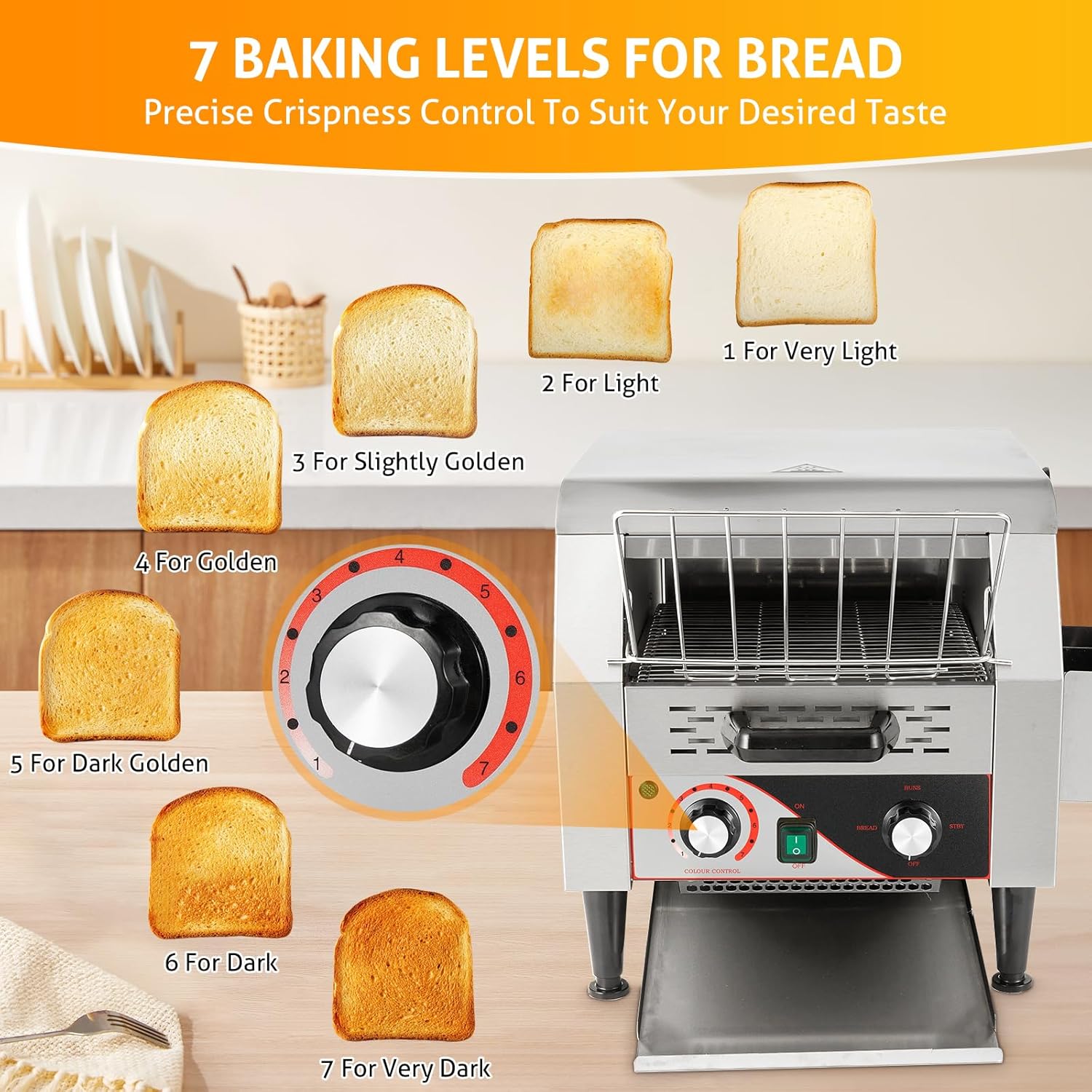
Image 4.2: Visual guide to the 7 browning levels and their appearance.
4.4 Loading and Toasting
- Turn the toaster ON using the power switch.
- Select the desired toasting mode (BREAD, BUNS, or STBY).
- Adjust the browning level knob to your preference.
- Place bread slices or other items onto the conveyor belt at the loading area. The conveyor will automatically transport them through the heating chamber.
- Toasted items will exit the toaster via the selected discharge chute.
4.5 Output Ways
The toaster offers two output options:
- Front Catch Tray: Toasted items are discharged to the front, ideal for self-service or quick access.
- Rear Catch Tray: Toasted items are discharged to the rear, suitable for kitchen staff to collect.

Image 4.3: Illustration of the front and rear discharge options.
5. Maintenance
Regular cleaning and maintenance will ensure the longevity and optimal performance of your WICHEMI Commercial Conveyor Toaster.
5.1 Cleaning the Crumb Tray
- Ensure the toaster is unplugged and completely cool.
- Carefully pull out the removable crumb tray from the front of the toaster.
- Discard accumulated crumbs.
- Wipe the tray with a damp cloth and mild detergent if necessary. Rinse and dry thoroughly.
- Reinsert the crumb tray into its slot.
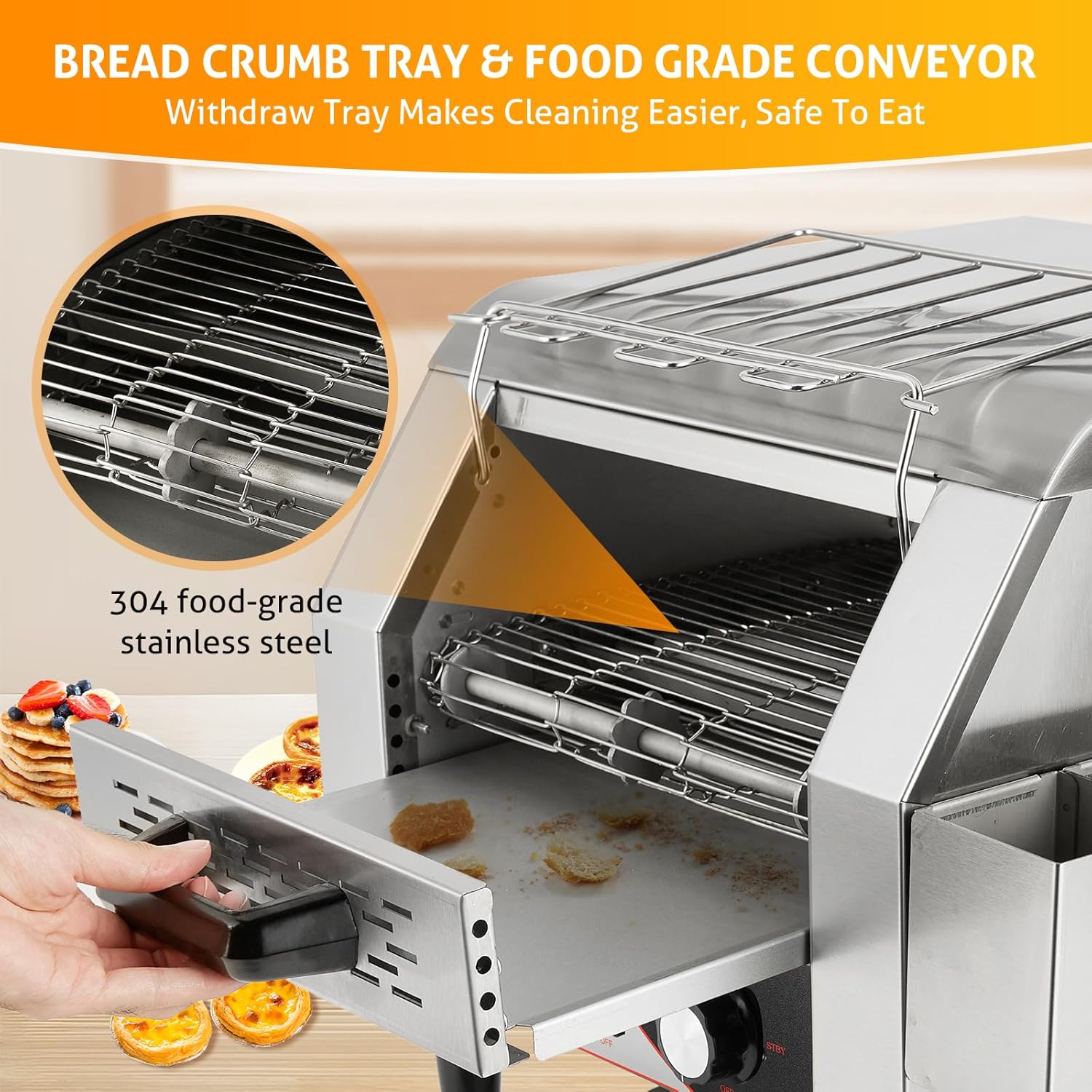
Image 5.1: Demonstrating the removal of the crumb tray for cleaning.
5.2 Cleaning the Exterior
- Unplug the toaster and allow it to cool.
- Wipe the exterior stainless steel surfaces with a soft, damp cloth. For stubborn stains, use a mild stainless steel cleaner.
- Do not use abrasive cleaners, scouring pads, or harsh chemicals, as these can damage the finish.
- Ensure all surfaces are dry before plugging the toaster back in.
5.3 Cleaning the Conveyor Belt and Interior
- With the toaster unplugged and cool, use a soft brush or a dry cloth to gently remove any food particles from the conveyor belt and interior heating elements.
- Do not use water or liquid cleaners directly on the heating elements or conveyor mechanism.
6. Troubleshooting
If you encounter issues with your toaster, refer to the following common problems and solutions:
| Problem | Possible Cause | Solution |
|---|---|---|
| Toaster does not turn on. | No power supply. | Check if the power cord is securely plugged into a working outlet. Verify the outlet has power. |
| Bread is not toasting or toasting unevenly. | Incorrect browning level setting. Incorrect mode selected. Heating elements obstructed. | Adjust the browning level to a higher setting. Ensure the correct mode (BREAD/BUNS) is selected. Check for any debris obstructing the heating elements (after unplugging and cooling). |
| Conveyor belt is not moving. | Motor malfunction. Obstruction on the belt. | Unplug the unit and check for any large food items or debris jamming the conveyor. If the issue persists, contact customer support. |
| Smoke or unusual odor during operation. | Food particles burning. First use odor. | Unplug immediately. Allow to cool. Clean the crumb tray and interior thoroughly. A slight odor during first use is normal. If smoke persists, discontinue use and contact support. |
If the problem persists after attempting these solutions, please contact WICHEMI customer support for assistance.
7. Specifications
| Feature | Specification |
|---|---|
| Brand | WICHEMI |
| Model Number | Toaster-300 |
| Material | Stainless Steel |
| Product Dimensions (D x W x H) | 22" x 15" x 16" (55.88 cm x 38.1 cm x 40.64 cm) |
| Wattage | 2200 watts |
| Voltage | 110 Volts (AC) |
| Output Capacity | Up to 300 slices/hour |
| Number of Browning Settings | 7 |
| Special Feature | Removable Crumb Tray |
| Item Weight | 38.4 pounds (17.4 kg) |
8. Warranty and Support
For warranty information and customer support, please refer to the documentation included with your purchase or visit the official WICHEMI website. Keep your purchase receipt as proof of purchase for any warranty claims.
If you require technical assistance or have questions regarding the operation or maintenance of your WICHEMI Commercial Conveyor Toaster, please contact WICHEMI customer service.