
1. Introduction and Safety Information
This manual provides essential instructions for the safe and effective use of your HOTWAVE Vibration Plate Exercise Machine. Please read all instructions carefully before operation and retain this manual for future reference.
Important Safety Precautions
- Consult a physician before starting any new exercise program, especially if you have pre-existing medical conditions.
- Do not use the machine if you are pregnant, have a pacemaker, or suffer from severe heart conditions, epilepsy, or acute thrombosis.
- Ensure the machine is placed on a stable, level surface.
- Keep children and pets away from the machine during operation.
- Do not exceed the maximum weight recommendation of 350 pounds.
- Always wear appropriate athletic footwear or use the machine barefoot.
- Stop exercising immediately if you feel dizzy, nauseous, or experience any pain.
- Unplug the machine from the power outlet when not in use or before cleaning.
2. Package Contents
Verify that all components are present in the package:
- Vibration Plate Exercise Machine (x1)
- Resistance Bands (x2)
- Remote Control Unit (x1)
- Power Cord (x1)
- Instruction Manual (x1)

Figure 2.1: Included components and dimensions of the vibration plate.
3. Setup
The HOTWAVE Vibration Plate Exercise Machine requires no assembly. Follow these steps to prepare for use:
- Place the vibration plate on a firm, level surface. Ensure there is enough space around the machine for safe movement.
- Connect the power cord to the machine's power port and then plug it into a standard 110V electrical outlet.
- Ensure the remote control has 2 AAA batteries installed (batteries not included).
4. Operating Instructions
The vibration plate features an LED display, touch controls on the unit, and a remote control for convenient operation. It offers 120 speed levels and multiple preset programs.
Control Panel and Remote Functions

Figure 4.1: Overview of the control panel and remote control functions.
- Power Button: Turns the machine on or off.
- Start/Pause Button: Initiates or pauses the vibration.
- Program Mode Button: Cycles through preset programs (P1-P5) and manual mode (HR).
- Speed / Time Increase/Decrease Buttons: Adjusts vibration speed or exercise duration in manual mode.
- Speed Cycle Button (Remote Only): Quickly switches between low, medium, and high-speed gear settings (e.g., 30, 60, 90 gears).
Operating Modes
The machine offers both manual and automatic modes:
- Manual Mode (HR): Allows you to manually adjust the speed from 0 to 120 levels.
- Preset Programs (P1-P5): These are automatic programs with varying speed and intensity profiles.

Figure 4.2: Speed level guide for different intensity levels.
Recommended Usage
Begin with short sessions (e.g., 10-15 minutes) at lower speeds and gradually increase duration and intensity as your body adapts. The machine is designed for various positions to target different muscle groups.
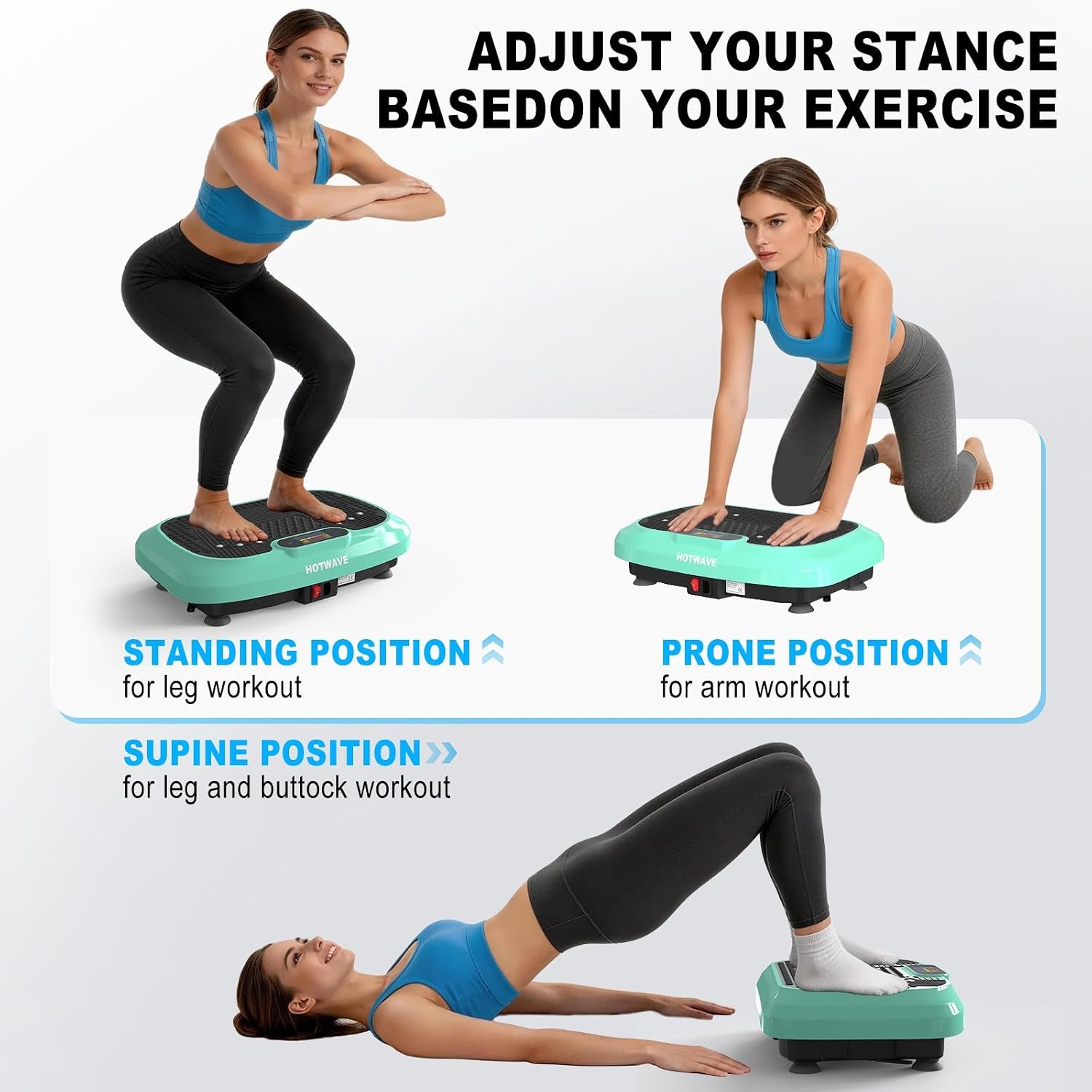
Figure 4.3: Adjusting your stance for different exercises.

Figure 4.4: Various exercise poses for full-body conditioning.
5. Maintenance
Proper maintenance ensures the longevity and optimal performance of your vibration plate.
- Cleaning: Wipe the machine with a soft, damp cloth after each use. Do not use abrasive cleaners or solvents. Ensure the machine is unplugged before cleaning.
- Storage: Store the machine in a cool, dry place away from direct sunlight and moisture. Its compact design allows for easy storage under a bed or couch.
- Inspection: Periodically check the power cord for any damage. If damaged, discontinue use and contact customer support.

Figure 5.1: Storing the vibration plate.
6. Troubleshooting
If you encounter any issues with your HOTWAVE Vibration Plate, refer to the following common problems and solutions:
| Problem | Possible Cause | Solution |
|---|---|---|
| Machine does not power on. | Power cord not properly connected or no power from outlet. | Ensure the power cord is securely plugged into both the machine and a working electrical outlet. Check the power switch on the machine. |
| Vibration is weak or inconsistent. | Low speed setting or uneven surface. | Increase the speed setting using the control panel or remote. Ensure the machine is on a flat, stable surface. |
| Remote control not working. | Dead batteries or obstruction. | Replace the AAA batteries in the remote control. Ensure there is no obstruction between the remote and the machine's infrared receiver window. |
| Unusual noise during operation. | Loose components or uneven placement. | Check for any loose parts. Ensure the machine is placed evenly on the floor. If the noise persists, discontinue use and contact customer support. |
If the problem persists after attempting these solutions, please contact HOTWAVE customer support for assistance.
7. Specifications
| Feature | Detail |
|---|---|
| Brand | HOTWAVE |
| Model Number | hotwave vibration plate |
| Item Weight | 14.3 pounds |
| Product Dimensions (D x W x H) | 21.9" x 13.6" x 4.72" |
| Material | Iron |
| Controls Type | Remote, On-unit buttons |
| Display | LED |
| Motor Horsepower | 200 watts |
| Number of Resistance Levels | 120 |
| Operation Mode | Automatic, Manual |
| Power Source | Corded Electric |
| Maximum Weight Recommendation | 350 pounds |
8. Warranty and Support
Your HOTWAVE Vibration Plate Exercise Machine comes with a 180-day warranty from the date of purchase, covering manufacturing defects. Please retain your proof of purchase for warranty claims.
Contact Support
For any questions, technical support, or warranty claims, please contact HOTWAVE customer service. Refer to the product packaging or the official HOTWAVE website for the most current contact information.