
Luckyernity Luckyernity
Wireless Earbuds User Manual
Model: Luckyernity | Brand: Luckyernity
Introduction
Thank you for choosing the Luckyernity Wireless Earbuds. These Bluetooth headphones are designed to provide a high-quality audio experience with deep bass, stereo sound, and ENC noise cancelling for clear calls. Featuring a translucent charging case and intuitive touch controls, they are waterproof and compatible with various devices. This manual will guide you through the setup, operation, and maintenance of your new earbuds.
What's in the Box
- Luckyernity Wireless Earbuds (Left and Right)
- Wireless Charging Case
- USB Charging Cable
- User Manual (this document)

Image: The Luckyernity Wireless Earbuds, showing both earbuds and the translucent charging case with a digital display.
Product Overview
Familiarize yourself with the main components of your earbuds and charging case.
Earbuds
- Touch Control Area: For managing playback, calls, and voice assistant.
- Microphone: Built-in for calls and voice commands.
- Charging Contacts: Connects with the charging case.
- LED Indicator: Shows pairing status and battery level.
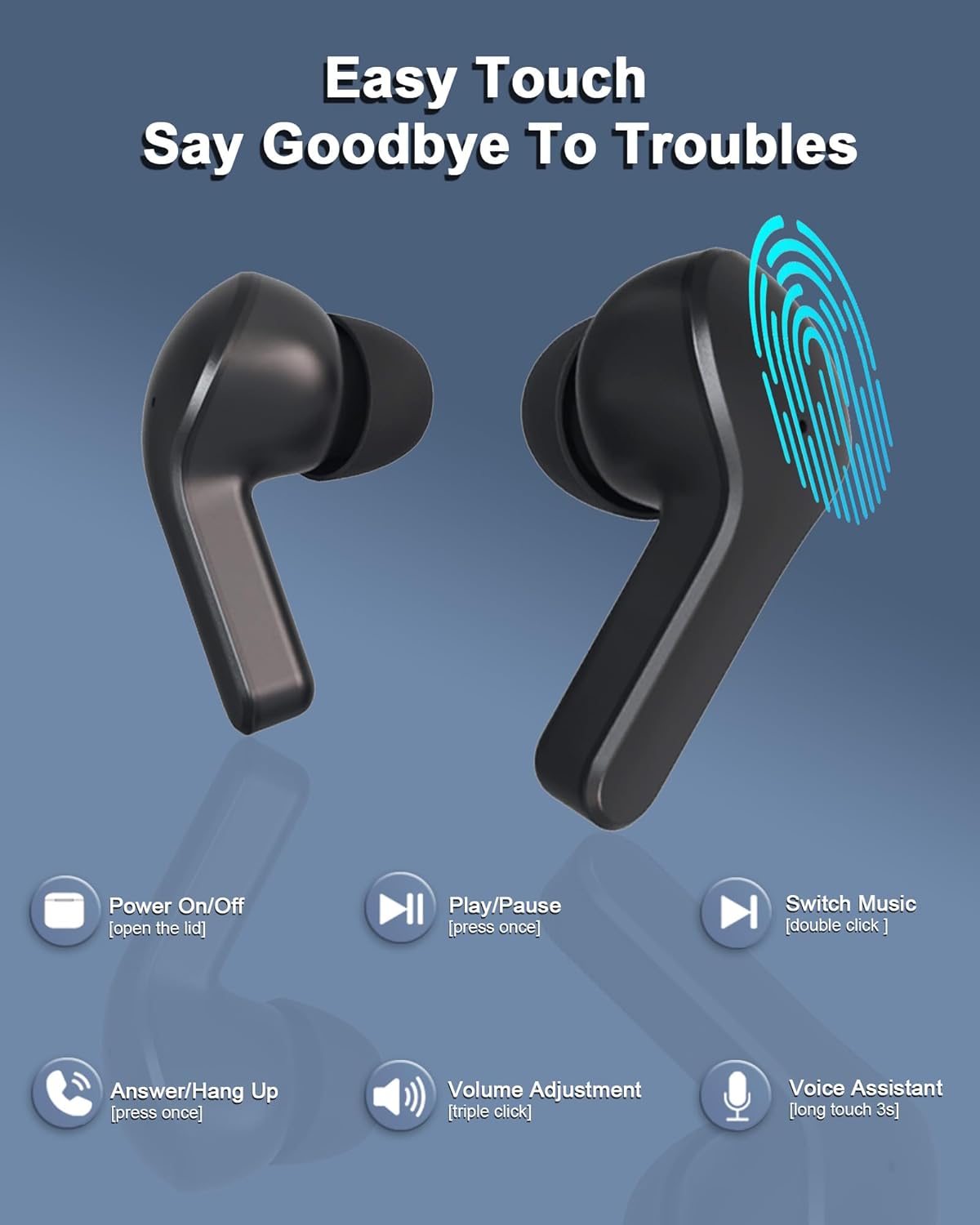
Image: Close-up of the earbuds highlighting the touch control area with a fingerprint icon.
Charging Case
- Earbud Charging Slots: Holds and charges the earbuds.
- Digital LED Display: Shows battery percentage of the case and individual earbud charge levels.
- USB-C Charging Port: For charging the case.
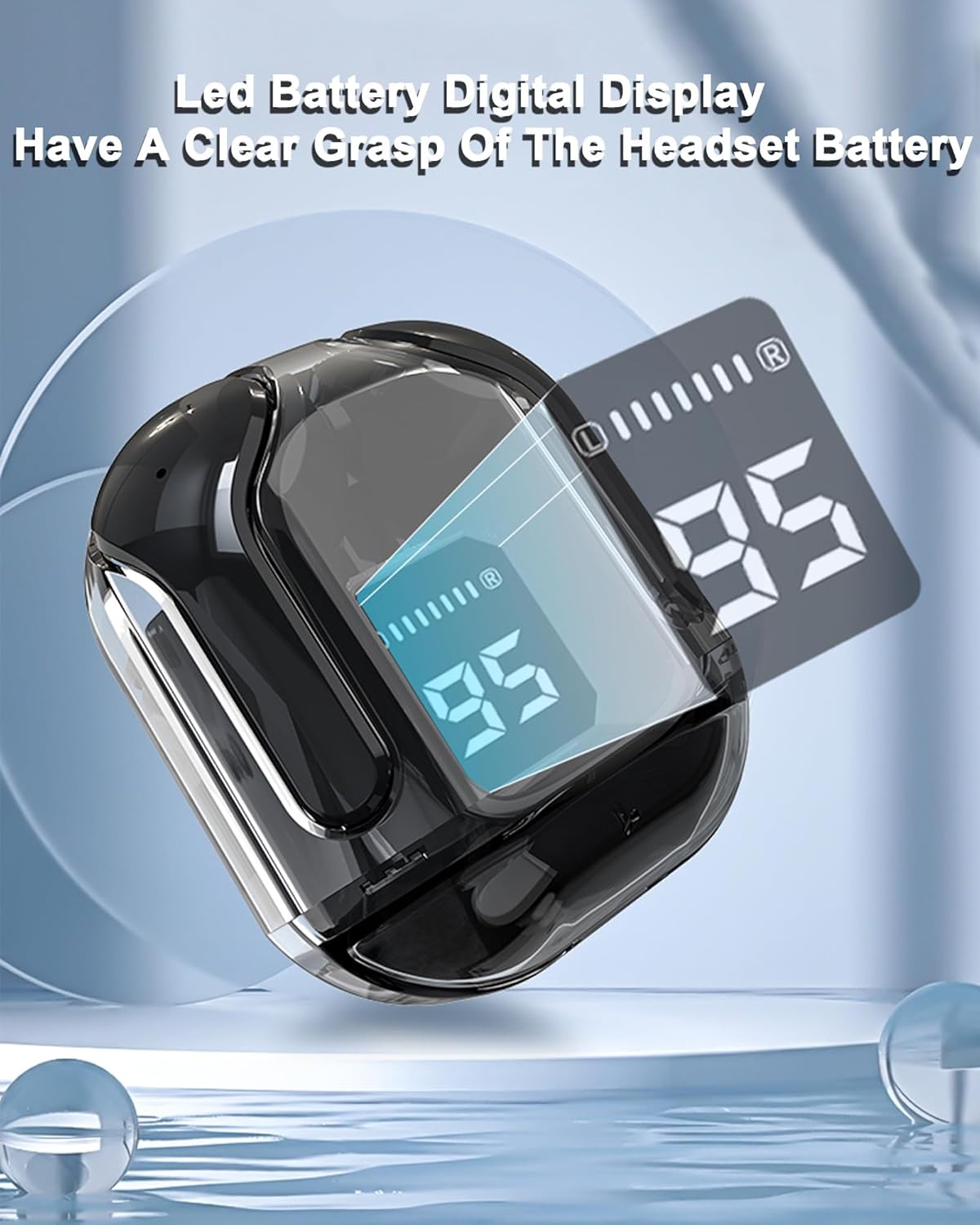
Image: The translucent charging case displaying its digital LED battery level indicator.
Setup
1. Initial Charging
Before first use, fully charge both the earbuds and the charging case.
- Place the earbuds into the charging case. Ensure the charging contacts align.
- Connect the USB charging cable to the charging port on the case and to a power source (e.g., USB wall adapter, computer USB port).
- The LED display on the case will show the charging status. A full charge typically takes about 1 hour for both the earbuds and the case.
2. First-Time Pairing
The earbuds are designed for automatic pairing for convenience.
- Ensure your device's Bluetooth is turned on.
- Open the lid of the charging case. The earbuds will automatically power on and enter pairing mode.
- On your device (phone, tablet, laptop), search for Bluetooth devices and select "Luckyernity" (or similar name) from the list.
- Once connected, you will hear a confirmation tone, and the earbuds' LED indicators will change.

Image: Illustration of the automatic pairing process between the earbuds and a smartphone.
3. Connecting to New Devices
To connect to a new device, disconnect from the currently paired device first, then follow the "First-Time Pairing" steps.
Operating Instructions
Power On/Off
- Power On: Open the charging case lid, or take the earbuds out of the case.
- Power Off: Place the earbuds back into the charging case and close the lid. They will automatically disconnect and begin charging.
Touch Controls
The earbuds feature intuitive touch controls on their outer surface. The following actions can be performed by tapping the touch control area:
| Action | Left Earbud | Right Earbud |
|---|---|---|
| Play/Pause Music | Single Tap | Single Tap |
| Next Song | Double Tap | Double Tap |
| Volume Up | Triple Tap | |
| Volume Down | Triple Tap | |
| Answer/End Call | Single Tap | Single Tap |
| Reject Call | Long Press (2s) | Long Press (2s) |
| Activate Voice Assistant | Long Press (3s) | Long Press (3s) |

Image: A visual guide to the touch control functions on the earbuds.
Mono and Stereo Mode
The earbuds support both mono and twin stereo modes:
- Stereo Mode: Use both earbuds for an immersive stereo audio experience.
- Mono Mode: Use either the left or right earbud independently. This is useful for calls or when you need to be aware of your surroundings. Simply take one earbud out of the case, and it will connect in mono mode.
Wearing the Earbuds
For optimal sound quality and comfort, ensure the earbuds are properly seated in your ear canal. The semi-in-ear design is crafted for a comfortable and stress-free fit for most users.

Image: A person demonstrating the comfortable fit of the semi-in-ear design.
Charging and Battery Life
Your Luckyernity earbuds and charging case are equipped with a dual LED power display to keep you informed about battery levels.
Checking Battery Level
- Charging Case: The middle number on the LED display shows the battery percentage of the charging case.
- Earbuds: The left and right LED light bars on the display indicate the battery level of the respective earbuds.

Image: The charging case with its dual LED display, illustrating how battery levels for both the case and individual earbuds are shown.
Charging the Earbuds
Simply place the earbuds into the charging case. They will automatically begin charging. The LED indicators on the earbuds (if present) and the case display will confirm charging status.
Charging the Case
Connect the provided USB charging cable to the charging port on the case and to a compatible USB power source. The digital display will show the charging progress.
Battery Performance
- Earbud Playtime: Up to 4 hours on a single charge.
- Total Playtime with Charging Case: Up to 20 hours (multiple charges from the case).
- Charging Time (Earbuds & Case): Approximately 1 hour for a full charge.
Maintenance
Cleaning
Regular cleaning helps maintain optimal performance and hygiene.
- Use a soft, dry, lint-free cloth to wipe the earbuds and charging case.
- For stubborn dirt, slightly dampen the cloth with water. Avoid using harsh chemicals or abrasive materials.
- Gently clean the charging contacts on both the earbuds and the case to ensure proper connection.
Water Resistance (IP54)
The Luckyernity earbuds are rated IP54 water resistant. This means they are protected against dust ingress and splashing water from any direction. The nano-coating on the earbuds' surface helps prevent water and sweat from penetrating.
- They are suitable for use during workouts, light rain, or other activities where they might encounter sweat or splashes.
- Do not submerge the earbuds in water.
- The charging case is not water resistant.
- Ensure earbuds are dry before placing them back into the charging case to prevent damage.

Image: The earbuds and case, illustrating their water-resistant capabilities in a dynamic setting.
Storage
When not in use, store the earbuds in their charging case to protect them and keep them charged. Store in a cool, dry place away from extreme temperatures.
Troubleshooting
If you encounter any issues with your earbuds, please refer to the following common problems and solutions:
Earbuds Not Pairing or Connecting
- Ensure both earbuds are fully charged.
- Make sure Bluetooth is enabled on your device.
- Place the earbuds back into the charging case, close the lid, wait a few seconds, then open the lid again to re-enter pairing mode.
- Forget/delete "Luckyernity" from your device's Bluetooth list and try pairing again.
- Ensure the earbuds are within the Bluetooth range (approximately 33 feet or 10 meters) of your device.
No Sound or Low Volume
- Check the volume level on both your device and the earbuds (using touch controls).
- Ensure the earbuds are properly connected to your device.
- Try playing different audio sources to rule out a problem with the specific media.
- Clean any debris from the earbud speaker mesh.
One Earbud Not Working
- Ensure both earbuds are charged.
- Place both earbuds back into the charging case, close the lid, and then take them out again. This often re-syncs them.
- Clean the charging contacts on both the earbud and the case.
Charging Issues
- Verify the charging cable is securely connected to both the case and the power source.
- Try a different USB cable or power adapter.
- Ensure the charging contacts on the earbuds and inside the case are clean and free of obstruction.
Specifications
| Feature | Detail |
|---|---|
| Model Name | Luckyernity |
| Connectivity Technology | Wireless (Bluetooth 5.3) |
| Bluetooth Range | Up to 33 feet (10 meters) |
| Noise Control | Adaptive Noise Cancellation (ENC for calls) |
| Earbud Battery Life | Up to 4 hours |
| Charging Case Battery Life | Up to 20 hours additional playtime |
| Charging Time | Approx. 1 hour (earbuds & case) |
| Water Resistance Rating | IP54 (earbuds only) |
| Frequency Range | 20Hz - 20KHz |
| Impedance | 40 Ohm |
| Sensitivity | 42 dB |
| Material | Plastic |
| Dimensions (Case) | 3.54 x 1.97 x 1.18 inches |
| Item Weight | 1.44 ounces |
| UPC | 729921442729 |
Warranty and Support
For warranty information or technical support, please refer to the contact details provided with your purchase or visit the official Luckyernity website. Keep your proof of purchase for any warranty claims.
no relevant documents
Ask a question about this manual
Ask about setup, troubleshooting, compatibility, parts, safety, or missing instructions. Manuals+ will review the question and use this page’s manual context to help answer it.