1. Introduction and Overview
The KCX BT003 is a compact Bluetooth 4.2 audio receiver module designed for integration into various electronic projects and audio systems. It allows wireless audio streaming from Bluetooth-enabled devices to an amplifier or speaker system. This module is ideal for DIY audio projects, converting wired speakers to wireless, or adding Bluetooth capability to existing audio equipment.
Its small form factor and clear pinout make it suitable for embedded applications. The module supports stereo audio output and features various control pins for advanced functionality.
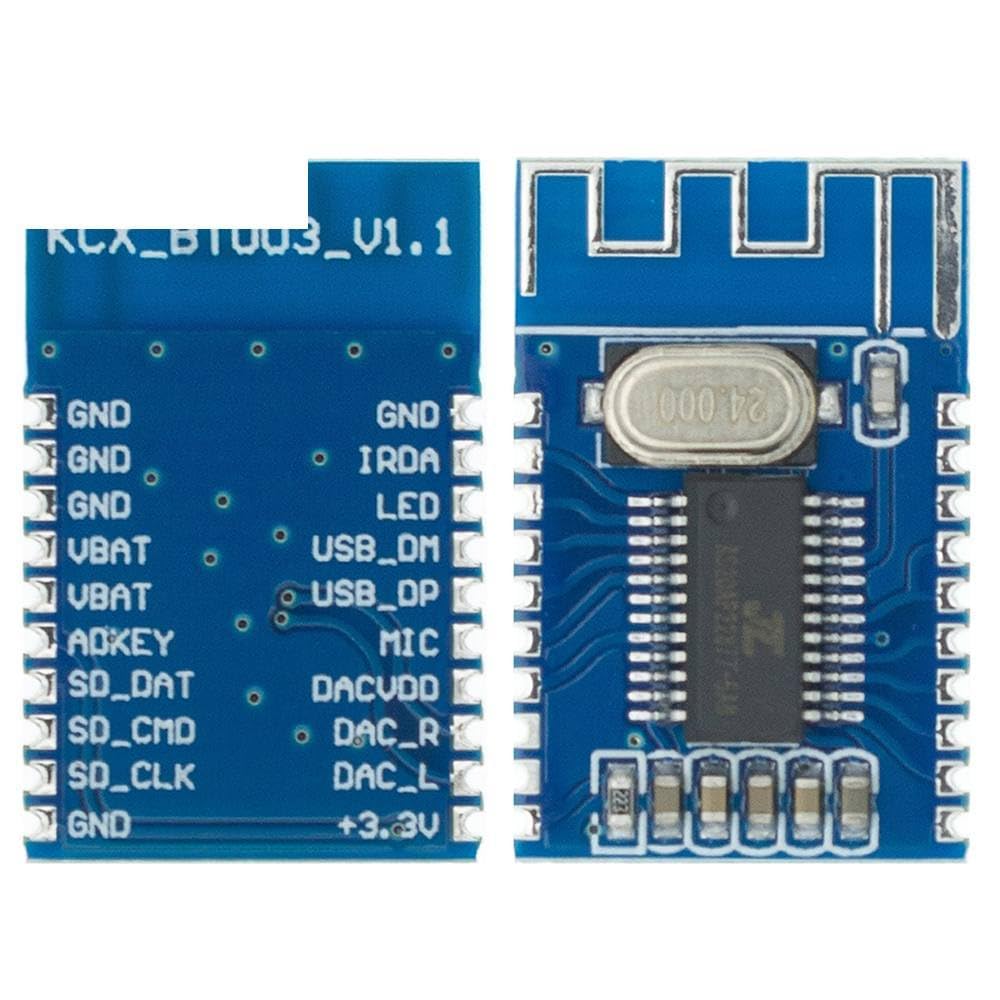
Figure 1: Front and back view of the KCX BT003 module, showing the main components and pin labels for connection.
2. Setup and Connections
Proper connection of the KCX BT003 module is crucial for its operation. Refer to the pinout diagram and descriptions below for correct wiring.

Figure 2: Close-up view of the KCX BT003 module's pinout, detailing each connection point.
2.1 Pinout Description
| Pin Name | Description |
|---|---|
| GND | Ground connection. Multiple GND pins are provided for convenience. |
| VBAT | Power supply input (typically 3.7V-5V DC). |
| ADKEY | Analog key input for control functions (e.g., play/pause, next/previous track). |
| SD_DAT | SD card data line (if SD card functionality is supported by the specific firmware). |
| SD_CMD | SD card command line. |
| SD_CLK | SD card clock line. |
| IRDA | Infrared receiver data input (for remote control). |
| LED | LED indicator output (for status indication like pairing, connected). |
| USB_DM | USB Data Minus. |
| USB_DP | USB Data Plus. |
| MIC | Microphone input. |
| DACVDD | Digital-to-Analog Converter (DAC) power supply. |
| DAC_R | Right channel audio output. |
| DAC_L | Left channel audio output. |
| +3.3V | 3.3V regulated output (for external components). |
2.2 Basic Wiring Diagram (Conceptual)
For basic audio reception, connect the following:
- Power Supply: Connect your DC power source (e.g., 3.7V-5V) to VBAT and GND. Ensure correct polarity.
- Audio Output: Connect DAC_L and DAC_R to the left and right audio input channels of your amplifier or active speakers. Connect the audio ground to one of the GND pins on the module.
- LED Indicator (Optional): Connect an LED (with appropriate current-limiting resistor) between the LED pin and GND to observe module status.
Always ensure power is disconnected before making or changing any connections to prevent damage to the module or other components.
3. Operating Instructions
3.1 Powering On
Once all connections are securely made, apply power to the VBAT pin. The module will typically power on and enter Bluetooth pairing mode automatically. The LED indicator (if connected) will usually blink rapidly to indicate pairing mode.
3.2 Bluetooth Pairing
- Ensure the KCX BT003 module is powered on and in pairing mode.
- On your Bluetooth-enabled device (smartphone, tablet, computer), navigate to the Bluetooth settings.
- Scan for available devices. The module should appear as "BT003" or a similar name.
- Select "BT003" to initiate the pairing process.
- Once successfully paired, the LED indicator will typically change its blinking pattern (e.g., slow blink or solid on) to indicate a connected state.
3.3 Audio Playback
After successful pairing, any audio played on your connected device will be streamed wirelessly to the KCX BT003 module and output through the DAC_L and DAC_R pins. Ensure your amplifier or speaker system connected to these outputs is powered on and set to the correct input.
Volume control is typically managed from the connected Bluetooth device.
4. Maintenance
The KCX BT003 module is a robust electronic component, but proper handling and care will ensure its longevity.
- Environmental Conditions: Operate the module within its specified temperature and humidity ranges. Avoid extreme temperatures, direct sunlight, and high humidity.
- Moisture and Liquids: Keep the module dry. Exposure to water or other liquids can cause short circuits and permanent damage.
- Static Electricity: Handle the module with care, especially in environments prone to static discharge. Use anti-static precautions when installing or handling.
- Physical Damage: Avoid dropping or subjecting the module to strong impacts. Do not bend or apply excessive force to the circuit board or components.
- Cleaning: If cleaning is necessary, use a dry, soft cloth. Do not use liquid cleaners or solvents.
5. Troubleshooting
If you encounter issues with your KCX BT003 module, refer to the following common problems and solutions:
- No Power/LED Off:
- Check power supply connections to VBAT and GND. Ensure correct voltage (3.7V-5V) and polarity.
- Verify the power source is functioning correctly.
- Cannot Pair/Module Not Found:
- Ensure the module is powered on and the LED (if connected) indicates pairing mode (rapid blinking).
- Move your Bluetooth device closer to the module.
- Turn off and on Bluetooth on your device, then rescan.
- Ensure no other device is currently connected to the module. The module typically connects to only one device at a time.
- Restart the module by cycling its power.
- No Audio Output:
- Verify that the module is successfully paired and connected to your Bluetooth device.
- Check the audio output connections (DAC_L, DAC_R, GND) to your amplifier/speakers.
- Ensure your amplifier/speakers are powered on, set to the correct input, and their volume is turned up.
- Check the volume level on your Bluetooth source device.
- Try playing audio from a different source device to rule out source issues.
- Poor Audio Quality/Interference:
- Ensure the module is not too far from the source device. Bluetooth range can be affected by obstacles.
- Minimize interference from other 2.4GHz wireless devices (Wi-Fi routers, cordless phones).
- Check power supply for noise. A noisy power supply can introduce hum or static.
6. Specifications
| Feature | Detail |
|---|---|
| Model | BT003 |
| Bluetooth Version | 4.2 |
| Audio Output | Stereo (DAC_L, DAC_R) |
| Power Supply | VBAT (typically 3.7V-5V DC) |
| Manufacturer | Generic |
| ASIN | B0DFVM1HYV |
| Date First Available | September 1, 2024 |
7. Warranty and Support
Specific warranty information for the KCX BT003 module is not provided in the product details. For any warranty claims, technical support, or further inquiries, please contact the seller or manufacturer directly through your purchase platform.
It is recommended to retain your proof of purchase for any support requests.
8. Official Product Videos
No official product videos from the seller are available for this product at this time.


