
1. Introduction
The Rollei HS Freeze Q1 is a versatile 2-in-1 lighting solution designed for photographers and videographers. It functions as both a powerful flash unit and a bi-color LED continuous light, offering flexibility for various shooting scenarios. This manual provides detailed instructions for the safe and effective use of your HS Freeze Q1.

Image 1.1: The Rollei HS Freeze Q1, a compact and powerful lighting solution.
2. Safety Information
Please read all safety instructions before using the device to prevent damage or injury. Keep this manual for future reference.
- Do not expose the device to water or excessive humidity.
- Avoid direct eye exposure to the flash or LED light, as it can cause temporary vision impairment.
- Do not attempt to disassemble or repair the device yourself. Refer to qualified service personnel.
- Use only the specified charging cable and power adapter.
- Keep the device away from flammable materials.
- Ensure proper ventilation during operation to prevent overheating.
3. Package Contents
Verify that all items are present in your package:
- 1 x Rollei HS Freeze Q1 Unit
- 1 x Transport Bag
- 1 x USB Cable
- 1 x Quick Start Manual (may not be in English)

Image 3.1: Contents of the Rollei HS Freeze Q1 package, showing the flash unit, carrying bag, and USB cable.
4. Product Overview
Familiarize yourself with the components of your Rollei HS Freeze Q1.
Front View
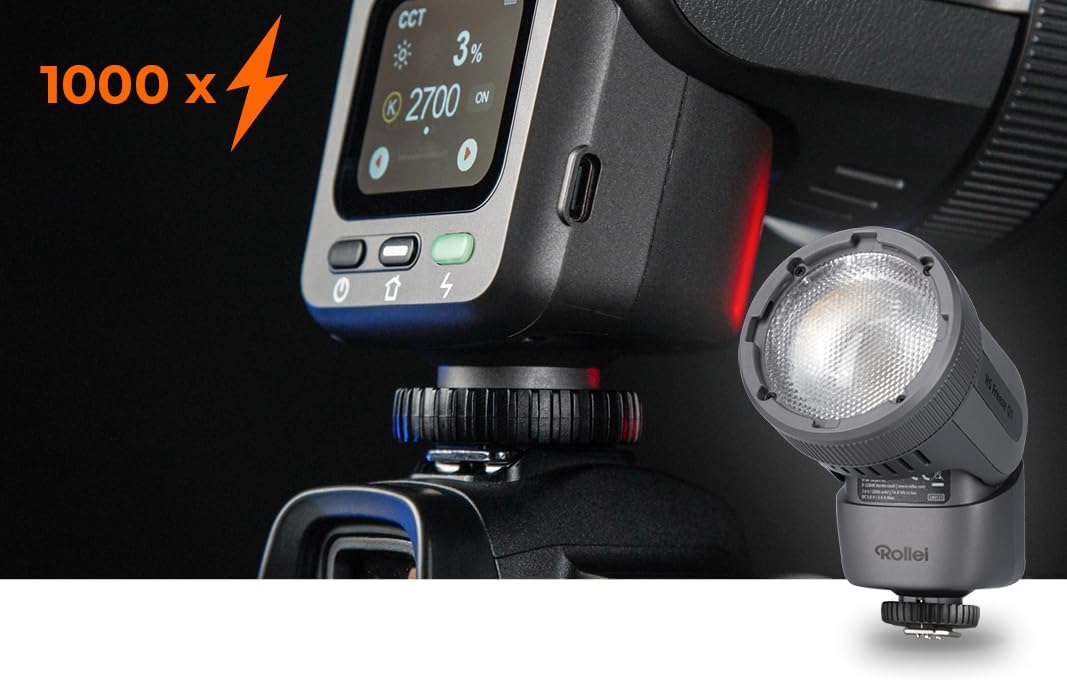
Image 4.1: Front view of the HS Freeze Q1, highlighting the flash and LED light source.
Control Panel and Side View

Image 4.2: Side view of the HS Freeze Q1, displaying the intuitive touch control screen and physical buttons for operation.
The device features a robust housing, a powerful flash head, and an integrated touch screen for easy control. The hot shoe mount ensures compatibility with various camera systems.
5. Setup
5.1 Charging the Battery
The HS Freeze Q1 is equipped with an internal lithium-ion battery. Before first use, fully charge the device.
- Connect the provided USB cable to the charging port on the HS Freeze Q1.
- Connect the other end of the USB cable to a compatible USB power adapter (e.g., 5V/3A) or a computer's USB port.
- The charging indicator on the screen will show the charging status. The device is fully charged when the indicator shows 100%.
5.2 Mounting on a Camera
The HS Freeze Q1 features a universal hot shoe mount for easy attachment to most cameras.
- Ensure your camera is turned off.
- Slide the hot shoe foot of the HS Freeze Q1 into your camera's hot shoe slot.
- Tighten the locking ring or lever on the HS Freeze Q1 to secure it firmly in place.

Image 5.1: The HS Freeze Q1 securely mounted on a camera, ready for use.
6. Operating Instructions
6.1 Power On/Off
Press and hold the power button (usually marked with a power symbol) on the device to turn it on or off. The screen will illuminate upon startup.
6.2 Navigating the Touch Control Interface
The HS Freeze Q1 features an intuitive touch screen for adjusting settings.
- Tap: Select options or confirm settings.
- Swipe: Navigate through menus or adjust values (e.g., power levels, color temperature).

Image 6.1: User interacting with the touch screen to adjust settings on the HS Freeze Q1.
6.3 Flash Modes
The HS Freeze Q1 supports various flash modes for different photographic needs:
- TTL (Through-The-Lens) Mode: The flash automatically adjusts its output based on the camera's metering system for balanced exposure.
- Manual Mode: Allows you to manually set the flash power output (e.g., 1/1 to 1/128). This provides precise control over lighting.
- HSS (High-Speed Sync): Enables flash synchronization at shutter speeds faster than the camera's native sync speed, useful for freezing action or overpowering ambient light.
- First Curtain Sync: The flash fires at the beginning of the exposure.
- Second Curtain Sync: The flash fires just before the second curtain closes, creating a light trail behind moving subjects.

Image 6.2: The HS Freeze Q1 operating in continuous LED light mode, indicating 12W output.
6.4 Continuous LED Light
In addition to flash capabilities, the HS Freeze Q1 features a 12W bi-color LED continuous light.
- Activating LED Mode: Select the continuous light mode from the touch screen interface.
- Adjusting Brightness: Swipe on the screen to increase or decrease the LED light intensity.
- Adjusting Color Temperature: The bi-color LED allows adjustment of color temperature (e.g., from warm to cool light) to match ambient conditions or creative preferences.

Image 6.3: The HS Freeze Q1 display showing adjustable color temperature and brightness settings for the continuous LED light.
7. Maintenance
7.1 Cleaning
- Use a soft, dry cloth to clean the exterior of the device.
- For the screen, use a microfiber cloth specifically designed for electronics.
- Do not use liquid cleaners or solvents, as they may damage the finish or internal components.
7.2 Storage
- Store the HS Freeze Q1 in a cool, dry place, away from direct sunlight and extreme temperatures.
- When storing for extended periods, ensure the battery is partially charged (around 50%) to prolong its lifespan.
- Use the provided transport bag for protection during storage and transport.
8. Troubleshooting
If you encounter issues with your Rollei HS Freeze Q1, refer to the following common problems and solutions:
| Problem | Possible Cause | Solution |
|---|---|---|
| Device does not power on. | Battery is depleted. | Charge the battery fully using the provided USB cable. |
| Flash does not fire. | Incorrect camera settings or flash mode. | Check camera flash settings. Ensure the HS Freeze Q1 is securely mounted and in the correct mode (e.g., TTL or Manual). |
| LED light is dim or flickers. | Low battery or incorrect brightness setting. | Recharge the battery. Adjust the brightness setting on the touch screen. |
| Touch screen is unresponsive. | Temporary software glitch. | Turn the device off and then on again. If the issue persists, contact customer support. |
If the problem persists after attempting these solutions, please contact Rollei customer support.
9. Specifications
| Feature | Detail |
|---|---|
| Brand | Rollei |
| Model | HS Freeze Q1 (Model Number: 28834) |
| Type | 2-in-1 Flash & Bi-color LED Continuous Light |
| Guide Number | 26 |
| Continuous LED Power | 12W |
| Connectivity Technology | Wireless |
| Mounting Type | Hot Shoe Mount |
| Battery Type | Lithium-ion (1 included) |
| Battery Life | Up to 2 days (usage dependent) |
| Minimum Shutter Speed | 1/250s |
| Maximum Shutter Speed | 1/200s (Standard Sync) |
| Flash Sync Speed | 1/200-1/250s (HSS supported) |
| Dimensions (L x W x H) | 15.8 x 10 x 12 cm |
| Weight | 700 grams |
| Color | Black |
| Compatible Devices | Various cameras with hot shoe flash mount |
10. Warranty and Support
Rollei products are designed for reliability and performance. For warranty information and customer support, please refer to the official Rollei website or contact your local distributor.
- Warranty Period: Spare parts availability is stated as 2 years. Please check your purchase documentation for specific warranty terms.
- Online Support: Visit www.rollei.com for product registration, FAQs, and support resources.
- Contact: For technical assistance or service inquiries, please refer to the contact information provided on the official Rollei website.