
KEATRONIC LGT130 BEAM
KEATRONIC 130W BEAM Moving Head Light User Manual
Model: LGT130 BEAM
1. Introduction
Thank you for purchasing the KEATRONIC 130W BEAM Moving Head Light. This professional stage lighting fixture is designed to deliver powerful and versatile lighting effects for various applications, including clubs, theaters, churches, and concert productions. Featuring an 18-facet prism, 10 gobos, and 8 vibrant colors, this unit provides impressive output with uniform coverage and precise beam control. Please read this manual thoroughly before operation to ensure safe and optimal performance.

Figure 1.1: Two KEATRONIC 130W BEAM Moving Head Lights in a stage setting, demonstrating their powerful light output and compact design.
2. Safety Instructions
Always observe the following safety precautions to prevent electric shock, fire, or injury:
- Power Supply: Ensure the power supply voltage matches the specified voltage (110V) before connecting the unit. Always use a grounded power outlet.
- Ventilation: Do not block ventilation openings. Ensure adequate airflow around the unit to prevent overheating. The built-in fan system requires clear space.
- Installation: Install the fixture in a stable and secure location, away from flammable materials. Use appropriate mounting brackets and safety cables when suspending the unit.
- Temperature: Avoid operating the unit in extremely high or low temperatures. The operating temperature range is typically 10°C to 35°C.
- Moisture: Do not expose the unit to rain, moisture, or excessive humidity.
- Servicing: Refer all servicing to qualified personnel. Do not attempt to repair the unit yourself.
- Eye Safety: Avoid direct eye exposure to the light source. The light output is very bright.
3. Product Features
The KEATRONIC 130W BEAM Moving Head Light is equipped with advanced features for dynamic lighting effects:
- Powerful Light Source: Utilizes a real 130W LED lamp bead, providing over 6000 lumens of bright output.
- Prism Effect: Features an 18-facet circular prism for stunning multi-beam effects.
- Gobo Wheel: Includes 10 rotating gobos + open spot for diverse pattern projections.
- Color Wheel: Offers 8 vibrant colors + open spot with color mixing capabilities (RGBW).
- DMX Control: Supports 12 DMX channels for professional control, including Pan/Tilt inversion and fine adjustment.
- Cooling System: Integrated fan and thermostat system ensures rapid cooling and extends LED lifespan up to 300,000 hours.
- Control Modes: Operates via Auto, Sound Control, DMX512, and Master-Slave modes.
- Compact Design: Lightweight and portable, making it easy to transport and set up.
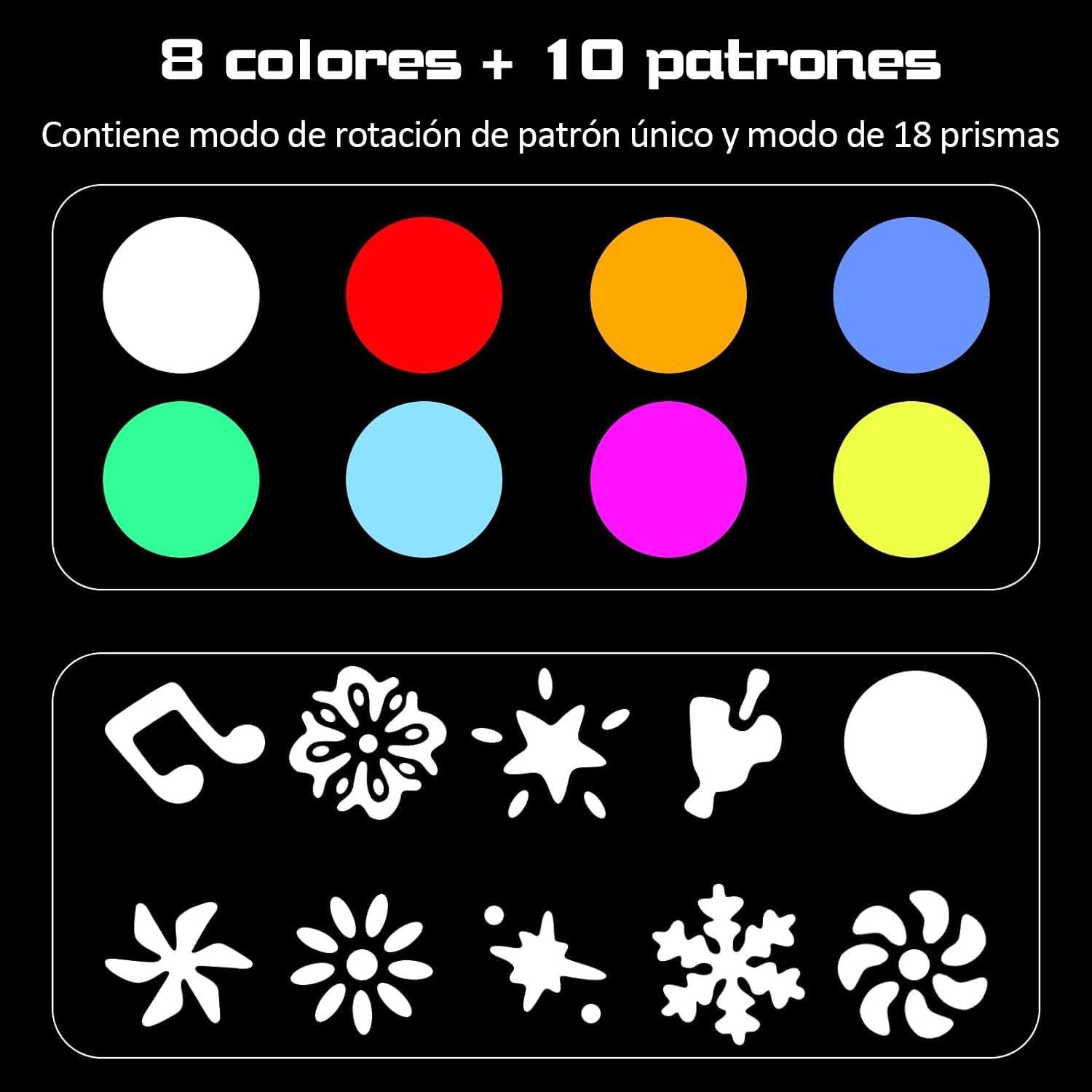
Figure 3.1: Illustration of the 8 available colors and 10 distinct gobo patterns that can be projected by the light fixture. The patterns include various shapes and designs, and the colors cover a wide spectrum for diverse lighting effects.

Figure 3.2: Examples of dynamic light effects created by the KEATRONIC 130W BEAM Moving Head Light, showcasing various color and gobo combinations projected onto a surface.
4. Setup
4.1 Unpacking and Inspection
Carefully unpack the fixture and inspect it for any damage during transit. If any damage is found, contact your dealer immediately. Ensure all components listed in the specifications (moving head light, mounting brackets) are present.
4.2 Mounting the Fixture
The KEATRONIC 130W BEAM Moving Head Light can be mounted in various positions (e.g., truss, floor). Always use the provided mounting brackets and ensure the fixture is securely fastened. For overhead installations, use a safety cable as an additional safety measure.

Figure 4.1: This image illustrates the physical dimensions of the moving head light (approximately 31cm height, 23cm length, 15cm width) and highlights the location of the control panel buttons (MENU, UP, DOWN, ENTER) and the built-in microphone (MIC).
4.3 Power Connection
Connect the power cable to the power input on the rear of the unit. Ensure the power switch is in the OFF position before connecting to a power outlet. The unit operates on 110V AC power.
4.4 DMX Connection (Optional)
For DMX control, connect a 3-pin DMX cable from your DMX controller's output to the DMX IN port on the fixture. If linking multiple fixtures, connect the DMX OUT of the first fixture to the DMX IN of the next, and so on. Ensure the last fixture in the chain has a DMX terminator connected to its DMX OUT port.

Figure 4.2: This image provides a detailed view of the control panel on the front of the base, showing the display and navigation buttons (MENU, UP, DOWN, ENTER, MIC). It also shows the rear panel with the DMX IN and DMX OUT ports, the FUSE holder, and the POWER input and ON/OFF switch.
5. Operating Instructions
5.1 Control Panel Operation
The fixture features a 4-button LCD menu for configuration:
- MENU: Cycles through the main menu options.
- UP: Navigates up through menu options or increases parameter values.
- DOWN: Navigates down through menu options or decreases parameter values.
- ENTER: Confirms selection or enters a submenu.
Refer to the display for current settings and options. Common settings include DMX address, operating mode (Auto, Sound, DMX, Master/Slave), and specific effect parameters.
5.2 Operating Modes
- DMX512 Mode: For professional control, connect to a DMX controller. The fixture supports 12 DMX channels, allowing precise control over Pan, Tilt, Gobo, Color, Prism, Strobe, and Dimmer functions. Consult the DMX channel chart (not provided in input, but implied by DMX mode) for specific channel assignments.
- Auto Mode: The fixture runs through pre-programmed light shows automatically. Use the control panel to select different auto programs.
- Sound Control Mode: The fixture reacts to sound and music via its built-in microphone, creating dynamic light shows synchronized with audio.
- Master-Slave Mode: Link multiple fixtures together. Set one unit as the "Master" and others as "Slave" units. The slave units will mimic the master's operation, ideal for synchronized light shows without a DMX controller.
5.3 Beam and Effect Control
The 130W LED provides a focused 3-degree beam angle, suitable for both wide washes and precise beam effects. The 18-facet prism can be activated to split the beam into multiple smaller beams, creating a wider, more complex light pattern. The gobo wheel allows for projection of various shapes, while the color wheel enables quick color changes and mixing.
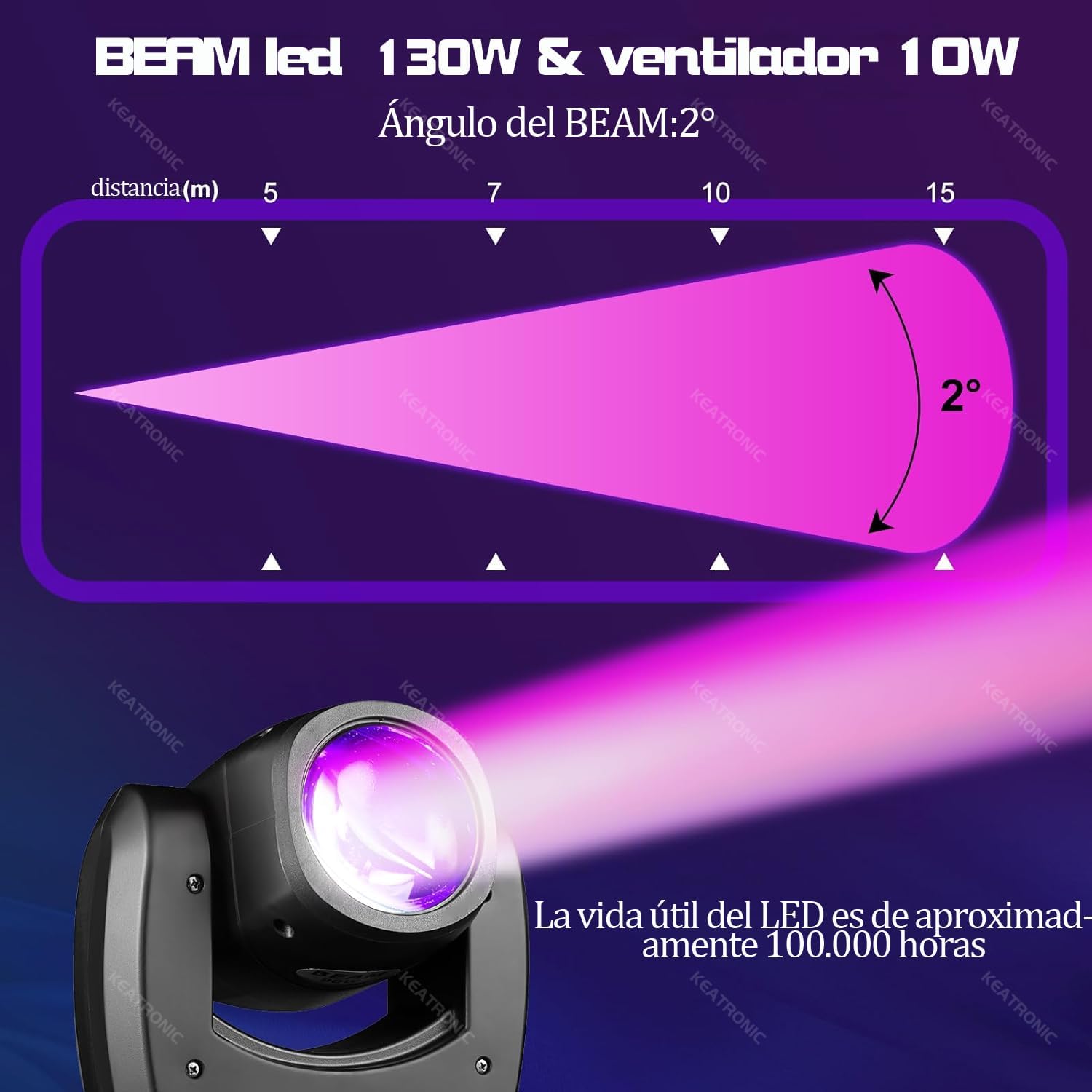
Figure 5.1: This diagram illustrates the narrow 2-degree beam angle of the KEATRONIC 130W BEAM light, showing its projection distance capabilities. It also highlights the impressive LED lifespan of approximately 100,000 hours.
6. Maintenance
Regular maintenance ensures the longevity and optimal performance of your KEATRONIC Moving Head Light.
- Cleaning: Periodically clean the lenses and exterior casing with a soft, lint-free cloth. Do not use abrasive cleaners or solvents. Ensure the unit is powered off and unplugged before cleaning.
- Ventilation: Keep the ventilation openings clear of dust and debris. The internal fan system is crucial for heat dissipation.
- Inspection: Regularly inspect power cables, DMX cables, and mounting hardware for any signs of wear or damage. Replace damaged components immediately.
- LED Lifespan: The LED light source has an estimated lifespan of up to 300,000 hours under normal operating conditions.
7. Troubleshooting
If you encounter issues with your KEATRONIC Moving Head Light, refer to the following common troubleshooting steps:
| Problem | Possible Cause | Solution |
|---|---|---|
| No power | Power cable not connected; Power switch off; Blown fuse | Ensure power cable is securely connected; Turn power switch ON; Check and replace fuse if necessary (refer to Figure 4.2 for fuse location). |
| No light output | Dimmer channel at 0%; Light source issue; Operating mode issue | Increase dimmer value via DMX or control panel; Check operating mode (e.g., ensure not in blackout); Contact support if LED is faulty. |
| Fixture not responding to DMX | Incorrect DMX address; Faulty DMX cable; No DMX signal; DMX terminator missing | Verify DMX address matches controller; Test DMX cable; Ensure DMX controller is sending signal; Add DMX terminator to last fixture. |
| Movement erratic or stuck | Mechanical obstruction; Motor issue; Calibration needed | Check for obstructions; Power cycle the unit; Perform a reset or calibration via the control panel if available. |
If the problem persists after attempting these steps, please contact KEATRONIC customer support or your authorized dealer.
8. Specifications
| Feature | Detail |
|---|---|
| Brand | KEATRONIC |
| Model Number | LGT130 BEAM |
| Light Source | 130W LED |
| Luminous Flux | 6000 lumens |
| Beam Angle | 3 degrees |
| Prism | 18-facet circular prism |
| Gobos | 10 rotating gobos + open |
| Colors | 8 colors + open (RGBW) |
| DMX Channels | 12 channels |
| Control Modes | Auto, Sound Control, DMX512, Master-Slave |
| Voltage | 110 Volts |
| Power Source | Electric Cord |
| Material | Aluminum, Plastic |
| Dimensions (L x W x H) | 28 x 33 x 38 cm (11.02 x 12.99 x 14.96 inches) |
| Weight | 8.78 kg (19.36 lbs) |
| LED Lifespan | Up to 300,000 hours |
| Certification | UL |
9. Warranty and Support
KEATRONIC is committed to providing high-quality products. For warranty information, technical support, or service inquiries, please contact your authorized KEATRONIC dealer or visit the official KEATRONIC website. Please have your model number (LGT130 BEAM) and purchase date available when contacting support.
Related Documents - LGT130 BEAM
 |
SHOWLIGHT LED 300W Beam Moving Head User Manual & Specifications Comprehensive user manual for the SHOWLIGHT LED 300W Beam Moving Head stage lighting fixture. Includes installation, safety, technical specifications, DMX control, and operation details. |
 |
QTX GOBO Beam 100W LED Moving Head User Manual (150.463UK) Comprehensive user manual for the QTX GOBO Beam 100W LED Moving Head (Model 150.463UK), covering setup, DMX control, specifications, and troubleshooting. Learn how to operate and maintain your moving head light. |
 |
U King ZQ-02229 280W Moving Head Light DMX Control Guide A comprehensive guide to the DMX control channels and functions of the U King ZQ-02229 280W moving head light, covering color, strobe, dimmer, gobo, prism, focus, pan, tilt, and bulb control. |
 |
Moving Head Beam User Manual - UKING Comprehensive user manual for the UKING Moving Head Beam stage light, covering installation, operation, safety, and DMX channel functions. |
 |
Eurolite LED TMH-B120 Hypno Moving Head Beam User Manual | Specifications & Operation Comprehensive user manual for the Eurolite LED TMH-B120 Hypno Moving Head Beam. Includes installation, operation, DMX control, technical specifications, safety guidelines, and accessories. |
 |
Yellowriver YR-300BF 300W Moving Head Beam User Manual User manual for the Yellowriver YR-300BF 300W Moving Head Beam stage lighting fixture, detailing specifications, installation, operation, menu system, channel control, and troubleshooting. |