
1. Introduction
Thank you for choosing the FCPLEXSW Tmall Genie Intelligent LED Driver Power Supply. This device is designed to provide stable and efficient power to LED ceiling lamps, featuring intelligent control capabilities. This manual provides essential information for the safe and effective installation, operation, and maintenance of your LED driver.
2. Safety Information
Please read all safety instructions carefully before installation and operation. Failure to follow these instructions may result in electric shock, fire, or other hazards.
- Electrical Hazard: Installation should only be performed by a qualified electrician or trained personnel. Ensure power is disconnected at the circuit breaker before installation or maintenance.
- Voltage Compatibility: Verify that the input voltage (170-245 VAC) matches your local power supply.
- Output Load: Do not exceed the specified output power (12-24W per channel, total max 48W) or current (280mA) to prevent damage to the driver and connected LEDs.
- Ventilation: Ensure adequate ventilation around the driver to prevent overheating. Do not cover the unit.
- Environment: Do not install in damp or wet locations. Avoid exposure to extreme temperatures outside the specified operating range (-25°C to 145°C).
- Grounding: Ensure proper grounding according to local electrical codes.
3. Product Overview
The FCPLEXSW Tmall Genie Intelligent LED Driver is a constant current power supply designed for LED lighting applications. It features intelligent control capabilities, allowing for dimming and color adjustment when paired with compatible Tmall Genie systems.
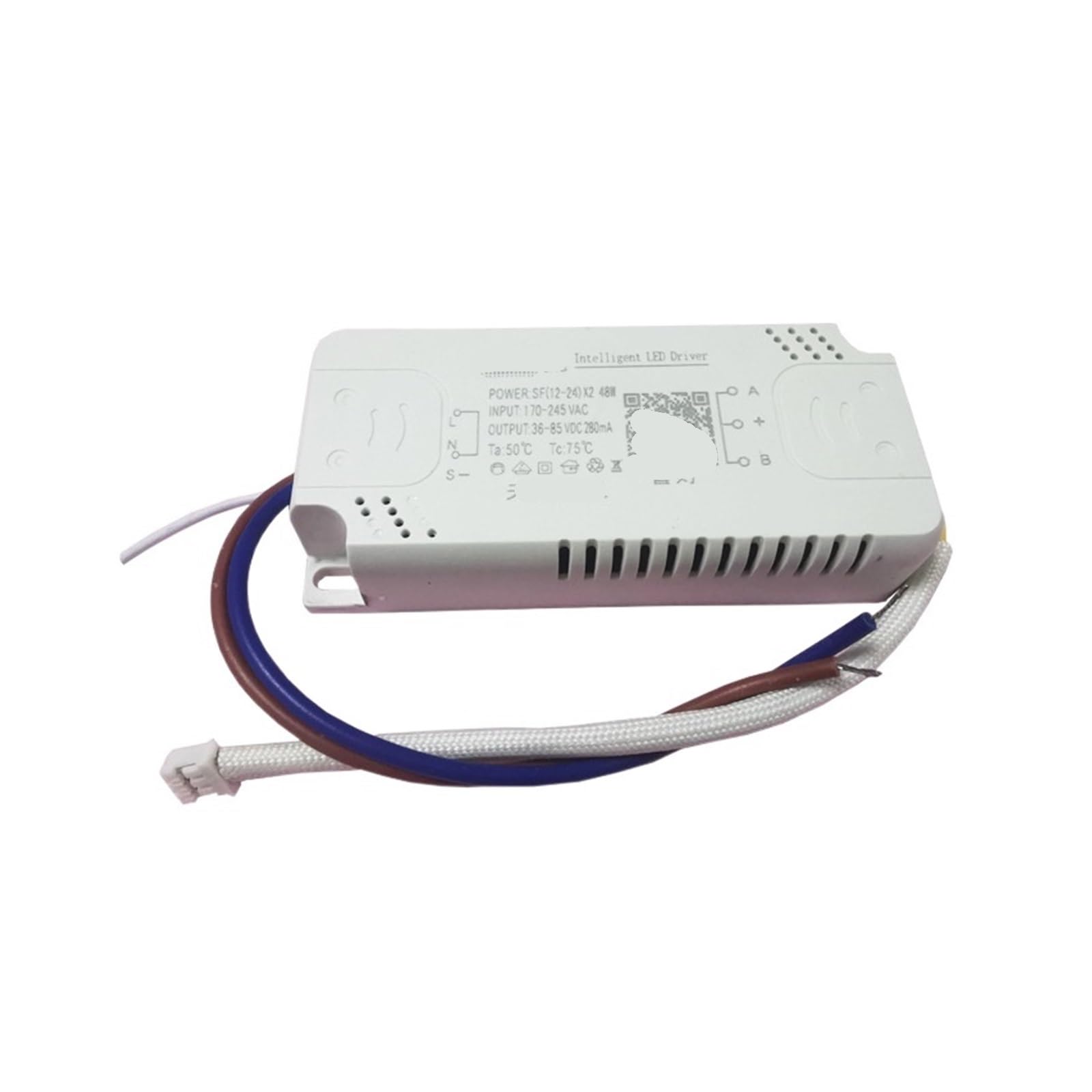
Figure 1: FCPLEXSW Tmall Genie Intelligent LED Driver Power Supply. The white rectangular unit displays input/output specifications and connection points for AC power and LED output.
3.1 Key Components and Labels
- Input (L, N): Connects to the AC mains power supply (170-245 VAC).
- Output (A, B): Connects to the LED lamp load. This model supports two channels.
- Control (S-): This terminal is typically used for intelligent control signals, such as dimming or color adjustment, compatible with Tmall Genie systems.
- Specifications Label: Displays critical electrical parameters including input voltage, output voltage, output current, and operating temperatures (Ta: 50°C, Tc: 75°C).
4. Specifications
| Feature | Detail |
|---|---|
| Model | Tmall Genie 12-24W*2 |
| Type | Constant Current Source |
| Input Voltage | 170-245 VAC (220V nominal) |
| Input Frequency | 50/60 Hz |
| Output Power | 12-24W per channel (x2 channels, total max 48W) |
| Output Voltage | 36-85 VDC (for 280mA output) |
| Output Current | 280mA (constant) |
| Efficiency | 90% |
| Power Factor | 0.7 |
| Protection | Overload protection |
| Protection Level | IP20 |
| Working Temperature | -25°C to 145°C (Ta: 50°C, Tc: 75°C) |
| Lifespan | 50,000 hours |
| Dimensions (L*W*H) | 90 x 40 x 17 mm |
| Weight | 58g (approx. 2.05 oz) |
| Applicable Lamps | LED lamp beads |
5. Setup and Installation
Important: Ensure all power is disconnected at the main circuit breaker before beginning installation. This device operates at high voltage and improper installation can lead to serious injury or damage.
- Prepare Wiring: Identify the input (AC mains) and output (LED lamp) wiring. The driver has clearly labeled terminals for input (L, N) and output (A, B). The 'S-' terminal is for control.
- Connect AC Input: Connect the live (L) and neutral (N) wires from your AC power supply to the corresponding 'L' and 'N' terminals on the LED driver. Ensure connections are secure.
- Connect LED Output: Connect the positive (+) and negative (-) wires from your LED lamp(s) to the 'A' and 'B' output terminals on the driver. This model supports two independent output channels. Ensure correct polarity.
- Connect Control (Optional): If using Tmall Genie intelligent control features, connect the control wire from your Tmall Genie compatible system to the 'S-' terminal. Refer to your Tmall Genie system's manual for specific wiring instructions.
- Secure Driver: Mount the LED driver in a suitable location, ensuring it is protected from moisture and has adequate ventilation. The overall dimensions are 90x40x17mm.
- Restore Power: Once all connections are secure and verified, restore power at the circuit breaker.
Note: The driver is designed for external installation. Always follow local electrical codes and regulations.
6. Operating Instructions
6.1 Basic Operation
Once installed and powered, the LED driver will supply constant current to the connected LED lamps, illuminating them. The driver is designed for automatic operation.
6.2 Intelligent Control (Tmall Genie)
This intelligent LED driver is compatible with Tmall Genie systems for dimming and color adjustment. To utilize these features:
- Ensure the 'S-' control terminal is correctly connected to your Tmall Genie compatible control system.
- Follow the instructions provided with your Tmall Genie device or smart home application to discover and pair the LED lighting system.
- Once paired, you can use voice commands or the Tmall Genie app to control the brightness and color temperature of your LED lamps.
Note: Specific control functions may vary depending on the Tmall Genie model and the connected LED lamps.
7. Maintenance
The FCPLEXSW Tmall Genie Intelligent LED Driver is designed for long-term, maintenance-free operation. However, periodic checks can help ensure optimal performance and longevity.
- Cleaning: Ensure the driver remains free of dust and debris. If cleaning is necessary, disconnect power and use a dry, soft cloth. Do not use liquid cleaners.
- Connections: Periodically check all electrical connections to ensure they remain tight and secure.
- Ventilation: Ensure that the ventilation openings are not obstructed.
- Damage Inspection: Inspect the driver and its wiring for any signs of physical damage, such as cracks, frayed wires, or discoloration. If damage is found, disconnect power immediately and replace the unit.
Warning: Do not attempt to open or repair the LED driver. There are no user-serviceable parts inside. Opening the unit will void the warranty and may expose you to dangerous voltages.
8. Troubleshooting
If you encounter issues with your LED driver, refer to the following troubleshooting guide:
| Problem | Possible Cause | Solution |
|---|---|---|
| LEDs do not light up |
|
|
| LEDs flicker or dim unexpectedly |
|
|
| Intelligent control not working |
|
|
| Driver is hot to the touch |
|
|
If the problem persists after following these steps, contact customer support.
9. Warranty and Support
9.1 Warranty Information
This FCPLEXSW product comes with a standard manufacturer's warranty against defects in materials and workmanship. The warranty period typically covers 3 years from the date of purchase. Please retain your proof of purchase for warranty claims. The warranty does not cover damage caused by improper installation, misuse, unauthorized modifications, or natural disasters.
9.2 Customer Support
For technical assistance, troubleshooting beyond this manual, or warranty inquiries, please contact your retailer or the manufacturer directly. Please have your product model number (Tmall Genie 12-24W*2) and purchase date available when contacting support.
Manufacturer: FCPLEXSW