
AW12
AW12 Multifunction Stainless Steel Smart Watch User Manual
Model: AW12 | Brand: Generic
1. Product Overview
The AW12 Multifunction Stainless Steel Smart Watch is a sophisticated and functional timepiece designed to seamlessly integrate into your daily life. It combines durable construction with advanced features to keep you connected and informed.
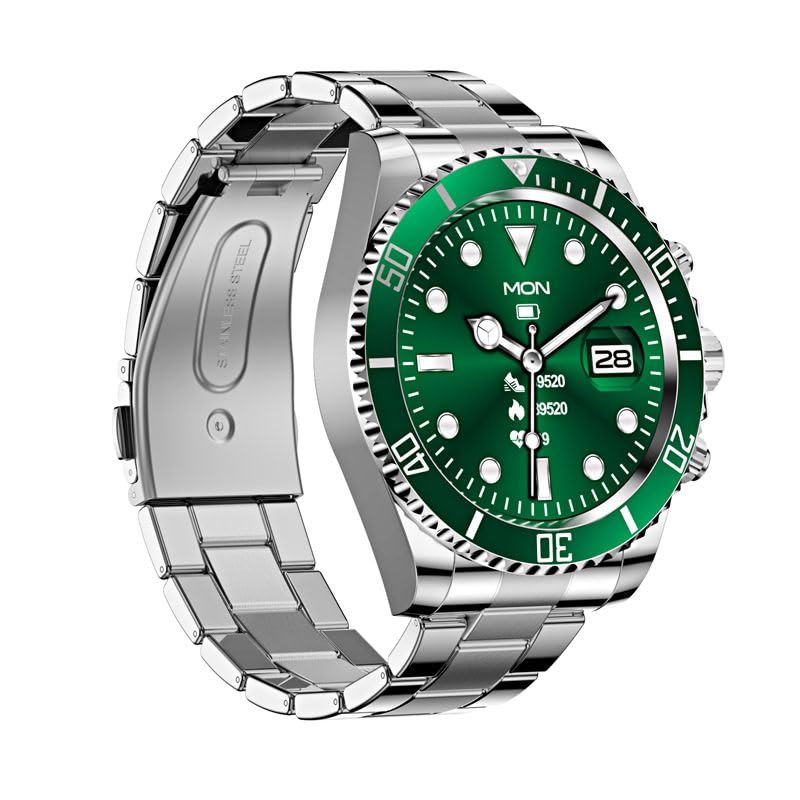
Figure 1: AW12 Multifunction Stainless Steel Smart Watch. The watch features a robust stainless steel case and bracelet, complemented by a vibrant green dial with luminous markers.
Key Features:
- Precision Timekeeping: Robust stainless steel case and bracelet design for exceptional durability.
- Vibrant Display: 1.28-inch Full-Touch IPS Screen with 240x240 resolution.
- Luminous Markers: Green dial boasts luminous hour markers and hands for easy reading in low-light conditions.
- Activity Tracking: Sleep Monitor, Cycle Tracking, Activity Tracker, Alarm Clock.
- Connectivity: Bluetooth for phone calls and notifications.
- Water Resistance: IP68 rating, water-resistant up to 200 meters.
- Unidirectional Bezel: For precise timekeeping and tracking of elapsed time.
2. What's in the Box
Upon opening your AW12 Smart Watch package, you will find the following items:
- AW12 Smart Watch
- Charging Cable
- User Manual (this document)
Video 1: AW12 Stainless Steel Smartwatch Overview. This video provides a comprehensive overview of the AW12 Stainless Steel Smartwatch, highlighting its design, features, and what's included in the box.
3. Setup Guide
3.1 Initial Charging
- Connect the provided charging cable to the charging port on the back of your AW12 Smart Watch.
- Plug the USB end of the charging cable into a compatible USB power adapter (not included) or a computer's USB port.
- Allow the watch to charge fully before first use. A full charge typically takes approximately 2 hours. The battery indicator on the screen will show charging progress.
3.2 Powering On/Off
- To Power On: Press and hold the side button until the screen illuminates.
- To Power Off: Press and hold the side button, then select 'Power Off' on the screen.
3.3 Pairing with Your Smartphone
To unlock the full potential of your AW12 Smart Watch, pair it with your smartphone via Bluetooth.
- Ensure Bluetooth is enabled on your smartphone.
- On your AW12 Smart Watch, navigate to the Bluetooth settings.
- On your smartphone, search for available Bluetooth devices and select 'AW12' from the list.
- Follow the on-screen prompts on both devices to complete the pairing process. A confirmation message will appear once successfully connected.
4. Operating Instructions
4.1 Navigating the Interface
- Touchscreen: Swipe left, right, up, or down to navigate through menus and screens. Tap to select an option.
- Side Button: Press to return to the home screen or wake the device. Long press for power options.
- Rotating Bezel: The unidirectional rotating bezel can be used for timing events or tracking elapsed time. Rotate it counter-clockwise to align the zero marker with the minute hand for timing.
4.2 Core Functions
- Time and Date: The watch automatically synchronizes time and date with your paired smartphone.
- Phone Calls: Once paired, you can make and receive calls directly from your watch. Access the call log or dial pad from the phone icon on the watch.
- Notifications: Receive alerts for messages, calls, and app notifications directly on your wrist.
4.3 Lifestyle Features
- Activity Tracker: Monitors steps taken, distance covered, and calories burned. View your daily progress in the activity app.
- Sleep Monitor: Tracks your sleep patterns, including deep sleep, light sleep, and awake times. Access sleep data in the dedicated sleep app.
- Cycle Tracking: Helps track and predict menstrual cycles. Input relevant data into the cycle tracking feature.
- Alarm Clock: Set multiple alarms directly from your watch.
5. Maintenance and Care
5.1 Water Resistance
The AW12 Smart Watch has an IP68 water resistance rating and is water-resistant up to 200 meters. This means it is suitable for swimming, showering, and shallow diving. However, it is not recommended for high-pressure water activities or prolonged submersion at extreme depths. Avoid exposing the watch to hot water or steam, as this can compromise the seals.
5.2 Cleaning Your Watch
- Wipe the watch case and strap regularly with a soft, damp cloth.
- For stubborn dirt, use a mild soap solution and rinse thoroughly with clean water.
- Ensure the watch is completely dry before charging or prolonged storage.
5.3 Battery Care
- To prolong battery life, avoid fully discharging the watch frequently.
- Store the watch in a cool, dry place when not in use for extended periods.
- Use only the provided charging cable.
6. Troubleshooting
If you encounter any issues with your AW12 Smart Watch, please refer to the following common troubleshooting steps:
| Problem | Possible Cause | Solution |
|---|---|---|
| Watch does not turn on | Low battery | Charge the watch for at least 30 minutes. |
| Cannot pair with smartphone | Bluetooth off, watch not in pairing mode, or interference | Ensure Bluetooth is on for both devices. Restart both devices. Try pairing again. |
| Display is unresponsive | Software glitch or low battery | Restart the watch. Ensure it is charged. |
| Inaccurate activity tracking | Improper fit or software calibration needed | Ensure the watch is worn snugly. Check for software updates or recalibrate if available in settings. |
If the issue persists after trying these steps, please contact customer support for further assistance.
7. Specifications
| Feature | Detail |
|---|---|
| Model | AW12 |
| Display | 1.28-inch Full-Touch IPS LCD Screen |
| Resolution | 240 x 240 pixels |
| Weight | 300 g |
| Memory Storage Capacity | 16 MB |
| Operating System | AsteroidOS |
| Connectivity | Bluetooth |
| Water Resistance Rating | IP68, up to 200 meters |
| Battery Capacity | 12 Amp Hours |
| Clasp Type | Tang Buckle |
| Special Features | Sleep Monitor, Cycle Tracking, Activity Tracker, Alarm Clock, Phone Call |
8. Warranty and Support
For information regarding warranty coverage and terms, please refer to the product packaging or the official product page on Amazon.in. For technical support, troubleshooting assistance beyond this manual, or to inquire about repairs, please contact the seller or manufacturer directly through the Amazon platform.
You can find more detailed information and contact options by visiting the product's detail page: AW12 Smart Watch on Amazon.in
Related documentsAW12


Ask a question about this manual
Ask about setup, troubleshooting, compatibility, parts, safety, or missing instructions. Manuals+ will review the question and use this page’s manual context to help answer it.