
1. Introduction
This manual provides essential information for the safe and efficient operation, installation, and maintenance of your GarveeHome 24-inch Built-in Electric Convection Wall Oven. Please read this manual thoroughly before using the appliance and retain it for future reference.
The GarveeHome electric convection wall oven is designed for modern kitchens, offering multiple cooking functions and a user-friendly touch control interface. Its 2.5 cubic feet capacity is suitable for various cooking needs.

Image 1: Front view of the GarveeHome 24-inch Built-in Electric Convection Wall Oven, showcasing its sleek black finish and illuminated interior with food cooking.
2. Safety Information
Always follow basic safety precautions when using electrical appliances to reduce the risk of fire, electric shock, burns, or injury to persons.
2.1 General Safety
- Read all instructions before using the appliance.
- Ensure the oven is properly installed and grounded by a qualified technician.
- Do not touch hot surfaces. Use oven mitts or pot holders.
- Do not heat unopened food containers; pressure buildup may cause them to burst.
- Never use the oven for warming or heating the room.
- Keep children away from the oven during operation. This oven is equipped with a safety lock feature to prevent accidental operation by children.
2.2 Electrical Safety
- This appliance operates on 240V~60Hz power with a maximum 3000W output. Ensure your electrical supply meets these requirements.
- Do not operate any appliance with a damaged cord or plug, or if the appliance malfunctions or has been damaged in any manner.
- Disconnect power before servicing.
2.3 Triple-Layer Tempered Glass Door
The oven features a triple-layer tempered glass door designed to insulate heat and keep the exterior cool to the touch, enhancing safety during operation. This allows for safe monitoring of cooking progress.

Image 2: Illustration of the oven's triple-layer tempered glass door, showing heat insulation properties.
3. Product Overview
3.1 Components
- Control Panel: Touch controls and a rotary knob for setting functions, temperature, and time.
- Oven Cavity: 2.5 cubic feet (70 liters) capacity with enamel interior.
- Rack Supports: 5 side racks for stable placement of oven racks and trays.
- Oven Door: Triple-layer tempered glass, removable for cleaning.
- Convection Fan: Located at the rear of the oven for even heat distribution.
3.2 Key Features
- Large Capacity: 2.5 Cu.ft (70 L) interior, suitable for various dishes.
- Convection System: Circulates heated air for fast preheating and even cooking.
- 8 Automatic Cooking Modes: Pre-set functions for common dishes.
- 108 Smart Recipes: Integrated recipe options for convenience.
- Touch Control Interface: Intuitive operation with a digital display.
- Timer Function: Multifunctional timer for cooking duration and clock display.
- Safety Lock: Child safety lock feature.
- Easy Cleaning: Enamel interior and removable door for simplified maintenance.

Image 3: Overview of the oven's key features, including touch control, LCD screen, 3D heating, 8 automatic recipes, accurate temperature control, timer, safety lock, interior light, and easy cleaning.
4. Setup and Installation
Proper installation is crucial for the safe and efficient operation of your oven. It is recommended that installation be performed by a qualified professional.
4.1 Unpacking
- Carefully remove the oven from its packaging.
- Inspect the oven for any shipping damage. If damage is found, do not install and contact customer support.
- Remove all packing materials, including any tape or protective films from the oven interior and exterior.
4.2 Location Requirements
- The oven is designed for built-in installation in a cabinet.
- Ensure the cabinet opening dimensions match the oven's specifications.
- Provide adequate ventilation around the oven as per local building codes.
4.3 Electrical Connection
- The oven requires a dedicated 240V~60Hz electrical circuit with a maximum 3000W output.
- Ensure the electrical supply is properly grounded.
- All electrical connections must comply with local codes and ordinances.
4.4 Dimensions for Installation
The oven measures approximately H23.4 inches x W23.4 inches x D22.1 inches. Refer to the diagram below for detailed installation measurements.
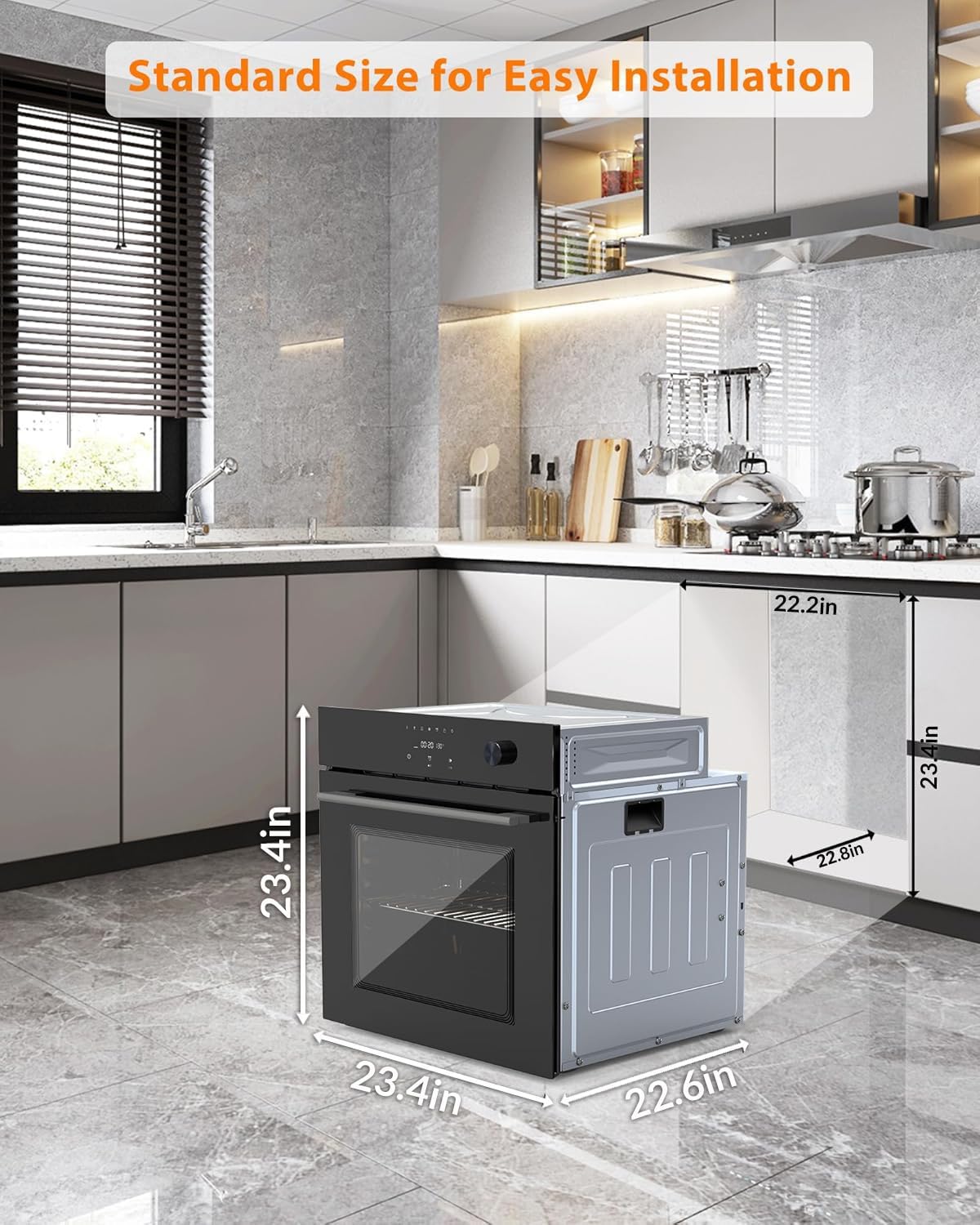
Image 4: Diagram illustrating the standard dimensions for installing the 24-inch built-in electric wall oven, showing height, width, and depth measurements for cabinet integration.
5. Operating Instructions
Your GarveeHome oven features an intuitive touch control panel and a rotary knob for easy operation.
5.1 Control Panel Overview

Image 5: Detailed view of the oven's touch control panel, highlighting indicators for various functions such as Pause/Start, Preset, Power ON/OFF, Preheat, Defrost, Fermentation, Dehydrate, Child Lock, and Lamp. It also shows instructions for changing temperature units and activating the child lock.
5.2 Basic Operation
- Power On/Off: Press the Power ON/OFF button to turn the oven on or off.
- Selecting Functions: Use the touch controls and rotary knob to navigate through cooking modes and settings.
- Setting Temperature and Time: Rotate the knob to adjust temperature and time. Confirm selections by pressing the knob.
- Changing Temperature Unit: Press and hold the knob for 5 seconds to switch between Celsius and Fahrenheit.
5.3 Cooking Modes
The oven offers 8 automatic cooking modes and 108 smart recipes. These modes have pre-set temperatures, times, and heating methods for optimal results.
- Warming: For keeping food warm.
- Reheating: For gently warming previously cooked food.
- Toasting: For browning bread or similar items.
- Pizza: Optimized for baking pizzas.
- Chicken Legs: Specific setting for cooking chicken legs.
- Bread: For baking various types of bread.
- Cake: Ideal for baking cakes and pastries.
- Beef: Optimized for cooking beef dishes.

Image 6: Visual representation of the 8 quick automatic cooking functions available on the oven, such as Defrost, Keep Warm, Bake, Convection, Grill, Vegetable, Rotisserie, and Insulation.
5.4 Convection Cooking
The powerful convection system circulates heated air throughout the oven cavity, ensuring fast preheating and even cooking for uniform baking and roasting.

Image 7: Close-up view of the oven interior demonstrating the precision airflow generated by the convection system, ensuring even heat distribution for thorough cooking.
5.5 Timer and Safety Lock
- Timer: The multifunctional timer can display the current time and can be set to automatically turn the oven off or on at a specified time.
- Safety Lock: To activate the child safety lock, press and hold the designated button (usually indicated by a lock icon) for 3 seconds. This prevents accidental operation.
6. Maintenance and Cleaning
Regular cleaning and maintenance will ensure the longevity and optimal performance of your oven.
6.1 General Cleaning
- Always ensure the oven is cool and disconnected from power before cleaning.
- Use a soft cloth and mild detergent for cleaning the exterior surfaces. Avoid abrasive cleaners.
- The enamel interior can be cleaned with a damp cloth and mild soap. For stubborn stains, use oven cleaner specifically designed for enamel surfaces, following product instructions.
- Wipe up spills immediately to prevent them from baking onto surfaces.
6.2 Removable Door
The oven door is designed to be removable for easier cleaning of both the door and the oven cavity. Refer to the installation section or a separate guide for instructions on how to safely remove and reattach the oven door.
6.3 Oven Racks and Trays
Oven racks and trays can be removed and washed in warm, soapy water. Smaller racks should be used with trays to catch drips and spills, simplifying cleanup.
7. Troubleshooting
Before contacting customer service, please refer to the following troubleshooting guide for common issues.
| Problem | Possible Cause | Solution |
|---|---|---|
| Oven does not turn on. | No power supply; circuit breaker tripped. | Check power connection. Reset circuit breaker. |
| Oven not heating properly. | Incorrect temperature setting; door not closed completely. | Verify temperature setting. Ensure oven door is fully closed. |
| Child lock is active. | Accidental activation of safety lock. | Press and hold the child lock button for 3 seconds to deactivate. |
| Display shows an error code. | Internal malfunction. | Note the error code and contact customer support. |
8. Specifications
| Feature | Detail |
|---|---|
| Model Number | cG-XJuyMkenayxbegy5bww61 |
| Capacity | 2.5 cubic feet (70 Liters) |
| Power Supply | 240V~60Hz |
| Maximum Output | 3000W |
| Product Dimensions (H x W x D) | 23.4 in x 23.4 in x 22.1 in (Built-in) |
| Item Weight | 80.2 pounds |
| Color | Black |
| Heating Method | Convection |
| Control Type | Touch Control |
| Interior Material | Enamel |
| Door Type | Triple-layer Tempered Glass |
9. Warranty and Support
For warranty information and customer support, please refer to the documentation included with your purchase or visit the official GarveeHome website. Please have your model number (cG-XJuyMkenayxbegy5bww61) and purchase date available when contacting support.
You can also visit the GarveeHome Store on Amazon for additional product information and support resources.